
1. Introduzione
Thank you for choosing the NGS SKYGAZER 2.1 Sound Tower. This manual provides essential information for the safe and efficient operation of your new audio system. Please read this manual thoroughly before using the device and retain it for future reference.
2. Informazioni sulla sicurezza
- Non esporre il dispositivo a pioggia, umidità o temperature estreme.
- Assicurare una ventilazione adeguata attorno all'unità. Non ostruire le aperture di ventilazione.
- Non posizionare il dispositivo vicino a fonti di calore come radiatori, termoregolatori, stufe o altri apparecchi (inclusi amplificatori) che producono calore.
- Utilizzare solo gli accessori specificati dal produttore.
- Scollegare il dispositivo durante i temporali o quando non viene utilizzato per lunghi periodi.
- Affidare tutte le operazioni di manutenzione a personale di assistenza qualificato. L'assistenza è necessaria quando l'apparecchio è stato danneggiato in qualsiasi modo.
- Tenere il dispositivo lontano da forti campi magnetici.
3. Contenuto della confezione
Si prega di verificare che i seguenti articoli siano inclusi nel pacchetto:
- NGS SKYGAZER 2.1 Sound Tower
- Cavo di alimentazione
- Telecomando
- 3.5mm Audio Cable (AUX-in)
- Manuale dell'utente (questo documento)
4. Prodotto finitoview
The NGS SKYGAZER is a 2.1 channel sound tower designed for versatile audio playback and convenience. It features a CD player, USB port, AUX-in, Bluetooth connectivity, and a wireless charging pad.

Figura 1: Fronte view of the NGS SKYGAZER Sound Tower, showcasing its tall, sleek design and speaker arrangement.
Top Panel Controls and CD Player

Figura 2: dettagliata view of the top panel, showing the CD tray, LED display, and control buttons for power, source, volume, and playback.
Componenti dell'altoparlante

Figure 3: Close-up of the speaker drivers, including a larger woofer and a smaller tweeter, indicating a multi-driver audio setup.
Wireless Charging Pad and Controls
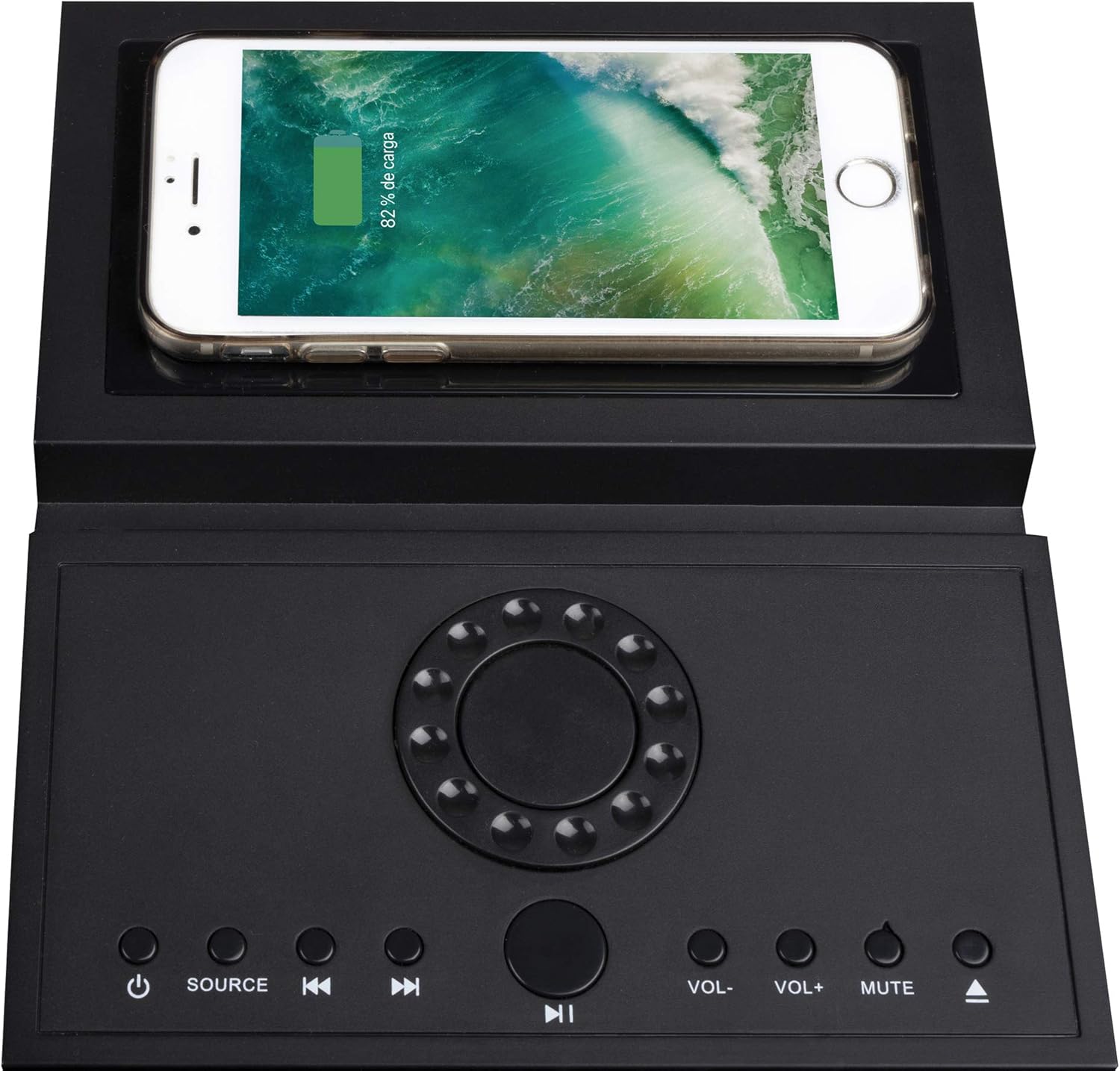
Figure 4: The top panel featuring a smartphone placed on the integrated wireless charging pad, demonstrating its functionality alongside the control buttons.
5. Impostazione
5.1 Disimballaggio e posizionamento
- Estrarre con cautela la torre sonora e tutti gli accessori dalla confezione.
- Place the sound tower on a stable, flat surface. Ensure there is adequate space around the unit for ventilation.
- Attach the base to the bottom of the tower if it is not pre-assembled, following any specific instructions provided with the base.
5.2 Collegamento di alimentazione
- Collegare il cavo di alimentazione alla porta AC IN sul retro della sound tower.
- Collegare l'altra estremità del cavo di alimentazione a una presa a muro standard.
- L'unità entrerà in modalità standby.
6. Istruzioni per l'uso
6.1 Accensione/spegnimento
Premere il tasto ENERGIA pulsante ( ) on the top panel or remote control to turn the unit on or off. The LED display will illuminate when the unit is powered on.
6.2 Selezione della sorgente
Premere il tasto FONTE button on the top panel or remote control repeatedly to cycle through available input modes: Bluetooth, CD, USB, and AUX.
6.3 Funzionamento Bluetooth
- Turn on the sound tower and select Bluetooth mode using the SOURCE button. The LED display will show "BT" and flash, indicating pairing mode.
- Abilita il Bluetooth sul tuo dispositivo mobile (smartphone, tablet, ecc.).
- Cercare "NGS SKYGAZER" in your device's Bluetooth settings and select it to pair.
- Once paired, the "BT" indicator on the sound tower's display will stop flashing and remain solid. You can now play audio from your device.
- Utilizzare il Volume+ / vol- buttons on the unit or remote to adjust volume. Use the Traccia precedente/successiva pulsanti per saltare le tracce.
6.4 Funzionamento del lettore CD
- Selezionare CD mode using the SOURCE button.
- Gently insert a CD into the motorized CD tray located on the top panel. The tray will automatically pull the CD in.
- La riproduzione inizierà automaticamente. In caso contrario, premere il tasto RIPRODUCI/PAUSA pulsante.
- Utilizzare il Traccia precedente/successiva pulsanti per navigare tra le tracce.
- Per espellere il CD, premere il tasto ESPELLERE button (usually combined with the CD icon on the remote or top panel).
6.5 Riproduzione USB
- Inserire una chiavetta USB contenente audio MP3 files nella porta USB.
- Selezionare USB mode using the SOURCE button.
- La riproduzione inizierà automaticamente. In caso contrario, premere il tasto RIPRODUCI/PAUSA pulsante.
- Utilizzare il Traccia precedente/successiva pulsanti per navigare tra le tracce.
6.6 Connessione AUX-in
- Connect one end of the 3.5mm audio cable to the AUX-in port on the sound tower.
- Connect the other end of the cable to the headphone jack or audio output of your external audio device (e.g., MP3 player, TV).
- Selezionare AUSILIARIO mode using the SOURCE button.
- Controlla la riproduzione e il volume dal tuo dispositivo esterno.
6.7 Ricarica wireless
The NGS SKYGAZER features a wireless charging pad on its top surface. To use this function:
- Ensure the sound tower is powered on.
- Place your Qi-compatible smartphone directly onto the designated wireless charging area on the top panel.
- Il telefono dovrebbe indicare che è in carica. In caso contrario, regolarne la posizione finché la carica non inizia.
Note: Wireless charging functionality may vary depending on the smartphone model and case.
7. Manutenzione
7.1 Pulizia
- Prima di pulirlo, scollegare sempre il dispositivo dalla presa di corrente.
- Use a soft, dry cloth to wipe the exterior surfaces of the sound tower.
- Do not use liquid cleaners, aerosols, or abrasive cleaning agents, as these may damage the finish or internal components.
7.2 Conservazione
If you plan to store the sound tower for an extended period, unplug it from the power source and store it in a cool, dry place, away from direct sunlight and extreme temperatures.
8. Risoluzione Dei Problemi
| Problema | Possibile causa | Soluzione |
|---|---|---|
| Nessun potere | Cavo di alimentazione non collegato saldamente. | Check power cable connection to the unit and wall outlet. Ensure the outlet is functional. |
| Nessun suono | Volume too low; incorrect source selected; audio cable not connected (AUX). | Increase volume. Select the correct input source. Ensure audio cables are properly connected. |
| L'associazione Bluetooth non riesce | Device too far; Bluetooth not enabled on source; "NGS SKYGAZER" not selected. | Ensure device is within 10 meters. Enable Bluetooth on your device. Select "NGS SKYGAZER" from the list. Try restarting both devices. |
| Il CD non viene riprodotto o salta | Il CD è sporco, graffiato o inserito in modo errato. | Clean the CD with a soft cloth. Check for deep scratches. Re-insert the CD correctly. Try a different CD. |
| Ricarica wireless non funzionante | Phone not Qi-compatible; phone not positioned correctly; phone case too thick. | Ensure your phone supports Qi wireless charging. Adjust phone position on the pad. Remove thick phone cases. |
9. Specifiche
- Nome modello: SKYGAZER
- Potenza di uscita: 120 Watt (canale 2.1)
- Connettività: Bluetooth, USB, AUX-in, CD Player
- Comunicazione wireless: Bluetooth
- Metodo di controllo: Remote Control, Top Panel Buttons
- Fonte di energia: Cavo AC
- Caratteristiche speciali: Wireless Charging Pad, LED Display
- Colore: Nero
- Peso dell'articolo: Circa 1 chilogrammo
- Dispositivi compatibili: Computer portatili, smartphone, tablet
10. Garanzia e supporto
NGS products are designed and manufactured to the highest quality standards. For detailed warranty information and technical support, please refer to the warranty card included with your product or visit the official NGS website. Please note that spare parts availability information is not provided.
For further assistance, contact NGS customer support.