
1. Introduzione
This manual provides essential instructions for the installation, operation, and maintenance of your FSP iFP600 Uninterruptible Power Supply (UPS). Please read this manual thoroughly before installing or operating the unit to ensure proper function and safety. The FSP iFP600 is designed to provide reliable power backup and surge protection for your electronic devices.

Immagine 1.1: anteriore view of the FSP iFP600 UPS, showcasingrazie al suo design compatto e al display LCD integrato.
2. Istruzioni di sicurezza
Please adhere to these important safety guidelines during installation, operation, and maintenance of the UPS:
- Non aprire l'UPS casing. All'interno non sono presenti parti riparabili dall'utente. Per qualsiasi intervento di assistenza, rivolgersi a personale qualificato.
- Do not connect appliances that could overload the UPS, such as laser printers, vacuum cleaners, or heaters.
- Assicurarsi che l'UPS sia collegato a una presa di corrente CA dotata di messa a terra.
- Evitare di posizionare l'UPS alla luce diretta del sole, vicino a fonti di calore o in ambienti con polvere, umidità o sostanze corrosive eccessive.
- Position the UPS in a well-ventilated area to prevent overheating.
- In case of fire, use a dry chemical extinguisher. Water can be hazardous.
- The battery inside the UPS is not user-replaceable. Battery replacement should only be performed by qualified personnel.
3. Prodotto finitoview
The FSP iFP600 UPS provides reliable power protection for your critical electronics. It features a compact design and an intuitive LCD display for monitoring status.
3.1 Contenuto della confezione
All'apertura della confezione, verificare che tutti i componenti siano presenti e integri:
- FSP iFP600 UPS Unit
- Manuale dell'utente (questo documento)
- Cavo di alimentazione
- Cavo di comunicazione USB
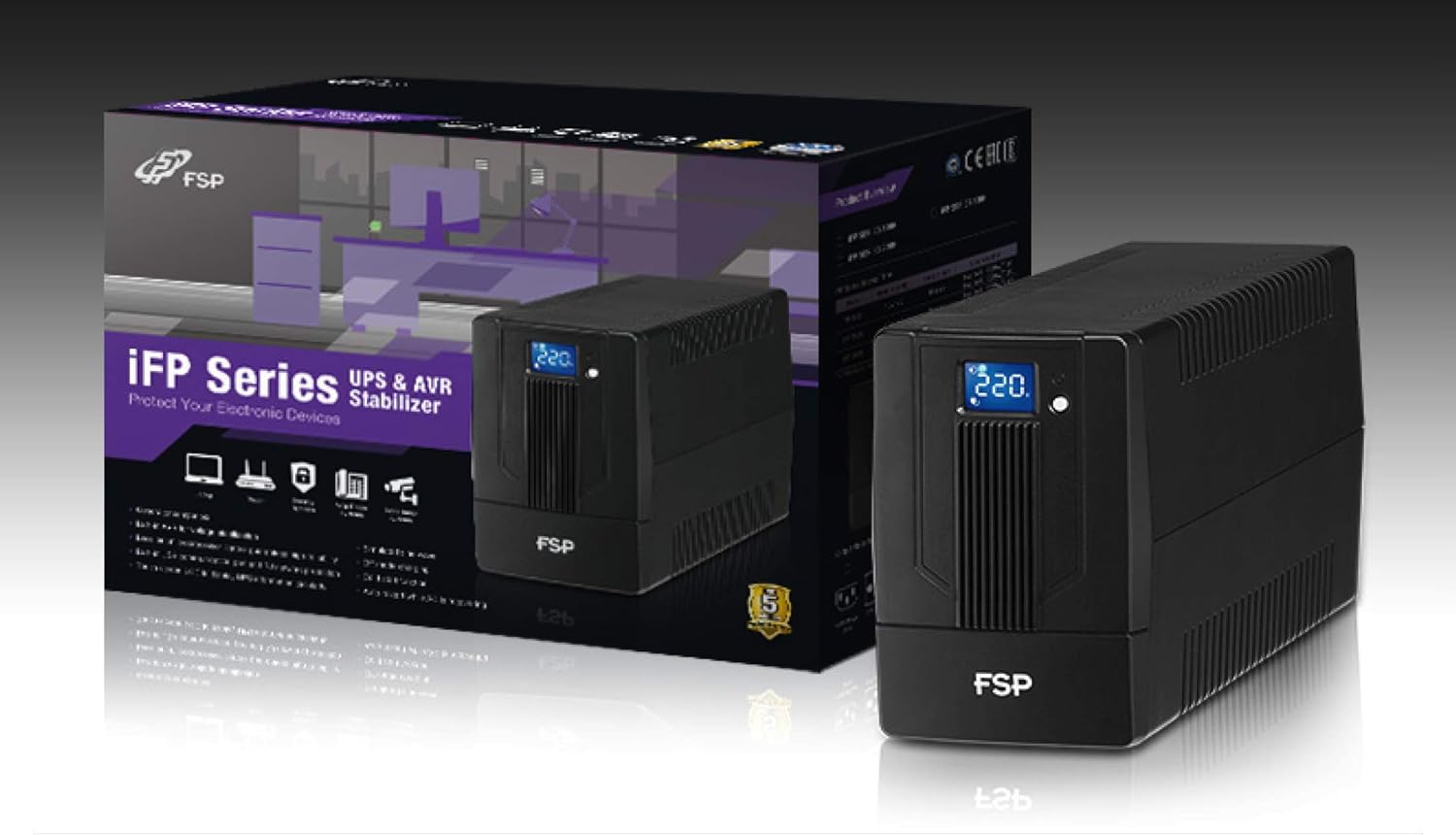
Image 3.1: The FSP iFP600 UPS shown alongside its retail packaging, illustrating the product's presentation.
3.2 Componenti del pannello posteriore
Familiarize yourself with the connections on the rear panel of the UPS:

Immagine 3.2: Dettagliata view of the FSP iFP600 UPS rear panel, highlighting connection points.
- Punti vendita: Two SCHUKO type outlets for connecting protected equipment.
- Ingresso CA: Connects the UPS to the main utility power.
- Fusibile/Interruttore: Protezione da sovracorrente per l'UPS.
- Comunicazione USB: Port for connecting to a computer for monitoring and management.
- Combo RJ11/RJ45 Surge Protection: Fornisce protezione contro le sovratensioni per le linee telefoniche/di rete.
4. Configurazione e installazione
Follow these steps to set up your FSP iFP600 UPS:
- Disimballaggio: Estrarre con cautela l'UPS dall'imballaggio. Verificare che non vi siano danni causati dal trasporto.
- Posizionamento: Place the UPS on a flat, stable surface in a clean, cool, and well-ventilated area. Ensure adequate clearance around the unit for airflow.
- Carica iniziale: Connect the UPS to a standard grounded AC outlet using the provided power cord. Allow the unit to charge for at least 4-6 hours before initial use to ensure optimal battery performance. The UPS will charge whether it is turned on or off.
- Collegamento dell'attrezzatura: Plug your computer, monitor, and other critical electronic devices into the UPS outlets (A). Do not connect surge suppressors or power strips to the UPS outlets.
- Comunicazione USB (opzionale): Connect the USB cable from the UPS USB port (D) to your computer's USB port to enable power management software features (software not included, typically downloaded from manufacturer's webposto).
- RJ11/RJ45 Protection (Optional): For surge protection of your telephone or network line, connect the incoming line to the 'IN' port of the Combo RJ11/RJ45 (E) and connect the 'OUT' port to your device.
5. Istruzioni per l'uso
5.1 Accensione/Spegnimento
- Per accendere: Tenere premuto il pulsante di accensione sul pannello frontale per circa 2 secondi, finché non si sente un segnale acustico e il display LCD non si illumina.
- Per spegnere: Tenere premuto il pulsante di accensione per circa 2 secondi finché non si sente un segnale acustico e il display LCD non si spegne.
5.2 Informazioni sul display LCD
The FSP iFP600 features an LCD display that provides real-time status information. The display is touch-sensitive for navigating information.

Image 5.1: The LCD display of the FSP iFP600 UPS, indicating voltage output and its touch-screen functionality.
Il display LCD in genere mostra:
- Ingresso volumetage
- Volume di uscitatage
- Livello di carica della batteria
- Livello di carico
- Operating Mode (e.g., AC mode, Battery mode)
- Warning/Fault Indicators
5.3 Funzionamento in modalità batteria
When the utility power fails or fluctuates outside acceptable limits, the UPS will automatically switch to battery mode. During battery mode, the UPS will provide power to connected equipment from its internal battery. An audible alarm will sound to indicate battery operation.
6. Manutenzione
Proper maintenance ensures the longevity and reliability of your UPS.
- Pulizia: Utilizzare un panno morbido e asciutto per pulire l'esterno dell'UPS. Non utilizzare detergenti liquidi o spray.
- Cura della batteria: To maximize battery life, ensure the UPS is connected to AC power and fully charged. If the UPS is stored for an extended period, recharge it every three months to prevent battery degradation.
- Sostituzione della batteria: The internal battery (12V / 7Ah x1) is not user-serviceable. Battery replacement should only be performed by FSP-certified service personnel or a qualified technician. Incorrect battery replacement can pose a risk of explosion or injury.
- Magazzinaggio: Store the UPS in a cool, dry place with adequate ventilation. Ensure the battery is fully charged before storage.
7. Risoluzione Dei Problemi
Refer to the following table for common issues and their solutions. If the problem persists, contact FSP support.
| Sintomo | Allarme acustico | Possibile causa | Soluzione |
|---|---|---|---|
| UPS operating on battery power | Emette un segnale acustico ogni 10 secondi | Utility power failure or fluctuation | Save work and shut down equipment if power outage is prolonged. UPS will return to AC mode when power is restored. |
| Avviso di batteria scarica | Emette un segnale acustico ogni secondo | La carica della batteria è estremamente bassa | Immediately save work and shut down connected equipment. |
| Condizione di sovraccarico | Emette un segnale acustico ogni 0.5 secondo | L'apparecchiatura collegata supera la capacità dell'UPS | Disconnect non-essential equipment until the alarm stops. Ensure total load is within UPS capacity. |
| Guasto UPS | Suono continuo | Guasto o malfunzionamento interno | Turn off the UPS and disconnect it from the AC outlet. Contact FSP technical support. |
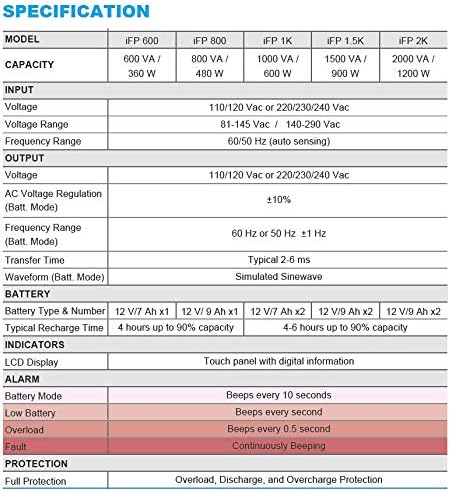
Image 7.1: Excerpt from the FSP iFP series specification table, detailing alarm indicators and their meanings.
8. Specifiche
Detailed technical specifications for the FSP iFP600 UPS:
| Caratteristica | Specificazione |
|---|---|
| Modello | iFP 600 |
| Capacità | Potenza: 600 VA / 360 W |
| Ingresso volumetage | 110/120 Vac or 220/230/240 Vac |
| Ingresso volumetage Gamma | 81-145 Vac / 140-290 Vac |
| Gamma di frequenza di ingresso | 60/50 Hz (rilevamento automatico) |
| Volume di uscitatage | 110/120 Vac or 220/230/240 Vac |
| Volume ACtage Regolamento (Modalità Batt.) | ±10% |
| Output Frequency Range (Batt. Mode) | 60 Hz or 50 Hz ±1 Hz |
| Tempo di trasferimento | Tipico 2-6 ms |
| Forma d'onda (modalità Batt.) | Onda sinusoidale simulata |
| Tipo e numero di batteria | 12V / 7Ah x1 |
| Tempo di ricarica tipico | 4 ore fino al 90% della capacità |
| Indicatori | LCD Display (Touch panel with digital information) |
| Protezione | Overload, Discharge, and Overcharge Protection |
| Peso dell'articolo | 9.24 libbre (4.2 kg) |
| Dimensioni del prodotto (LxWxH) | 11.81 x 3.98 x 5.59 pollici |
| Colore | Nero |
| Materiale | Metallo |
9. Garanzia e supporto
FSP products are designed for reliability and performance. For warranty information, please refer to the warranty card included with your product or visit the official FSP website. For technical support, troubleshooting assistance, or service inquiries, please contact FSP customer service through their official channels.
Puoi trovare maggiori informazioni e risorse di supporto su Negozio FSP su Amazon.