
1. Introduzione
This manual provides detailed instructions for the proper setup, operation, and maintenance of your Zerone USB Digital Microscope. This device is designed for various applications including industrial testing, laboratory research, educational purposes, and detailed examination of small objects. Please read this manual thoroughly before using the product to ensure optimal performance and longevity.
2. Informazioni sulla sicurezza
- Non esporre il dispositivo a temperature estreme, umidità o sostanze corrosive.
- Avoid direct exposure of the LED lights to eyes.
- Tenere il dispositivo lontano dalla portata dei bambini.
- Use only the provided accessories or compatible replacements.
- Disconnect the device from the power source when not in use or during cleaning.
3. Contenuto della confezione
Verificare che tutti gli articoli siano presenti nel pacco:
- Zerone USB Digital Microscope
- Supporto regolabile
- USB Cable with LED Dimming Knob
- CD di installazione del software (o link per il download)

Image 3.1: Contents of the Zerone USB Digital Microscope package, including the microscope, stand, USB cable, and software CD.
4. Prodotto finitoview
The Zerone USB Digital Microscope features a compact design with adjustable magnification and integrated LED illumination. Key components include:
- Corpo del microscopio: Contains the lens, sensor, and control buttons.
- Zoom/Focus Wheel: Located on the microscope body for adjusting magnification and focus.
- Luci LED: Eight adjustable LEDs surrounding the lens for illuminating the specimen.
- Pulsante a scatto: Per catturare immagini fisse.
- Cavo USB: Connects the microscope to a computer.
- LED Dimming Knob: Integrated into the USB cable for brightness control.
- Supporto regolabile: Provides stable support and allows for precise positioning of the microscope.

Image 4.1: The Zerone USB Digital Microscope mounted on its adjustable stand, connected via USB cable.

Immagine 4.2: Uno sguardo più da vicino view of the Zerone USB Digital Microscope on its stand, highlighting its portable design and 1000X zoom capability.
5. Impostazione
5.1 Installazione del software
- Insert the provided software installation CD into your computer's CD-ROM drive. If your computer does not have a CD-ROM drive, please refer to the manufacturer's websito per le istruzioni per il download del software.
- Follow the on-screen prompts to install the digital microscope software.
- Once installation is complete, restart your computer if prompted.
5.2 Connecting the Microscope
- Attach the microscope to the adjustable stand. Ensure it is securely fastened.
- Connect the USB cable from the microscope to an available USB port on your computer.
- The computer should automatically detect the device. If not, check your device manager for driver installation status.

Image 5.1: The Zerone USB Digital Microscope set up on a surface, demonstrating its use in a typical research or inspection environment.
6. Istruzioni per l'uso
6.1 Avvio del software
Launch the digital microscope software installed on your computer. The live feed from the microscope should appear on your screen.
6.2 Regolazione della messa a fuoco e dello zoom
- Place the object you wish to examine under the microscope lens.
- Ruotare il Zoom/Focus Wheel on the microscope body to adjust the magnification and bring the image into clear focus on your computer screen.
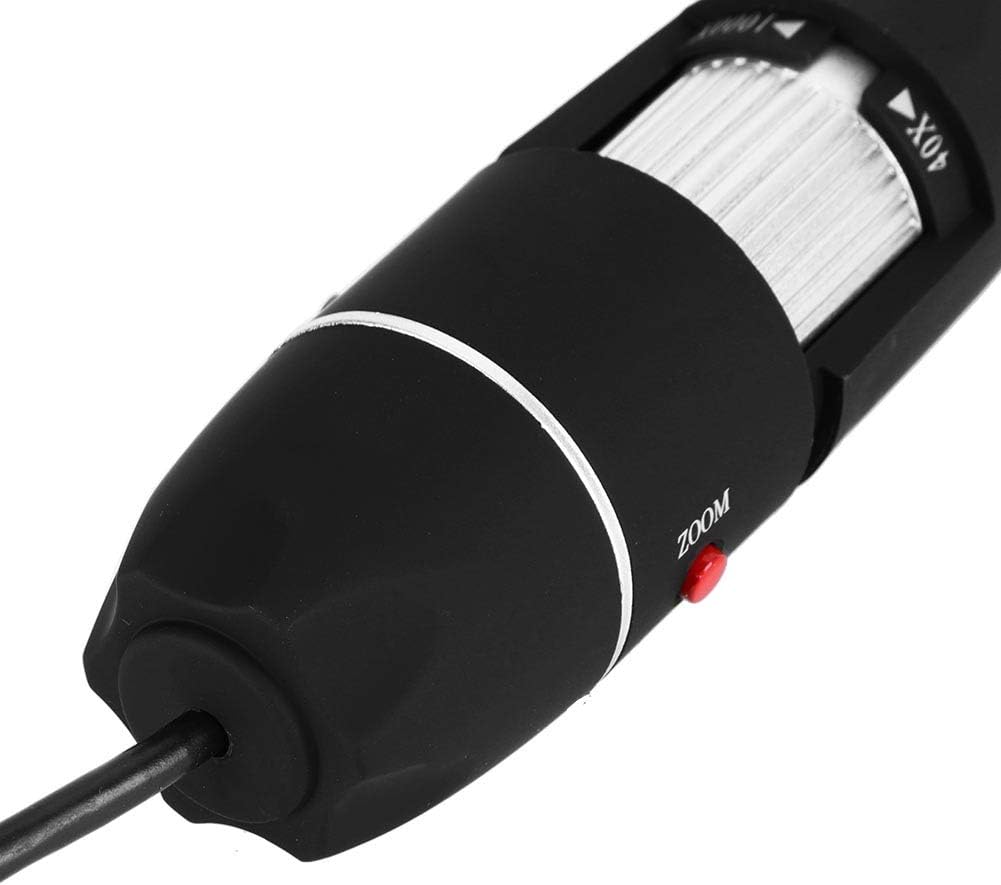
Immagine 6.1: Un dettaglio view of the zoom and focus adjustment wheel on the microscope body, used for precise image clarity and magnification.
6.3 Regolazione della luminosità del LED
The microscope is equipped with 8 adjustable LED lights. Use the LED Dimming Knob located on the USB cable to increase or decrease the brightness. Adjust the lighting to achieve optimal visibility of your specimen.

Image 6.2: A close-up showing the arrangement of the 8 LEDs around the microscope lens, designed to provide even illumination.

Image 6.3: The front of the microscope with its 8 LEDs illuminated, demonstrating the lighting capability for viewing specimens.
6.4 Acquisizione di immagini e video
Per catturare un'immagine fissa, premere il tasto Bottone a pressione on the microscope body or use the corresponding function within the software. To record video, select the video recording option in the software and follow the prompts.

Image 6.4: A hand holding the Zerone USB Digital Microscope, illustrating its ergonomic design and portability for handheld use.
6.5 Video dimostrativo del prodotto
Watch this video for a visual guide on the features and operation of the Zerone USB Digital Microscope.
Video 6.1: A demonstration video showcasing the Zerone 1000X Zoom USB Digital Microscope, highlighting its features and how it functions as a digital magnifier and endoscope camera.
7. Manutenzione
7.1 Pulizia
- Pulire delicatamente il corpo del microscopio con un panno morbido e asciutto.
- Per la lente, utilizzare un panno e una soluzione specifici per la pulizia delle lenti, per evitare graffi.
- Non utilizzare detergenti abrasivi o solventi.
7.2 Conservazione
When not in use, store the microscope in a clean, dry place, away from direct sunlight and extreme temperatures. Use the original packaging or a protective case to prevent dust accumulation and physical damage.
8. Risoluzione Dei Problemi
| Problema | Possibile causa | Soluzione |
|---|---|---|
| Nessuna immagine sullo schermo | Microscope not connected properly; Software not launched; Driver issue. | Ensure USB cable is securely connected. Launch the software. Reinstall drivers if necessary. |
| L'immagine è sfocata | Incorrect focus; Incorrect working distance. | Adjust the Zoom/Focus Wheel. Ensure the microscope is at an appropriate distance from the object. |
| I LED non si accendono | LED dimming knob set to minimum; Power issue. | Rotate the LED Dimming Knob to increase brightness. Check USB connection. |
| Il software non rileva il dispositivo | Driver not installed or corrupted; USB port issue. | Reinstall the software and drivers. Try a different USB port. |
9. Specifiche
| Caratteristica | Dettaglio |
|---|---|
| Marca | Zerone |
| Numero di modello | SKIESOARtbx1zsgua2 |
| Ingrandimento | Fino a 1000X |
| Sorgente luminosa | 8 LED regolabili |
| Connettività | USB |
| Dispositivi compatibili | Personal computer |
| Materiale | Metallo |
| Colore | Nero, Argento |
| Dimensioni del prodotto | 5.31 x 5.12 x 1.77 pollici |
| Peso dell'articolo | 7 once |
10. Garanzia e supporto
For warranty information and technical support, please refer to the documentation included with your product or visit the official Zerone websito. Conservare la ricevuta d'acquisto come prova d'acquisto per eventuali reclami in garanzia.