
1. Impostazione
The Apple Mighty Mouse A1152 is a wired USB mouse designed for straightforward connection and immediate use. Follow these steps to connect your mouse to your computer:
- Individua una porta USB disponibile sul tuo computer.
- Insert the USB connector of the Mighty Mouse into the USB port.
- Your computer should automatically detect and configure the mouse. No additional drivers are typically required for basic functionality on compatible operating systems.

Figura 1: in alto view of the Apple Mighty Mouse A1152, showing its smooth white surface and the scroll ball.

Figura 2: Fronte view of the Apple Mighty Mouse A1152, highlighting the USB cable connection.
2. Operating Your Apple Mighty Mouse A1152
The Apple Mighty Mouse A1152 features a unique design that integrates multiple functions into its seamless shell. Here’s how to use its primary features:
- Clic sinistro: Press the left side of the mouse's top shell.
- Clic destro: Press the right side of the mouse's top shell. The touch-sensitive technology allows for a four-button mouse experience within a single-button design.
- Scroll Ball: The revolutionary 360-degree Scroll Ball located on the top of the mouse allows for scrolling in any direction (up, down, left, right, and diagonally) within documents, web pagine e applicazioni.
- Pulsanti laterali: The force-sensing side buttons can be programmed for various functions, such as launching applications or Exposé (on Mac OS X). Customization options are available through your computer's system preferences.
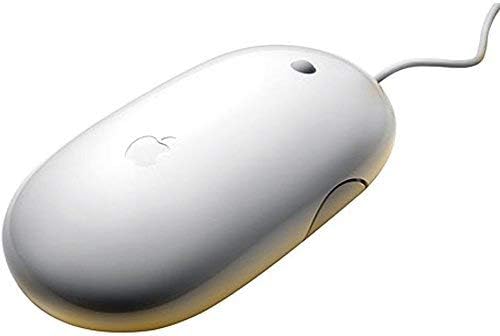
Figura 3: lato view of the Apple Mighty Mouse A1152, showing the force-sensing side buttons.
3. Manutenzione
To ensure optimal performance and longevity of your Apple Mighty Mouse A1152, regular cleaning is recommended:
- Pulizia dell'esterno: Utilizzare un panno morbido e privo di lanugine leggermente dampened with water to wipe the exterior of the mouse. Avoid using harsh chemicals or abrasive materials.
- Cleaning the Scroll Ball: Over time, dust and debris can accumulate around the scroll ball, affecting its smooth operation. To clean it, turn the mouse upside down and firmly roll the scroll ball across a clean, lint-free cloth. This action helps dislodge any trapped particles. Repeat this process in different directions if necessary.
- Cavo USB: Inspect the USB cable periodically for any signs of wear or damage. If the cable is damaged, discontinue use and seek a replacement.
4. Risoluzione Dei Problemi
If you encounter issues with your Apple Mighty Mouse A1152, try the following troubleshooting steps:
- Il mouse non risponde:
- Assicurati che il cavo USB sia collegato saldamente a una porta USB funzionante del tuo computer.
- Prova a collegare il mouse a una porta USB diversa.
- Riavvia il computer.
- Scroll Ball Not Working Smoothly:
- Perform the scroll ball cleaning procedure described in the Maintenance section.
- Ensure there is no excessive dirt or debris obstructing the scroll ball's movement.
- I pulsanti non rispondono:
- Check your computer's mouse settings or system preferences to ensure the buttons are configured correctly.
- Ensure the mouse surface is clean and free from obstructions that might interfere with the touch-sensitive top shell.
- Problemi di compatibilità:
- The Mighty Mouse A1152 is compatible with Mac OS X (programmability requires v10.4.2 Tiger or later), Windows 2000, and Windows XP. Ensure your operating system meets these requirements.
Se questi passaggi non risolvono il problema, consultare la sezione Garanzia e supporto per ulteriore assistenza.
5. Specifiche
| Caratteristica | Descrizione |
|---|---|
| Marca | Mela |
| Numero di modello | A1152 (MB112LL/B) |
| Tecnologia di connettività | Wired USB 2.0 (compatible with USB 1.1) |
| Tecnologia di rilevamento del movimento | Ottico |
| Quantità del pulsante | 4 (programmable via touch-sensitive top shell and force-sensing side buttons) |
| Scorrimento | Revolutionary 360-degree Scroll Ball |
| Orientamento della mano | Giusto |
| Sistemi operativi compatibili | Mac OS X v10.4.2 Tiger or later, Windows 2000, Windows XP |
| Peso dell'articolo | 0.12 chilogrammi |
| Colore | Bianco |
6. Garanzia e supporto
Informazioni sulla garanzia: This Apple Mighty Mouse A1152 comes with a 90-day limited warranty. Please retain your proof of purchase for any warranty claims.
Assistenza clienti: For further assistance, technical support, or warranty inquiries, please contact the seller or refer to Apple's official support resources. Ensure you have your product model number (A1152) and any relevant purchase details ready when contacting support.