
1. Introduzione
Grazie per l'acquistoasing the Flylinktech 22000mAh 2000A Peak 12V Jump Starter, Model CF100. This device is designed to provide reliable jump-starting for your vehicle and serve as a portable power bank for your electronic devices. Please read this manual thoroughly before use to ensure safe and effective operation. Keep this manual for future reference.
2. Informazioni importanti sulla sicurezza
La mancata osservanza di queste istruzioni di sicurezza può provocare scosse elettriche, incendi o lesioni gravi.
- Quando si lavora con le batterie, indossare sempre occhiali protettivi e indumenti protettivi.
- Non lasciare che l'avviatore di emergenza si chiudaampper toccarsi o collegarsi allo stesso pezzo di metallo.
- Non tentare di avviare una batteria congelata.
- Ensure the vehicle is in park (P) or neutral (N) and the parking brake is engaged before jump starting.
- Tenere fuori dalla portata dei bambini.
- Non esporre il prodotto a pioggia o umidità.
- Non smontare, modificare o tentare di riparare l'unità.
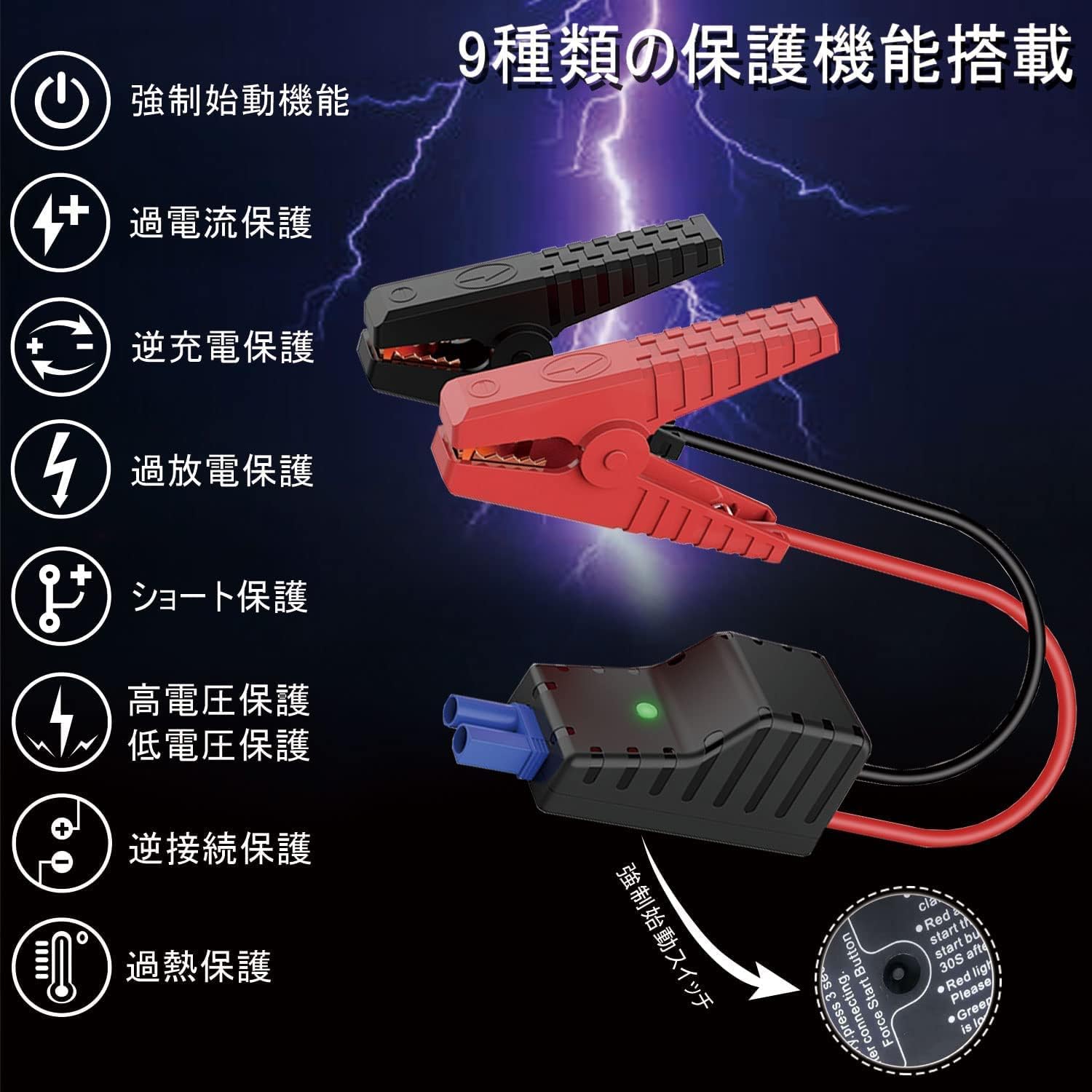
- This jump starter is equipped with 9 protection functions: short circuit protection, reverse connection protection, over-discharge protection, over-current protection, reverse charge protection, high voltage protezione, basso voltage protection, forced start function, and overheat protection. These features are designed to prevent various dangers and ensure safe operation.
3. Contenuto della confezione
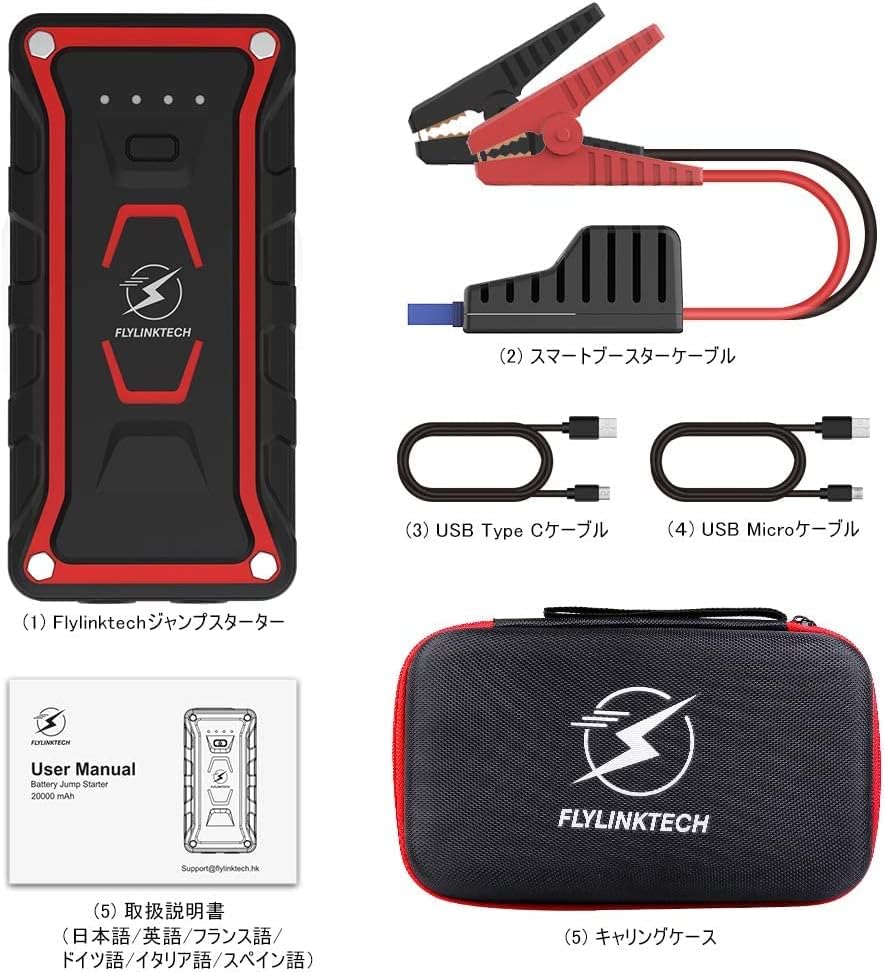
Verifica che tutti gli articoli siano presenti nel tuo pacco:
- Flylinktech Jump Starter Unit (1)
- Smart Jump Starter Cables (1 set)
- Cavo USB di tipo C (1)
- Cavo Micro USB (1)
- Dedicated Carrying Case (1)
- Manuale di istruzioni (1)
4. Caratteristiche del prodotto
- High Capacity & Peak Current: 22000mAh battery capacity with 2000A peak current, capable of jump-starting all gasoline vehicles and diesel vehicles up to 7.0L.
- Luce LED multifunzionale: Equipped with 2 high-brightness LEDs, offering three modes: illumination, strobe, and SOS signal.
- Grado di impermeabilità IP68: Complies with IP68 protection class (dustproof class: 6, waterproof class: 8) based on IEC and JIS standards, protecting the unit from water and dust when terminal covers are closed.
- Banca di alimentazione portatile: Features two USB output ports for simultaneous fast charging of two USB devices, including smartphones, tablets, cameras, and more.

5. Setup and Charging the Jump Starter
5.1 Carica iniziale
Before using the jump starter for the first time, ensure it is fully charged. It is recommended to fully charge the unit every 3-6 months to maintain battery health, even when not in use.
5.2 Ricarica dell'unità
The jump starter can be charged using either the Micro USB input port or the USB Type-C input port. Connect the provided USB cable to a 5V/3A, 9V/2A, or 12V/1.5A USB charger (not included). The indicator lights on the unit will show the charging status.

6. Istruzioni per l'uso: avviamento di emergenza di un veicolo
Per avviare il veicolo con i cavi, seguire attentamente questi passaggi:
- Assicurarsi che l'avviatore di emergenza sia completamente carico.
- Turn off your vehicle's ignition and all accessories (lights, radio, etc.).
- Collegare il rosso (+) clamp of the smart jump starter cable to the positive (+) terminal of your vehicle's battery.
- Collegare il nero (-) clamp of the smart jump starter cable to the negative (-) terminal of your vehicle's battery.
- Plug the smart jump starter cable connector into the jump starter unit's output port. Ensure a secure connection.
- Once connected, the indicator on the smart cable should turn green, indicating it's ready to start. If it's red, check connections or refer to troubleshooting.
- Start your vehicle's engine. If it doesn't start immediately, wait 30 seconds and try again. Do not crank for more than 3 seconds per attempt.
- Once the vehicle starts, immediately disconnect the smart jump starter cable from the jump starter unit.
- Quindi, scollegare il cl nero (-)amp dalla batteria del veicolo, seguito dal polo rosso (+)amp.

7. Istruzioni per l'uso: Funzione Power Bank
The Flylinktech jump starter can also function as a portable power bank to charge your electronic devices.
- Connect your electronic device (smartphone, tablet, etc.) to one of the two USB output ports on the jump starter using an appropriate USB cable.
- The jump starter will automatically begin charging your device. The unit supports QC3.0 fast charging for compatible devices.
- Puoi caricare due dispositivi contemporaneamente.
8. Operating Instructions: LED Light Function
La luce LED integrata fornisce illuminazione per diverse situazioni:
- Tenere premuto il pulsante di accensione per 3 secondi per accendere la luce LED (modalità di illuminazione).
- Press the power button once more to switch to Strobe mode.
- Premere nuovamente il pulsante di accensione per passare alla modalità segnale SOS.
- Premere nuovamente il pulsante di accensione per spegnere la luce LED.

9. Risoluzione Dei Problemi
In caso di problemi, fare riferimento ai seguenti problemi comuni e alle relative soluzioni:
- Il jump starter non si accende: Assicurarsi che l'unità sia carica. Se la batteria è completamente scarica, potrebbero essere necessari alcuni minuti di ricarica prima che risponda.
- Il veicolo non si avvia:
- Check that the smart jump starter cable clampsiano collegati saldamente ai terminali corretti della batteria (rosso al positivo, nero al negativo).
- Ensure the smart cable connector is fully inserted into the jump starter unit.
- Verificare che l'avviatore di emergenza abbia una carica sufficiente.
- If the smart cable indicator is red, refer to the cable's specific error codes (if any) or recheck connections.
- Do not attempt to crank the engine for too long. Allow the jump starter to cool down between attempts.
- Dispositivo non in carica tramite USB: Ensure the jump starter is powered on and has sufficient battery. Try a different USB cable or port.
Se i problemi persistono, contattare l'assistenza clienti.
10. Specifiche
| Caratteristica | Specificazione |
|---|---|
| Marca | TECNOLOGY DI FLYLINK |
| Numero di modello | CF100 |
| Capacità della batteria | 22000 mAh |
| Corrente di picco | 2000 A |
| Voltage | 12 Volt |
| Tipo di batteria | Agli ioni di litio |
| Tipi di veicoli compatibili | All Gasoline Vehicles, Diesel Vehicles up to 7.0L |
| Grado di impermeabilità | IP68 (Dustproof: 6, Waterproof: 8) |
| Uscita USB | 2 Ports (QC3.0 Fast Charging) |
| Ingresso di ricarica | Micro USB, USB Type-C (5V/3A, 9V/2A, 12V/1.5A) |
11. Manutenzione e conservazione
- Pulire l'unità con un panno asciutto e morbido. Non utilizzare detergenti abrasivi o solventi.
- Conservare l'avviatore di emergenza in un luogo fresco e asciutto, lontano dalla luce solare diretta e da temperature estreme.
- For optimal battery life, fully charge the unit every 3-6 months, even if it has not been used.
- Keep the terminal covers closed when not in use to maintain the IP68 rating.
12. Garanzia e assistenza clienti
This Flylinktech jump starter comes with a Garanzia del produttore di 24 mesi dalla data di acquisto. Questa garanzia copre difetti di materiali e lavorazione in condizioni di normale utilizzo.
For any questions, concerns, or warranty claims, please do not hesitate to contact our customer support team:
E-mail: Support@flylinktech.hk
Please have your purchase details and model number (CF100) ready when contacting support.