
Introduzione
This manual provides detailed instructions for the setup, operation, maintenance, and troubleshooting of your CHOUBENBEN remote control, model 201905030004. This remote is designed for use with various Omnia air conditioner units, ensuring comfortable and efficient control of your indoor climate.
1. Impostazione
1.1 Installazione della batteria
The remote control requires batteries for operation. Please note: Batteries are not included with this product.
- Individuare il coperchio del vano batterie sul retro del telecomando.
- Far scorrere il coperchio verso il basso o premere il fermo per aprire il vano.
- Inserire due nuove batterie AAA (non incluse), assicurandosi che i terminali positivo (+) e negativo (-) corrispondano agli schemi all'interno del vano.
- Richiudere il coperchio del vano batteria facendolo scorrere in posizione finché non scatta in posizione.
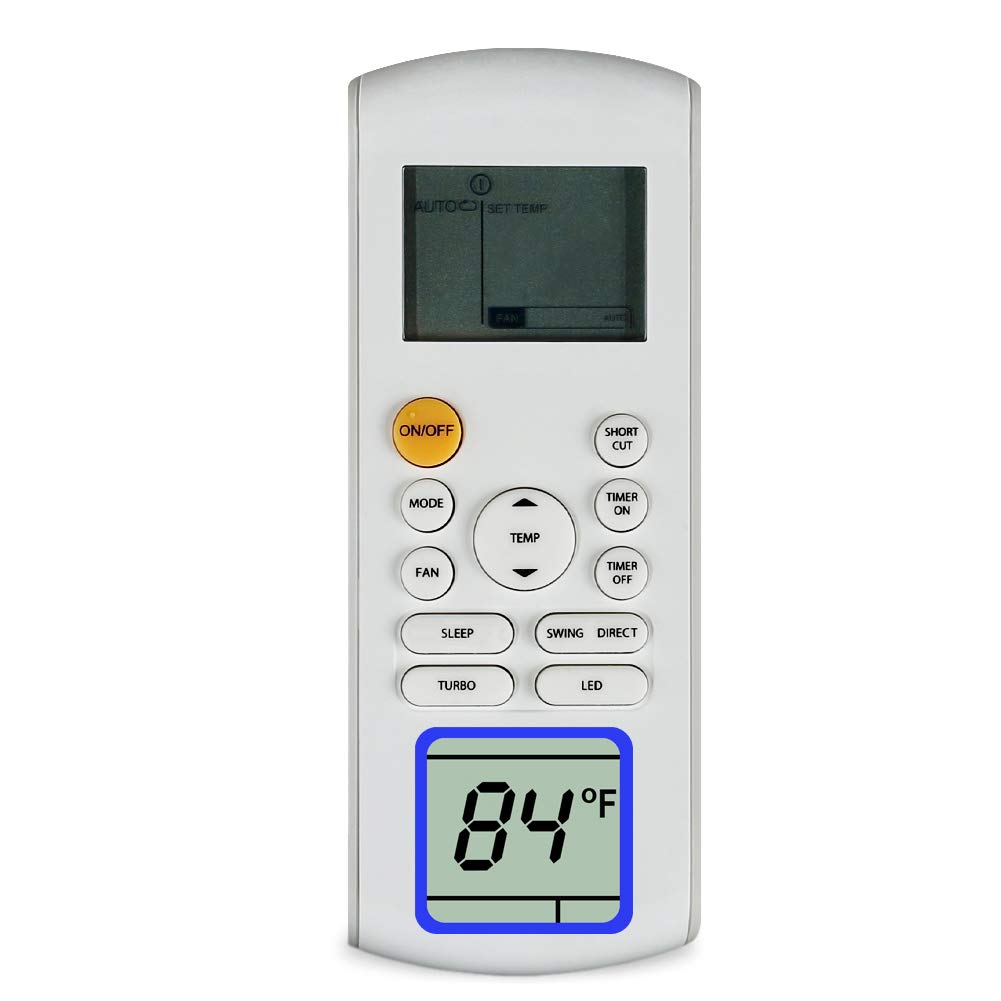
Figure 1: CHOUBENBEN Remote Control. The battery compartment is typically located on the back of the unit.
2. Istruzioni per l'uso
This section outlines the basic functions of your remote control. The exact button layout may vary slightly, but the functions remain consistent.
2.1 Funzioni di base
- Pulsante di accensione: Premere per ACCENDERE o SPEGNERE il condizionatore.
- Pulsante Modalità: Premere ripetutamente per scorrere le modalità operative disponibili: Auto, Raffreddamento, Asciugatura, Ventilatore, Riscaldamento (if applicable to your AC unit).
- Pulsanti di regolazione della temperatura (▲ / ▼): Utilizzare questi pulsanti per aumentare o diminuire l'impostazione della temperatura desiderata.
- Pulsante velocità ventola: Press to adjust the fan speed (e.g., Basso, Medio, Alto, Auto).
- Pulsante oscillante: Attiva o disattiva la funzione di oscillazione automatica delle alette.
2.2 Advanced Functions (Common)
- Pulsante Timer: Sets the timer for automatic ON/OFF operations. Refer to your air conditioner's main manual for specific timer programming details.
- Pulsante di sospensione: Attiva la modalità sleep, che regola la temperatura e la velocità della ventola per un sonno confortevole e un risparmio energetico.
- Light/Display Button: Accende o spegne la luce del display dell'unità di condizionamento dell'aria.
3. Manutenzione
3.1 Pulizia del telecomando
To ensure optimal performance and longevity, keep your remote control clean.
- Pulire la superficie del telecomando con un panno morbido e asciutto.
- Per sporco ostinato, leggermente dampInumidire il panno con acqua e un detergente delicato, quindi asciugarlo immediatamente.
- Non utilizzare detergenti abrasivi, alcol o liquidi corrosivi, poiché potrebbero danneggiare la superficie del telecomando o i componenti interni.
3.2 Sostituzione della batteria
Replace batteries when the remote control's response becomes sluggish or stops working. Refer to section 1.1 for battery installation instructions. Always replace both batteries at the same time with new ones of the same type.
4. Risoluzione Dei Problemi
Se riscontri problemi con il telecomando, fai riferimento alle seguenti soluzioni comuni:
- Il telecomando non risponde:
- Controllare che le batterie siano inserite correttamente, rispettando la polarità corretta.
- Sostituire le vecchie batterie con quelle nuove.
- Assicurarsi che non vi siano ostacoli tra il telecomando e il ricevitore del condizionatore.
- Verificare di trovarsi all'interno del raggio di funzionamento effettivo del condizionatore d'aria.
- Il condizionatore non risponde a comandi specifici:
- Verificare che l'unità del condizionatore d'aria sia accesa e funzioni correttamente.
- Some functions may be specific to certain air conditioner models. Refer to your air conditioner's manual for compatibility.
5. Specifiche
| Marca | CHOUBENBEN |
| Numero di modello | 201905030004 |
| Dispositivi compatibili | Omnia Air Conditioners (RG57A3/BGEF, RG57A2/BGEF, O1MVI-12WFR, O1MVI-18WFR, O1MVI-24WFR, RG57B/BGE, RG57D/BGE, O1MVI-09WFR) |
| Tecnologia di connettività | Infrarossi |
| Tipo di controllore | Controllo dei pulsanti |
| Caratteristica speciale | Ergonomic |
| Produttore | KITCHENWARE STORE |
6. Garanzia e supporto
6.1 Informazioni sulla garanzia
This product comes with a warranty period of 3. Please retain your proof of purchase for any warranty claims.
6.2 Assistenza clienti
Should you have any questions or require further assistance regarding your CHOUBENBEN remote control, please do not hesitate to contact us. We are available to help clarify any aspects of our item.