1. Prodotto finitoview
The PCE Instruments PCE-RCM 8 is a multi-function air quality meter designed for indoor monitoring. It accurately measures various air quality parameters, including particulate matter (PM1.0, PM2.5, PM10), formaldehyde (HCHO), total volatile organic compounds (TVOC), carbon dioxide (CO₂), as well as ambient temperature and humidity. Its compact design, clear LCD display, and data logging capabilities make it suitable for use in homes, offices, schools, and other indoor environments.
Caratteristiche principali:
- Measures PM1.0, PM2.5, PM10, HCHO, TVOC, CO₂, Temperature, and Humidity.
- Integrated data logging function for reviewing past measurements.
- Clear 320 x 240 pixel LCD display for real-time readings.
- Built-in rechargeable lithium-ion battery for portable use.
- Audible alarm function for critical air quality levels.

Image 1.1: The PCE-RCM 8 Air Quality Meter connected to a laptop, showing its display with various air quality parameters. This setup allows for data transfer and analysis.
2. Impostazione
2.1 Unboxing e componenti inclusi
Carefully unpack the PCE-RCM 8 Air Quality Meter and verify that all components are present. The standard delivery content includes:
- 1 x PCE-RCM 8 Particle Counter
- 1 x Cavo di ricarica micro USB
- 1 x Manuale utente (questo documento)
Inspect the device for any signs of damage. If any components are missing or damaged, contact your supplier immediately.
2.2 Ricarica del dispositivo
The PCE-RCM 8 is equipped with a built-in 1000 mAh lithium-ion battery. Before initial use, fully charge the device.
- Connect the micro USB charging cable to the charging port on the PCE-RCM 8.
- Collegare l'altra estremità del cavo USB a un adattatore di alimentazione USB standard (non incluso) o a una porta USB del computer.
- The charging indicator on the device will illuminate. Allow the device to charge until the indicator shows a full charge, typically a few hours.
The device can be operated while charging.
2.3 Accensione/Spegnimento
To power on the device, press and hold the power button located on the side/front of the unit until the display illuminates. To power off, press and hold the power button again until the display turns off.
3. Funzionamento
3.1 Fine displayview
The PCE-RCM 8 features a 320 x 240 pixel LCD display that shows real-time measurements for all monitored parameters. The display typically shows:
- PM1.0, PM2.5, PM10 concentrations (µg/m³)
- HCHO (Formaldehyde) concentration (mg/m³)
- TVOC (Total Volatile Organic Compounds) concentration (mg/m³)
- Temperatura (° C / ° F)
- Umidità (% RH)
- Indice di qualità dell'aria (AQI)
- Indicatore di stato della batteria
- Data logging status
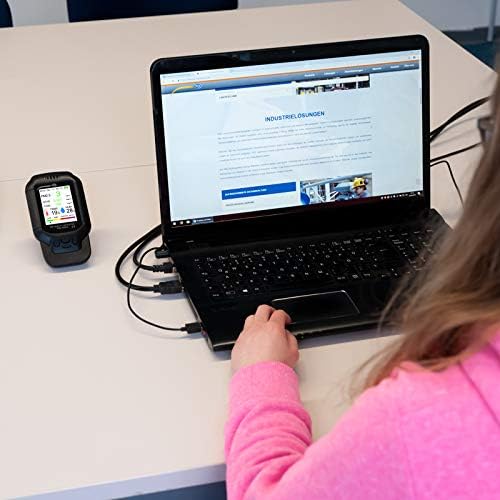
Immagine 3.1: Un dettaglio view of the PCE-RCM 8 display, illustrating the layout of measured parameters.
3.2 Esecuzione delle misurazioni
Once powered on, the PCE-RCM 8 will automatically begin taking measurements. The measuring rate is approximately 1.5 seconds. For accurate readings, ensure the device is placed in an open area, away from direct airflow, heat sources, or strong chemical fumes that could interfere with sensor operation.
The device is designed for indoor use. Avoid exposing it to extreme temperatures or high humidity environments outside its specified operating range.
3.3 Funzione di registrazione dei dati
The PCE-RCM 8 includes a data logger function, allowing you to review past measurement parameters. Consult the on-screen menu or specific buttons (if available) to access and navigate the logged data. The manual does not specify how to access this, so refer to the device's on-screen interface for detailed instructions on data retrieval.
3.4 Funzione di allarme
The device features an audible alarm function. This alarm is triggered when certain measured parameters exceed predefined thresholds, indicating potentially unhealthy air quality levels. Refer to the device's settings menu to adjust alarm thresholds or to enable/disable the alarm.
4. Manutenzione
4.1 Pulizia
To ensure optimal performance and longevity of your PCE-RCM 8, keep the device clean. Use a soft, dry cloth to wipe the exterior. Do not use abrasive cleaners, solvents, or immerse the device in water. Ensure that the sensor openings are free from dust and debris.
4.2 Conservazione
When not in use for extended periods, store the PCE-RCM 8 in a cool, dry place, away from direct sunlight and extreme temperatures. The recommended storage conditions are -10 to 60°C (14 to 140°F) and 20 to 85% relative humidity. Ensure the battery is partially charged before long-term storage to maintain battery health.
5. Risoluzione Dei Problemi
If you encounter issues with your PCE-RCM 8, please refer to the following common troubleshooting steps:
- Il dispositivo non si accende: Ensure the battery is fully charged. Connect the device to a power source using the USB cable and try again.
- Letture imprecise:
- Ensure the device is placed in an area with good air circulation, away from direct drafts, vents, or sources of contamination.
- Verify that the sensor openings are clean and unobstructed.
- Allow the device to stabilize for a few minutes after powering on, especially when moving it to a new environment.
- Check if any calibration options are available in the device's settings menu for specific sensors (e.g., temperature).
- Schermo non funzionante: If the device powers on but the display remains blank or shows errors, try restarting the device. If the issue persists, contact customer support.
- La batteria non mantiene la carica: Ensure you are using the provided USB cable and a compatible power adapter. If the battery life significantly degrades, it may require service.
For issues not covered here, or if troubleshooting steps do not resolve the problem, please contact PCE Instruments customer support.
7. Garanzia e supporto
7.1 Informazioni sulla garanzia
PCE Instruments products are covered by a manufacturer's warranty. The specific terms and duration of the warranty may vary by region and product. Please refer to the warranty card included with your product packaging or visit the official PCE Instruments websito per informazioni dettagliate sulla garanzia.
7.2 Assistenza clienti
For technical assistance, service, or inquiries regarding your PCE-RCM 8 Air Quality Meter, please contact PCE Instruments customer support. Contact information can typically be found on the official PCE Instruments websito o nella confezione del prodotto.
PCE Instruments Official Websito: www.pce-instruments.com
