
1. Prodotto finitoview
The Symcode 2D Bluetooth Ring Barcode Scanner is a wearable, wireless, and compact device designed for efficient barcode reading. Its ring design allows for comfortable wear on the finger, enhancing user satisfaction and productivity. This scanner supports a wide range of 1D and 2D barcodes and offers versatile connectivity options for various operating systems and devices.

Figure 1: Symcode 2D Bluetooth Ring Barcode Scanner
2. Contenuto della confezione
Dopo aver aperto la confezione, verificare che tutti gli articoli elencati di seguito siano presenti e in buone condizioni:
- 1 x Mini Barcode Scanner
- 1 x English Version User Manual
- 1 cavo USB
- 1 x Charger Head
- 1 x Mobile Phone 4.0 Receiver (Bluetooth Dongle)

Figura 2: Contenuto della confezione
3 Caratteristiche
- Design dell'anello indossabile: Allows for comfortable use on the finger, left or right, increasing satisfaction and comfort during extended use.
- Doppia connettività wireless: Supports both 2.4G Wireless (via dongle) and Bluetooth 4.0 for flexible connection to various devices.
- Ampia compatibilità: Compatible with Microsoft Windows XP/7.0/8.0/10, Android, and iOS devices.
- Ampio supporto per codici a barre: Scans 1D codes (UPC, EAN, Code128, Code39, Code11, Interleaved 2 of 5, Codabar, etc.) and 2D codes (PDF417, Data Matrix, QR Code, etc.).
- Lunga distanza di trasmissione: Up to 30 feet (10m) for Bluetooth and up to 492ft (150m) in barrier-free environments for 2.4G wireless.
- Due modalità di caricamento: Supports Instant Upload Mode (synchronous data upload) and Storage Mode (stores up to 50,000 barcodes in 512KB memory for later upload).
- Batteria a lunga durata: Provides up to 6 hours of continuous scanning and a standby time of up to 720 hours. Fully recharges in approximately 1.5 hours.
4. Impostazione
4.1 Caricamento dello scanner
Before initial use, fully charge the scanner using the provided USB cable and charger head. Connect the USB cable to the scanner's charging port and the other end to a power source. The charging indicator light will show the charging status.

Figura 3: Informazioni sulla batteria
4.2 Connessione a un dispositivo
The scanner offers two primary connection methods: 2.4G Wireless via dongle and Bluetooth 4.0.
4.2.1 Connessione wireless 2.4G (tramite dongle)
- Plug the 2.4G wireless receiver (dongle) into an available USB port on your laptop, PC, or POS system.
- Accendi lo scanner di codici a barre. Dovrebbe associarsi automaticamente al dongle.
- Una connessione riuscita sarà indicata da un suono o da una luce specifici sullo scanner.
Connessione Bluetooth 4.0 4.2.2
- Ensure Bluetooth is enabled on your mobile phone, tablet, or computer.
- Accendere lo scanner per codici a barre.
- On your device, search for available Bluetooth devices. The scanner should appear as "Barcode Scanner HID" or similar.
- Seleziona lo scanner da associare. L'avvenuta connessione sarà indicata da un suono o da una spia specifici sullo scanner.

Figura 4: Opzioni di connessione wireless

Figure 5: Transmission Distance
Video 1: Demonstrates unboxing, product rotation, and connecting the scanner to a laptop and mobile device via Bluetooth for scanning.
5. Istruzioni per l'uso
5.1 Indossare lo scanner
The ring scanner is designed to be worn on your finger. Adjust the strap for a comfortable and secure fit. The scanner head can be rotated 180 degrees to accommodate different scanning angles and user preferences.

Figure 6: 180 Degree Rotation
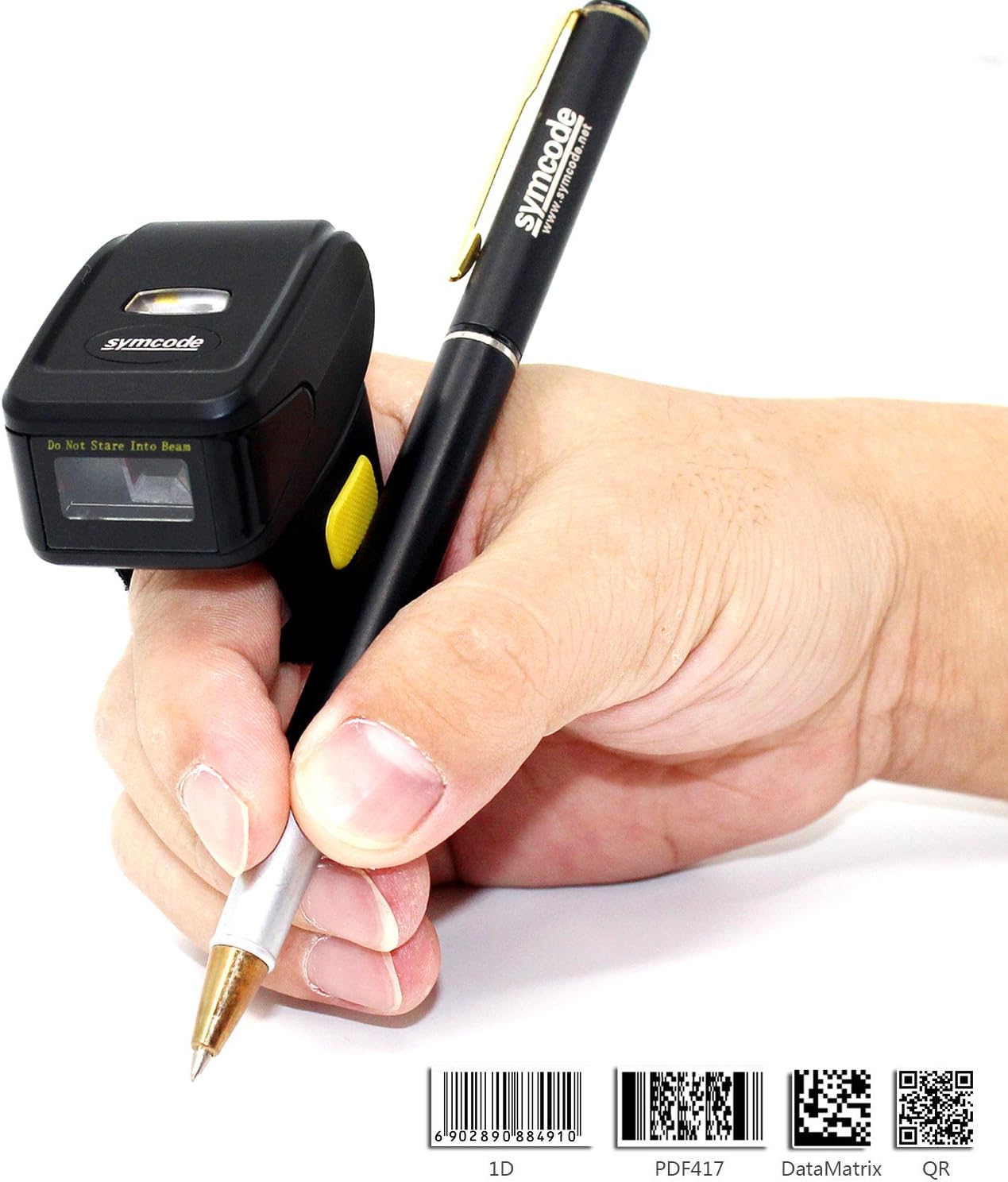
Figura 7: Uso ergonomico
5.2 Scansione dei codici a barre
Once connected, point the scanner's laser at the barcode you wish to scan and press the trigger button. The scanner will emit a beep and/or flash to indicate a successful scan. The scanned data will appear on your connected device.
5.3 Modalità di caricamento
Lo scanner supporta due modalità di caricamento dati:
- Modalità di caricamento istantaneo: Data is synchronously uploaded to your device as soon as a barcode is scanned. This is ideal for real-time inventory management or POS systems.
- Modalità di archiviazione: Barcode data is stored in the scanner's internal memory (up to 512KB, capable of holding over 50,000 barcodes). This mode is useful when working out of range of your device. Data can be uploaded later when a connection is re-established. Refer to the included user manual for specific instructions on switching between modes and uploading stored data.

Figura 8: Due modalità di caricamento
6. Specifiche
| Caratteristica | Dettaglio |
|---|---|
| Numero di modello | MJ-R30CB-2D |
| Sorgente luminosa | 650nm visible laser |
| Frequenza di scansione | 100 ± 10 scans/second |
| Reading Preciseness | 0.10 mm (4 mil) |
| Interfaccia | Mobile phone wireless 4.0 (Bluetooth) |
| Batteria | DC 3.7V, 360mA Li-ion battery (1 Lithium Ion battery included) |
| Memoria | 512KB |
| Sistema operativo supportato | Microsoft Windows XP/7.0/8.0/10, Android, iOS |
| Distanza di lettura | 2.5-600 mm (100% UPC/EAN) |
| Tipi di codici a barre supportati | Codabar, Code 11, Code 93, MSI, Code 128, UCC/EAN-128, Code 39, EAN-8, EAN-13, UPC-A, ISBN, Industrial 25, Interleaved 25, Standard 25, 2/5 Matrix, GS1 DataBar (formerly RSS) variants, PDF417, Data Matrix (ECC200, ECC000, 050, 080, 100, 140), QR Code |
| Ambito di scansione | 10mm-250mm |
| Angolo di scansione | Roll: ±35 degree / Pitch: ±65 degree / Yaw: ±50 degree |
| Tasso di errore di bit | 1 / 5 milioni |
| Potenza Voltage | 5V |
| Prestazioni di sicurezza | CE e Rohs |
| Dimensioni | 150mm x 50mm x 65mm (Product: 1.81 x 1.97 x 1.38 inches) |
| Peso | 95 g (4.4 once) |
7. Manutenzione
To ensure the longevity and optimal performance of your Symcode barcode scanner, follow these maintenance guidelines:
- Pulizia: Utilizzare un panno morbido e asciutto per pulire l'esterno dello scanner. Per la finestra di scansione, utilizzare un panno per la pulizia delle lenti per evitare graffi. Non utilizzare detergenti abrasivi o solventi.
- Magazzinaggio: Conservare lo scanner in un luogo fresco e asciutto, lontano dalla luce solare diretta e da temperature estreme.
- Cura della batteria: Avoid fully discharging the battery frequently. Recharge the scanner when the battery low indicator appears. If storing for an extended period, charge the battery to about 50% and recharge every few months.
- Gestione: Maneggiare lo scanner con cura. Evitare di farlo cadere o di sottoporlo a forti urti, poiché ciò potrebbe danneggiare i componenti interni.
8. Risoluzione Dei Problemi
Se riscontri problemi con lo scanner, fai riferimento ai seguenti passaggi comuni per la risoluzione dei problemi:
- Lo scanner non si accende: Ensure the battery is charged. Connect the scanner to the charger and try again.
- Nessun dato trasmesso dopo la scansione: Verify that the scanner is properly connected to your device (Bluetooth or 2.4G wireless). Check the device's input settings to ensure it's ready to receive data.
- Impossibile effettuare l'associazione tramite Bluetooth: Ensure the scanner is in pairing mode. On your device, try forgetting the scanner and re-pairing. Make sure no other Bluetooth devices are interfering.
- Scarse prestazioni di scansione: Ensure the barcode is clean and not damaged. Adjust the distance and angle of the scanner to the barcode. Check for sufficient lighting.
- Dati di output errati: Verify the scanner's configuration settings. You may need to scan specific configuration barcodes from the full user manual to adjust settings like prefix/suffix or data format.
For more detailed troubleshooting or issues not covered here, please consult the comprehensive user manual included in your package or contact Symcode customer support.
9. Garanzia e supporto
Symcode products are designed for reliability and performance. For information regarding product warranty, please refer to the warranty card included with your purchase or visit the official Symcode website. For technical support, product inquiries, or service requests, please contact Symcode customer service through the channels provided on their official websito o sulla confezione del prodotto.
Visit the official Symcode Store for more products and support: Symcode Amazon Store
Additional resources may be available on the manufacturer's websito: www.cnlhwood.com