
Introduzione
This manual provides detailed instructions for the Depusheng X5 Digital Mixer Reverberator, a professional audio processor designed for KTV, karaoke, and general audio applications. The X5 features a 32-bit DSP chip for high-fidelity sound processing, 5-channel output, and an integrated anti-howling module. It supports computer tuning for precise control over music and microphone balance.

The Depusheng X5 Digital Mixer Reverberator, a professional pre-stage effector for enhanced audio processing.
Prodotto finitoview
Caratteristiche principali
- Professional digital audio processor with computer tuning capabilities for music and microphone balance.
- Equipped with a professional 32-bit DSP chip for fast and efficient sound signal processing, ensuring detailed and high-fidelity audio reproduction.
- Features a 5-channel output (5.1-channel) for distributing sound to individual channels, suitable for KTV systems and home theater integration.
- Built-in professional frequency shift anti-whistle module to prevent howling and feedback.

A graph illustrating the effectiveness of the intelligent anti-whistling feedback suppression feature, showing improved fidelity with 3-speed anti-squeak.

The Depusheng X5 Digital Mixer is suitable for a wide range of applications including home karaoke, parties, DJ events, and professional meetings.
Contenuto della confezione
Prima di procedere con la configurazione, assicurarsi che tutti gli elementi siano presenti nella confezione:
- Depusheng X5 Digital Mixer Reverberator Unit
- Cavo di alimentazione
- Cavo USB (per la connessione al PC)
- Cavi audio RCA
- Manuale dell'utente (questo documento)

An illustration of the items included in the Depusheng X5 package: the main unit, power cable, USB cable, and RCA cables.
Configurazione e collegamenti
Follow these steps to connect your Depusheng X5 Digital Mixer Reverberator to your audio system.
Collegamenti del pannello posteriore

A diagram showing how to connect the Depusheng X5 to microphones, a computer, an amplifier, and speakers for a complete audio setup.
- Collegamento elettrico: Connect the provided power cable to the AC IN port on the rear panel and plug it into a suitable power outlet.
- Audio Input (Music): Connect your audio source (e.g., mobile phone, computer, DVD player) to the IN1 or IN2 RCA input ports using RCA audio cables.
- Ingresso microfono: Connect your microphones to the MIC 1, MIC 2, or MIC 3 input ports on the front panel.
- Uscita audio: Connect the main outputs (ML/MR) to your amplifier or powered speakers. For 5.1 channel setup, connect Center, SUB, SL, and SR outputs to the corresponding inputs on your amppiù vivace.
- Connessione PC: For computer tuning, connect the X5 to your computer using the USB cable. Install the necessary drivers and software (contact Depusheng support if drivers are not included).
Avvicinamento view of the Depusheng X5 rear panel, highlighting the power input, RS232 port, RCA inputs (IN1, IN2), and XLR/RCA outputs (ML, MR, Center, SUB, SL, SR, RECOUT).
Istruzioni per l'uso
Controlli del pannello frontale

Detailed diagram of the Depusheng X5 front panel, labeling each control knob and button for microphone input, volume, effects, music, and system settings.
- MIC 1, MIC 2, MIC 3: Microphone input ports.
- Manopola del volume del microfono: Adjusts the overall microphone volume.
- Manopola EFFETTO: Controls the level of applied effects (e.g., echo, reverb).
- MUSIC Knob: Adjusts the music input volume.
- Main, Sub, S-C, System, Save, Recall Buttons: These buttons allow access to various parameter settings for main output, subwoofer, surround sound, system configurations, saving presets, and recalling presets.
- Manopola di controllo: A multi-function rotary knob used for navigating menus and adjusting parameters.
- Up/Esc, Down Buttons: Used for menu navigation and confirming/canceling selections.
Regolazione degli effetti

A close-up of the Depusheng X5 display showing 'Echo EFF Level' and 'Direct Level' settings, indicating professional effects adjustment capabilities including Echo, Reverb, Delay, and Humidity.
The X5 offers professional effects adjustment for Echo, Reverb, Delay, and Humidity to enrich your audio experience. Use the dedicated EFFECT knob and the menu buttons (Echo, Reverb) to fine-tune these parameters. The display will show the current effect levels.
Pre-saved Effect Modes

The Depusheng X5 display indicating 'Recall Mode 16 Factory Preset', demonstrating the availability of multiple customizable and factory effect modes.
The unit supports up to 16 pre-saved effect modes. You can customize and save your preferred sound effects for different occasions or recall factory presets using the 'Save' and 'Recall' buttons and the Control knob.
Controllo PC e software

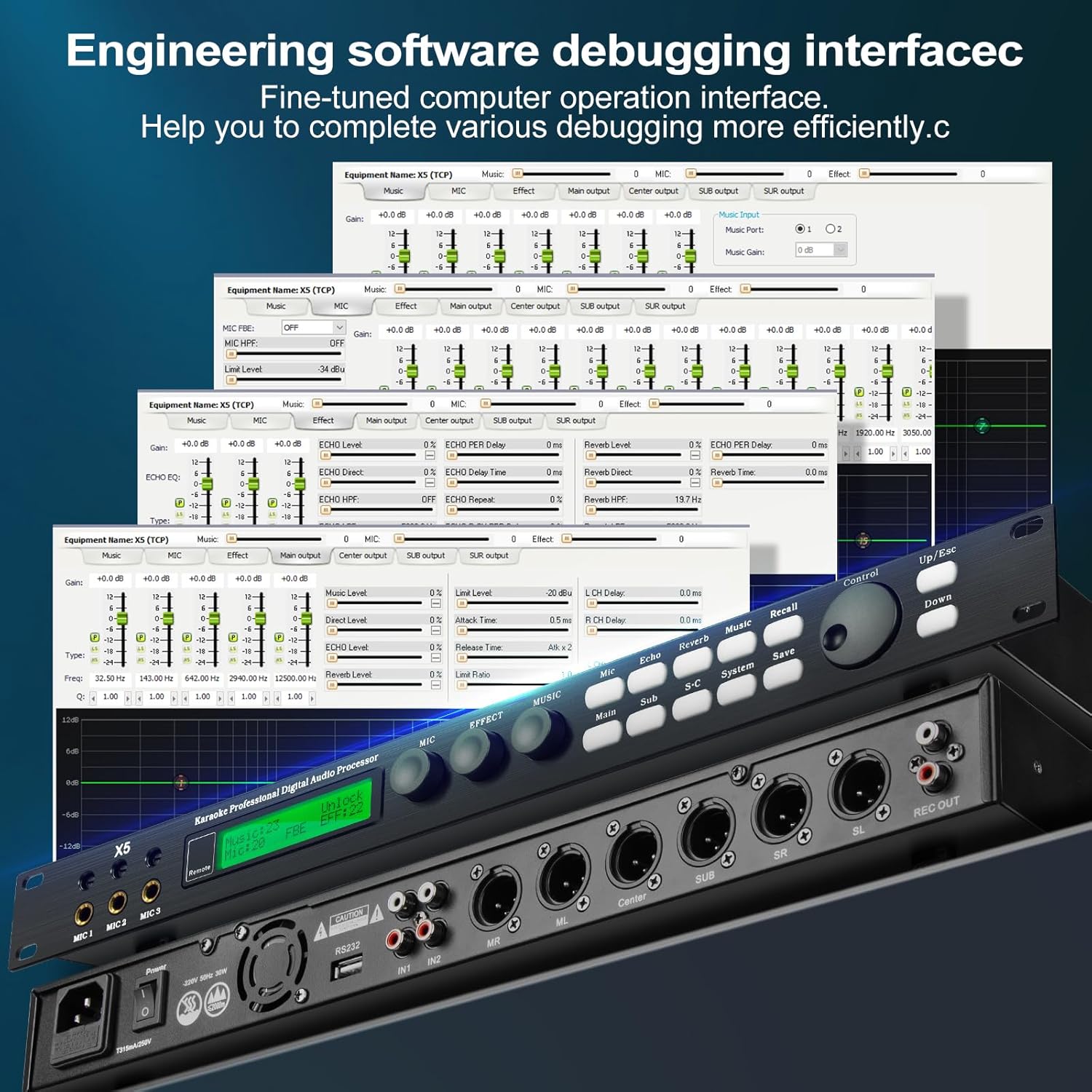
Screenshot of the PC software interface for the Depusheng X5, showing detailed equalization settings (7-band EQ for music, 15-band EQ for microphone) and other audio parameters for precise control.
For advanced tuning and precise control, connect the X5 to a computer via USB. The dedicated software allows for detailed adjustments, including a 7-band equalizer for music and a 15-band equalizer for microphone input/output. This engineering software debugging interface helps in completing various debugging operations more efficiently.
Manutenzione
To ensure the longevity and optimal performance of your Depusheng X5 Digital Mixer Reverberator, follow these simple maintenance guidelines:
- Pulizia: Use a soft, dry cloth to wipe the exterior of the unit. Avoid using liquid cleaners or solvents, as they may damage the finish or internal components.
- Ventilazione: Assicurarsi che l'unità abbia una ventilazione adeguata. Non ostruire le aperture di ventilazione.
- Magazzinaggio: Quando non viene utilizzato per lunghi periodi, conservare l'unità in un luogo fresco e asciutto, lontano dalla luce solare diretta e da temperature estreme.

Un top-down view of the Depusheng X5 unit, showing its sleek design and ventilation grilles.
Risoluzione dei problemi
If you encounter issues with your Depusheng X5, refer to the following common problems and solutions:
| Problema | Possibile causa | Soluzione |
|---|---|---|
| Nessun potere | Cavo di alimentazione non collegato o presa di corrente difettosa. | Ensure the power cable is securely connected to the unit and a working power outlet. Check the power switch. |
| Nessuna uscita audio | Incorrect audio connections, volume levels too low, or incorrect input selection. | Verify all audio cables are correctly connected to the appropriate input/output ports. Increase the MUSIC and MIC volume knobs. Check your amplifier/speaker connections and volume. |
| Il microfono non funziona | Microphone not connected, microphone volume too low, or faulty microphone. | Ensure microphones are securely plugged into MIC 1/2/3. Increase the MIC volume knob. Test with a different microphone if available. |
| Howling/Feedback | Microphone too close to speakers, high gain settings, or anti-howling module not optimized. | Move microphones further from speakers. Reduce MIC volume. Adjust anti-howling settings via PC software or system menu. The X5 has a built-in anti-howling module to mitigate this. |
| PC Software Connection Issues | Incorrect drivers, USB cable issue, or software not installed correctly. | Ensure the correct drivers are installed. Try a different USB port or cable. Reinstall the PC software. Contact customer support for driver assistance. |
| Suono distorto | Input levels too high, faulty cables, or incorrect effect settings. | Reduce input volume from your audio source. Check cables for damage. Reset effect settings to default or adjust them. |
Specifiche
Detailed technical specifications for the Depusheng X5 Digital Mixer Reverberator:
- Modello: X5
- Peso dell'articolo: 3.84 chilogrammi (8.45 libbre)
- Dimensioni del prodotto: 48cm (18.9") D x 19.5cm (7.68") W x 4.5cm (1.77") H
- Numero di canali: Uscita canale 5.1
- Fonte di energia: Elettrico con cavo
- Chip DSP: 32-Bit Professional DSP
- Ingressi microfono: 3 canali
- Modalità di effetto: 16 pre-savable modes
- Controllo PC: Yes, with dedicated software for EQ and parameter adjustment.
- Anti-Howling: Built-in professional frequency shift anti-whistle module.

Diagram showing the physical dimensions of the Depusheng X5 Digital Mixer Reverberator: 48cm (18.9 inches) length, 20.5cm (8.07 inches) depth, and 4.6cm (1.81 inches) height, along with its net weight.
Garanzia e supporto
Depusheng is committed to providing high-quality products and customer satisfaction. While specific warranty details are not provided in this manual, please retain your proof of purchase for any warranty claims.
For technical support, troubleshooting assistance, or any inquiries regarding your Depusheng X5 Digital Mixer Reverberator, please contact Depusheng customer service. We are dedicated to helping you and strive for excellent customer service.
You can often find support contact information on the official Depusheng websito o tramite il tuo rivenditore.