
Introduzione
This manual provides essential information for the installation, operation, and maintenance of your Lorex LBV8541XB 4K Security Camera. This add-on bullet camera is designed for both indoor and outdoor surveillance, offering 4K resolution, color night vision, and active deterrence features.
Contenuto della confezione
- Lorex LBV8541XB 4K HD Bullet Camera
- Kit di montaggio (viti e tasselli a muro)
- 60ft UL Extension Cable
- Adattatore di alimentazione
- Guide rapide
Configurazione e installazione
The Lorex LBV8541XB camera is designed for wall mounting and requires a wired connection to a compatible Lorex Digital Video Recorder (DVR) system. Ensure you have a compatible DVR from the LHV5100, LHV5100W, D841, D841B, D861, D862, D862B, or D871 series.
1. Montaggio della fotocamera
Select a suitable location for the camera, ensuring it provides the desired field of view and is within reach of the 60ft extension cable. Use the provided mounting kit to securely attach the camera to a wall or other stable surface. The camera's durable housing is IP65-rated, making it suitable for both indoor and outdoor environments, capable of withstanding temperatures from -22°F to 140°F.
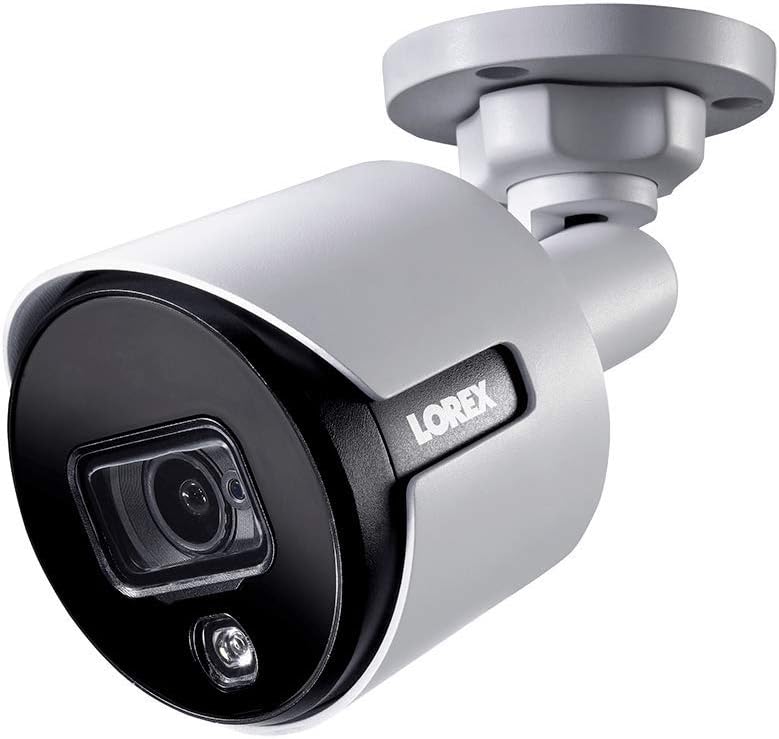
Image: The Lorex LBV8541XB 4K Bullet Security Camera, showing its compact design and mounting bracket. This camera is designed for robust surveillance in various conditions.

Image: Icons representing the camera's weather resistance, including protection against rain, extreme heat, and freezing temperatures. The camera is rated IP65 for outdoor use.
2. Collegamento della fotocamera
- Connect the 60ft UL Extension Cable to the camera's BNC video output.
- Connect the other end of the extension cable to an available BNC input on your compatible Lorex DVR.
- Connect the power adapter to the camera's power input and then plug it into a standard electrical outlet.
- Ensure all connections are secure to prevent signal loss or power interruptions.
Utilizzo della fotocamera
Once connected to your Lorex DVR, the camera will begin transmitting video. You can access and control the camera's features through your DVR interface or via the Lorex mobile application on compatible smartphones and tablets.
Caratteristiche principali:
- Risoluzione 4K: Provides ultra-high-definition video for clear and detailed surveillance.
- Campo di 87 gradi View: Captures a wide area, reducing the need for multiple cameras in certain locations.
- Visione notturna a colori: Utilizes ambient light to provide full-color video in low-light conditions. In complete darkness, infrared LEDs provide crisp black and white video up to 135 feet.
- Deterrenza attiva: Features a motion-activated LED warning light and a remote-triggered siren to deter intruders. The siren can be activated manually via the Lorex app or DVR interface.
- Motion-Only Alerts: The camera is configured to trigger alerts based on motion detection, which can be customized through your DVR settings.

Image: A close-up of the camera's front, highlighting the lens and the integrated LED warning light, which activates upon motion detection.

Image: The Lorex camera mounted on a brick wall, demonstrating its active deterrence LED light illuminating an area. This feature helps to deter unwanted activity.

Image: A graphic illustrating the camera's 135ft infrared night vision range and its capability for color night vision in low-light conditions.
Manutenzione
Regular maintenance ensures optimal performance and longevity of your Lorex security camera.
- Pulizia: Pulire periodicamente l'obiettivo e l'alloggiamento della fotocamera con un panno morbido eamp panno per rimuovere polvere, sporco o macchie d'acqua che potrebbero ostruire il viewEvitare detergenti abrasivi.
- Ispezione dei cavi: Regularly inspect the video and power cables for any signs of wear, damage, or loose connections. Secure or replace damaged cables promptly.
- Aggiornamenti del firmware: Check the Lorex website or your DVR system for available firmware updates for your camera and DVR to ensure you have the latest features and security enhancements.
Risoluzione dei problemi
If you encounter issues with your Lorex LBV8541XB camera, refer to the following common troubleshooting steps:
- Nessun segnale video:
- Assicurarsi che la fotocamera sia correttamente alimentata e che l'adattatore di alimentazione funzioni.
- Verify that the BNC cable is securely connected at both the camera and the DVR.
- Check if the camera is connected to a compatible DVR input.
- Scarsa qualità dell'immagine:
- Pulisci l'obiettivo della fotocamera per rimuovere eventuali macchie o sporco.
- Assicurarsi che la messa a fuoco della telecamera sia corretta (se regolabile).
- Check the cable for damage or interference.
- Problemi di visione notturna:
- Ensure there are no obstructions blocking the infrared LEDs.
- Verify that the camera's night vision settings are correctly configured on your DVR.
- Note that color night vision requires some ambient light; in complete darkness, the camera will switch to black and white infrared mode.
- Siren Volume is Low:
- Confirm that the siren volume settings on your DVR or Lorex app are set to the maximum level.
- Ensure the camera's speaker is not obstructed.
Specifiche
| Numero di modello | LBV8541XB |
| Risoluzione | 4K (8 Megapixel) |
| Campo di View | 87 gradi |
| Gamma di visione notturna | Up to 135 feet (IR) |
| Resistenza alle intemperie | IP65 (interno/esterno) |
| Temperatura di esercizio | Da -22°C a 140°C (da -30°F a 60°F) |
| Connettività | Wired (BNC), Wi-Fi for app control |
| Fonte di alimentazione | Elettrico con filo (12 Volt) |
| Dimensioni (L x P x A) | 5 x 13.1 x 4.2 pollici |
| Peso | 2.29 libbre |
| Materiale | Metallo |
| Codice UPC | 695529017129 |
Garanzia e supporto
For warranty information, technical support, or further assistance, please visit the official Lorex website or contact Lorex customer service. Keep your purchase receipt and model number (LBV8541XB) handy when contacting support.
Official Lorex Websito: www.lorex.com