1. Prodotto finitoview
The Crystal Vision Technology CVT21WB is a wireless audio 1080P 2MP camera designed for surveillance. It features built-in microphones for audio capture and delivers high-definition video both day and night. This camera is weather-resistant and includes night vision capabilities, making it suitable for various indoor and outdoor environments.
Nota importante: This camera is only compatible with Crystal Vision wireless surveillance NVR systems, specifically the CVT804 and CVT808 Series.
Caratteristiche principali:
- Microfono integrato: Captures clear audio alongside video footage.
- Video Full HD 1080P: Provides 2.0 Megapixel (1920x1080) high-definition video for clear imaging.
- Resistente alle intemperie (IP65): Progettato per durare in diverse condizioni atmosferiche.
- Visione notturna: Equipped with low-light technology for clear visibility in dark environments.
- Connettività wireless: Utilizes Wi-Fi for flexible placement and installation.
Componenti della fotocamera:
Familiarize yourself with the main components of your CVT21WB camera:
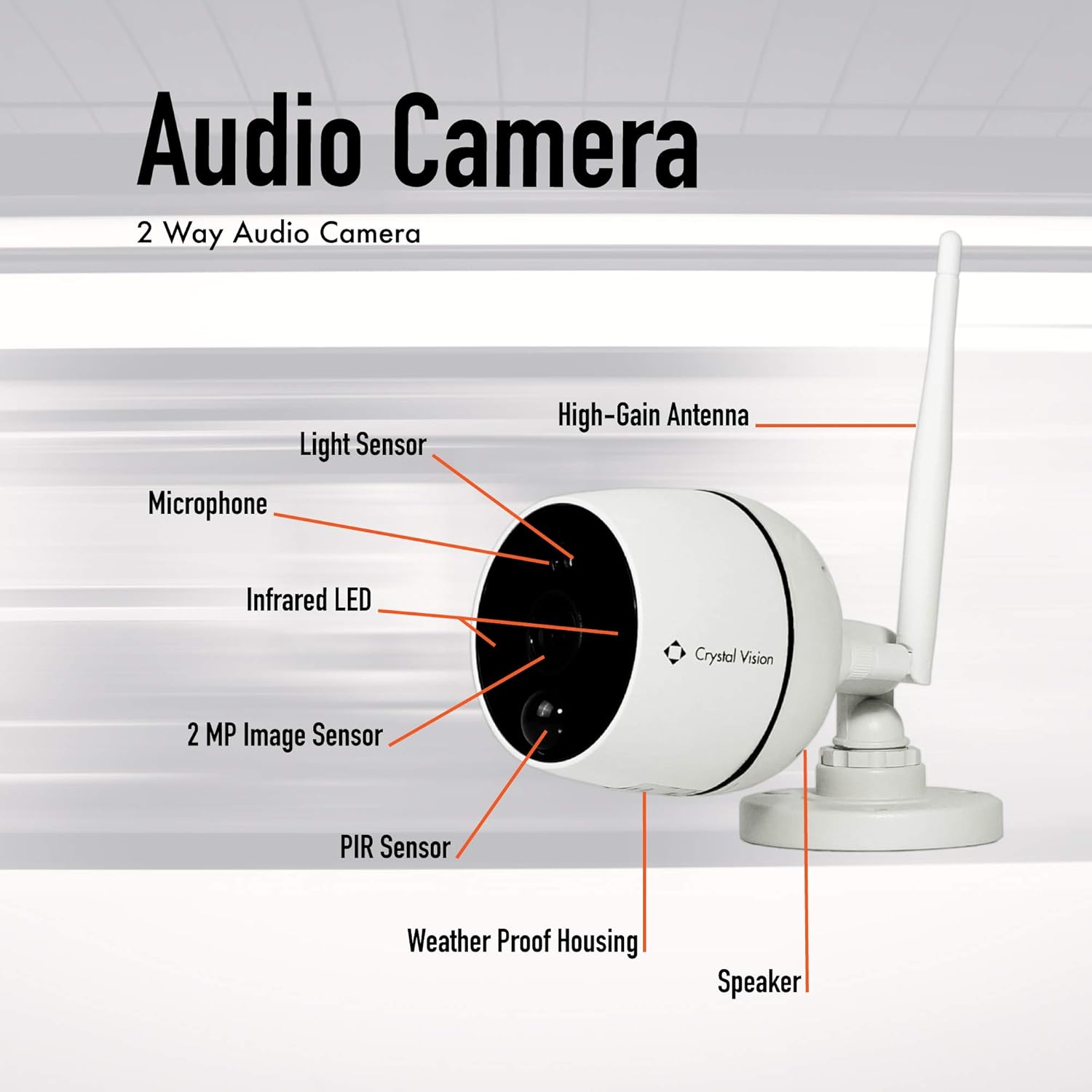
Immagine 1.1: This diagram illustrates the key components of the CVT21WB camera. Visible elements include the light sensor, microphone, infrared LED, 2 MP image sensor, PIR sensor, weather-proof housing, speaker, and the high-gain antenna for wireless communication.
Contenuto della confezione:
Verifica che tutti gli articoli siano presenti nel tuo pacco:

Immagine 1.2: This image displays the contents typically found in the CVT21WB camera package. It includes the 2-way audio camera unit, an antenna, an extension cable, a power supply adapter, and a set of anchors and screws for mounting.
2. Configurazione e installazione
Before beginning installation, ensure you have your compatible Crystal Vision NVR (CVT804 or CVT808 Series) powered on and configured according to its own manual.
2.1 Montaggio della telecamera
- Seleziona una posizione: Choose a suitable location for your camera. The CVT21WB is designed for both indoor and outdoor use and is wall-mountable. Consider areas that provide optimal viewing angles and are within range of your Wi-Fi network.
- Segnare i punti di foratura: Use the camera's mounting base as a template to mark the positions for drilling holes on the wall.
- Fori di perforazione: Drill pilot holes at the marked positions. Insert the provided anchors into the holes if mounting on drywall or masonry.
- Fissare la fotocamera: Attach the camera's mounting base to the wall using the provided screws. Ensure it is securely fastened.
- Regola l'angolo: Regolare l'angolazione della telecamera per coprire l'area di sorveglianza desiderata.
2.2 Alimentazione della fotocamera
- Collegare l'adattatore di alimentazione: Collegare l'adattatore di alimentazione alla porta di ingresso dell'alimentazione della fotocamera.
- Collegare alla presa: Plug the power adapter into a standard AC/DC power outlet. The camera will power on automatically.
2.3 Wireless Pairing with NVR
The CVT21WB camera is designed to wirelessly pair with compatible Crystal Vision NVRs. Refer to your NVR's instruction manual for specific steps on adding new wireless cameras. Generally, the process involves:
- Accedi alle impostazioni NVR: Navigate to the camera management or wireless pairing section on your NVR interface.
- Avvia associazione: Select the option to add a new wireless camera or initiate pairing mode on the NVR.
- Rilevamento della fotocamera: The NVR will search for available wireless cameras. Ensure your CVT21WB camera is powered on and within range.
- Conferma connessione: Once detected, confirm the connection on the NVR. The camera's video feed should appear on your NVR display.
3. Utilizzo della fotocamera
Once the camera is successfully paired with your NVR, you can access its features through the NVR interface or associated mobile application.
3.1 Vivere View e Registrazione
- Accedi al Live Feed: On your NVR monitor or mobile app, select the CVT21WB camera to view its live 1080P HD video feed.
- Registrazione: The NVR system will typically manage video recording based on your configured settings (e.g., continuous, motion-triggered, scheduled).
3.2 Monitoraggio audio
The built-in microphone allows for audio monitoring of the camera's surroundings.
- Abilita audio: On your NVR or app, ensure the audio option for the CVT21WB camera is enabled to hear sound from the camera's location.
- Two-Way Audio (if supported by NVR/App): While the camera has a speaker, two-way audio functionality depends on the NVR system and its application. If supported, you may be able to speak through the camera's speaker from your monitoring device.
3.3 Visione notturna
The camera automatically switches to night vision mode in low-light conditions, utilizing its infrared LEDs and low light technology to provide clear black and white images.
- Attivazione automatica: The light sensor on the camera detects ambient light levels and activates night vision as needed.
- Prestazioni ottimali: Ensure there are no obstructions directly in front of the camera that could block the infrared light.
4. Manutenzione
Una manutenzione regolare contribuisce a garantire prestazioni ottimali e longevità della fotocamera.
4.1 Pulizia
- Pulizia delle lenti: Gently wipe the camera lens with a soft, clean, lint-free cloth. If necessary, use a small amount of lens cleaning solution. Avoid abrasive materials that could scratch the lens.
- Pulizia degli alloggi: Wipe the camera's weather-resistant housing with a damp panno per rimuovere polvere e sporco. Non utilizzare prodotti chimici aggressivi.
4.2 Considerazioni ambientali
- Resistenza alle intemperie: The camera has an IP65 rating, meaning it is protected against dust ingress and low-pressure water jets from any direction. While weather-resistant, avoid submerging the camera in water or exposing it to extreme pressure washing.
- Temperatura: Per evitare danni, utilizzare la fotocamera entro l'intervallo di temperatura specificato.
4.3 Aggiornamenti firmware
Periodically check the Crystal Vision Technology website or your NVR's settings for available firmware updates. Firmware updates can improve performance, add features, or enhance security.
5. Risoluzione Dei Problemi
If you encounter issues with your CVT21WB camera, refer to the following common troubleshooting steps:
5.1 No Video Feed / Disconnected Camera
- Controlla la potenza: Ensure the camera is properly powered on and the power adapter is securely connected to both the camera and the power outlet.
- Segnale Wi-Fi: Verify that the camera is within range of your NVR's wireless signal. Obstructions like thick walls or metal objects can interfere with the signal.
- Ricollegare la fotocamera: If the connection is lost, try re-pairing the camera with your NVR following the steps in Section 2.3.
- Stato NVR: Check the status of your NVR system to ensure it is operating correctly.
5.2 Scarsa qualità video
- Lente pulita: Ensure the camera lens is clean and free from dirt, dust, or smudges (refer to Section 4.1).
- Condizioni di illuminazione: While the camera has night vision, extreme low light or direct bright lights can affect image quality.
- Interferenza Wi-Fi: Strong Wi-Fi interference can degrade video stream quality. Try repositioning the camera or NVR.
5.3 Nessun audio / scarsa qualità audio
- Abilita audio: Confirm that audio monitoring is enabled on your NVR or mobile application.
- Ostruzione del microfono: Ensure the microphone port on the camera is not blocked.
- Rumore ambientale: High ambient noise levels will affect audio clarity.
5.4 La fotocamera non risponde
- Ciclo di alimentazione: Disconnect the camera's power adapter, wait 10 seconds, and then reconnect it.
- Ripristino di fabbrica: If available, a factory reset button (often a small pinhole button) can restore the camera to its default settings. Refer to the NVR manual or manufacturer's support for specific instructions on resetting the camera.
6. Specifiche
| Caratteristica | Dettaglio |
|---|---|
| Modello | CVT21WB |
| Risoluzione video | 1080p (1920x1080) |
| Sensore di immagine | 2 Megapixel |
| Audio | Built-in Microphone, Speaker (for potential two-way audio) |
| Connettività | Senza fili (Wi-Fi) |
| Fonte di alimentazione | Adattatore CA/CC |
| Tipo di montaggio | Montaggio a parete |
| Resistenza alle intemperie | IP65 (a tenuta di polvere, protetto contro getti d'acqua a bassa pressione) |
| Visione notturna | Yes, with Night Color low light technology |
| Compatibilità | Crystal Vision NVR CVT804 and CVT808 Series |
| Peso dell'articolo | 1.3 libbre |
| Dimensioni del pacco | 7.44 x 3.98 x 3.31 pollici |
| Codice UPC | 852653008113 |
7. Garanzia e supporto
For warranty information, technical support, or service inquiries, please contact Crystal Vision Technology directly. Details regarding your product's warranty period and terms are typically provided at the time of purchase or can be found on the manufacturer's official websito.
Produttore: Tecnologia Crystal Vision
Supporto online: For additional resources, FAQs, and contact information, please visit the official Crystal Vision Technology Store on Amazon o il loro funzionario websito.