
Introduzione
This manual provides essential instructions for the setup, operation, and maintenance of your Easytry123 replacement remote control. This remote is designed to function with various ONKYO AV A/V Receiver models, including RC-745M, TX-NR1007, TX-NR807, RC-717M, RC-738M, TX-SR607, TX-SR607S, RC-742M, and TX-SR707.
Nota importante: As a replacement unit, this remote control may not support all advanced functions or features present on your original ONKYO remote. Its primary purpose is to provide core control over your AV receiver. Please ensure your receiver model is listed above for compatibility.
Impostare
1. Installazione della batteria
Il telecomando richiede due batterie AAA (non incluse). Per installarle, segui questi passaggi:
- Individuare il coperchio del vano batterie sul retro del telecomando.
- Premere la linguetta e far scorrere il coperchio verso il basso per aprire il vano.
- Inserire due batterie AAA, assicurandosi che i terminali positivo (+) e negativo (-) siano allineati correttamente con le marcature all'interno del vano. Un inserimento errato può impedire il funzionamento del telecomando.
- Riposizionare il coperchio del vano batteria finché non scatta in posizione.
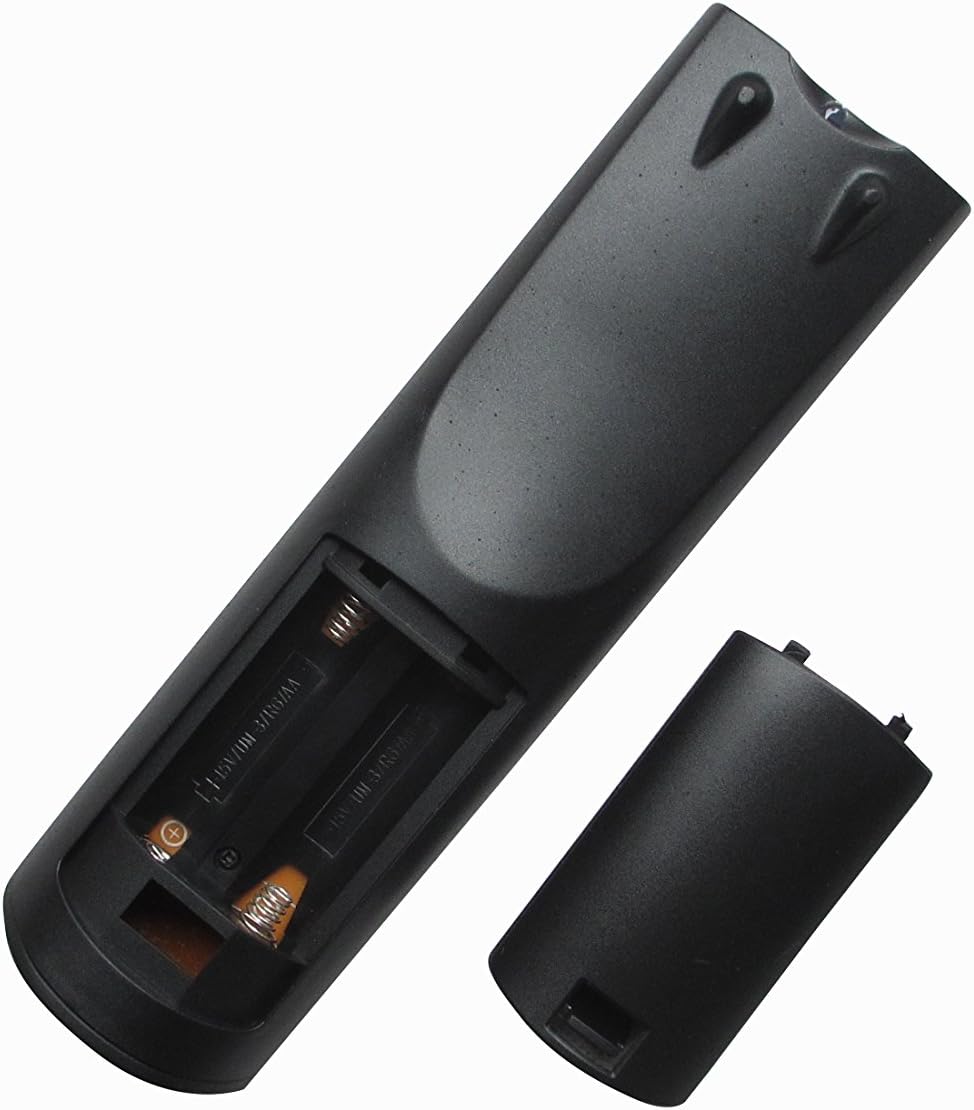
Immagine 1: posteriore view of the remote control with the battery compartment open, ready for battery insertion. Note the spring contacts for the negative terminals and raised contacts for the positive terminals.

Immagine 2: Un altro view of the remote's battery compartment, illustrating the correct orientation for AAA battery placement.
2. Utilizzo iniziale
This replacement remote control is pre-programmed for the listed ONKYO AV A/V Receiver models. No additional programming or pairing steps are typically required. Once batteries are installed, the remote should be ready for immediate use with your compatible receiver.
Point the remote control directly at your ONKYO AV A/V Receiver and press the desired function button.
Istruzioni per l'uso
The Easytry123 replacement remote control provides intuitive access to the primary functions of your ONKYO AV A/V Receiver. While the exact button layout may vary slightly from your original remote, the core functions are generally mapped to standard remote control buttons.
- Accensione/spegnimento: Utilizzare il ENERGIA button to turn your receiver on or off.
- Controllo del volume: Regolare il livello audio utilizzando il VOLUME+ E VOLUME - pulsanti.
- Selezione input: Cycle through available audio/video inputs (e.g., HDMI 1, DVD, CD) using the INGRESSO or dedicated input selection buttons.
- Disattiva audio: Temporarily silence the audio output with the MUTE pulsante.
- Navigazione: Use the directional arrow buttons and ENTRARE or OK button for menu navigation on your receiver's display.
For specific advanced functions or detailed operation of your ONKYO receiver's features, please refer to your receiver's original instruction manual.
Manutenzione
Pulizia del telecomando
Per mantenere l'aspetto e la funzionalità del telecomando:
- Pulisci la superficie con un panno morbido e asciutto.
- Per sporco ostinato, leggermente dampPulire il panno con acqua o con un detergente delicato e non abrasivo. Non utilizzare prodotti chimici o solventi aggressivi.
- Avoid getting moisture into the battery compartment or any openings.
Sostituzione della batteria
Replace the batteries when the remote's response becomes sluggish or it stops functioning. Always replace both batteries at the same time with new AAA batteries. Do not mix old and new batteries, or different types of batteries.
Magazzinaggio
Se il telecomando non verrà utilizzato per un periodo prolungato, rimuovere le batterie per evitare perdite e potenziali danni al telecomando.
Risoluzione dei problemi
Se riscontri problemi con il telecomando, fai riferimento alle seguenti soluzioni comuni:
- Il telecomando non risponde:
- Controllare che le batterie siano inserite correttamente con la polarità corretta (+/-).
- Sostituisci le batterie con batterie AAA nuove.
- Ensure there are no obstructions between the remote control and the ONKYO receiver's infrared sensor.
- Make sure you are within the effective range of the receiver and pointing the remote directly at it.
- Alcune funzioni non funzionano:
- As a replacement remote, it may not support all functions of your original ONKYO remote. Focus on core functions like power, volume, and input selection.
- Verify that your ONKYO receiver model is listed as compatible in the introduction section.
- Consult your ONKYO receiver's original manual for specific function details.
- Il telecomando funziona a intermittenza:
- Spesso indica che la batteria è scarica. Sostituire le batterie.
- Assicurare una visuale libera verso il ricevitore.
Se i problemi persistono dopo aver provato questi passaggi, contatta il venditore per ulteriore assistenza.
Specifiche
| Numero modello: | RM-736M |
| Marca: | Easytry123 |
| Dispositivi compatibili: | ONKYO AV A/V Receivers (Models: RC-745M, TX-NR1007, TX-NR807, RC-717M, RC-738M, TX-SR607, TX-SR607S, RC-742M, TX-SR707) |
| Tecnologia di connettività: | Infrarossi (IR) |
| Caratteristica speciale: | Design ergonomico |
| Numero massimo di dispositivi supportati: | 1 |
| Fonte di energia: | 2 x batterie AAA (non incluse) |
Garanzia e supporto
Specific warranty information for this replacement remote control is typically provided by the seller at the time of purchase. Please refer to your purchase documentation or contact the seller directly for details regarding warranty coverage and support.
For technical assistance or inquiries not covered in this manual, please reach out to the Easytry123 customer support or the retailer from whom you purchased the product.