
1. Introduzione
The ONKRON TS1881 mobile TV stand is designed to securely hold flat-panel displays ranging from 50 to 86 inches, with a maximum weight capacity of 90 kg (198 lbs). It features adjustable height, integrated shelves for AV equipment, and lockable wheels for mobility. This manual provides comprehensive instructions for the safe assembly, operation, and maintenance of your ONKRON TS1881 mobile TV stand.

Figure 1: ONKRON TS1881 Mobile TV Stand in use.
2. Informazioni sulla sicurezza
Please read all instructions carefully before assembly and use. Failure to follow these instructions may result in serious personal injury or damage to property. If you have any questions, please contact ONKRON customer support.
- Capacità di peso: Do not exceed the maximum weight capacity of 90 kg (198 lbs) for the TV mount and 5 kg (11 lbs) per shelf. Overloading can cause instability and potential injury.
- Dimensioni dello schermo: This stand is designed for displays between 50 and 86 inches. Ensure your TV falls within this range.
- Compatibilità VESA: Verifica che lo schema di montaggio VESA del tuo televisore sia compatibile con la gamma del supporto (da 200x200 mm a 800x500 mm).
- Montaggio: Assemble the stand on a soft, clean surface to prevent scratches. Ensure all fasteners are securely tightened before use. Do not overtighten screws.
- Stabilità: Always ensure the stand is on a stable, level surface. Lock the wheels when the stand is in a stationary position to prevent accidental movement.
- Gestione dei cavi: Utilize the integrated cable management channels to prevent tripping hazards and protect cables from damage.
- Bambini: Keep children away from the stand during assembly. Do not allow children to climb on or play with the stand or mounted TV.
3. Contenuto della confezione
Before beginning assembly, check that all parts are present and undamaged. If any parts are missing or damaged, do not attempt to assemble the stand. Contact ONKRON customer support for assistance.

Figura 2: Tutti i componenti inclusi nella confezione.
Il pacchetto tipicamente include:
- Base con ruote
- Vertical columns (2 sections)
- Piastra di montaggio TV
- TV mounting brackets (2 pieces)
- AV shelves (2 pieces)
- Scaffale per fotocamera
- Hardware kit (various screws, washers, spacers, Allen keys)
- Manuale di istruzioni
4. Istruzioni per l'installazione e il montaggio
Follow these steps carefully to assemble your ONKRON TS1881 mobile TV stand. It is recommended to have two people for assembly, especially when mounting the TV.
- Assemblare la base: Attach the vertical columns to the base using the provided screws. Ensure they are securely fastened.
- Installa le ruote: Insert the lockable wheels into the designated slots on the base. Ensure they are firmly in place.
- Fissare la piastra di montaggio TV: Secure the TV mounting plate to the top section of the vertical columns.
- Install TV Brackets: Attach the TV mounting brackets to the back of your television using the appropriate screws and spacers from the hardware kit. Ensure the brackets are level and centered.
- Monte TV: With assistance, carefully lift the TV and hook the mounting brackets onto the TV mounting plate on the stand. Secure the TV to the stand using the safety screws or locking mechanisms.
- Installa scaffali: Attach the AV shelves to the vertical columns at your desired height. The shelves are designed to hold up to 5 kg each. The top shelf is suitable for a webcam or small camera.
- Gestione dei cavi: Route all cables through the integrated cable management channels in the vertical columns to maintain a tidy and safe setup.

Figure 3: Stand features including adjustable height and cable management.
5. Istruzioni per l'uso
The ONKRON TS1881 offers flexibility in positioning and display adjustment.
- Regolazione dell'altezza della TV: The TV height can be adjusted from 1350 mm to 1650 mm (from the floor to the center of the TV). Loosen the height adjustment screws on the vertical columns, raise or lower the TV to the desired position, and then securely tighten the screws.
- Spostamento del supporto: To move the stand, unlock all four wheels. Carefully push the stand to its new location. Once positioned, lock all four wheels to ensure stability.
- Utilizzo degli scaffali: The two AV shelves can be adjusted in height along the vertical columns. Place your media devices, laptops, or other accessories on the shelves, ensuring not to exceed the 5 kg weight limit per shelf. The top camera shelf is fixed and designed for webcams or small cameras.
- Optional Tilt Function: An optional tilt adapter (model ATL-1881, sold separately) allows you to tilt the TV from 0 to 10 degrees for optimal viewangoli di inclinazione.
- Optional Reinforced Wheels: For enhanced mobility and stability on various surfaces, consider purchasing the ONKRON AWL-75 universal reinforced wheel kit (sold separately).

Figure 4: Easy mobility and cable management.
Video 1: Oltreview of ONKRON TS1881 features, including VESA compatibility, weight capacity, shelves, height adjustment, and optional accessories.
6. Manutenzione
Una manutenzione regolare garantisce la longevità e il funzionamento sicuro del vostro supporto TV.
- Pulizia: Pulisci il supporto con un panno morbido eamp panno. Evitare l'uso di detergenti abrasivi o solventi che potrebbero danneggiare la finitura.
- Controllo del dispositivo di fissaggio: Controllare periodicamente tutte le viti e i bulloni per assicurarsi che siano ben serrati. Serrare nuovamente se necessario, ma senza esagerare.
- Ispezione delle ruote: Inspect the wheels for any debris or damage that might hinder smooth movement. Clean or replace as needed.
7. Risoluzione Dei Problemi
If you encounter any issues with your ONKRON TS1881 mobile TV stand, refer to the following common solutions:
- Il supporto è instabile: Ensure all assembly screws are tightened. Verify the stand is on a level surface. Do not exceed the maximum weight capacity.
- Difficoltà nello spostamento del supporto: Check that all wheels are unlocked. Inspect wheels for obstructions or damage. Ensure the floor surface is suitable for rolling.
- La TV non è in piano: Recheck the installation of the TV mounting brackets on the TV and the mounting plate on the stand. Adjust as necessary.
- Shelves are loose: Ensure the shelf attachment screws are securely tightened.
If the problem persists, please contact ONKRON customer support.
8. Specifiche
| Caratteristica | Specificazione |
|---|---|
| Modello | TS1881 |
| Dimensioni dello schermo compatibile | 50 - 86 pollici |
| Peso massimo TV | 90 kg (198 libbre) |
| Compatibilità VESA | da 200x200mm a 800x500mm |
| Gamma di regolazione dell'altezza | 1350 millimetri - 1650 millimetri |
| Materiale | Acciaio e plastica |
| Colore | Bianco |
| Carico massimo sullo scaffale | 5 kg (11 libbre) per ripiano |
| Maximum Tilt Angle (with optional adapter) | 10 gradi |
| Peso del prodotto | 31.5 kg (69.4 libbre) |
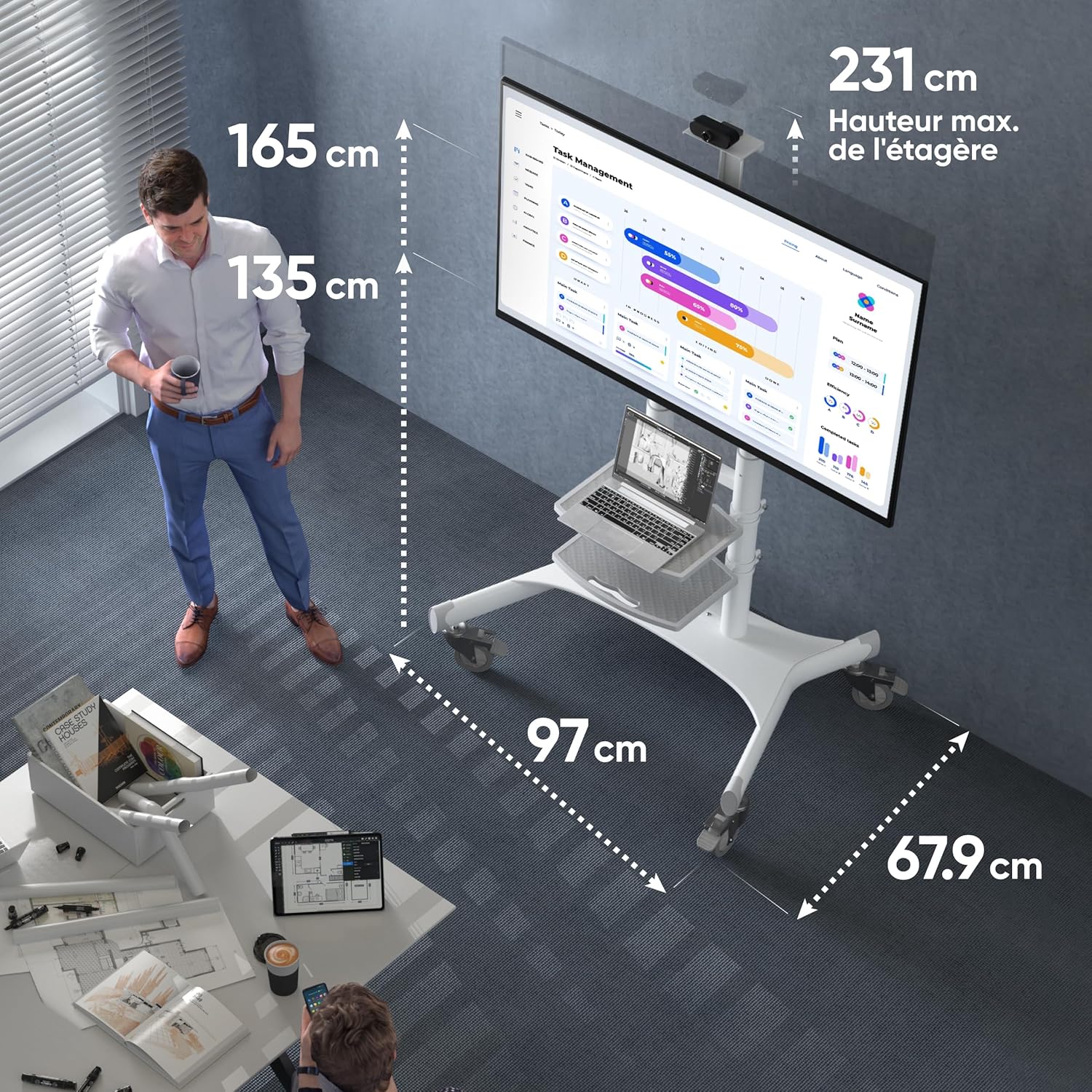
Figure 5: Key dimensions of the ONKRON TS1881 Mobile TV Stand.
9. Garanzia e supporto
ONKRON provides a 5-year availability of spare parts in the EU for the TS1881 mobile TV stand.
For any questions, technical assistance, or warranty claims, please contact ONKRON customer support. Our specialists are available to provide support and address any concerns you may have regarding your product.
Please refer to the ONKRON official website or your purchase documentation for specific contact details and the full warranty policy.