
1. Introduzione
The Pyle PMXU68BT is a versatile 6-channel studio audio mixer designed for professional and portable use. It features Bluetooth compatibility, a USB audio interface, and a digital DJ mixing console, making it suitable for studio recording, live sound, and various audio mixing applications. This manual provides detailed instructions for setting up, operating, and maintaining your mixer to ensure optimal performance.

Figura 1: Fronte view of the Pyle PMXU68BT 6-Channel Bluetooth Studio Audio Mixer, showing all controls and inputs.
2. Caratteristiche principali
- Controllo a 6 canali: Independent master volume, gain, high/low EQ, FX/send, and pan tone audio adjustment for each channel.
- Streaming musicale tramite Bluetooth: Seamless wireless audio streaming from smartphones, tablets, laptops, and computers.
- 4 Combo Mic Inputs: Equipped with 4 mic/line combo inputs for vocals, instruments, or other sources.
- Controlli dell'equalizzazione: BUS audio control, sound routing, smooth rotary faders for mic/USB/line/master controls, and LED indicator lights. Features an LCD display and front panel control center with output signal indication.
- Alimentazione phantom +48 V: Provides +48V phantom power for condenser microphones with ultra-low noise design and high headroom.
- Interfaccia USB: MP3 flash drive reader and computer connection for playback and recording.
- Uscita cuffie: 6.35mm headphone output jack for monitoring.
3. Contenuto della confezione
Si prega di verificare che tutti gli articoli siano presenti nel pacco:
- Pyle PMXU68BT Bluetooth Studio Mixer
- Adattatore di alimentazione a muro
- Manuale dell'utente (questo documento)
4. Impostazione
4.1 Collegamento di alimentazione
- Assicurarsi che l'interruttore di alimentazione del mixer sia in posizione OFF.
- Connect the provided wall power adapter to the DC 5V input on the mixer.
- Collegare l'alimentatore a una presa elettrica adeguata.
- Ruotare l'interruttore di alimentazione del mixer in posizione ON. Il LED indicatore di alimentazione si illuminerà.
4.2 Collegamento di microfoni e strumenti
The PMXU68BT features 4 XLR/1/4'' combo audio line/microphone inputs (Channels 1-4) and 1/4'' (6.35mm) mono/stereo inputs (Channels 5-6).

Figura 2: in alto view of the mixer, highlighting input and control layout.
- XLR Microphones: Connect XLR cables from your microphones to the XLR inputs on Channels 1-4. If using condenser microphones, activate the +48V phantom power switch for the respective channel.
- 1/4'' Instruments/Line Devices: Connect instruments (guitars, keyboards) or other line-level devices using 1/4'' cables to the 1/4'' inputs on Channels 1-4, or to the stereo 1/4'' inputs on Channels 5-6.
4.3 Collegamento dei dispositivi di output
- Uscite principali: Connect your main speakers or recording device to the (2) XLR 3-pin (L/R) main outputs.
- Cuffie: Plug your headphones into the 1/4'' (6.35mm) headphone jack output for monitoring.
5. Istruzioni per l'uso
5.1 Controlli dei canali
Ogni canale di ingresso (1-6) è dotato di controlli dedicati:
- GUADAGNO: Regola la sensibilità di ingresso per il microfono o lo strumento collegato.
- ALTO/BASSO: 2-band graphic EQ (80Hz/12kHz, +15dB) for adjusting treble and bass frequencies.
- FX/INVIA: Controls the level of the signal sent to the internal effects processor or external send.
- PADELLA: Regola la posizione stereo del segnale del canale (da sinistra a destra).
- VOLO: Adjusts the individual channel's volume level.
5.2 Connettività Bluetooth
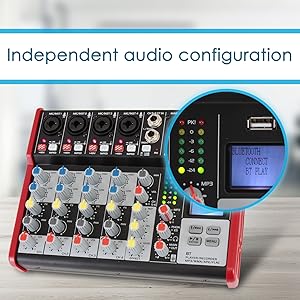
Figura 3: Collegamento di uno smartphone al mixer tramite Bluetooth.
- Press the 'MODE' button on the digital display panel until 'BT' is selected.
- On your external device (smartphone, tablet, etc.), search for Bluetooth networks.
- Select 'PYLEPRO MIXER' from the list of available devices.
- Una volta effettuata l'associazione, è possibile trasmettere l'audio in modalità wireless al mixer.
5.3 Riproduzione e registrazione USB
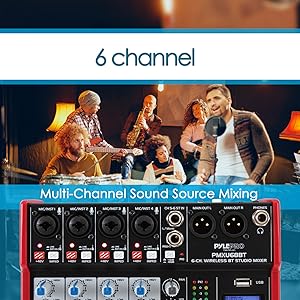
Figure 4: USB port for connecting a flash drive.
- Riproduzione: Insert a USB flash drive (up to 64GB) containing MP3, WMA, APE, or FLAC audio files into the USB port. Use the digital display controls (E/PREV, P/PLAY, N/NEXT, MENU) to navigate and play tracks.
- Registrazione: The mixer can record the mixed audio output directly to a connected USB flash drive. Refer to the digital display menu for recording options. Note: Playback and recording via USB cannot be performed simultaneously.
5.4 Alimentazione Phantom +48V
The +48V phantom power switch provides power to condenser microphones. Ensure this switch is only activated when using condenser microphones that require it. Turn off phantom power before connecting or disconnecting microphones to prevent damage.
6. Manutenzione
- Pulizia: Use a soft, dry cloth to clean the mixer's surface. Avoid using abrasive cleaners, solvents, or waxes.
- Magazzinaggio: Conservare il mixer in un luogo fresco e asciutto, lontano dalla luce solare diretta e da temperature estreme.
- Gestione: Handle the mixer with care. Avoid dropping or subjecting it to strong impacts.
- Liquidi: Keep the mixer away from liquids. Spills can cause damage to internal components.
7. Risoluzione Dei Problemi
| Problema | Possibile causa | Soluzione |
|---|---|---|
| Nessuna uscita audio | Incorrect cable connections, low volume levels, phantom power off for condenser mic. | Check all cable connections. Increase channel and master volume levels. Activate +48V phantom power if using a condenser microphone. |
| Il Bluetooth non si connette | Mixer not in BT mode, device not discoverable, out of range. | Ensure mixer is in 'BT' mode. Make sure your device's Bluetooth is on and discoverable. Move device closer to the mixer (within 33+ ft). |
| La riproduzione/registrazione USB non funziona | Non supportato file format, USB drive not detected, drive full, attempting simultaneous playback/recording. | Garantire files are MP3, WMA, APE, or FLAC. Check USB drive connection. Verify drive has sufficient space. Do not attempt playback and recording at the same time. |
| Audio distorto | Input gain too high, output level too high. | Reduce the GAIN knob for the affected channel. Lower the main output level. |
8. Specifiche
- Marca: Pilo
- Modello: PMXU68BT
- Numero di canali: 6
- Dimensioni del prodotto (L x P x A): 8.70'' x 2.59'' x 6.50'' -inches (6.5"D x 8.66"W x 2.6"H)
- Tecnologia di connettività: Ausiliario, Bluetooth, USB
- Fonte di energia: Elettrico con cavo
- Risposta in frequenza: +0.5 dB, 20 Hz-20 kHz
- Tipo connettore di uscita: XLR
- Ingresso audio: XLR, 1/4" (6.35mm)
- Potenza Phantom Voltage: +48V
- Consumo energetico: Massimo: 5W
- Versione Bluetooth: 2.1
- Portata wireless: Fino a 33+ piedi.
- Audio digitale USB File Compatibilità: MP3, WMA, APE, FLAC
- Massimo supporto flash USB: Fino a 64 GB
- Misuratore di livello audio: 2 x 6 point LED display
- Livello di uscita massimo: 3 Vrm
- Guadagno di sistema: -14+40dB
- Gamma dinamica: 102 dB
- THD @ 1kHz: <0.05%
- Diafonia stereo: 92 dB
9. Garanzia
This product comes with a limited manufacturer's warranty. For specific details regarding warranty coverage, terms, and conditions, please refer to the warranty information provided with your purchase documentation or contact Pyle customer support.
10. Supporto
For technical support, product inquiries, or service, please visit the official Pyle website or contact their customer service department. You can often find FAQs, troubleshooting guides, and contact information on their support pages.
Pyle USA Store: https://www.amazon.com/stores/PyleUSA/page/D79E9149-99F8-49A4-8E8C-D24560694FC2