
1. Introduzione
The Reloop Groove Blaster BT is a portable 100W loudspeaker designed for high sound pressure levels and robust bass performance. It features a built-in Bluetooth 4.0 interface for wireless audio streaming up to 30 meters and an integrated, rechargeable Li-ion battery providing up to 10 hours of music playback. NFC connectivity simplifies pairing with supported devices. The speaker's 3-way frequency separation, with two 3-inch midrange drivers, one 1-inch tweeter, and a 6-inch low-frequency driver, ensures a balanced and wide stereo sound.

Figure 1.1: Reloop Groove Blaster BT in use, highlighting its 10-hour battery life.
2. Contenuto della confezione
Assicurarsi che tutti gli articoli siano presenti nel pacco:
- Groove Blaster BT Portable Bluetooth Speaker
- Detachable Carrying Handle
- Power Supply Unit (located in the adapter compartment)
3. Controlli e collegamenti
3.1 Pannello di controllo superiore
The top panel provides access to all primary playback and pairing functions.
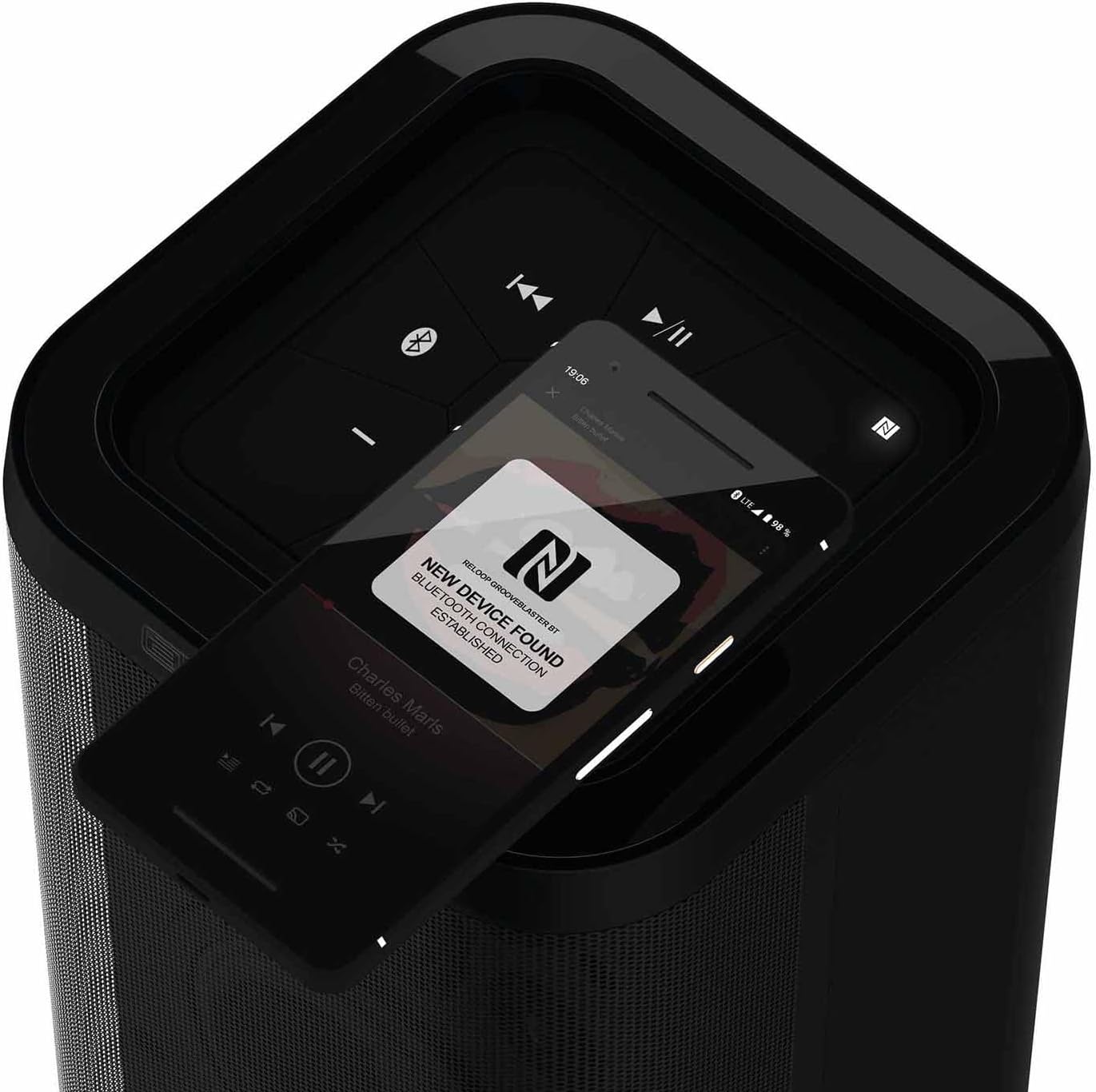
Figura 3.1: dettagliata view del pannello di controllo superiore.
- Pulsante di accensione (ⓘ): Tenere premuto per accendere o spegnere l'altoparlante.
- Play/Pause (▶/‖‖): Controlla la riproduzione multimediale.
- Traccia precedente (⏮): Salta all'inizio della traccia corrente o alla traccia precedente.
- Traccia successiva (⏭): Passa alla traccia successiva.
- Volume basso (-): Diminuisce il volume dell'altoparlante.
- Volume su (+): Aumenta il volume dell'altoparlante.
- Bluetooth Pairing Button (ⓘ): Avvia la modalità di associazione Bluetooth.
- NFC Area (N): Touch NFC-enabled devices here for quick pairing.
- Speaker Pairing Button (Speaker Pairing): Activates Smart Link function to connect two Groove Blaster BT speakers.
3.2 Collegamenti posteriori
The rear panel houses the power input, USB charging port, and auxiliary input, protected by an adapter compartment.

Figure 3.2: Rear connection panel with adapter compartment open.
- DC IN: Power input for the included power supply unit.
- Battery Level LEDs: Indicate the current battery charge status.
- USB POWER OUT (5V DC 1A): Porta USB per caricare dispositivi esterni.
- INGRESSO AUX: Ingresso ausiliario da 3.5 mm per connessioni audio cablate.
- Power Supply Holder: Compartment to store the power supply unit.
4. Impostazione
4.1 Caricamento della batteria
Before first use, fully charge the integrated Li-ion battery. Connect the included power supply unit to the DC IN port on the rear of the speaker and plug it into a wall outlet. The battery level LEDs will indicate charging status. A full charge provides up to 10 hours of playback, depending on usage and volume.
4.2 Accensione/Spegnimento
Press and hold the Power button (ⓘ) on the top control panel for approximately 2 seconds to turn the speaker on or off. An audible cue will confirm the action.
5. Istruzioni per l'uso
5.1 Associazione Bluetooth
- Ensure the Groove Blaster BT is powered on.
- Press the Bluetooth Pairing button (ⓘ) on the top panel. The Bluetooth indicator LED will flash, indicating pairing mode.
- On your audio device (smartphone, tablet, laptop), enable Bluetooth and search for available devices.
- Select "Groove Blaster BT" from the list of devices.
- Once connected, the Bluetooth indicator LED will glow solid, and an audible confirmation will sound.
L'altoparlante ha una portata Bluetooth fino a 30 metri.
5.2 Accoppiamento NFC
For NFC-enabled devices, pairing is simplified:
- Ensure NFC is enabled on your audio device.
- Gently tap your NFC-enabled device against the NFC area (N) on the top control panel of the Groove Blaster BT.
- Follow any on-screen prompts on your device to confirm the connection.
Figure 5.1: NFC pairing in progress.
5.3 Smart Link (Speaker Pairing)
The Smart Link function allows you to wirelessly connect two Groove Blaster BT speakers for a stereo experience or to double the overall volume across multiple rooms.
- Ensure both Groove Blaster BT speakers are powered on and not connected to any Bluetooth device.
- On the first speaker, press the "Speaker Pairing" button. The LED will flash.
- Ripetere il procedimento sul secondo altoparlante.
- The speakers will automatically search and connect to each other. Once connected, an audible confirmation will sound, and the LEDs will glow solid.
- Now, connect your audio device to one of the paired speakers via Bluetooth (as described in Section 5.1). Audio will play through both speakers.

Figure 5.2: Two Groove Blaster BT speakers connected using Smart Link.
5.4 Controlli di riproduzione
Use the buttons on the top control panel to manage your audio playback:
- Premere Play/Pause (▶/‖‖) to start or pause music.
- Premere Traccia precedente (⏮) per passare alla canzone precedente.
- Premere Traccia successiva (⏭) per passare alla canzone successiva.
- Premere Volume basso (-) or Volume su (+) per regolare il livello audio.
5.5 Funzione di ricarica USB
The USB POWER OUT port (5V DC 1A) on the rear of the speaker can be used to charge external devices such as smartphones or tablets. Connect your device's USB charging cable to this port.
6. Manutenzione
6.1 Pulizia
Pulisci l'esterno dell'altoparlante con un panno morbido e asciutto. Non utilizzare detergenti abrasivi, cere o solventi. Assicurati che nessun liquido penetri nelle aperture dell'altoparlante.
6.2 Cura della batteria
To prolong battery life, avoid fully discharging the speaker frequently. If storing the speaker for an extended period, charge it to approximately 50% every few months.
7. Risoluzione Dei Problemi
| Problema | Possibile causa | Soluzione |
|---|---|---|
| L'altoparlante non si accende. | La batteria è scarica. | Connect the speaker to the power supply and charge the battery. |
| Nessun suono dall'altoparlante. | Il volume è troppo basso o disattivato. Dispositivo non connesso. | Increase volume on speaker and connected device. Ensure Bluetooth or AUX connection is established. |
| Il dispositivo Bluetooth non riesce ad associarsi. | Altoparlante non in modalità di associazione. Dispositivo troppo lontano. Interferenza. | Press Bluetooth pairing button. Move device closer. Avoid obstacles. Restart both devices. |
| Smart Link not connecting. | Speakers already paired to a device. | Ensure both speakers are disconnected from any Bluetooth devices before initiating Smart Link. |
| Qualità del suono scadente. | Low battery. Device too far. Source audio quality. | Charge speaker. Move device closer. Use high-quality audio files. |
8. Specifiche
| Caratteristica | Specificazione |
|---|---|
| Marca | Rifare il loop |
| Numero di modello | GROOVE-BLASTER-BT |
| Potenza massima in uscita dell'altoparlante | 100 Watt |
| Risposta in frequenza | 50 Hz (lower limit, full range not specified) |
| Tecnologia di connettività | Bluetooth, NFC |
| Portata Bluetooth | 30 metri |
| Modalità di uscita audio | Stereo |
| Materiale di recinzione | Metallo |
| Diametro subwoofer | 6 pollici |
| Diametro del tweeter | 1 pollici |
| Tipo di batteria | Ioni di litio (inclusi) |
| Capacità della batteria | 6600 milioneamp Ore |
| Durata media della batteria | 10 ore |
| Uscita USB | 5V DC 1A |
| Peso dell'articolo | 4.65 chilogrammi |
| Metodo di controllo | Tocco |
| Impermeabile | NO |
9. Garanzia e supporto
The Reloop Groove Blaster BT comes with a Garanzia limitata di 1 anno. For warranty claims or technical support, please contact your retailer or visit the official Reloop websito per le informazioni di contatto.