
Introduzione
This manual provides comprehensive instructions for the setup, operation, and maintenance of your Perixx PERIBOARD-612 Wireless Ergonomic Keyboard. The PERIBOARD-612 features a split ergonomic design and offers dual-mode connectivity via 2.4 GHz wireless and Bluetooth 4.0, compatible with both Windows and Mac operating systems. Please read this manual thoroughly to ensure proper use and to maximize your keyboard's functionality.

Immagine: in alto view of the Perixx PERIBOARD-612 Wireless Ergonomic Keyboard, showcasing its split design and integrated palm rest.
Contenuto della confezione
Verifica che tutti gli articoli siano presenti nel tuo pacco:
- Perixx PERIBOARD-612 Wireless Ergonomic Keyboard
- USB 2.4 GHz Receiver (stored in the keyboard's battery compartment)
- 4 Extra Mac Keycaps (Option, Command)
- Estrattore per tasti
- Manuale d'uso

Image: Contents of the Perixx PERIBOARD-612 retail package, showing the keyboard, manual, USB receiver, extra Mac keycaps, and keycap puller.
Caratteristiche principali
- Ergonomic Split-Key Design: Features an integrated palm rest to support wrists, reduce median nerve pressure, and minimize forearm tension. Promotes natural arm and hand positioning to reduce the risk of Repetitive Strain Injury (RSI) and carpal tunnel syndrome.
- Wireless Dual Mode Connectivity: Seamlessly switch between 2.4 GHz wireless and Bluetooth 4.0 connections. The nano receiver for 2.4 GHz is conveniently stored in a compartment at the bottom of the keyboard.
- 7 tasti multimediali: Dedicated function keys provide quick access to multimedia controls, including browser, email, volume up/down, mute, sleep mode, and search functions. Optimized for both Mac and Windows operating systems.
- Long Travel Distance Keys: Tactile and responsive keys offer a satisfying typing experience with a comfortable key travel distance.
- Compatibilità con doppio sistema: Compatible with Windows (8/10/11) and Mac OS X. An OS switch located at the bottom of the keyboard allows for easy switching between systems.

Image: Hands positioned naturally on the split ergonomic keyboard, illustrating comfortable typing posture.

Image: Close-up of the keyboard keys, highlighting the full key travel distance for comfortable and responsive typing.
Configurazione e connettività
1. Powering On and OS Selection
- Locate the power switch on the bottom of the keyboard. Slide it to the "ON" position.
- Identify the OS switch (labeled "WIN" and "OS X") on the bottom of the keyboard. Slide it to match your operating system (Windows or Mac).
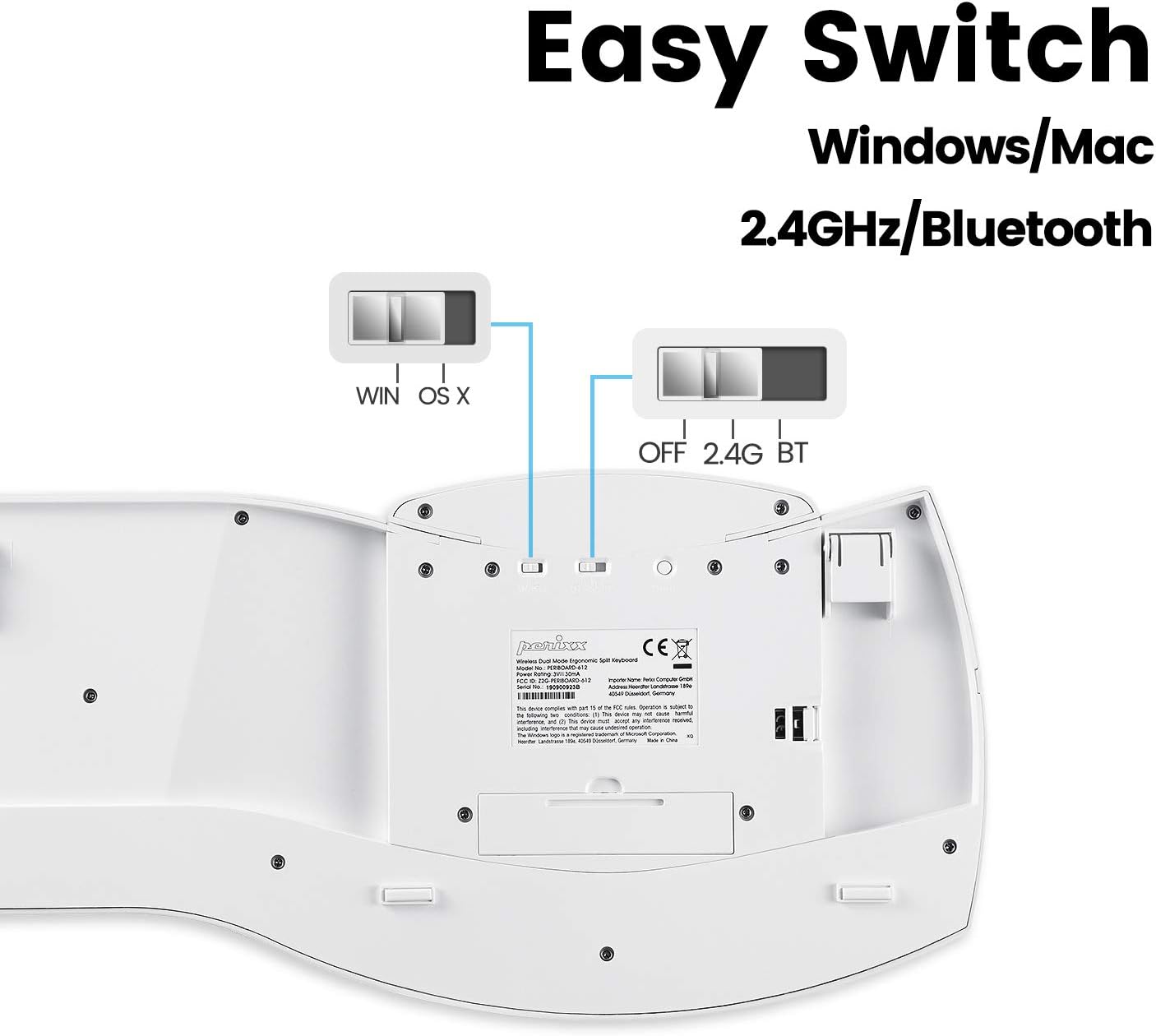
Image: Underside of the keyboard, showing the power switch, OS selection switch (WIN/OS X), and the 2.4G/BT connectivity switch.
2. Connessione wireless a 2.4 GHz
- Ensure the connectivity switch on the bottom of the keyboard is set to "2.4G".
- Remove the USB nano receiver from its storage compartment on the bottom of the keyboard.
- Collega il nano-ricevitore USB a una porta USB disponibile sul tuo computer.
- The keyboard should automatically connect. If not, ensure the keyboard is powered on and the receiver is securely plugged in.
3. Connessione Bluetooth 4.0
- Ensure the connectivity switch on the bottom of the keyboard is set to "BT".
- Sul tuo computer o dispositivo, apri le impostazioni Bluetooth.
- The keyboard should appear as "PERIBOARD-612" in the list of available devices. Select it to pair.
- Seguire le istruzioni visualizzate sullo schermo per completare il processo di associazione.

Image: Diagram illustrating the dual wireless connectivity modes (Bluetooth and 2.4GHz) and compatibility with Mac and Windows.
Tasti multimediali
The PERIBOARD-612 includes dedicated multimedia keys for enhanced control. These keys are located above the function row (F1-F12).
- Traccia precedente: Go to the previous audio/video track.
- Pausa/Riproduzione: Toggle play/pause for media.
- Traccia successiva: Go to the next audio/video track.
- Controllo missione (Mac) / Attività View (Finestre): Access system overview.
- Volume basso: Diminuire il volume audio.
- Aumenta volume: Aumentare il volume audio.
- Disattiva audio: Disattiva o riattiva l'audio.
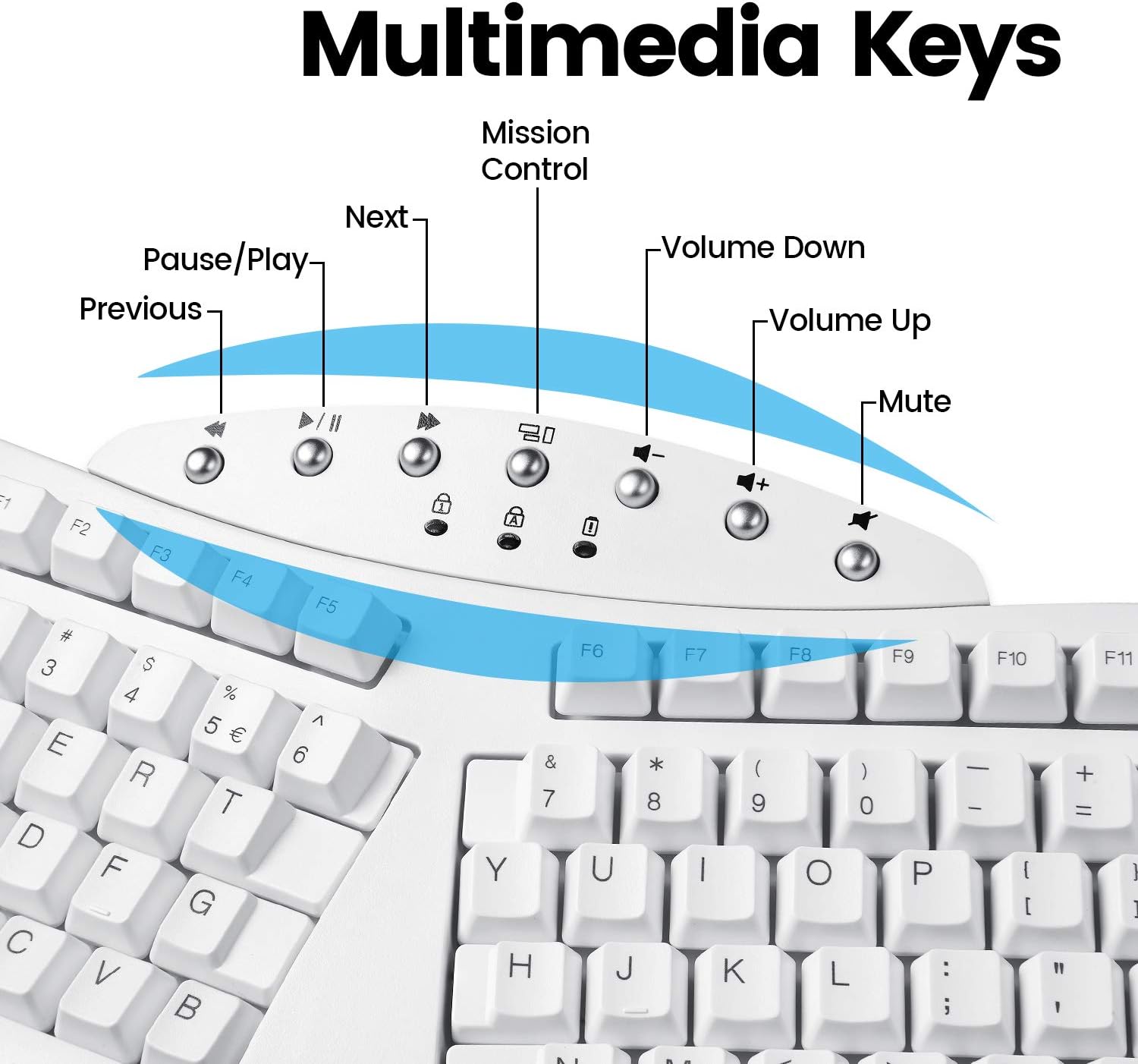
Immagine: dettagliata view of the multimedia keys located at the top center of the keyboard, with their respective functions labeled.
Istruzioni per l'uso
The PERIBOARD-612 functions as a standard full-size keyboard with the added benefit of its ergonomic split design. For optimal comfort and to prevent strain, ensure your wrists are relaxed and your fingers are curved over the keys. The integrated palm rest is designed to support your wrists in a neutral position.
- Sostituzione dei tasti: If you are a Mac user, you can replace the default Windows keycaps (Alt, Windows key) with the provided Mac keycaps (Option, Command) using the included keycap puller. Gently pull the keycap straight up to remove it, then align and press down the new keycap.
- Durata della batteria: The keyboard is battery-powered. Replace batteries when performance degrades or the low battery indicator (if present) illuminates.
Manutenzione
Regular maintenance helps prolong the life of your keyboard:
- Pulizia: Utilizzare un panno morbido e privo di lanugine leggermente dampened with water or a mild cleaning solution to wipe the surface of the keyboard. Avoid harsh chemicals or abrasive materials. For cleaning between keys, use compressed air to remove dust and debris.
- Magazzinaggio: When not in use for extended periods, store the keyboard in a dry, cool place. If using 2.4 GHz wireless, store the USB receiver in its designated compartment to prevent loss.
- Cura della batteria: If the keyboard will not be used for a long time, remove the batteries to prevent leakage.
Risoluzione dei problemi
If you encounter issues with your PERIBOARD-612, refer to the following common solutions:
- La tastiera non risponde:
- Assicurati che la tastiera sia accesa.
- Controllare i livelli della batteria e sostituirla se necessario.
- For 2.4 GHz: Ensure the USB receiver is securely plugged into a working USB port and the keyboard switch is set to "2.4G".
- For Bluetooth: Ensure Bluetooth is enabled on your device, the keyboard switch is set to "BT", and the keyboard is paired correctly. Try re-pairing if necessary.
- Verify the OS switch on the bottom of the keyboard matches your operating system.
- Keys Not Functioning Correctly (e.g., sticking, multiple inputs):
- Pulire intorno e sotto il tasto interessato utilizzando aria compressa.
- Gently remove the keycap with the keycap puller and inspect for any obstructions. Reinstall the keycap securely.
- Layout Issues (e.g., incorrect symbols when typing):
- Ensure your computer's operating system keyboard layout settings are configured for a US English keyboard.
- Connessione intermittente:
- Move the keyboard closer to the receiver (for 2.4 GHz) or Bluetooth device.
- Evitare di posizionare la tastiera vicino ad altri dispositivi wireless che potrebbero causare interferenze.
Specifiche
| Caratteristica | Dettaglio |
|---|---|
| Numero di modello | PERIBOARD-612 (Item model number: 11615) |
| Tecnologia di connettività | 2.4 GHz Radio Frequency, Bluetooth 4.0 |
| Descrizione della tastiera | Ergonomic, Split Keyset Design |
| Dispositivi compatibili | Computer portatile, PC |
| Sistema operativo | Mac OS X, Windows (8/10/11) |
| Peso dell'articolo | 2.2 libbre (circa 1 kg) |
| Dimensioni del prodotto (LxWxH) | 19.09 x 8.98 x 1.57 pollici (circa 48.5 x 22.8 x 4 cm) |
| Colore | Bianco |
| Fonte di alimentazione | Alimentato a batteria |
| Voltage | 4.25 Volt (CC) |
Garanzia e supporto
Perixx products typically come with a manufacturer's warranty. For specific warranty terms and conditions, please refer to the official Perixx website or the warranty card included with your product. In case of technical issues or support inquiries, please contact Perixx customer service.
A digital version of this user manual and other support documents may be available on the Perixx websito o tramite il seguente link: Perixx PERIBOARD-612 User Manual (PDF)
Informazioni sulla conformità
Questo dispositivo è conforme alla Parte 15 delle Norme FCC. Il funzionamento è soggetto alle due condizioni seguenti: (1) Questo dispositivo non può causare interferenze dannose e (2) questo dispositivo deve accettare qualsiasi interferenza ricevuta, comprese le interferenze che possono causare un funzionamento indesiderato.
For detailed compliance certificates, please refer to the official Perixx documentation or websito.