
1. Introduzione
This manual provides essential instructions for the safe and efficient operation of your Areyourshop 12/24V 50A MPPT Solar Charge Controller. Please read this manual thoroughly before installation and use to ensure proper functionality and longevity of the device. This controller is designed to manage power flow from solar panels to batteries and loads, optimizing charging efficiency.
2. Prodotto finitoview
The Areyourshop MPPT Solar Charge Controller is a robust device designed for solar power systems. It features an LCD display for monitoring, dual USB outputs for charging external devices, and comprehensive protection mechanisms.
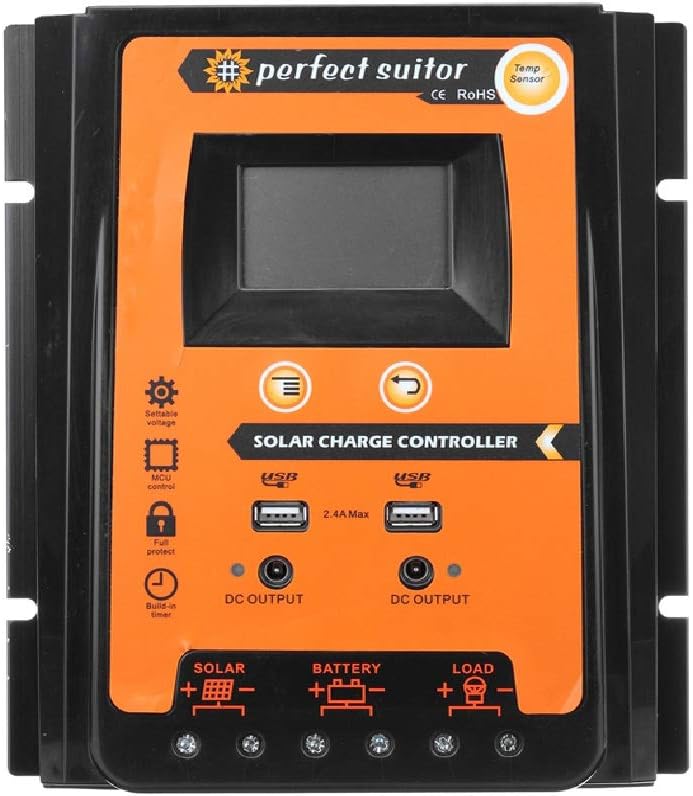
Immagine: Frontale view of the Areyourshop 50A MPPT Solar Charge Controller, showing the LCD screen, control buttons, USB ports, and connection terminals.
Caratteristiche principali:
- MPPT Charging: Utilizza la tecnologia Maximum Power Point Tracking per una conversione efficiente dell'energia solare.
- Volume automaticotage Adaptation: Automatically detects 12V or 24V system voltage.
- Schermo LCD: Provides real-time monitoring of system status and parameters.
- Doppia uscita USB: Two 2.4A USB ports for charging mobile devices.
- Protezione completa: Includes overcharge, over-discharge, overcurrent, and short-circuit protection.
- Parametri regolabili: Control parameters can be adjusted to suit various battery types.
- Compensazione della temperatura: Automatic temperature compensation for accurate charging and discharging voltage.

Image: Diagram highlighting features such as high conversion efficiency MPPT, intelligent LCD display, battery charge voltage/current/power, PV voltage/current power generation, perfect protection, and load power consumption work mode.
3. Specifiche
| Parametro | Valore |
|---|---|
| Modello | E401-A002 (PVSC50A) |
| Tipo di ricarica | MPPT |
| Volume di sistematage | 12V/24V (identificazione automatica) |
| Corrente di carica/scarica nominale | 50A |
| Massimo. PV voltage | 50V |
| Uscita USB | Dual USB, 2.4A each (5V total) |
| Sovraccarico voltage | 13.7V (for 12V system) / 27.4V (for 24V system) |
| Volume di scarico eccessivotage | 10.5-11V (for 12V system) / 21-22V (for 24V system) |
| Recovery Discharge Voltage | 12.6V (for 12V system) / 25.2V (for 24V system) |
| Compensazione della temperatura | -3mv/℃/cell |
| Empty Load Wastage | <45mA |
| Ciclo Voltage Rilascia | <200mv |
| Display | Schermo LCD |
| Dimensions (50A) | 21 x 19.2 x 4 cm (circa 8.27 x 7.56 x 1.57 pollici) |
| Peso dell'articolo | Circa 1.98 libbre |
| Materiale | Plastica |
| Caratteristiche speciali | Impermeabile |

Image: The 50A solar charge controller with its physical dimensions (21cm, 19.2cm, 4cm) indicated.
4. Configurazione e installazione
Una corretta installazione è fondamentale per il funzionamento sicuro ed efficiente del regolatore di carica solare. Seguire attentamente questi passaggi.
Note importanti sulla sicurezza:
- This controller is designed exclusively for LEAD-ACID batteries. Do not use with other battery types (e.g., Lithium-ion, NiMH) as this may cause damage to the controller or battery.
- Ensure all connections are secure and correct polarity is observed to prevent damage.
- Installare il controller in un'area ben ventilata, lontano dalla luce solare diretta e dall'umidità.
Metodo di connessione:
Collegare i componenti nel seguente ordine:
- Collegare la batteria: First, connect the battery to the controller's battery terminals (marked with a battery symbol). Ensure correct polarity (+ to + and - to -). The controller will automatically detect 12V or 24V system voltage.
- Collegare il pannello solare: Next, connect the solar panel to the controller's solar terminals (marked with a solar panel symbol). Ensure correct polarity.
- Collegare il carico: Finally, connect your DC load to the controller's load terminals (marked with a light bulb symbol). Ensure correct polarity.

Image: A clear diagram illustrating the correct connection sequence: Solar Panel to Controller, Battery to Controller, and Load to Controller.
5. Istruzioni per l'uso
The controller features an intuitive LCD display and control buttons for monitoring and adjusting settings.
Display LCD e pulsanti:

Immagine: dettagliata view of the controller's LCD display and control buttons. Labels indicate: 1. Solar panel, 2. Battery, 3. Load, 4. Warming, 5. Digital display, 6. Voltage, 7. Timer setting, 8. Unit symbol value. The 'Menu' button switches display or function, and 'Return' button is also shown.
- Display digitale (5): Mostra vari parametri come voltage, corrente e stato di carica.
- Pulsante Menu: Press to cycle through different display screens or functions. Long press to enter setting mode for adjustable parameters.
- Pulsante di ritorno: Used to exit setting mode or confirm selections.
Regolazione dei parametri:
The controller allows adjustment of certain parameters to optimize performance for your specific lead-acid battery. Refer to the LCD display and use the Menu/Return buttons to navigate and modify settings such as overcharge voltage, sovrascarica voltage, and load control mode. Consult your battery's specifications for recommended voltage impostazioni.
Uscita USB:
The dual 2.4A USB ports provide 5V output for charging small electronic devices. These outputs are active when the controller is powered.
6. Manutenzione
Una manutenzione regolare garantisce la longevità e le prestazioni ottimali del regolatore di carica solare.
- Pulizia: Mantenere il controller pulito e privo di polvere e detriti. Utilizzare un panno asciutto per la pulizia.
- Connessioni: Controllare periodicamente tutti i collegamenti elettrici per assicurarsi che siano ben saldi e privi di corrosione. Collegamenti allentati possono causare perdite di potenza o surriscaldamento.
- Ventilazione: Assicurarsi che l'area di installazione sia ben ventilata per evitare il surriscaldamento del controller.
- Stato della batteria: Monitor your battery's health and electrolyte levels (for flooded lead-acid batteries) as per the battery manufacturer's recommendations.
7. Risoluzione Dei Problemi
Questa sezione affronta i problemi più comuni che potresti riscontrare con il tuo regolatore di carica solare.
- Nessun display/Nessuna alimentazione: Controllare i collegamenti della batteria e assicurarsi che sia sufficientemente carica. Verificare i collegamenti del pannello solare.
- Controller Stops Output to Load: The controller is designed to protect the battery from over-discharge. If the battery voltage drops below the set over-discharge voltage (e.g., 10.5-11V for 12V systems), the load output will be disconnected. The output will automatically recover once the solar panel charges the battery back to the recovery discharge voltage (e.g., 12.6V for 12V systems).
- Batteria non in carica: Verify solar panel connections and ensure the panel is receiving adequate sunlight. Check for any shading or damage to the solar panel. Ensure the battery is properly connected and not severely discharged.
- Protezione da sovraccarico: The controller will stop charging the battery once it reaches the overcharge voltage (e.g., 13.7V for 12V systems) to prevent damage.
- Volume erratotage Letture: Ensure all connections are secure. Temperature compensation is automatic, but extreme temperatures can affect readings.
8. Note importanti e avvertenze
- Lead-Acid Batteries Only: This controller is specifically designed for use with LEAD-ACID batteries. Using it with other battery chemistries may result in damage to the battery or the controller, and poses a safety risk.
- Simple MPPT Controller: This product is a simple MPPT controller. While it offers efficient charging, it does not include advanced features such as communication interfaces found in higher-end multifunctional MPPT controllers.
- Scenari applicativi: This controller is suitable for various applications including farm solar power systems, solar street lights, solar patio lights, solar billboards, outdoor camping solar systems, and ship solar systems.

Immagine: Visual examples of suitable application scenarios for the solar charge controller, including residential solar, water pumping, street lighting, and recreational use.
9. Garanzia e supporto
For any technical assistance or warranty inquiries, please contact Areyourshop customer support. Keep your purchase receipt as proof of purchase.
Manufacturer: Areyourshop