
1. Introduzione
This manual provides essential instructions for the safe and efficient use of your Sunny-room USB Single Battery Charger. This charger is designed to power various Samsung camcorder lithium-ion battery packs. Please read this manual thoroughly before operating the device.
2. Contenuto della confezione
Verifica che tutti gli articoli elencati di seguito siano inclusi nel tuo pacchetto:
- 1x USB Single Battery Charger
- Cavo 1x Micro USB
3. Specifiche
Technical specifications for the USB Single Battery Charger:
| Caratteristica | Dettaglio |
|---|---|
| Micro input | CC 5V |
| Produzione | CC 8.4 V, 400-600 mA |
| Compatibilità | For 7.2V-8.0V Lithium-ion Camera Battery Packs |
| Dimensioni (L x P x A) | 85 x 48 x 20 mm (3.35 x 1.89 x 0.79 pollici) |
| Peso | 30 g (1.06 once) |
| Caratteristiche di sicurezza | Constant Current Control, Over-Voltage Protection, Over-Charging Protection, Short-Circuit Protection |
| Indicatore LED | Rosso (in carica), Verde (completamente carico) |

Image: Charger's Micro USB port and bottom label detailing input/output specifications.

Image: Charger dimensions in inches (1.78" x 0.71" x 3.54").

Image: Charger dimensions in centimeters (8.3cm x 4.5cm x 1.5cm).
4. Impostazione
The charger offers flexible power options. To set up the charger:
- Connect the provided Micro USB cable to the Micro USB port on the charger.
- Connect the other end of the USB cable to a compatible 5V USB power source. This can be a USB wall charger, a car charger, an external battery (power bank), or any other device with a USB port.

Image: Multiple charging options for the USB Single Charger, including USB wall charger, power bank, and car charger.
5. Istruzioni per l'uso
Follow these steps to charge your compatible battery:
- Ensure the charger is connected to a power source as described in the Setup section. The charger is ready when no battery is inserted.
- Carefully insert the battery into the charger slot, ensuring the correct polarity (positive and negative terminals) aligns with the charger's contacts.
- Once the battery is correctly inserted, the LED indicator on the charger will illuminate rosso, indicando che la ricarica è in corso.
- Quando la batteria è completamente carica, l'indicatore LED si accenderà verde. You can then remove the battery from the charger.
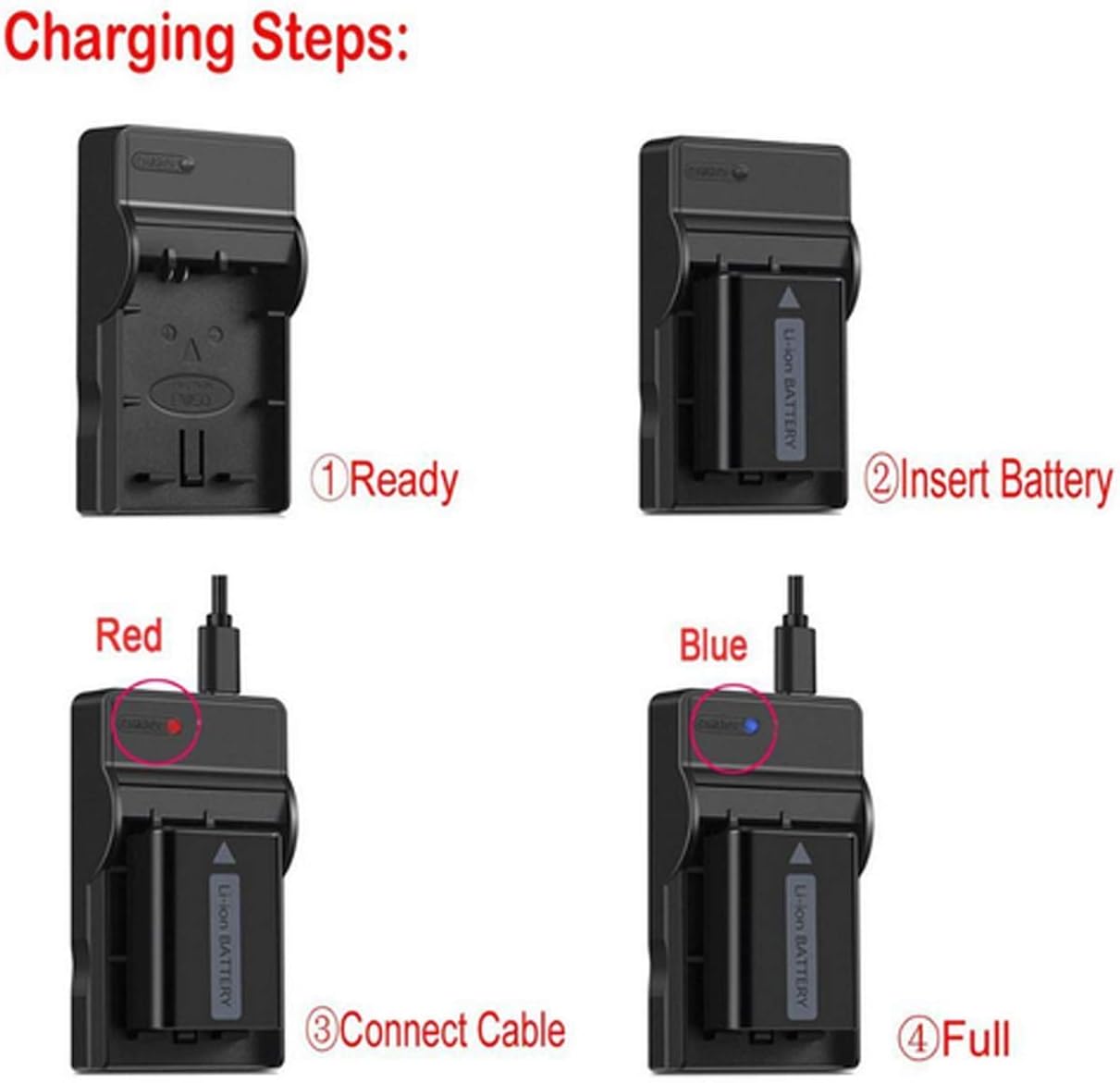
Image: Visual guide to the battery charging process, from insertion to full charge indication.
6. Manutenzione
Per garantire la longevità e il corretto funzionamento del caricabatterie:
- Mantenere il caricabatterie pulito e asciutto. Evitare l'esposizione a umidità o temperature estreme.
- Non tentare di smontare o modificare il caricabatterie.
- Conservare il caricabatterie in un luogo fresco e asciutto quando non in uso.
7. Risoluzione Dei Problemi
Se riscontri problemi con il caricabatterie, fai riferimento alle seguenti soluzioni comuni:
- Charger LED does not light up: Ensure the Micro USB cable is securely connected to both the charger and the power source. Verify that the power source is active and providing 5V DC.
- Battery not charging (LED remains off or green immediately): Check that the battery is correctly inserted with the correct polarity. Ensure the battery is compatible with this charger. The battery might already be fully charged.
- Ricarica lenta: Ensure your USB power source provides sufficient current (e.g., a standard 1A or 2A USB adapter is recommended).
Se i problemi persistono, contattare l'assistenza clienti per ricevere assistenza.
8. Compatibilità
This charger is compatible with the following Samsung Lithium-ion battery models, typically used with camcorders such as the Samsung VP-W70, VP-W70U, VP-W71, VP-W75, and VP-W75D series:
- Samsung SB-L110A
- Samsung SB-L160
- Samsung SB-L320
- Samsung SB-L70
- Samsung SB-L70A
- Samsung SB-L70R
- Samsung SB-L110
- Samsung SB-L220
- Samsung SB-LS70
- Samsung SB-LS110
- Samsung SB-LS220
- AD43-00070A
Importante: Please confirm the specific model of your camera or battery before purchase to ensure compatibility. Incorrect purchases may result in unusable equipment.
9. Safety Information and Important Tips
- The charger is designed for charging batteries only. It cannot directly charge a camera or camcorder.
- Always ensure correct battery polarity when inserting the battery into the charger.
- Do not expose the charger to water, fire, or high temperatures.
- Tenere fuori dalla portata dei bambini.
- Scollegare il caricabatterie dalla fonte di alimentazione quando non è in uso.
- If you are unsure about battery or charger compatibility, please contact the manufacturer for more information.