
Introduzione
This manual provides instructions for the Extreme Networks Summit X460-24p, a high-performance, managed Layer 3 Ethernet switch designed for enterprise and data center environments. It features 24 Gigabit Ethernet ports with Power over Ethernet (PoE) capabilities, along with additional SFP and shared Gigabit SFP ports for flexible connectivity.
Informazioni sulla sicurezza
Linee guida di sicurezza
- Always disconnect all power supply inputs before removing any panel for servicing.
- This device contains a Class 1 Laser product. Avoid direct eye exposure to beam.
- Assicurarsi che la messa a terra sia adeguata durante l'installazione.
- Refer to the installation manual for power cord selection and additional compliance markings.
Contenuto della confezione
Cosa c'è nella scatola
- Extreme Networks Summit X460-24p Switch
- Cavo di alimentazione (specifico per regione)
- Kit di montaggio su rack
- Documentazione (questo manuale)
Prodotto finitoview
The Summit X460-24p switch is designed for efficient network management and high-speed data transfer.
Pannello posteriore

This image displays the rear panel of the Summit X460-24p switch, highlighting the power input, fan modules, and the SummitStack ports. The overall chassis is purple.

Un dettagliato view of the SummitStack ports (Stack Port 1 and Stack Port 2) located on the rear of the switch, used for stacking multiple switches.
Etichetta del prodotto
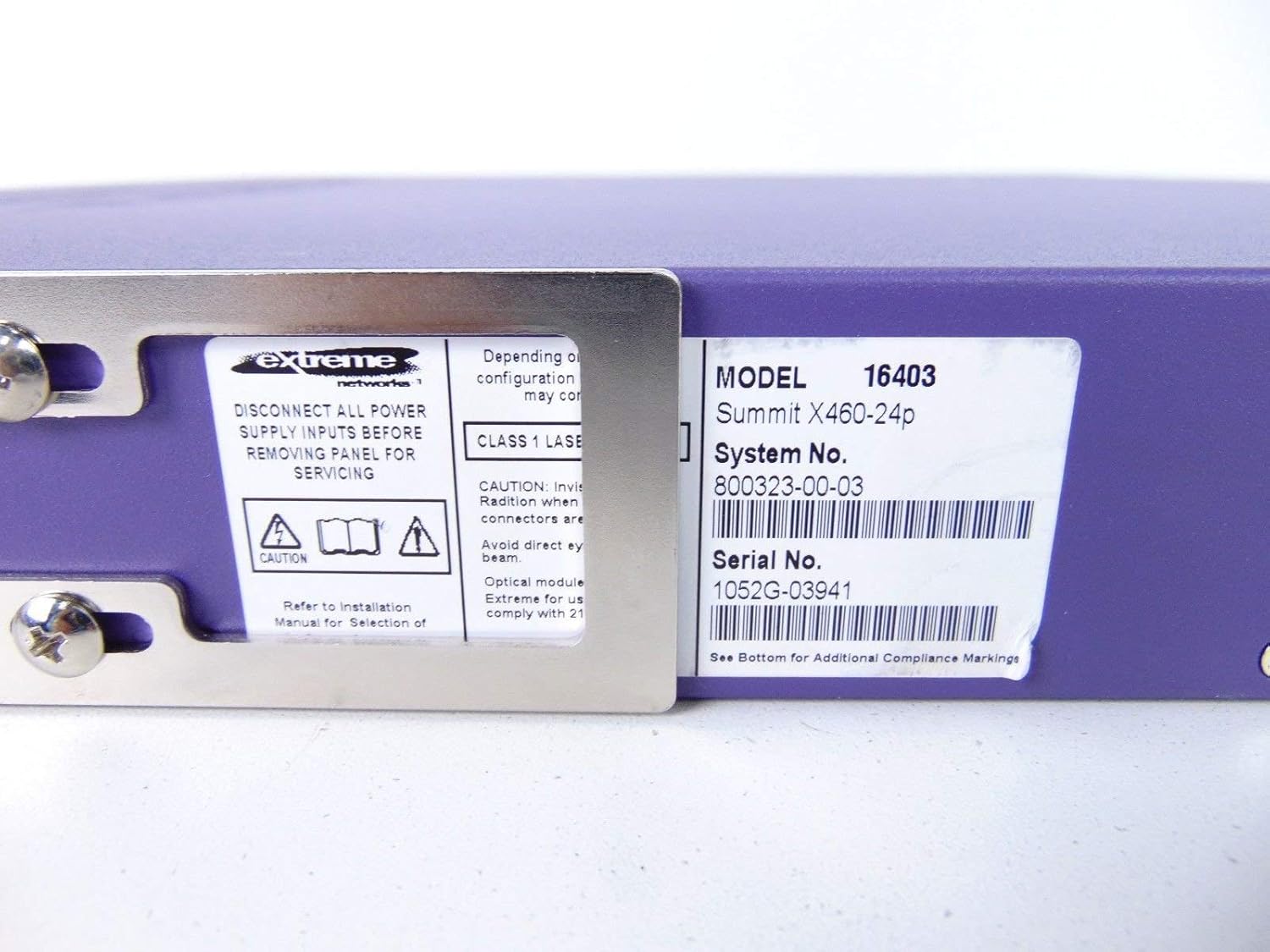
This label provides critical identification information for the switch, including Model: 16403, Summit X460-24p, System No.: 800323-00-03, and Serial No.: 1052G-03941.
Componenti opzionali

This image shows the label for an optional Extreme Networks Summit 750W PoE AC Power Supply Unit (PSU), Model 10931, System No. 800382-00-03, Serial No. 1053A-41986.

This image displays the label for an optional Extreme Networks SummitStack Module, Model 16419, System No. 800384-00-01, Serial No. 1122G-02565.
Impostare
Guida all'installazione
Montaggio su rack
The Summit X460-24p is designed for standard 19-inch rack mounting. Use the provided rack-mounting kit to secure the switch in a server rack. Ensure adequate ventilation around the unit.
Collegamento dell'alimentazione
Connect the power cord to the AC power inlet on the rear of the switch and then to a grounded electrical outlet. The switch will power on automatically.
Collegamento dei cavi di rete
- Connect Ethernet cables from your network devices to the 24 10/100/1000Base-T PoE ports on the front panel.
- For uplink or fiber connections, use the SFP or shared Gigabit SFP ports.
- For stacking, connect SummitStack ports on multiple switches using appropriate stacking cables.
Initial Configuration Access
Access the switch's management interface via a console cable connected to the console port, or through a web browser if the switch has a default IP address configured. Refer to the Extreme Networks documentation for detailed initial setup procedures.
Istruzioni per l'uso
Funzionamento di base
Accensione/spegnimento
The switch powers on automatically when connected to a power source. To power off, disconnect the power cord. For proper shutdown, it is recommended to use the software-based shutdown command if available.
Indicatori LED
Observe the LED indicators on the front panel for status information regarding power, system health, port activity, and PoE status. Consult the full product documentation for a detailed explanation of each LED's behavior.
Interfaccia di gestione
The switch can be managed via a Command Line Interface (CLI) accessible through the console port or Telnet/SSH, or through a web-interfaccia utente grafica (GUI) basata su.
Manutenzione
Cura e manutenzione
Pulizia
Keep the switch clean and free of dust. Use a soft, dry cloth for external cleaning. Do not use liquid or aerosol cleaners.
Aggiornamenti del firmware
Controllare periodicamente il supporto di Extreme Networks webSito per gli aggiornamenti del firmware per garantire prestazioni e sicurezza ottimali. Seguire le istruzioni fornite per le procedure di aggiornamento del firmware.
Moduli di alimentazione e ventola
The switch may feature hot-swappable fan and power supply modules. Refer to the Extreme Networks documentation for instructions on replacement if necessary.
Risoluzione dei problemi
Problemi comuni
Nessun potere
- Assicurarsi che il cavo di alimentazione sia collegato saldamente sia all'interruttore che alla presa di corrente.
- Verificare che la presa di corrente funzioni.
Port Link Down
- Controllare la connessione del cavo Ethernet a entrambe le estremità.
- Verificare che il dispositivo collegato sia acceso e funzioni correttamente.
- Check the port status via the management interface.
Problemi di connettività di rete
- Verify IP configuration and network settings.
- Controllare eventuali conflitti tra indirizzi IP.
- Consult network diagnostics tools.
Specifiche
Specifiche tecniche
| Caratteristica | Descrizione |
|---|---|
| Modello | Summit X460-24p (Part Number: 16403) |
| Porti | 24 x 10/100/1000Base-T PoE+ ports, 4 x shared Gigabit SFP, 4 x SFP |
| Strato | Switch gestito di livello 3 |
| Marca | Reti estreme |
| Tipo di interfaccia | PoE, SFP |
| Numero di sistema | Numero di telefono: 800323-00-03 |
| Numero di serie | 1052G-03941 |
| Codice UPC | 683332278646 |
Garanzia e supporto
Informazioni sulla garanzia
This product typically comes with a 90-day limited warranty. For specific warranty terms and conditions, please refer to the official Extreme Networks warranty statement or contact your vendor.
Supporto tecnico
For technical assistance, visit the official Extreme Networks support webo contattare il servizio clienti. Tieni a portata di mano il modello e il numero di serie del tuo prodotto quando richiedi assistenza.