
1. Introduzione
This manual provides comprehensive instructions for the Gvirtue Universal Replacement Remote Control, model PN-15+EL. Designed as a direct replacement for various Panasonic TV remote controls, this device offers broad compatibility and essential functions for your television viewesperienza. Leggere attentamente questo manuale per garantire una corretta configurazione e un corretto funzionamento.
2. Prodotto finitoview
The Gvirtue PN-15+EL remote control is engineered to provide a seamless replacement experience for your Panasonic TV. It features a user-friendly design with essential buttons and a learning function for advanced customization.
2.1 Caratteristiche principali
- Compatibilità universale: Works with a wide range of Panasonic LCD, LED, 3D, Smart, and 4K Ultra HD TV models.
- Funzione di apprendimento: Ability to learn functions directly from your original remote control.
- Pulsanti retroilluminati: Designed for convenient use in low-light conditions.
- Design ergonomico: Lightweight and comfortable to grip, reducing the chance of slipping.
- Nessuna programmazione richiesta: Often works directly out of the box for basic functions.
- Risposta rapida: Stable performance with a fast response time of 0.2 seconds.
2.2 Compatibilità
This remote is compatible with numerous Panasonic TV models and replaces many original Panasonic remote control models. A partial list of compatible TV models includes:
- TC-40AS520, TC-39AS530, TC-55AS530
- TC-42AS630, TC-50AS630, TC-60AS630
- TC-40AS520U, TC-39AS530U, TC-50AS530U, TC-55AS530U, TC-60AS530U
- TC-50AS530UE
- TC-42AS630U, TC-50AS630U, TC-60AS640U
- TC-50ASU534, TC-55LET64
- TC-32LX24, TC-42LD24, TC-42LS24
- TC-50PS24, TC-58PS24, TC-65PS24
- TC-L42ET60, TC-L47ET60, TC-L50ET60, TC-L55ET60
- TC-L32C22, TC-L22X2
- TC-L42U22, TC-L32U22, TC-L37U22, TC-L42U25
- TC-P42C2, TC-P50C2, TC-P46C2
- TC-P42U2, TC-P50U2
- TC-P42X2, TC-P50X2
- TC-P50GT50, TC-P55GT50, TC-P60GT50, TC-P65GT50
- TC-P55ST50, TC-P60ST
This remote also replaces original Panasonic remote models such as N2QAYB000100, N2QAYB000102, N2QAYB000221, N2QAYB000485, N2QAYB000779, and many others.
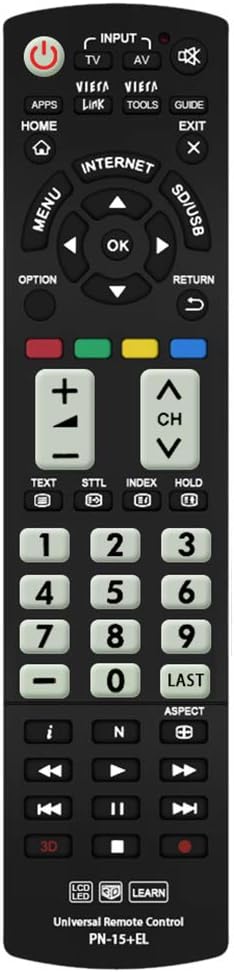
Immagine: Frontale view of the Gvirtue PN-15+EL Universal Replacement Remote Control.
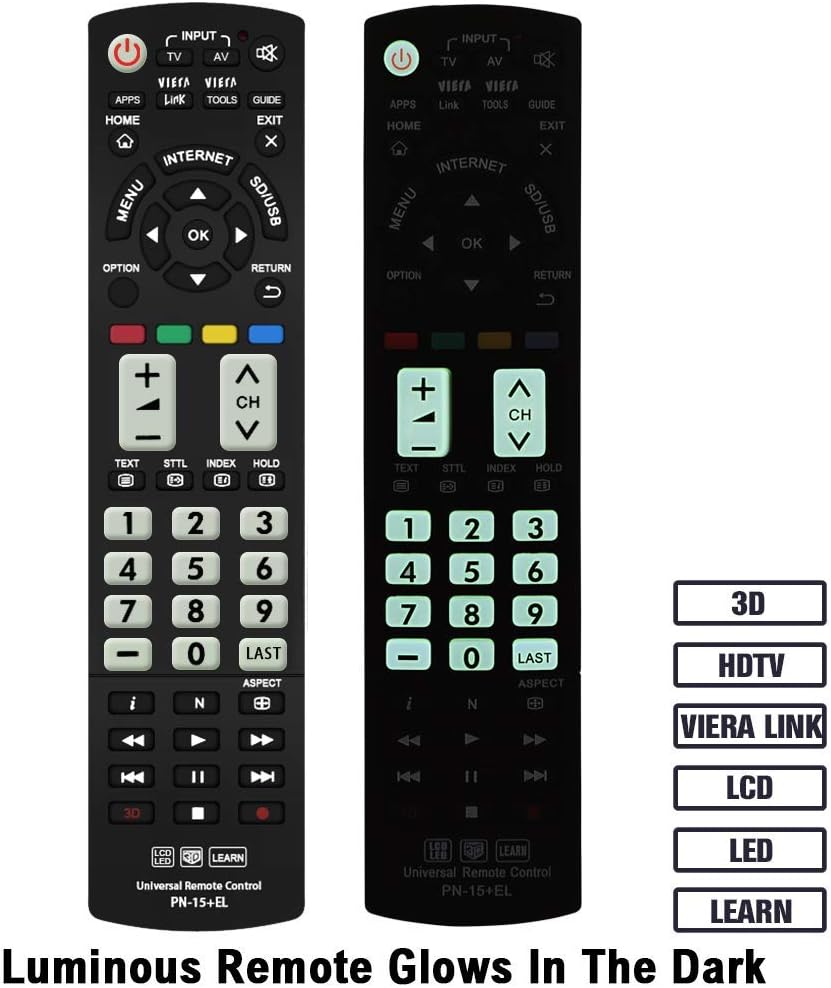
Image: The Gvirtue PN-15+EL remote control highlighting its luminous buttons for use in the dark.

Image: The Gvirtue PN-15+EL remote control shown alongside a list of compatible Panasonic TV models.
3. Impostazione
3.1 Installazione della batteria
Il telecomando richiede due (2) batterie AAA (non incluse) per funzionare. Seguire questi passaggi per installare le batterie:
- Individuare il coperchio del vano batterie sul retro del telecomando.
- Far scorrere il coperchio verso il basso o premere il fermo (se presente) per aprire il vano.
- Insert two fresh AAA batteries, ensuring the positive (+) and negative (-) terminals align correctly with the markings inside the compartment.
- Chiudere il coperchio del vano batteria facendolo scorrere nuovamente in posizione finché non scatta in posizione.
Note: This remote control does not include batteries. Please purchase them separately.

Image: Illustration showing how to open the battery compartment and insert two AAA batteries into the Gvirtue PN-15+EL remote control.
3.2 Uso iniziale
For most compatible Panasonic TV models, the Gvirtue PN-15+EL remote control is designed to work immediately after battery installation without any additional programming or pairing. Simply point the remote at your TV and test its functions.
If the remote does not function correctly out of the box, or if you wish to customize specific buttons, refer to the "Learning Function" section below.
4. Istruzioni per l'uso
This section details the functions of the buttons on your Gvirtue PN-15+EL remote control.

Image: Diagram illustrating the various function buttons on the Gvirtue PN-15+EL remote control.
4.1 Funzioni dei pulsanti
- Pulsante di accensione (●): Accende e spegne il televisore.
- INGRESSO / TV / AV: Selects the TV input source directly.
- Collegamento VIERA: Activates Panasonic's Viera Link feature for integrated control of connected devices.
- UTENSILI: Displays frequently used functions or quick settings.
- GUIDA: Displays the Electronic Program Guide (EPG).
- CASA: Enters the TV's home menu or smart TV interface.
- USCITA: Esce dal menu o dall'applicazione corrente.
- MENU: Visualizza il menu principale su schermo.
- OPZIONE: Displays available options for the current selection.
- RITORNO: Ritorna al menu o alla schermata precedente.
- Tasti direzionali (su, giù, sinistra, destra) e OK: Consente di navigare nei menu e di confermare le selezioni.
- Pulsanti colorati (rosso, verde, giallo, blu): Shortcut keys for interactive functions, often context-dependent.
- VOL +/-: Regola il livello del volume.
- CH +/-: Cambia canale.
- Disattiva audio: Disattiva o riattiva l'audio della TV.
- Tastierino numerico (0-9): Selezione diretta del canale.
- ULTIMO: Ritorna a quello precedente viewed canale.
- 3D: Toggles the 3D function on or off (for compatible 3D TVs).
- Controlli di riproduzione multimediale (Riproduci, Pausa, Interrompi, Riavvolgi, Avanzamento rapido, Salta): Controlla la riproduzione multimediale su dispositivi compatibili o le funzioni TV.
4.2 Funzione di apprendimento
The Gvirtue PN-15+EL remote control features a learning function, allowing you to program specific buttons to mimic functions from your original remote control. This is useful if certain advanced functions are not pre-programmed or if you want to consolidate controls.
Detailed instructions for activating and using the learning function are typically provided on a separate instruction sheet included with the product. Generally, the process involves:
- Entering a learning mode on the Gvirtue remote.
- Pointing your original remote at the Gvirtue remote.
- Pressing the desired button on the original remote, then the corresponding button on the Gvirtue remote to be programmed.
- Exiting the learning mode.
Refer to the specific learning function instructions provided with your remote for precise steps.
5. Manutenzione
Per garantire la longevità e le prestazioni ottimali del tuo telecomando, segui queste linee guida per la manutenzione:
- Pulizia: Wipe the remote control with a soft, dry cloth. Do not use abrasive cleaners, solvents, or alcohol, as these can damage the surface and buttons.
- Sostituzione della batteria: Sostituisci le batterie quando la risposta del telecomando diventa lenta o smette di funzionare. Sostituisci sempre entrambe le batterie contemporaneamente con batterie nuove dello stesso tipo (AAA).
- Magazzinaggio: If the remote control will not be used for an extended period, remove the batteries to prevent leakage, which can damage the device. Store in a cool, dry place.
- Evitare danni: Do not drop the remote control, expose it to extreme temperatures, or immerse it in water. Keep it away from direct sunlight and heat sources.
6. Risoluzione Dei Problemi
If you encounter issues with your Gvirtue PN-15+EL remote control, refer to the following troubleshooting tips:
- Il telecomando non risponde:
- Controllare che le batterie siano inserite correttamente con la polarità corretta (+/-).
- Sostituisci le vecchie batterie con batterie AAA nuove.
- Assicurarsi che non vi siano ostacoli tra il telecomando e il sensore a infrarossi del televisore.
- Make sure you are within the effective operating range (approximately 10 meters / 30 feet) and pointing the remote directly at the TV.
- Pulsanti specifici non funzionanti:
- If you used the learning function, try re-programming the problematic button.
- Some advanced functions might require specific TV settings or may not be supported by all Panasonic TV models.
- Lavoro da remoto intermittente:
- Spesso indica che la batteria è scarica. Sostituire le batterie.
- Assicurarsi che i contatti della batteria siano puliti e privi di corrosione.
If the issue persists after trying these steps, please contact Gvirtue customer support for further assistance.
7. Specifiche
| Modello | PN-15+EL |
| Marca | virtù |
| Materiale | ABS & Plastic |
| Tecnologia di connettività | Infrarossi (IR) |
| Dispositivi compatibili | Panasonic Televisions (LCD, LED, 3D, Smart, 4K UHD) |
| Fonte di alimentazione | 2 x batterie AAA (non incluse) |
| Dimensioni del prodotto | Circa 6 x 2 x 0.7 pollici (15.2 x 5.1 x 1.8 cm) |
| Peso dell'articolo | Circa 3.2 once (90.7 grammi) |
| Caratteristiche speciali | Backlit buttons, Ergonomic design, Learning function |

Image: Visual representation of the Gvirtue PN-15+EL remote control's key specifications.

Immagine: anteriore, laterale e posteriore views of the Gvirtue PN-15+EL remote control with dimensions indicated.
8. Garanzia e supporto
Gvirtue products are designed for reliability and performance. While specific warranty details may vary, please retain your proof of purchase for any warranty claims.
For technical support, troubleshooting assistance, or inquiries regarding your Gvirtue PN-15+EL remote control, please contact Gvirtue customer service through their official channels or the retailer from whom you purchased the product.
You may find additional support resources by visiting the Gvirtue Store on Amazon.