
1. Prodotto finitoview
The Schneider SC600SND is a versatile 2.0 channel soundbar designed to enhance your audio experience. It offers a total output power of 30W (15W x 2) and supports multiple connectivity options including Bluetooth, HDMI (ARC), Optical, and Aux. A unique feature of this soundbar is its convertible design, allowing it to be used as a single horizontal unit or split into two vertical speaker columns.

Image 1.1: The Schneider SC600SND Soundbar in its standard monoblock configuration.
2. Impostazione
2.1 Disimballaggio e posizionamento
Carefully remove all components from the packaging. Ensure you have the soundbar unit, remote control, and 3.5mm Jack cable.
The SC600SND soundbar offers two primary placement options:
- Monoblock Configuration: Use the soundbar as a single horizontal unit, ideal for placing below your television.
- Split Column Configuration: The soundbar can be separated into two vertical speaker columns. This allows for flexible placement on either side of your television or entertainment unit. To split, gently twist and pull the two halves apart at the central connection point. Attach the provided bases to each column for stability.

Image 2.1: Detail of the central connection point, allowing the soundbar to be split into two columns.
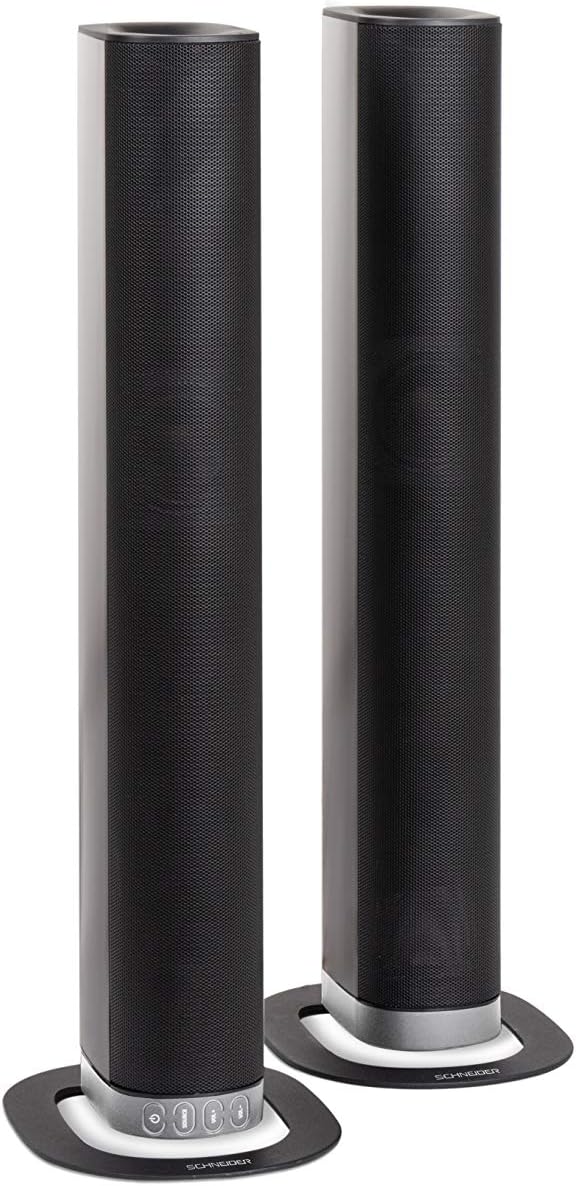
Image 2.2: The soundbar configured as two independent vertical speaker columns.
2.2 Collegamento all'alimentazione
Connect the power cable to the soundbar's power input and then to a suitable wall outlet. The soundbar will enter standby mode.
2.3 Collegamenti audio
Scegli uno dei seguenti metodi per collegare la tua sorgente audio:
- HDMI (ARCO): For optimal audio quality and control, connect an HDMI cable from the soundbar's HDMI ARC port to your TV's HDMI ARC port. This allows your TV remote to control the soundbar's volume.
- Ottico: Connect an optical cable from the soundbar's OPTICAL input to your TV's optical output.
- AUSILIARI: Use the included 3.5mm Jack cable to connect the soundbar's AUX input to the headphone jack or audio output of your device (e.g., TV, smartphone, MP3 player).
- Bluetooth: For wireless connection, refer to the Bluetooth pairing instructions in the Operating section.
3. Istruzioni per l'uso
3.1 Accensione/spegnimento
Premere il tasto Energia pulsante sulla soundbar o sul telecomando per accendere o spegnere l'unità.
3.2 Selezione della sorgente
Premere il tasto FONTE button on the soundbar or the remote control to cycle through the available input sources: Bluetooth (BT), HDMI (ARC), Optical, and AUX.

Image 3.1: On-unit control buttons for power, source selection, and volume adjustment.
3.3 Controllo del volume
Utilizzare il Volume+ E vol- buttons on the soundbar or remote control to adjust the volume. Press the MUTE pulsante sul telecomando per disattivare temporaneamente l'audio.
3.4 Associazione Bluetooth
- Select Bluetooth as the source input. The soundbar will enter pairing mode, indicated by a flashing LED.
- Sul tuo dispositivo mobile (smartphone, tablet, ecc.), attiva il Bluetooth e cerca i dispositivi disponibili.
- Select "SC600SND" from the list of devices.
- Once paired, the LED indicator on the soundbar will stop flashing and remain solid. You can now play audio wirelessly from your device.
3.5 modalità audio
The remote control includes dedicated buttons for different sound modes to optimize your listening experience:
- NOTIZIA: Migliora la chiarezza vocale nei notiziari e nei dialoghi.
- FILM: Fornisce suoni più coinvolgentitage per i film.
- MUSICA: Ottimizza l'audio per la riproduzione musicale.

Image 3.2: The included remote control with dedicated buttons for power, source, volume, mute, and sound modes.
4. Manutenzione
Per garantire la longevità e le prestazioni ottimali della tua soundbar, segui queste linee guida per la manutenzione:
- Pulizia: Use a soft, dry cloth to clean the exterior surfaces of the soundbar. Do not use liquid cleaners, aerosols, or abrasive materials, as these can damage the finish or internal components.
- Ventilazione: Assicurarsi che le aperture di ventilazione della soundbar non siano ostruite. Un flusso d'aria adeguato previene il surriscaldamento.
- Magazzinaggio: Se si conserva la soundbar per un periodo prolungato, scollegarla dall'alimentazione e conservarla in un luogo fresco e asciutto, lontano dalla luce solare diretta e da temperature estreme.
- Gestione: Evitare di far cadere o di sottoporre la soundbar a forti urti.
5. Risoluzione Dei Problemi
If you encounter issues with your SC600SND soundbar, refer to the following common problems and solutions:
- Nessun potere:
- Assicurarsi che il cavo di alimentazione sia collegato saldamente sia alla soundbar sia a una presa di corrente funzionante.
- Verificare che la presa di corrente funzioni collegandovi un altro dispositivo.
- Nessun suono:
- Verify that the correct input source (HDMI, Optical, AUX, Bluetooth) is selected on the soundbar.
- Increase the volume on both the soundbar and your connected audio source (e.g., TV, smartphone).
- Assicurarsi che la soundbar non sia disattivata.
- Check all audio cables for secure connections and damage. Try a different cable if possible.
- If using HDMI ARC, ensure your TV's HDMI ARC function is enabled in its settings.
- Scarsa qualità del suono / Audio distorto:
- Regolare i livelli del volume per evitare distorsioni.
- Try switching between the different sound modes (NEWS, MOVIE, MUSIC) to see if one improves the audio for your content.
- Ensure the soundbar is placed on a stable surface and not vibrating excessively.
- If using Bluetooth, ensure your device is within range and there are no obstructions causing interference.
- Problemi di accoppiamento Bluetooth:
- Assicurarsi che la soundbar sia in modalità di associazione Bluetooth (LED lampeggiante).
- Make sure your device's Bluetooth is enabled and it is searching for new devices.
- Avvicina il dispositivo alla soundbar.
- Se il dispositivo è già stato associato in precedenza, provare a dissociarlo e ad associarlo nuovamente.
- Il telecomando non funziona:
- Controllare e sostituire le batterie del telecomando.
- Assicurarsi che non vi siano ostacoli tra il telecomando e il sensore della soundbar.
- Puntare il telecomando direttamente verso la soundbar.
6. Specifiche
| Caratteristica | Specificazione |
|---|---|
| Numero di modello | SC600SND |
| Canali | 2.0 |
| Potenza di uscita | 30 W (15 W x 2) |
| Tecnologia di connettività | Bluetooth, HDMI (ARC), Optical, Aux |
| Comunicazione senza fili | Bluetooth |
| Metodo di controllo | Telecomando |
| Tipo di altoparlante | Barra audio |
| Dimensioni dell'altoparlante | 2 pollici |
| Fonte di alimentazione | Cavo elettrico |
| Product Dimensions (Monoblock) | Dimensioni: 80.5 x 6.2 x 9 cm |
| Peso del prodotto | 2.5 chilogrammi |
| Componenti inclusi | Remote Control, 3.5mm Jack Cable |
| Colore | Nero |
7. Garanzia e supporto
7.1 Garanzia limitata
This Schneider SC600SND Soundbar is covered by a Limited Warranty. Please refer to the warranty card included with your product or contact your retailer for specific terms and conditions regarding warranty coverage and duration.
7.2 Assistenza clienti
For technical assistance, troubleshooting beyond this manual, or warranty claims, please contact the retailer where you purchased the product or visit the official Schneider websito per informazioni di supporto.