
Introduzione
This manual provides comprehensive instructions for the Zerone RM-YD038 Universal Remote Control. This remote is designed as a replacement for various models, including RM-YD033, RM-ED040, RM-YD034, and RM-YD035, and is compatible with specific TV models such as KDL32EX500, KDL55HX729, and KDL40EX723. Please read this manual carefully to ensure proper setup and operation of your new remote control.
1. Impostazione
1.1 Installazione della batteria
The Zerone RM-YD038 remote control requires two (2) AAA batteries (sold separately) for operation. Follow these steps to install the batteries:
- Individuare il vano batterie sul retro del telecomando.
- Premere la linguetta e far scorrere il coperchio della batteria verso il basso per aprirlo.
- Inserire due batterie AAA, assicurandosi che i terminali positivo (+) e negativo (-) siano allineati correttamente con le marcature all'interno del vano.
- Far scorrere il coperchio della batteria in posizione finché non scatta in modo sicuro.

Figure 1: Battery compartment with cover removed, ready for AAA battery insertion.
1.2 Uso iniziale
No programming or setup is required for this universal remote control. Once the batteries are correctly installed, the remote is ready for immediate use with compatible devices.
2. Istruzioni per l'uso
The Zerone RM-YD038 remote control features a standard layout for easy navigation and control of your television. Below is an overview delle funzioni chiave:
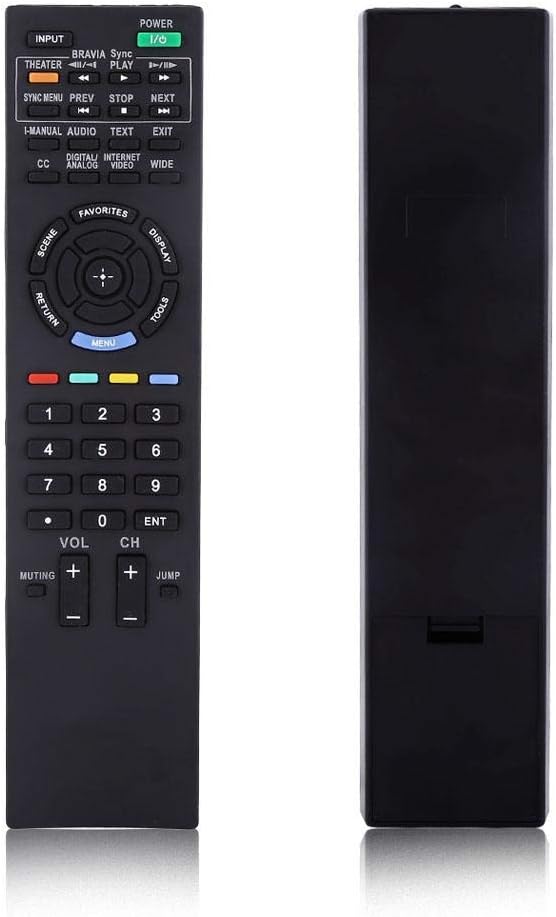
Figura 2: Fronte view of the Zerone RM-YD038 Remote Control.
- Pulsante di accensione (Green, top right): Turns the television on or off.
- Pulsante di input (Top left): Cycles through available input sources (HDMI, AV, etc.).
- Tasto di navigazione (Circular pad in the middle): Used for menu navigation. The central button typically acts as "Enter" or "OK". This dedicated menu navigation key allows direct access to digital TV functions.
- Volume su/giù (VOL +/-): Adjusts the audio volume.
- Canale su/giù (CH +/-): Changes television channels.
- Pulsante di disattivazione dell'audio (Muting): Mutes or unmutes the television audio.
- Tastierino numerico (0-9): Inserisce direttamente i numeri dei canali.
- Pulsante del menu (Blue, below navigation pad): Accesses the television's main menu.
- Pulsante di ritorno (Left of navigation pad): Returns to the previous screen or menu.
- Controlli di riproduzione (Play, Stop, Pause, Rewind, Fast Forward): Controls media playback if your TV supports it.

Figure 3: The remote control held in hand, showing button layout.

Figura 4: dettagliata view of the remote's buttons.
3. Manutenzione
3.1 Pulizia
To maintain the remote control's functionality and appearance, clean it regularly:
- Utilizzare un panno morbido e asciutto per pulire la superficie del telecomando.
- Per sporco ostinato, leggermente dampPulire il panno con acqua o con un detergente delicato e non abrasivo. Evitare l'eccessiva umidità.
- Non utilizzare prodotti chimici aggressivi, solventi o spugne abrasive, poiché potrebbero danneggiare la finitura del telecomando o i componenti interni.
3.2 Sostituzione della batteria
Replace batteries when the remote's response becomes sluggish or it stops functioning. Refer to Section 1.1 for battery installation instructions. Always replace both batteries at the same time with new AAA batteries.
3.3 Conservazione
Quando non si utilizza il telecomando per lunghi periodi, si consiglia di rimuovere le batterie per evitare perdite e potenziali danni.
4. Risoluzione Dei Problemi
If you experience issues with your Zerone RM-YD038 remote control, please refer to the following common troubleshooting steps:
- Il telecomando non risponde:
- Assicurarsi che le batterie siano installate correttamente con la polarità corretta (+/-).
- Replace old batteries with new ones. Weak batteries are a common cause of unresponsiveness.
- Verificare che non vi siano ostacoli tra il telecomando e il ricevitore a infrarossi del televisore.
- Assicuratevi di trovarvi nel raggio d'azione effettivo e di puntare il telecomando direttamente verso la TV.
- Buttons Require Excessive Pressure:
- This can sometimes occur with new remotes or after extended use. Ensure you are pressing the buttons firmly and directly.
- If the issue persists, ensure the remote is clean and free of debris around the buttons.
- Limited Range or Poor Signal:
- Replace batteries, as low battery power can reduce signal strength.
- Ensure there are no strong light sources (like direct sunlight or certain types of lighting) interfering with the IR signal.
- Remote Makes Unusual Sounds:
- If the remote produces unusual sounds, particularly after a fall, it may indicate internal damage. Consider replacing the unit.
Se questi passaggi non risolvono il problema, contattare l'assistenza clienti per ulteriore assistenza.
5. Specifiche
| Caratteristica | Dettaglio |
|---|---|
| Marca | Zerone |
| Numero di modello | RM-YD038 (Internal Model: Zer oneuhiskbndp2) |
| Modelli di telecomandi compatibili | RM-YD033, RM-ED040, RM-YD034, RM-YD035 |
| Modelli TV compatibili | KDL32EX500, KDL55HX729, KDL40EX723 |
| Fonte di alimentazione | 2 x batterie AAA (non incluse) |
| Peso dell'articolo | 2.39 once (circa 67.7 grammi) |
| Caratteristica speciale | Sostituzione universale |
| Numero massimo di dispositivi supportati | 1 (Televisione) |
| ASIN | B07WCN3S2V |
| Data prima disponibilità | 12 agosto 2019 |

Figure 5: Dimensions of the Zerone RM-YD038 Remote Control.
6. Garanzia e supporto
6.1 Informazioni sulla garanzia
Specific warranty details for the Zerone RM-YD038 remote control are not provided in this manual. Please refer to the product packaging or the retailer's websito per eventuali termini e condizioni di garanzia applicabili.
6.2 Assistenza clienti
For further assistance, technical support, or inquiries regarding your Zerone RM-YD038 remote control, please contact the retailer or manufacturer directly. Contact information can typically be found on the product packaging or the official Zerone websito.