
1. Introduzione
Grazie per l'acquistoasing the MUSE M-10 Red Radio Alarm Clock. This manual provides essential information for the safe and efficient operation of your device. Please read these instructions carefully before use and retain them for future reference.

Figure 1: MUSE M-10 Red Radio Alarm Clock. This image shows the front view of the red alarm clock with its digital LED display showing '12:00' and various control buttons on the top panel.
2. Istruzioni di sicurezza
- Leggere tutte le istruzioni prima di mettere in funzione l'apparecchio.
- Do not expose this appliance to rain or moisture to prevent fire or shock hazards.
- Ensure the power adapter is easily accessible.
- Utilizzare solo accessori/componenti specificati dal produttore.
- Non esporre il prodotto alla luce diretta del sole o vicino a fonti di calore.
- Avoid placing the product on surfaces that are unstable or subject to vibration.
- Non aprire il casing; affidare ogni intervento di manutenzione a personale qualificato.
- Smaltire le batterie usate in modo responsabile, rispettando le normative locali.
3. Prodotto finitoview
3.1 Pannello frontale e display
The front panel features a clear 0.6-inch white LED display for time and alarm indicators.
3.2 Controlli del pannello superiore
The top panel houses all control buttons for easy access:
- MEM: Memory button for saving and recalling radio presets.
- IMPOSTATO: Button for setting time and alarm parameters.
- AL1: Alarm 1 setting button.
- AL2: Alarm 2 setting button.
- << HR: Hour adjustment button (backward).
- MIN >>: Minute adjustment button (forward).
- SONNO: Activates the snooze function during an alarm.
- SONNO: Attiva la funzione del timer di spegnimento.
- DIMMERATORE: Regola la luminosità del display.

Figura 2: Oltreview of the MUSE M-10 Red Radio Alarm Clock's functions, including its 0.6-inch white LED display, PLL radio, 20 FM presets, dimmer, dual alarm, snooze, and sleep features.
4. Impostazione
4.1 Collegamento di alimentazione
Connect the provided AC adapter to the DC IN jack on the rear of the unit and then plug it into a standard wall outlet. The unit will power on and the display will light up.
4.2 Installazione della batteria di backup
For time and alarm settings backup during a power outage, install 2 x AAA batteries (not included) into the battery compartment located on the bottom of the unit. Ensure correct polarity (+/-) when inserting batteries.
5. Istruzioni per l'uso
5.1 Impostazione dell'ora
- Premere e tenere premuto il tasto IMPOSTATO finché le cifre dell'ora non lampeggiano.
- Utilizzare il << HR or MIN >> pulsanti per regolare l'ora.
- Premere IMPOSTATO di nuovo e le cifre dei minuti lampeggeranno.
- Utilizzare il << HR or MIN >> pulsanti per regolare i minuti.
- Premere IMPOSTATO ancora una volta per confermare e uscire dalla modalità di impostazione dell'ora.
5.2 Impostazione degli allarmi (Allarme 1 e Allarme 2)
L'unità è dotata di due allarmi indipendenti.
- Premere e tenere premuto il tasto AL1 (O AL2) finché le cifre dell'ora della sveglia non lampeggiano.
- Utilizzare il << HR or MIN >> pulsanti per impostare l'ora desiderata per la sveglia.
- Premere AL1 (O AL2) again, and the alarm minute digits will flash.
- Utilizzare il << HR or MIN >> pulsanti per impostare i minuti desiderati per la sveglia.
- Premere AL1 (O AL2) again to select the alarm source: Cicalino or Radio.
- Premere AL1 (O AL2) once more to confirm and activate the alarm. An alarm icon will appear on the display.
5.3 Funzionamento della radio FM
The unit has a PLL FM radio with 20 preset stations.
- tuning: Premere il tasto << HR or MIN >> buttons to manually tune the radio frequency. Press and hold these buttons for automatic scanning to the next available station.
- Salvataggio delle preimpostazioni: Sintonizzati sulla stazione desiderata. Tieni premuto il tasto MEM pulsante finché non lampeggia 'P01' (o il successivo numero preimpostato disponibile). Utilizzare << HR or MIN >> per selezionare un numero preimpostato, quindi premere MEM di nuovo per salvare.
- Richiamo delle preimpostazioni: Premere brevemente il tasto MEM pulsante per scorrere le stazioni preimpostate salvate.
5.4 Funzione posticipa
Quando suona un allarme, premere il tasto POSTICIPARE pulsante per silenziare temporaneamente l'allarme per circa 9 minuti. Dopo questo periodo, l'allarme suonerà di nuovo.
5.5 Funzione timer di spegnimento
Premere il tasto SONNO button repeatedly to set a sleep timer (e.g., 90, 60, 30, 15 minutes, or OFF). The radio will play for the selected duration and then automatically turn off.
5.6 Dimmer del display
Premere il tasto DIMENSIONATORE button repeatedly to cycle through display brightness levels: High, Low, or Off.

Figure 3: Key features of the MUSE M-10 Red Radio Alarm Clock, including snooze, radio or buzzer alarm, dimmable display, and FM PLL radio with 20 presets.
6. Manutenzione
- Pulizia: Pulire l'unità con un panno morbido e asciutto. Non utilizzare detergenti abrasivi o solventi.
- Sostituzione della batteria: Replace backup batteries annually or when the display shows signs of dimming during power outages.
- Magazzinaggio: Se si conserva l'unità per un periodo prolungato, rimuovere le batterie di riserva per evitare perdite.
7. Risoluzione Dei Problemi
| Problema | Possibile causa | Soluzione |
|---|---|---|
| Nessuna alimentazione/Display spento | Adattatore di alimentazione non collegato o difettoso. | Controllare il collegamento dell'adattatore di alimentazione. Provare una presa diversa. |
| L'allarme non suona | Allarme non attivato o impostato in modo errato. | Ensure alarm icon is visible on display. Re-check alarm time and source settings. |
| Scarsa ricezione radio | Antenna FM non estesa o area con segnale debole. | Fully extend the FM wire antenna. Adjust its position for better reception. |
| Ora/impostazioni perse dopo lo spegnimentotage | Batterie di backup non installate o esaurite. | Installare nuove batterie AAA di riserva. |
8. Specifiche
- Modello: M-10 ROSSO
- Marca: MUSA
- Display: 0.6-inch White LED, Digital
- Radio: FM PLL Radio with 20 Presets
- Allarme: Dual Alarm (Buzzer or Radio)
- Caratteristiche speciali: Snooze, Sleep Timer, Display Dimmer (High/Low/Off)
- Fonte di energia: AC Adapter (included), 2 x AAA batteries for backup (not included)
- Dimensioni (L x P x A): 12 x 7 x 10.9 cm (circa 4.7 x 2.8 x 4.3 pollici)
- Peso: 200 grammi (circa 0.44 libbre)
- Materiale: Plastica
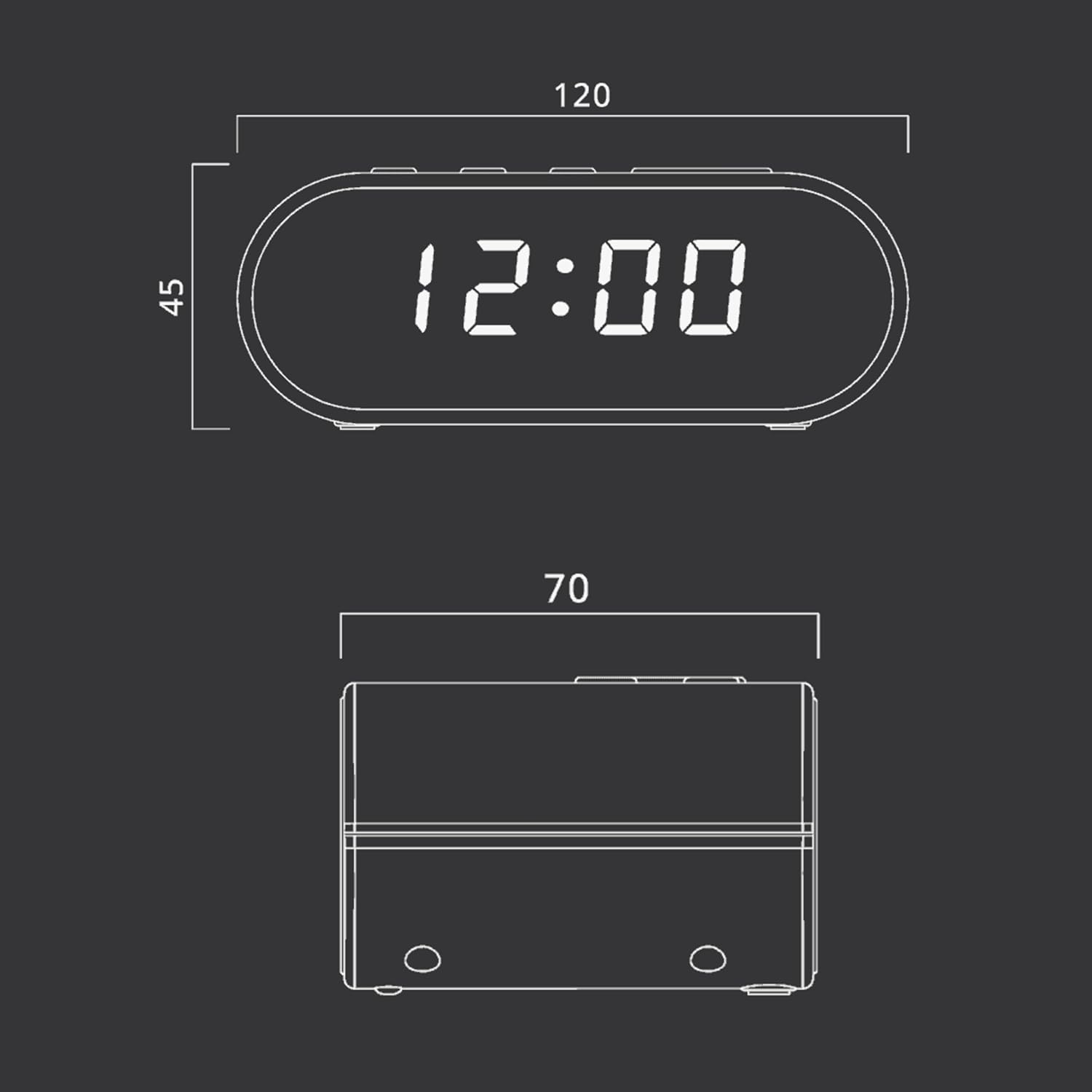
Figure 4: Dimensional drawing of the MUSE M-10 Red Radio Alarm Clock, showing its length (120mm), width (70mm), and height (45mm).
9. Garanzia e supporto
For warranty information or technical support, please refer to the warranty card included with your product or contact your local MUSE distributor. Keep your purchase receipt as proof of purchase.