
1. Prodotto finitoview
The TOTU 13-in-1 USB C Hub (Model TT-HB013A) is a versatile docking station designed to expand the connectivity of your USB-C enabled laptop or device. It provides multiple ports for display output, high-speed data transfer, and power delivery, enhancing productivity and convenience.
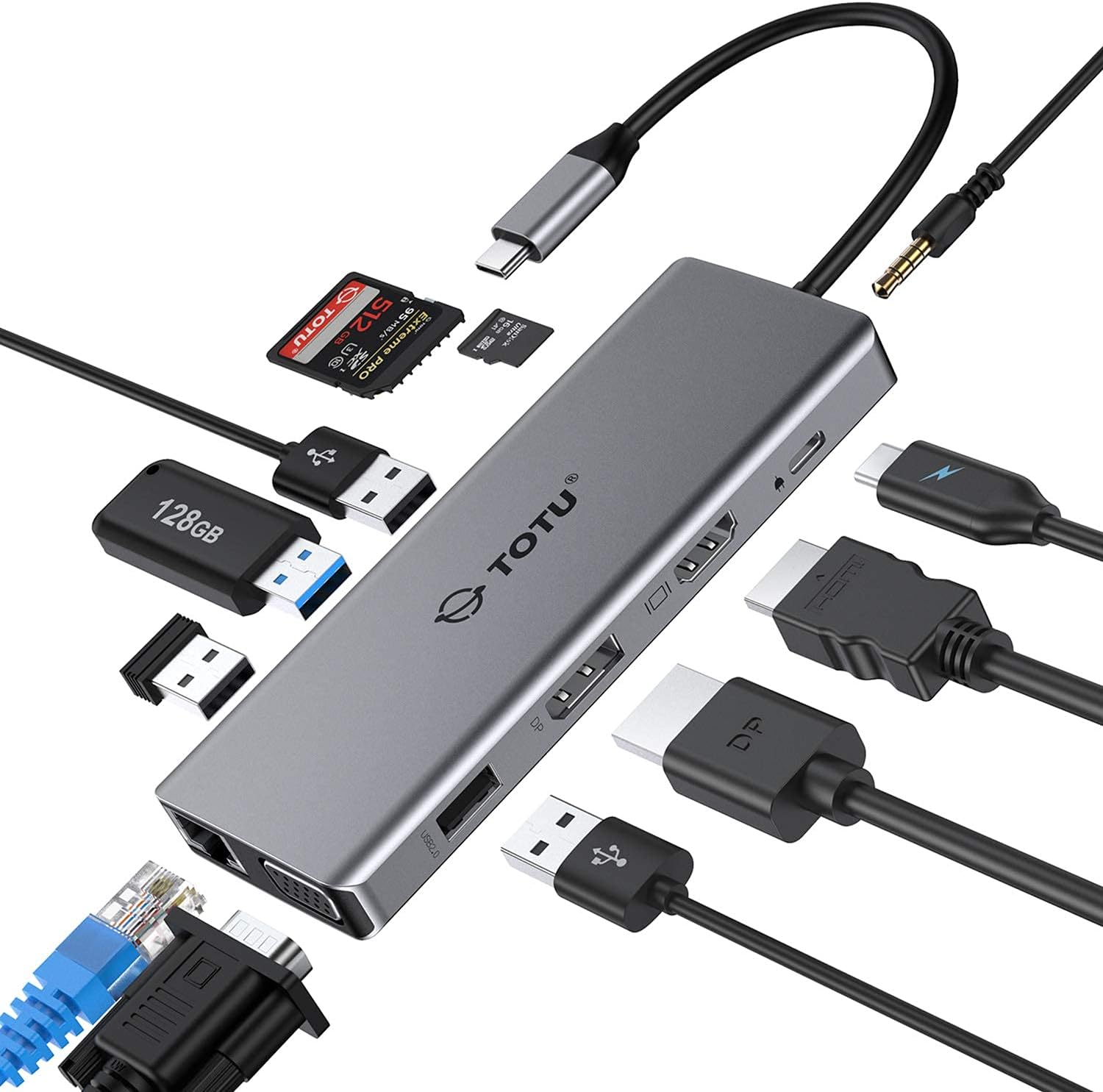
Figure 1: The TOTU 13-in-1 USB C Hub, showcasing its compact design and multiple connectivity options including USB, HDMI, DisplayPort, and audio jacks.
This hub is ideal for users seeking to connect multiple peripherals, external displays, and network connections through a single USB-C port.
2. Key Features and Port Layout
The TOTU 13-in-1 USB C Hub offers a comprehensive set of ports to meet diverse connectivity needs. Below is a detailed layout and description of each port:

- Porta HDMI (1): Supports up to 4K UHD (3840x2160) at 30Hz for high-resolution video output.
- DisplayPort (2): Supports up to 4K UHD (3840x2160) at 30Hz for high-resolution video output.
- VGA Port (3): Supports up to 1080P (1920x1080) at 60Hz for standard video output.
- USB 3.0 Type-A Ports (2): Data transfer speed up to 5Gbps, ideal for connecting external hard drives, flash drives, and other high-speed peripherals.
- USB 2.0 Type-A Ports (2): Data transfer speed up to 480Mbps, recommended for connecting mouse, keyboard, and other low-bandwidth devices to avoid potential USB 3.0 radio frequency interference.
- Slot per scheda SD (6): Supports memory cards up to 512GB with read/write speeds up to 104 MB/s.
- Slot per scheda TF (7): Supports memory cards up to 512GB with read/write speeds up to 104 MB/s. SD/TF memory cards can be used simultaneously.
- USB Type-C Female PD3.0 Charging Port (8): For Type-C laptop or Type-C smartphone charging. Input power 20V/3A max (Please use a 45W or above adapter for laptop charging).
- Porta Ethernet Gigabit RJ45: Provides stable and fast wired network connection (10/100/1000 Mbps).
- 3.5mm Audio/Mic 2-in-1 Jack: Per collegare cuffie o altoparlanti.
3. Guida all'installazione
Follow these steps to set up your TOTU 13-in-1 USB C Hub:
- Verifica della compatibilità: Ensure your laptop's USB-C port supports DisplayPort Alt Mode and Power Delivery for full functionality. The hub is incompatible with USB-A to USB-C adapters.
- Connetti al dispositivo host: Plug the integrated USB-C cable of the hub into the USB-C port of your laptop or compatible device.
- Erogazione di potenza (facoltativa ma consigliata): For stable operation and charging your laptop, connect a 45W or above USB-C power adapter to the PD3.0 charging port on the hub.
- Connetti le periferiche: Plug your desired peripherals (e.g., external monitors, USB drives, keyboard, mouse, Ethernet cable, audio devices) into the corresponding ports on the hub.
- Installazione del driver: The hub is generally plug-and-play for most operating systems (Windows 7/8/8.1/10, Mac OS X 10.6 or later, Linux 2.6.14 or later). No additional drivers are typically required.

Figure 2: Connecting the USB C Hub to a laptop and power source for charging.
4. Istruzioni per l'uso
4.1. Modalità di visualizzazione
The TOTU 13-in-1 USB C Hub supports various display configurations depending on your operating system:
Per i sistemi macOS:
macOS only supports mirror display across multiple external monitors. The laptop's own screen will also mirror the external displays.

Figure 3: Mirror Mode on macOS, where all connected displays show identical content.
Per i sistemi Windows:
Windows systems support triple display in extended mode, including the laptop's own display. The resolution for extended mode will be limited to 1080P.

Figure 4: Extended Mode on Windows, allowing different content on each display.

Figure 5: Multi-display mode comparison between Windows (supports MST) and macOS (mirror only).
4.2. Trasferimento dei dati
The hub features both USB 3.0 and USB 2.0 ports for efficient data transfer:
- Porte USB: 3.0 Offer ultra-high-speed data sync up to 5 Gbps, suitable for large file transfers and connecting high-bandwidth devices.
- Porte USB: 2.0 Provide transfer speeds of 480 Mbps. It is advisable to connect your mouse or keyboard to these ports to avoid potential radio frequency interference from USB 3.0 devices.

Figure 6: USB 3.0 and USB 2.0 ports for super fast and stable data transfer.
4.3. Connettività audio
The integrated 3.5mm audio/mic 2-in-1 jack allows you to connect headphones or speakers for an enhanced audio experience.

Figure 7: The 3.5mm audio jack enables connection to various audio devices.
5. Specifiche del prodotto
| Caratteristica | Specificazione |
|---|---|
| Marca | TUTTO |
| Numero di modello | TT-HB013A |
| Materiale | Lega di alluminio, ABS |
| Connettore | Connettore USB 3.1 di tipo C |
| Porta HDMI | Up to 4K UHD (3840x2160@30Hz) |
| Porta Display | Up to 4K UHD (3840x2160@30Hz) |
| Port VGA | 1080P (1920x1080@60Hz) |
| Porte USB 3.0 di tipo A | Data transfer speed up to 5Gbps |
| Porte USB 2.0 di tipo A | Velocità di trasferimento dati fino a 480Mbps |
| Slot per scheda SD | Supported memory card capacity up to 512GB, Read/Write speed up to 104 MB/s |
| Slot per schede TF | Supported memory card capacity up to 512GB, Read/Write speed up to 104 MB/s |
| USB Type-C PD3.0 Charging Port | Input power 20V/3A max (Only for Type-C laptop or Type-C smartphone charging) |
| Compatibilità del sistema operativo | Windows 7/8/8.1/10, Mac OS X 10.6 or later, Linux 2.6.14 or later |
| Peso dell'articolo | 3.68 once |
| Dimensioni del prodotto | 10.94 x 1.96 x 0.59 pollici |
6. Manutenzione
To ensure the longevity and optimal performance of your TOTU USB C Hub, please follow these maintenance guidelines:
- Pulizia: Use a soft, dry cloth to wipe the surface of the hub. Avoid using liquid cleaners or aerosols, as they may damage the device.
- Magazzinaggio: When not in use, store the hub in a cool, dry place, away from direct sunlight and extreme temperatures. The included soft pouch can be used for protection.
- Gestione: Evitare di far cadere l'hub o di sottoporlo a forti urti. Non piegare o torcere eccessivamente il cavo USB-C integrato.
- Ventilazione: Ensure the hub has adequate ventilation during use to prevent overheating. Do not cover the hub with cloths or place it in enclosed spaces.

Figure 8: The included soft pouch provides convenient storage and protection for the hub.
7. Risoluzione Dei Problemi
If you encounter issues with your TOTU USB C Hub, please refer to the following common troubleshooting tips:
- Nessuna uscita di visualizzazione:
- Assicurati che la porta USB-C del tuo laptop supporti la modalità DisplayPort Alt.
- Check all cable connections (USB-C from hub to laptop, HDMI/DP/VGA from hub to monitor).
- Try restarting your laptop and reconnecting the hub.
- Verify monitor input settings are correctly selected (e.g., HDMI 1, DisplayPort).
- For Windows, ensure display settings are configured for 'Extend' or 'Duplicate'. For macOS, remember it only supports mirror display.
- Display tremolante o instabile:
- Reduce the display resolution if using multiple monitors, especially if exceeding 1080P/60Hz.
- Ensure you are using high-quality HDMI/DP/VGA cables.
- Connect a power adapter to the hub's PD port to provide stable power.
- Dispositivi USB non riconosciuti:
- Reconnect the USB device and the hub.
- Prova a collegare il dispositivo a una porta USB diversa sull'hub.
- Ensure the hub is receiving sufficient power, especially for power-hungry devices.
- Trasferimento dati lento:
- Per ottenere velocità ottimali, assicurati di utilizzare dispositivi e cavi compatibili con USB 3.0.
- Avoid connecting high-bandwidth devices to USB 2.0 ports.
- Nessuna alimentazione al laptop:
- Ensure your power adapter is 45W or above.
- Verificare che l'adattatore di alimentazione e il cavo USB-C funzionino correttamente.
8. Garanzia e supporto
TOTU offers a robust warranty and support system for its products:
- Garanzia di rimborso al 100%: For quality problems within 30 days of purchase.
- Garanzia 12-mese: A standard 12-month warranty is provided for the product.
- 18-Month Extended Warranty: You can upgrade to an 18-month warranty by subscribing to the TOTU websito.
- Servizio clienti amichevole: TOTU is committed to providing hassle-free customer service.
- Supporto via e-mail: For any assistance or inquiries, please contact support@loopec.com.