
CaDA C51305w
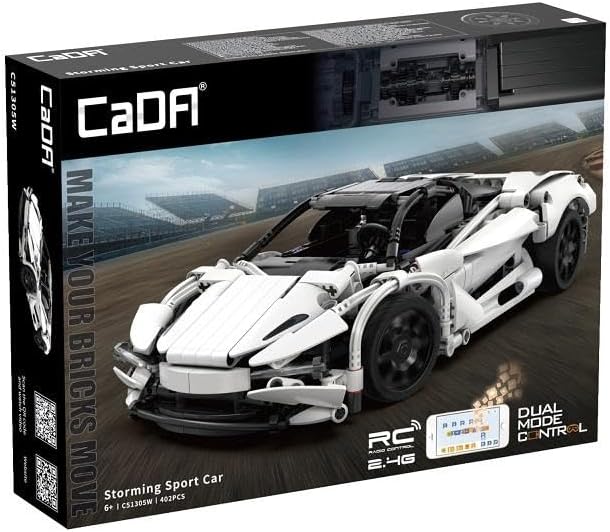
CaDA 1:14 Remote Control Storming Sport Car Instruction Manual
Model: C51305w | Brand: CaDA
Introduzione
Grazie per l'acquistoasing the CaDA C51305W Storming Sport Car. This remote-controlled terminal block model offers an engaging building experience and high-speed remote control performance. This manual provides essential information for assembly, operation, and maintenance to ensure optimal performance and longevity of your model.
Informazioni sulla sicurezza
- Leggere tutte le istruzioni prima del montaggio e dell'uso.
- Questo prodotto contiene piccole parti e non è adatto a bambini di età inferiore a 3 anni a causa del rischio di soffocamento.
- Si raccomanda la supervisione di un adulto durante il montaggio e l'uso, soprattutto per gli utenti più giovani.
- Do not operate the vehicle near water, heat sources, or in direct sunlight for extended periods.
- Prima di utilizzare il veicolo, assicurarsi che tutti i collegamenti siano ben saldi.
- Use only the specified battery type (3.7V, 500mAh Lithium Battery) and charger. Improper battery use can lead to fire or injury.
- Do not modify the product or its components, as this may void the warranty and pose safety risks.
Contenuto della confezione
Prima di iniziare il montaggio, verificare che tutti i componenti siano presenti.
- 402 pezzi di blocchi da costruzione
- 1 x 2.4 GHz Telecomando
- 1 x 3.7V, 500mAh Lithium Battery
- 1 cavo di ricarica USB
- 1 x Manuale di istruzioni (questo documento)
- 1 x RC Kit (motors, receiver, etc.)
Istruzioni di montaggio
Follow the step-by-step instructions provided in the included building guide to assemble your CaDA Storming Sport Car. The model consists of 402 precisely engineered parts.
Suggerimenti per l'Assemblea Generale:
- Prima di iniziare, organizza i tuoi pezzi in base al colore e al tipo.
- Prestare molta attenzione all'orientamento di ogni pezzo, come mostrato nei diagrammi.
- Assicurarsi che tutti i collegamenti siano saldi e sicuri.
- Test moving parts (e.g., wheels, steering) periodically during assembly to ensure smooth operation.
Integrating the RC Kit:
The RC kit components (motors, receiver, battery compartment) are integrated during the building process. Refer to the specific sections in the building guide for their placement and wiring.
- Installazione del motore: Install the drive motors into the designated chassis locations. Ensure wires are routed correctly to avoid pinching.
- Posizionamento del ricevitore: Secure the 2.4 GHz receiver unit in its compartment.
- Vano batteria: Assemble the battery compartment and ensure it can securely hold the 3.7V, 500mAh Lithium Battery.
- Cablaggio: Connect the motors and battery compartment to the receiver according to the wiring diagram in the building guide.


Istruzioni per l'uso
Ricarica e installazione della batteria:
- Connect the 3.7V, 500mAh Lithium Battery to the USB charging cable.
- Plug the USB charging cable into a standard USB power adapter (not included).
- The charging indicator light will show the charging status (refer to charger instructions for specific light patterns). Charge until fully charged.
- Once charged, carefully insert the battery into the designated battery compartment within the car model, ensuring correct polarity.
Remote Control Operation (2.4 GHz):
- Install 2x AA batteries (not included) into the remote control, observing polarity.
- Turn on the power switch on the car model.
- Turn on the power switch on the remote control. The remote and car will automatically pair. A successful pairing is usually indicated by a solid light on both devices.
- Use the joystick/buttons on the remote control to steer and accelerate the car. Refer to the remote control diagram for specific functions.
App Control (Android/iOS):
The CaDA Storming Sport Car can also be controlled and programmed via a dedicated mobile application.
- Scarica l'App: Cercare the official CaDA app on the Google Play Store (for Android 8.0 or later) or Apple App Store (for iOS 12.0 or later).
- Collegare: Ensure Bluetooth is enabled on your mobile device. Open the CaDA app and follow the on-screen instructions to connect to your Storming Sport Car.
- Control and Program: The app provides various control modes, including joystick control, gravity sensing, and programmable sequences. Explore the app's features for an enhanced driving experience.
Manutenzione
- Pulizia: Use a soft, dry cloth to wipe down the model. Do not use water or chemical cleaners, as they may damage the electronic components or plastic parts.
- Magazzinaggio: Store the model in a cool, dry place away from direct sunlight and extreme temperatures. Remove batteries from both the car and remote control if storing for extended periods to prevent leakage.
- Cura della batteria: Do not overcharge or over-discharge the Lithium battery. If the battery will not be used for a long time, charge it to approximately 50% capacity before storage.
- Ispezione: Periodically check all connections and moving parts for wear or damage. Replace any broken or worn-out pieces as needed.
Risoluzione dei problemi
| Problema | Possibile causa | Soluzione |
|---|---|---|
| L'auto non risponde al telecomando. | Low battery in car or remote; Not paired; Interference. | Charge car battery, replace remote batteries; Re-pair car and remote; Move to an area with less interference. |
| L'auto si muove lentamente o in modo irregolare. | Low car battery; Obstruction in gears/wheels; Loose connections. | Recharge car battery; Check for and remove obstructions; Secure all wiring connections. |
| La connessione all'app non riesce. | Bluetooth off; App version outdated; Incompatible device. | Ensure Bluetooth is on; Update app to latest version; Verify device meets Android 8.0 / iOS 12.0 requirements. |
| Alcune parti sono mancanti o danneggiate. | Manufacturing defect; Shipping damage. | Contact CaDA customer support for replacement parts. |
Specifiche
- Marca: CaDA
- Numero modello: C51305W
- Tema: Auto
- Scala: 1:14
- Numero di pezzi: 402
- Controllare: 2.4 GHz Remote Control, Android/iOS App (from Android 8.0 / from iOS 12.0)
- Batteria: 3.7V, 500mAh Lithium Battery (for car)
- Dimensioni del prodotto (L x P x A): 14.96 x 2.95 x 11.02 pollici (assemblato)
- Peso dell'articolo: Circa 2.2 libbre (1 chilogrammo)
Garanzia e supporto
CaDA products are manufactured to high-quality standards. For warranty information, technical support, or to order replacement parts, please visit the official CaDA websito o contattare il servizio clienti. Conservare la ricevuta d'acquisto come prova d'acquisto.
CaDA Official Websito: www.cada.cn
Ask a question about this manual
Ask about setup, troubleshooting, compatibility, parts, safety, or missing instructions. Manuals+ will review the question and use this page’s manual context to help answer it.