
1. Introduzione e oltreview
Thank you for choosing the Bewinner 12-inch LED Digital Photo Frame. This device allows you to display your favorite photos, play music and videos, and utilize clock and calendar functions. It features a high-resolution 12-inch LED screen (1280x800) and supports various media formats.

Image: The digital photo frame showcasing its 12-inch LED screen with a high-resolution image.
The frame is constructed from high-quality ABS material and comes with an infrared remote control for convenient operation. It includes built-in speakers and a 3.5mm headphone jack for audio output.
Contenuto della confezione:
- 1 x Bewinner Digital Photo Frame
- 1 x telecomando
- 1 x adattatore di alimentazione/caricabatterie
- 1 x supporto per telaio
- 1 x Manuale utente (questo documento)
2. Impostazione
2.1 Disimballaggio
Rimuovere con attenzione tutti i componenti dall'imballaggio. Assicurarsi che tutti gli articoli elencati nel contenuto della confezione siano presenti e integri.
2.2 Fissaggio del supporto
Locate the detachable frame stand. Insert the stand into the designated slot on the back of the digital photo frame. Ensure it is securely attached to provide stable support on any flat surface.

Immagine: Posteriore view of the digital photo frame with the stand in place, highlighting the port layout.
2.3 Collegamento di alimentazione
Connect the provided power adapter to the DC IN port on the digital photo frame. Plug the other end of the adapter into a standard electrical outlet. The frame will typically power on automatically or enter standby mode.
2.4 Inserting a Memory Card or USB Drive
The digital photo frame supports external storage via SD cards (up to 32GB, not included) and USB 2.0 host devices. Insert your SD card into the memory card slot or connect a USB flash drive to the USB host port. Ensure the media is inserted correctly.
Nota: This device does not have significant internal storage for media files. An external SD card or USB drive is required to display photos, videos, or music.

Immagine: Pro lateralefile of the digital photo frame, illustrating the various input ports including USB and SD card slots.
3. Istruzioni per l'uso
The digital photo frame can be operated using the buttons on the back of the frame or the included infrared remote control.
3.1 Navigazione di base
- Pulsante di accensione: Turns the frame on or off.
- Menu/Setup Button: Accesses the main menu and settings.
- Pulsanti freccia (su/giù/sinistra/destra): Navigare nei menu e selezionare le opzioni.
- Pulsante Invio: Conferma le selezioni.
- Pulsante di uscita: Returns to the previous screen or main display.
- Pulsanti del volume: Adjust audio volume (VOL+, VOL-).
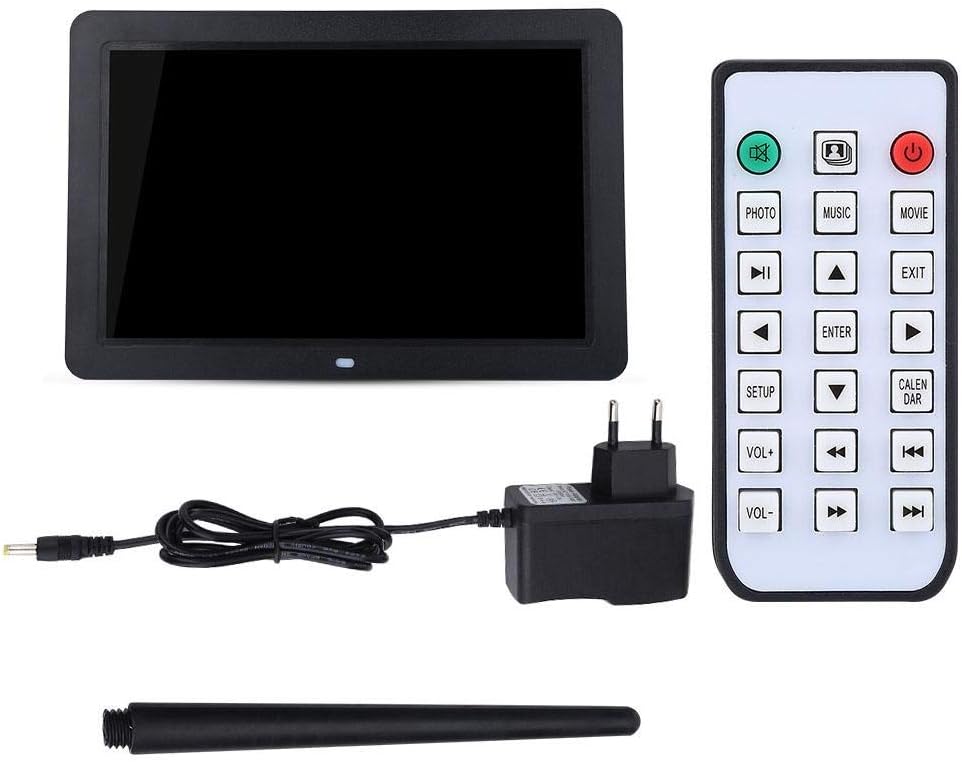
Image: The included remote control, showing buttons for various functions like Photo, Music, Movie, Setup, Calendar, and volume control.
3.2 Photo Playback
The frame supports JPEG and JPG image formats. To view foto:
- Ensure your photos are stored on a compatible SD card or USB drive.
- From the main menu, select "Photo" or press the FOTO pulsante sul telecomando.
- Navigate to your desired folder or select "All Photos" to start a slideshow.
- You can configure slideshow duration, transition effects, and brightness settings in the "Setup" menu.

Image: The digital photo frame displaying a high-resolution image, demonstrating its photo playback capability.
3.3 Riproduzione di musica
The frame supports MP3 audio format. To play music:
- Store your MP3 files on a compatible SD card or USB drive.
- From the main menu, select "Music" or press the MUSICA pulsante sul telecomando.
- Sfoglia la tua musica filee seleziona una traccia da riprodurre.
- Adjust the volume using the VOL+ and VOL- buttons. You can also connect headphones to the 3.5mm jack.

Image: The digital photo frame displaying a visual while playing music, with an overlay indicating MP3 support.
3.4 Riproduzione video
The frame supports various video formats including RM, RMVB, MKV, MOV, M4V, MPG, FLV, PMP, AVI, VOB, DAT, MP4, and 3PG. To play videos:
- Store your video files on a compatible SD card or USB drive.
- From the main menu, select "Movie" or press the FILM pulsante sul telecomando.
- Sfoglia il tuo video files and select a video to play.
- Regolare il volume utilizzando i pulsanti VOL+ e VOL-.
3.5 Clock and Calendar Functions
The digital photo frame includes built-in clock and calendar functions. To access these:
- From the main menu, select "Calendar" or press the CALENDARIO pulsante sul telecomando.
- You can set the time and date in the "Setup" menu.
3.6 Impostazioni e personalizzazione
Access the "Setup" menu to customize various settings:
- Lingua: Seleziona la lingua preferita.
- Impostazioni di visualizzazione: Regola luminosità, contrasto e proporzioni.
- Impostazioni presentazione: Configure interval, transition effects, and playback mode (e.g., sequential, random).
- Ora e data: Impostare l'ora e la data correnti.
- Riproduzione automatica: Set the frame to automatically play music, images, videos, or a mixed sequence upon startup.
4. Manutenzione
4.1 Pulizia dello schermo
To clean the LED screen, gently wipe it with a soft, lint-free cloth. For stubborn smudges, slightly dampPulisci il panno con acqua o una soluzione detergente adatta allo schermo. Evita di utilizzare prodotti chimici aggressivi o materiali abrasivi.
4.2 Cura generale
- Keep the digital photo frame away from direct sunlight, excessive heat, and moisture.
- Evitare di far cadere o sottoporre il dispositivo a forti impatti.
- Do not attempt to disassemble the frame, as this will void any potential warranty and may cause damage.
- When not in use for extended periods, unplug the power adapter.
5. Risoluzione Dei Problemi
If you encounter issues with your Bewinner Digital Photo Frame, please refer to the following common problems and solutions:
| Problema | Possibile causa/soluzione |
|---|---|
| Il telaio non si accende. |
|
| No photos/videos/music displayed. |
|
| Il telecomando non funziona. |
|
| Images appear washed out or too bright/dark. |
|
| Audio is distorted or no sound. |
|
6. Specifiche
| Caratteristica | Dettaglio |
|---|---|
| Marca | Vincitore |
| Numero di modello | Bewinner1moich0rzq-03 |
| Dimensioni dello schermo | 12 pollici |
| Tipo di visualizzazione | GUIDATO |
| Risoluzione | Risoluzione 1280 x 800 (WXGA) |
| Proporzioni | 16:9 |
| Luminosità | 250 cd/m² |
| Materiale del guscio | ABS (acrilonitrile-butadiene-stirene) |
| Colore | Nero |
| Supporto per archiviazione esterna | SD Card (up to 32GB), USB 2.0 Host |
| Formati di immagine supportati | JPEG, JPG (Base Encoding) |
| Formati musicali supportati | MP3 |
| Formati video supportati | RM, RMVB, MKV, MOV, M4V, MPG, FLV, PMP, AVI, VOB, DAT, MP4, 3PG |
| Formato e-book supportato | TXT |
| Altoparlante incorporato | 8Ω2W * 2 |
| Metodo di funzionamento | Infrared Remote Control, On-frame Buttons |
| Interfacce | 3.5mm Headphone Jack, Memory Card Slot, USB 2.0 Host, Mini USB Adapter, Charging Port |
| Dimensioni (L x P x A) | Circa 30.5 x 20.2 x 2.5 cm (12.0 x 7.9 x 1.0 pollici) |
| Peso | Circa 895 g |
| Fonte di alimentazione | Cavo elettrico |

Image: Dimensional diagram of the digital photo frame, indicating its width and height.
7. Garanzia e supporto
Information regarding specific warranty terms and conditions for the Bewinner Digital Photo Frame is not provided in the product details. For warranty claims or technical support, please refer to the retailer or manufacturer's official websito dove hai acquistato il prodotto.
Please note that information on spare parts availability and guaranteed software updates is also not available.