
Introduzione
This manual provides instructions for the Speedlink PIAVO Wireless Ergonomic Vertical Mouse (Model SL-630019-BK-01). This ergonomic mouse is designed to promote a natural, relaxed wrist posture, reducing strain on the hand, arm, shoulder, and neck during extended computer use. It features 5 buttons, adjustable DPI settings, and wireless 2.4 GHz connectivity.

Figura 1: Speedlink PIAVO Wireless Ergonomic Vertical Mouse, front view. This image shows the overall ergonomic design of the mouse.
Contenuto della confezione
Si prega di verificare che tutti gli articoli siano presenti nel pacco:
- Speedlink PIAVO Wireless Ergonomic Vertical Mouse
- Ricevitore USB-A
- Batteria (preinstallata o inclusa separatamente)
- Manuale di istruzioni (questo documento)

Figura 2: Packaging of the Speedlink PIAVO Wireless Ergonomic Vertical Mouse. The box indicates "Wireless Vertical Mouse" and "10m Range".
Impostare
- Inserire la batteria: If the battery is not pre-installed, open the battery compartment on the underside of the mouse and insert the included battery, ensuring correct polarity.
- Collegare il ricevitore USB: Locate an available USB-A port on your computer or laptop. Insert the USB-A receiver into the port.
- Accensione del mouse: Locate the On/Off switch on the underside of the mouse. Slide the switch to the "On" position.
- Installazione del driver: The mouse is designed for plug-and-play operation. Your operating system (e.g., Windows) should automatically detect and install the necessary drivers. This process typically takes a few seconds.
- Prova: Once installed, move the mouse to test cursor movement. If the cursor does not respond, ensure the mouse is powered on and the USB receiver is securely connected.

Figura 3: Underside of the mouse, illustrating the battery compartment and the On/Off switch. Ensure the switch is in the 'On' position for operation.
Istruzioni per l'uso
The Speedlink PIAVO mouse features 5 buttons and adjustable DPI settings for optimal control.
- Pulsante sinistro del mouse: Funzione standard di clic primario.
- Pulsante destro del mouse: Funzione di clic secondario standard.
- Rotella di scorrimento: Per scorrere i documenti e web pagine. Può anche essere premuto per una funzione di clic centrale.
- Pulsante di commutazione DPI: Located near the scroll wheel. Press this button to cycle through the available DPI settings (800, 1200, 1600 DPI). This adjusts the cursor speed and sensitivity.
- Pulsanti Avanti/Indietro: Located on the side of the mouse, typically used for navigation in web browser o file esploratori.
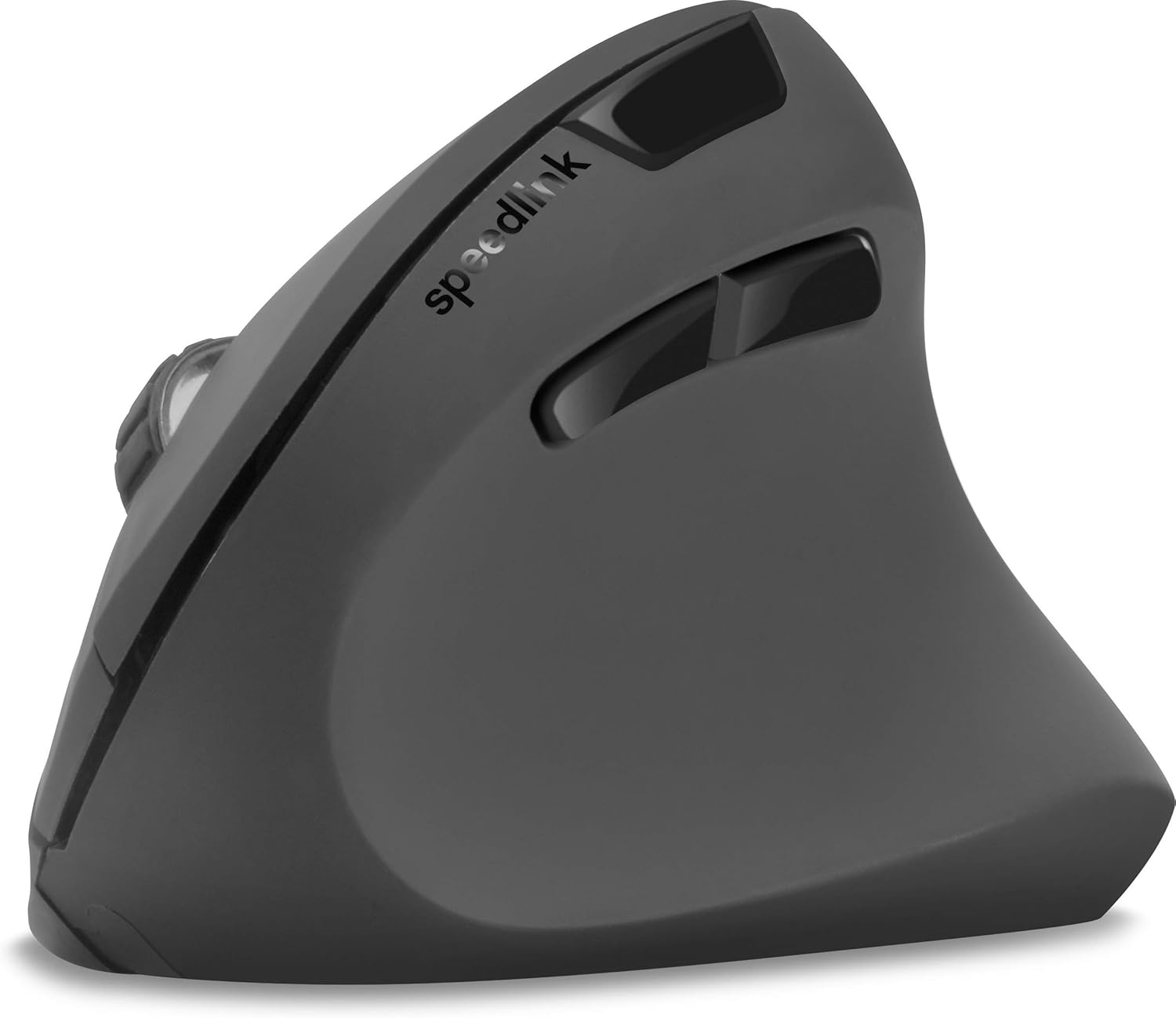
Figura 4: Top-down view of the mouse, highlighting the left/right click buttons, scroll wheel, and DPI switch button.

Figura 5: Lato view of the mouse, illustrating the ergonomic grip and the forward/backward navigation buttons.
Modalità di risparmio energetico
The mouse features an energy-saving mode to conserve battery life. If the mouse is inactive for a period, it will enter a sleep state. To wake it up, simply move the mouse or press any button.
Manutenzione
To ensure the longevity and optimal performance of your Speedlink PIAVO mouse, follow these maintenance guidelines:
- Pulizia: Utilizzare un panno morbido e asciutto per pulire l'esterno del mouse. Per lo sporco ostinato, un panno leggermenteamp È possibile utilizzare un panno, ma assicurarsi che non penetri umidità nel mouse. Evitare l'uso di prodotti chimici aggressivi o detergenti abrasivi.
- Pulizia del sensore: Occasionally, dust or debris may accumulate around the optical sensor on the underside of the mouse. Use a soft brush or compressed air to gently clean the sensor area.
- Sostituzione della batteria: When the mouse performance degrades or it stops responding, it may be time to replace the battery. Open the battery compartment, remove the old battery, and insert a new one of the same type, observing polarity.
- Magazzinaggio: When not in use for extended periods, it is recommended to switch off the mouse using the On/Off switch to conserve battery life. Store the mouse and USB receiver in a dry, dust-free environment.
Risoluzione dei problemi
| Problema | Possibile causa | Soluzione |
|---|---|---|
| Il mouse non risponde / Il cursore non si muove. |
|
|
| Movimento irregolare del cursore. |
|
|
| DPI setting resets after sleep/reboot. | This is a known characteristic for some mice; the DPI setting may revert to default. | Press the DPI switch button to select your preferred sensitivity after waking the mouse or restarting the computer. |
Specifiche
| Numero di modello | SL-630019-BK-01 |
| Connettività | Wireless 2.4 GHz via USB-A Receiver |
| Rilevamento del movimento | Ottico |
| Numero di pulsanti | 5 |
| Impostazioni DPI | 800, 1200, 1600 DPI (regolabili) |
| Orientamento della mano | Destro |
| wireless Range | Fino a 10 metri |
| Fonte di alimentazione | Battery-powered (Battery included) |
| Sistemi operativi compatibili | Finestre |
| Peso | 106 grammi |
| Colore | Nero |
Garanzia e supporto
Le informazioni relative ai termini di garanzia specifici e ai recapiti dell'assistenza clienti non sono disponibili nei dati di prodotto forniti. Fare riferimento alla confezione del prodotto o al manuale d'uso ufficiale del produttore. websito per le informazioni più aggiornate sulla garanzia e sulle opzioni di supporto.
Per ulteriore assistenza, puoi visitare il Speedlink official websito.