
Benss BRBD05
Benss Portable Digital Radio
Manuale d'uso
1. Prodotto finitoview
The Benss Portable Digital Radio (Model BRBD05) is a compact and versatile multi-band receiver designed for clear reception and ease of use. It supports AM, FM, and SW bands, features a digital LCD display with backlight, an alarm clock, and a sleep timer. Its portable design makes it ideal for both indoor and outdoor use.

Figura 1.1: Fronte view of the Benss Portable Digital Radio.
This radio is equipped with a built-in loudspeaker for clear audio and a 3.5mm earphone jack for private listening. The telescopic antenna ensures optimal signal reception, and the device is powered by two AA batteries, making it highly portable.
2. Informazioni sulla sicurezza
- Non esporre la radio a temperature estreme, alla luce solare diretta o a elevata umidità.
- Evitare di far cadere la radio o di sottoporla a forti urti.
- Non tentare di smontare o modificare la radio. Ciò invaliderà la garanzia e potrebbe causare danni.
- Utilizzare solo il tipo di batteria specificato (2 batterie AA). Assicurarsi che la polarità sia corretta quando si inseriscono le batterie.
- Rimuovere le batterie se la radio non verrà utilizzata per un periodo prolungato per evitare perdite.
- Tenere la radio lontana dall'acqua e da altri liquidi.
- Pulire la radio con un panno morbido e asciutto. Non utilizzare detergenti abrasivi o solventi.
3. Contenuto della confezione
Si prega di controllare la confezione per verificare la presenza dei seguenti elementi:
- 1 x Benss Pocket Radio
- 1 x Manuale utente
- Nota: le batterie non sono incluse e devono essere acquistate separatamente.
4. Impostazione
4.1 Installazione della batteria
- Individuare il coperchio del vano batteria sul retro della radio.
- Per aprire il vano, far scorrere il coperchio verso il basso.
- Insert two AA size batteries, ensuring the correct positive (+) and negative (-) polarity as indicated inside the compartment.
- Chiudere il coperchio del vano batteria facendolo scorrere verso l'alto finché non scatta in posizione.

Figure 4.1: Battery installation process for the Benss radio.
4.2 Regolazione dell'antenna
For optimal reception, especially for FM and SW bands, extend the telescopic antenna fully. The antenna can be rotated 360 degrees to find the best signal direction.

Figure 4.2: The radio's telescopic antenna can be rotated for optimal signal.
5. Istruzioni per l'uso
5.1 Accensione/spegnimento
Premere il tasto ACCESO/SPENTO button located on the front panel to turn the radio on or off. The LCD display will illuminate when the radio is powered on.
5.2 Impostazione dell'ora e della sveglia
- Tempo di presa: Premere il tasto IMPOSTAZIONE DELL'ORA pulsante. Utilizzare il P- E P+ pulsanti per regolare l'ora e i minuti. Premere IMPOSTAZIONE DELL'ORA again to confirm. You can switch between 12-hour and 24-hour display formats.
- Impostazione allarme: Premere il tasto AL.SET pulsante. Utilizzare il P- E P+ pulsanti per impostare l'orario desiderato della sveglia. Premere AL.SET again to confirm. The alarm sound will gradually increase in volume.

Figure 5.1: The radio supports both 12-hour and 24-hour time display.
5.3 Tuning Radio Stations (AM/FM/SW)
- Selezione della banda: Use the slide switch on the front panel to select between FM, AM, or SW (Shortwave) bands.
- Scansione automatica: Premere il tasto SCANSIONE pulsante per cercare e memorizzare automaticamente le stazioni disponibili.
- Sintonizzazione manuale: Utilizzare il P- E P+ pulsanti per sintonizzarsi manualmente su una frequenza specifica.
- Shortwave (SW) Reception: The radio supports multiple shortwave bands (SW1-SW7), allowing reception of international broadcasts.
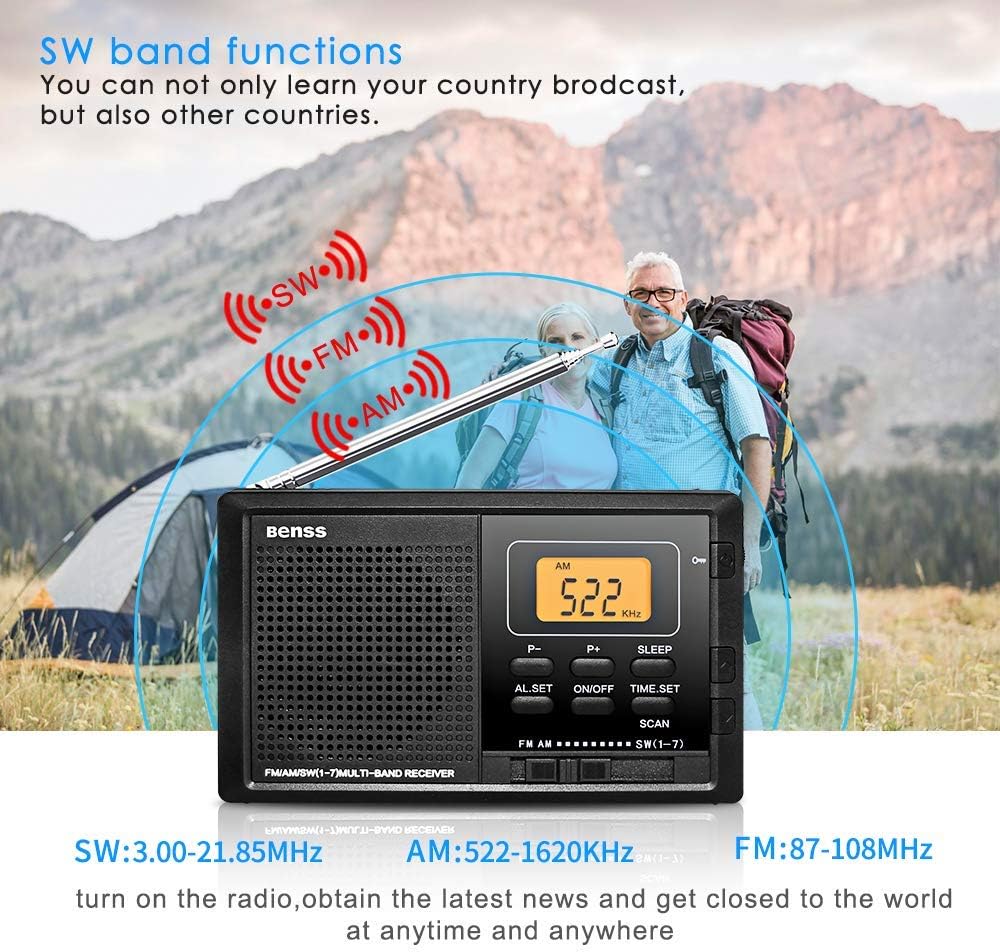
Figure 5.2: The radio supports AM, FM, and SW bands for diverse listening options.
5.4 Controllo del volume
Adjust the volume using the rotary knob located on the right side of the radio. Rotate upwards to increase volume and downwards to decrease.
5.5 Funzione timer di spegnimento
Premere il tasto SONNO button to activate the sleep timer. You can set the radio to automatically turn off after a specified duration (e.g., 10-90 minutes), allowing you to fall asleep to your favorite station without wasting battery power.

Figure 5.3: The sleep timer allows the radio to turn off automatically.
5.6 Pulsante di blocco
The lock button prevents accidental button presses. Slide the SERRATURA switch (usually on the side or top) to the locked position to disable all buttons. Slide it back to unlock.
5.7 Jack per auricolari
Connect standard 3.5mm earphones to the earphone jack on the side of the radio for private listening. The built-in speaker will automatically mute when earphones are connected.
6. Manutenzione
- Pulizia: Wipe the radio's surface with a soft, dry cloth. Do not use liquid cleaners or aerosols.
- Sostituzione della batteria: Replace batteries when the display dims or audio quality deteriorates. Always replace both batteries at the same time.
- Magazzinaggio: If storing the radio for an extended period, remove the batteries to prevent corrosion. Store in a cool, dry place.
7. Risoluzione Dei Problemi
| Problema | Possibile causa | Soluzione |
|---|---|---|
| La radio non si accende. | Le batterie sono scariche o inserite in modo errato. | Sostituire le batterie con batterie nuove, assicurandosi che la polarità sia corretta. |
| Poor reception/Static. | Antenna non estesa o posizionata correttamente; area con segnale debole. | Fully extend and rotate the telescopic antenna. Try moving to a different location. |
| L'allarme non suona. | Sveglia non impostata o volume troppo basso. | Ensure alarm time is set correctly. Increase the volume. |
| I pulsanti non rispondono. | La funzione di blocco è attivata. | Far scorrere l'interruttore LOCK nella posizione di sblocco. |
8. Specifiche
| Caratteristica | Dettaglio |
|---|---|
| Numero di modello | BRBD05 |
| Gamma di frequenza FM | Frequenza 87-108 MHz |
| Gamma di frequenza AM | Frequenza |
| Gamma di frequenza SW | Frequenza 3.00-21.85 MHz |
| Alimentazione elettrica | DC 3V (2 x AA Batteries) |
| Dimensioni (L x P x A) | 122 x 69 x 22 mm (4.7 x 2.7 x 0.8 pollici) |
| Peso (senza batteria) | 142 grammi |
| Tecnologia di connettività | Wifi (Note: This seems to be an error in the source data, as typical portable radios do not have Wi-Fi. The radio functions via radio waves.) |
| Caratteristica speciale | Portatile |
| Componenti inclusi | Manuale del proprietario |
9. Garanzia e supporto
This Benss product is manufactured with high-quality standards. For any issues or support inquiries, please refer to the contact information provided at the point of purchase or visit the official Benss websito.
Si prega di conservare la prova d'acquisto per eventuali reclami in garanzia. I termini e le condizioni di garanzia specifici possono variare a seconda della regione e del rivenditore.
Ask a question about this manual
Ask about setup, troubleshooting, compatibility, parts, safety, or missing instructions. Manuals+ will review the question and use this page’s manual context to help answer it.