
1. Introduzione
Welcome to the user manual for your Google Pixel 4 XL smartphone. This guide provides essential information to help you get started, understand its features, and maintain your device. The Google Pixel 4 XL is designed to offer a seamless Android experience with advanced camera capabilities, intuitive gesture controls, and the integrated Google Assistant.

Figure 1.1: Google Pixel 4 XL (Oh So Orange)
2. Impostazione
2.1 Cosa c'è nella scatola
- Google Pixel 4 XL Smartphone
- Adattatore CA
- Cavo USB (da USB-C a USB-C)
- OTG Dongle (USB-A to USB-C adapter)
- Strumento di espulsione del vassoio SIM
- Guida rapida
2.2 Inserimento della scheda SIM
- Individua il vassoio della scheda SIM sul lato del tuo Pixel 4 XL.
- Inserire lo strumento di espulsione del vassoio SIM nel piccolo foro accanto al vassoio e premere con decisione finché il vassoio non fuoriesce.
- Place your Nano SIM card into the tray with the gold contacts facing down. Ensure it fits securely.
- Spingere con cautela il vassoio della SIM nel telefono finché non scatta in posizione.

Figura 2.1: Posizione del vassoio della scheda SIM
2.3 Accensione iniziale e configurazione
- Tieni premuto il pulsante di accensione (situato sul lato destro) finché non appare il logo di Google.
- Segui le istruzioni sullo schermo per selezionare la lingua, connetterti al Wi-Fi e trasferire i dati da un vecchio dispositivo, se lo desideri.
- Accedi con il tuo account Google o creane uno nuovo.
- Set up security features such as Face Unlock.
2.4 Ricarica del dispositivo
Connect the USB cable to the AC adapter and plug it into a power outlet. Connect the other end of the USB cable to the USB-C port at the bottom of your Pixel 4 XL. The device supports fast charging. For optimal battery health, avoid fully discharging the battery frequently.
3. Istruzioni per l'uso
3.1 Navigazione di base
The Pixel 4 XL uses a touchscreen interface for navigation. Swipe up from the bottom to go to the home screen, swipe from the left or right edge to go back, and swipe up and hold to view app recenti.

Figure 3.1: Pixel 4 XL Front Display
3.2 Assistente Google
The new Google Assistant is integrated into the Pixel 4 XL. You can activate it by squeezing the sides of your phone or by saying "Hey Google." Use your voice to send texts, share photos, get directions, and more.
3.3 Caratteristiche della fotocamera
The Pixel 4 XL camera offers advanced photography capabilities:
- Punta e scatta: Capture brilliant color and control exposure balance.
- Vista notturna: Take clear photos in low-light conditions, including astrophotography for capturing the Milky Way.
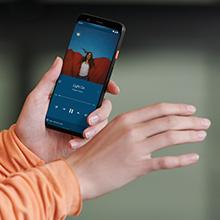
Figure 3.2: Using the Pixel 4 XL Camera
3.4 Motion Sense (Quick Gestures)
Utilize Quick Gestures to control your phone without touching it. Wave your hand above the screen to skip songs, silence calls, and more. Motion Sense functionality is available in specific regions including the US, Canada, Singapore, Australia, Taiwan, and most European countries.
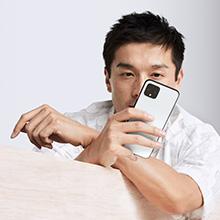
Figure 3.3: Motion Sense in Action
3.5 Call Screen
The Google Assistant's Call Screen feature helps filter out spam calls. It can proactively screen unknown callers and provide a transcript of the conversation, allowing you to decide whether to answer.
3.6 Video ufficiale del prodotto
Video 3.1: An official video from Google Inc showcasing the features of the Google Pixel 4, including Google Assistant and Motion Sense. This video provides a visual overview of key functionalities.
4. Manutenzione
4.1 Pulizia del dispositivo
To clean your Pixel 4 XL, use a soft, lint-free cloth. Avoid abrasive materials, solvents, or aerosol sprays. For stubborn marks, slightly dampen the cloth with water. Do not submerge the device in water.
4.2 Aggiornamenti software
Google regularly releases software updates to improve performance, add features, and enhance security. Ensure your device is connected to Wi-Fi and has sufficient battery life before installing updates. You can check for updates in Settings > System > System update.
4.3 Cura della batteria
Per prolungare la durata della batteria:
- Evitare temperature estreme.
- Use the provided charger or a compatible Qi-certified wireless charger.
- Enable Adaptive Battery in settings to optimize app usage.
- Disable features like Motion Sense and Always-on Display if not actively needed to conserve power.
4.4 Backup dei dati
Regularly back up your data to your Google Account. This includes photos, videos, contacts, and app data. Go to Settings > System > Backup to manage your backup settings.
5. Risoluzione Dei Problemi
5.1 Problemi comuni e soluzioni
- Il dispositivo non risponde: Per forzare il riavvio, tenere premuto il pulsante di accensione per circa 30 secondi.
- App che si bloccano: Clear the cache and data for the problematic app in Settings > Apps & notifications > See all apps > [App Name] > Storage & cache.
- Problemi di connettività (Wi-Fi/Bluetooth): Try toggling Wi-Fi or Bluetooth off and on. If the issue persists, reset network settings in Settings > System > Reset options > Reset Wi-Fi, mobile & Bluetooth.
- Scarsa durata della batteria: Review battery usage in Settings > Battery to identify apps consuming excessive power. Adjust screen brightness and disable unnecessary features.
5.2 Ripristino delle impostazioni di fabbrica
Un ripristino delle impostazioni di fabbrica cancellerà tutti i dati dal telefono e lo ripristinerà alle impostazioni di fabbrica originali. Questo può risolvere problemi software persistenti. Warning: Back up all important data before proceeding.
- Vai su Impostazioni > Sistema > Opzioni di ripristino.
- Tocca "Cancella tutti i dati (ripristino impostazioni di fabbrica)".
- Conferma la tua decisione e segui le istruzioni sullo schermo.
6. Specifiche
Key technical specifications for the Google Pixel 4 XL:
| Caratteristica | Specificazione |
|---|---|
| Marca | |
| Nome del modello | Pixel 4 XL |
| Sistema operativo | Android |
| Capacità di archiviazione della memoria | 64 GB |
| Dimensione della memoria RAM installata | 6 GB |
| Dimensioni dello schermo | 6.3 pollici |
| Risoluzione | 1440x2960 |
| Frequenza di aggiornamento | Frequenza 120 Hz |
| Modello CPU | Snapdragon S3 |
| Velocità della CPU | 2.84 GHz |
| Colore | Oh So Orange |
| Numero di slot per schede SIM | SIM singola |
| Tipo di connettore | USB tipo C |
| Funzione di sicurezza biometrica | Riconoscimento facciale |
| Livello di resistenza all'acqua | Resistente all'acqua |
| Presa per cuffie | Nessun jack per le cuffie |
| Risoluzione del sensore fotografico anteriore | 8 MP |
| Risoluzione di acquisizione video | 4k (30fps) |
| Tipo di visualizzazione | OLED |
| Fornitore di servizi wireless | Sbloccato |
| Durata media della batteria | 12 ore |
7. Informazioni sulla garanzia
Your Google Pixel 4 XL comes with a Garanzia del produttore di 2 anni. This warranty covers defects in materials and workmanship under normal use. It does not cover damage caused by accidents, misuse, unauthorized repairs, or normal wear and tear.
For detailed terms and conditions, please refer to the warranty card included with your product or visit the official Google support websito.
8. Supporto
If you require further assistance or encounter issues not covered in this manual, please utilize the following resources:
- Aiuto in linea: Visit the official Google Pixel Help Center for comprehensive articles, FAQs, and troubleshooting guides.
- Forum della comunità: Engage with other Pixel users and experts in Google's official product forums.
- Contatta l'assistenza: Access direct support options (chat, phone, email) through the Google Pixel Help Center.
Always ensure you are referring to official Google support channels for accurate and up-to-date information.