
Introduzione
The ElectraStim Flux is a versatile electro-stimulator designed for a wide range of applications. It features powerful outputs, an intuitive interface, and advanced control options including audio processing. This manual provides comprehensive instructions for the safe and effective use of your Flux device, covering setup, operation, maintenance, and troubleshooting.
Informazioni sulla sicurezza
Always follow the instructions provided in this guide. Keep the device away from water and do not use it while bathing or showering. Do not use the device if you have a pacemaker or any other electronic medical device. Consult a healthcare professional before use if you have any health concerns or are pregnant. Clean the device and accessories after each use with mild soap and warm water, and store them properly to maintain hygiene and prevent damage.
Le dichiarazioni relative agli integratori alimentari non sono state valutate dalla FDA e non intendono diagnosticare, trattare, curare o prevenire alcuna malattia o condizione di salute.
Contenuto della confezione
Assicurati che nel pacco siano presenti tutti i seguenti elementi:
- ElectraStim Flux Unit
- Custodia protettiva per il trasporto
- Elettrodi (più coppie)
- Electrode Cables (2x)
- Cavo di ricarica USB
- Audio Line-In Cable
- Guida rapida (documento separato)

Figure 1: ElectraStim Flux complete package contents.
Impostare
Caricamento del dispositivo
The Flux unit is powered by a high-capacity rechargeable lithium-ion battery. Before first use, or when the battery indicator shows low charge, connect the device to a USB power source using the provided USB charging cable.
- Locate the micro-USB port on the bottom of the Flux unit.
- Insert the small end of the USB cable into the Flux unit and the larger end into a USB wall adapter or computer USB port.
- The OLED display will show a battery charging indicator. The device charges to 80% in under an hour.
- A full charge provides up to 8 hours of play, depending on the selected mode and intensity.
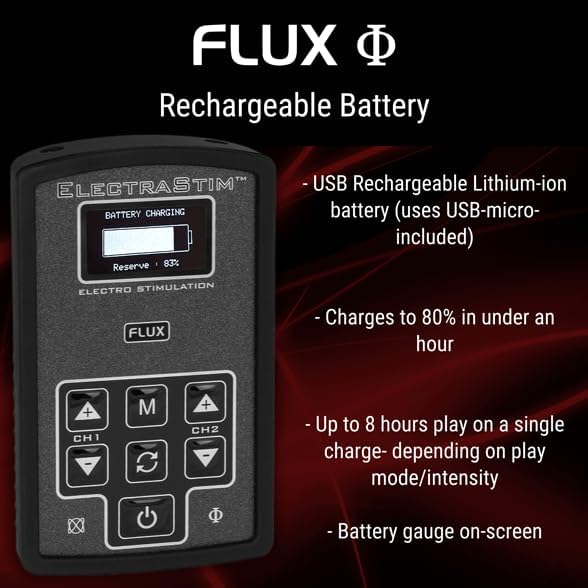
Figure 2: Battery charging display on the Flux unit.
Collegamento degli accessori
The Flux unit features twin outputs, allowing for a wide variety of accessory configurations. Ensure the device is turned off before connecting or disconnecting accessories.
- Connect the electrode cables to the two output ports located on the top edge of the Flux unit. These are labeled CH1 and CH2.
- Attach the electrode pads to the other end of the electrode cables.
- Assicurarsi che tutte le connessioni siano sicure prima di accendere il dispositivo.

Figura 3: in alto view showing output ports for electrode cables.
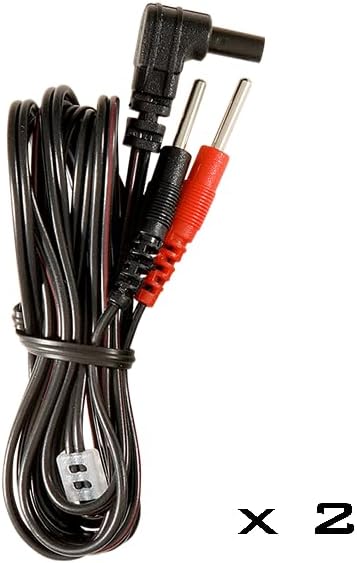
Figure 4: Electrode cables for connecting to pads.
Istruzioni per l'uso
Controlli finitiview
The Flux unit features a clear OLED display and intuitive button controls:

Figura 5: Fronte view of the ElectraStim Flux with controls.
- Pulsante di accensione (⑂): Tenere premuto per accendere o spegnere il dispositivo.
- Pulsante Modalità (M): Cycles through the available play modes.
- Channel 1 Intensity (+/-): Regola l'intensità per il Canale 1.
- Channel 2 Intensity (+/-): Regola l'intensità per il Canale 2.
- Cycle/Rotate Button (↻): Cycles through pre-programmed patterns within a selected mode or changes orientation in Tilt mode.
Accensione/spegnimento
To turn on the Flux unit, press and hold the Power button (⑂) until the display illuminates. To turn off, press and hold the Power button again until the display shuts down.
Regolazione dell'intensità
The Flux offers 99 intensity levels for precise control. Use the Channel 1 (+/-) and Channel 2 (+/-) buttons to increase or decrease the stimulation intensity for each respective channel. The current intensity level will be displayed on the OLED screen.
Selecting Play Modes and Patterns
The Flux comes with 6 distinct play modes and over 40 pre-programmed wave/pulse patterns. Press the Mode (M) button to cycle through the main play modes. Once a mode is selected, use the Cycle/Rotate (↻) button to switch between the available patterns within that mode.
Modalità audio
The Flux features advanced audio-processing controls, allowing external audio to influence the stimulation patterns. There are two primary audio modes:
- Stereo Line-In Mode: Connect an audio source (e.g., smartphone, MP3 player) to the 3.5mm audio jack on the bottom of the Flux unit using the provided audio line-in cable. The device will respond to the music or stereo-stim tracks, creating unique sensations.
- Modalità microfono: Utilize the built-in microphone to allow ambient noise, including voices or environmental sounds, to control the stimulation.

Figure 6: Flux unit displaying audio mode information.
Manutenzione
Pulizia
To ensure hygiene and longevity of your device, clean the Flux unit and all accessories after each use. Use a soft cloth dampened with mild soap and warm water. Do not submerge the unit in water. Ensure the device is completely dry before storage or next use.
Magazzinaggio
Store the ElectraStim Flux and its accessories in the provided protective carrying case when not in use. This protects the device from dust, moisture, and physical damage, ensuring its optimal performance over time.

Figure 7: Protective carrying case for the ElectraStim Flux.
Risoluzione dei problemi
If you encounter any issues with your ElectraStim Flux, please refer to the table below for common problems and their solutions.
| Problema | Possibile causa/soluzione |
|---|---|
| Device turns off unexpectedly during use. | Battery may be low. Recharge the device fully. Ensure electrode cables are securely connected. |
| Il dispositivo si blocca o non risponde più. | Try restarting the device by holding the power button. If the issue persists, contact customer support for potential firmware updates. |
| Limited variation in pre-programmed patterns. | Ensure you are cycling through all available patterns within each mode using the Cycle/Rotate button. Experiment with audio input modes for dynamic stimulation. |
| Nessuna stimolazione percepita o stimolazione debole. | Check intensity levels for both channels. Ensure electrode pads are properly applied and making good contact. Verify electrode cables are securely connected to both the unit and pads. |
Specifiche
| Caratteristica | Dettaglio |
|---|---|
| Numero di modello | Modello EM180 |
| Dimensioni del prodotto | 3.94 x 0.79 x 2.76 pollici |
| Peso | 10.58 once |
| Tipo di batteria | 1 batteria agli ioni di litio (ricaricabile) |
| Livelli di intensità | 99 |
| Modalità di gioco | 6 (including accelerometer and audio control) |
| Pre-programmed Patterns | 40+ |
| Risultati | Twin outputs |
| Produttore | ElectraStim |
| Data prima disponibilità | 7 ottobre 2019 |
Garanzia e supporto
For warranty information, technical support, or any inquiries not covered in this manual, please refer to the official ElectraStim webo contattare direttamente il servizio clienti. Conservare la prova d'acquisto per eventuali reclami in garanzia.