
Introduzione
This manual provides detailed instructions for the safe and efficient use of your FONESTAR DOTS-N Bluetooth TWS Speaker. Please read this manual thoroughly before operating the device and retain it for future reference.
The FONESTAR DOTS-N is a portable Bluetooth TWS speaker featuring Bluetooth 4.2 and NFC connectivity. It offers powerful sound with enhanced bass, playback controls, and hands-free calling. Equipped with a rechargeable Li-Ion battery providing up to 10 hours of autonomy, it also includes a 3.5mm auxiliary input. Its compact design makes it suitable for home use.
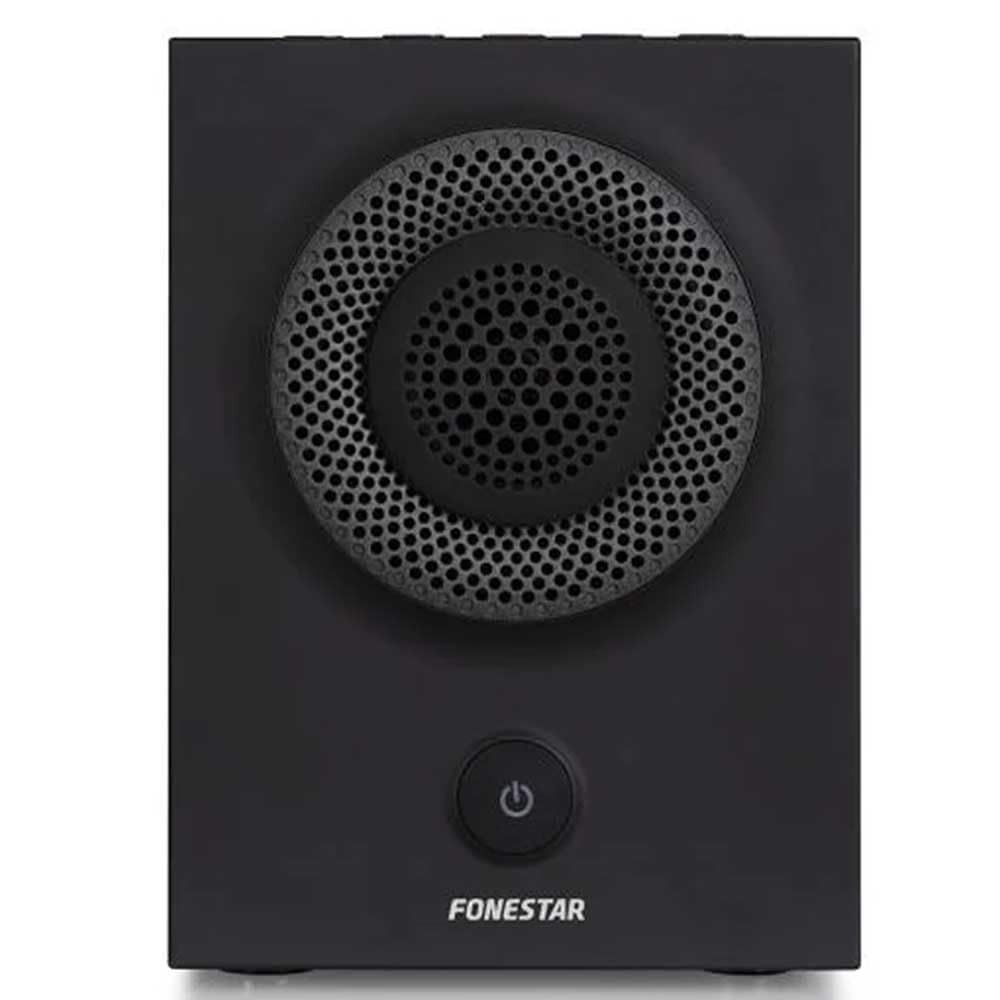
Figura 1: Fronte view of the FONESTAR DOTS-N Bluetooth TWS Speaker.
Impostare
1. Disimballaggio
Rimuovere con attenzione tutti i componenti dall'imballaggio. Assicurarsi che siano presenti tutti gli articoli elencati di seguito:
- FONESTAR DOTS-N Bluetooth TWS Speaker
- Cavo di ricarica da USB a micro USB
- Cavo audio stereo da 3.5 mm
- Manuale dell'utente (questo documento)
2. Ricarica dell'altoparlante
Before first use, fully charge the speaker. Connect the Micro USB end of the charging cable to the speaker's charging port and the USB-A end to a compatible USB power adapter (not included) or a computer's USB port.
- Durante la ricarica, la spia di carica si illuminerà.
- Il tempo di ricarica è di circa 3 ore per una ricarica completa.
- Una volta completata la ricarica, la spia luminosa cambierà colore o si spegnerà.
3. Accensione/Spegnimento
To power on the speaker, press and hold the power button (usually indicated by a ⏻ symbol) for a few seconds until you hear an audible prompt or see an indicator light. To power off, repeat the process.
Istruzioni per l'uso
1. Accoppiamento Bluetooth
L'altoparlante supporta Bluetooth 4.2 per lo streaming audio wireless.
- Ensure the speaker is powered on and in pairing mode (usually indicated by a flashing LED). If not, press the Bluetooth pairing button or power button briefly to enter pairing mode.
- Sul tuo smartphone, tablet o altro dispositivo abilitato Bluetooth, vai alle impostazioni Bluetooth.
- Cercare available devices and select "FONESTAR DOTS-N" from the list.
- Once paired, the speaker will emit an audible confirmation, and the LED indicator will typically become solid.
2. Accoppiamento NFC (Near Field Communication)
For devices with NFC, pairing can be done quickly:
- Assicurati che la tecnologia NFC sia abilitata sul tuo dispositivo e che l'altoparlante sia acceso.
- Tap your NFC-enabled device gently against the NFC area on the speaker (refer to product diagram for exact location, if available).
- Conferma la richiesta di associazione sul tuo dispositivo.
3. Funzione True Wireless Stereo (TWS)
The TWS function allows you to pair two FONESTAR DOTS-N speakers together for a stereo sound experience.
- Ensure both DOTS-N speakers are powered on and not connected to any other Bluetooth device.
- On one speaker (this will be the primary speaker), press and hold the TWS button (if available) or a designated button for TWS pairing.
- L'altoparlante principale cercherà l'altoparlante secondario. Una volta connessi, entrambi gli altoparlanti emetteranno un suono di conferma.
- Now, connect your Bluetooth device to the primary speaker as described in the "Bluetooth Pairing" section. Audio will play in stereo through both speakers.
4. Ingresso ausiliario (AUX)
For non-Bluetooth devices, use the included 3.5mm stereo audio cable.
- Collegare un'estremità del cavo audio da 3.5 mm alla porta AUX-in dell'altoparlante.
- Collegare l'altra estremità al jack delle cuffie o all'uscita audio del dispositivo.
- L'altoparlante passerà automaticamente alla modalità AUX oppure potrebbe richiedere la selezione manuale tramite un pulsante di modalità.
5. Playback Control and Hands-Free Calls
The speaker features integrated controls for music playback and managing calls:
- Riproduci/Pausa: Press the Play/Pause button (often combined with the power button or a dedicated button).
- Volume su/giù: Utilizzare i pulsanti del volume (+ / -) sull'altoparlante.
- Traccia successiva / precedente: Long press or double-press the volume buttons, or use dedicated track skip buttons if present.
- Rispondi/Termina chiamata: Press the Play/Pause button during an incoming call to answer, and again to end the call.
- Rifiuta chiamata: Tenere premuto il pulsante Riproduci/Pausa durante una chiamata in arrivo.
Manutenzione
1. Pulizia
- Spegnere sempre l'altoparlante prima di pulirlo.
- Per pulire le superfici esterne, utilizzare un panno morbido, asciutto e privo di lanugine.
- Non utilizzare detergenti abrasivi, cere o solventi poiché potrebbero danneggiare la finitura.
- Evitare che l'umidità penetri nelle aperture.
2. Conservazione
- Conservare l'altoparlante in un luogo fresco e asciutto, lontano dalla luce solare diretta e da temperature estreme.
- Se si conserva la batteria per un periodo prolungato, caricarla a circa il 50% ogni pochi mesi per mantenerla in buone condizioni.
3. Cura della batteria
- Non esporre la batteria a calore eccessivo, fuoco o luce solare diretta.
- Evitare di scaricare completamente la batteria frequentemente, poiché ciò può ridurne la durata.
- Utilizzare solo il cavo di ricarica fornito o un equivalente certificato.
Risoluzione dei problemi
| Problema | Possibile causa | Soluzione |
|---|---|---|
| L'altoparlante non si accende. | La batteria è scarica. | Carica l'altoparlante utilizzando il cavo USB in dotazione. |
| Impossibile effettuare l'associazione tramite Bluetooth. | L'altoparlante non è in modalità di associazione; il dispositivo è troppo lontano; interferenza. | Ensure speaker is in pairing mode. Move device closer (within 10m). Turn off other Bluetooth devices. |
| Nessun suono o volume basso. | Volume too low on speaker or source device; incorrect input mode. | Increase volume on both speaker and source device. Check if the correct input (Bluetooth/AUX) is selected. |
| L'associazione TWS non riesce. | Speakers are already paired to another device; incorrect TWS pairing procedure. | Assicurarsi che entrambi gli altoparlanti siano scollegati dagli altri dispositivi. Seguire attentamente i passaggi per l'associazione TWS. |
| Distorsione del suono. | Volume troppo alto; batteria scarica; segnale scarso. | Reduce volume. Charge the speaker. Move source device closer to the speaker. |
Specifiche tecniche

Figure 2: Dimensions of the FONESTAR DOTS-N Bluetooth TWS Speaker.
| Nome del modello | DOTS-N |
| Marca | FONESTAR |
| Tecnologia di connettività | Bluetooth 4.2, NFC, 3.5mm AUX |
| wireless Range | Fino a 10 metri (33 piedi) |
| Modalità di uscita audio | Stereo (con TWS) |
| Tipo di altoparlante | 3" Coaxial Woofer with Tweeter, 3" Subwoofer, 4" Passive Radiator |
| Potenza massima in uscita dell'altoparlante | 12 Watt RMS |
| Risposta in frequenza | 80 - 20,000 Hz |
| Signal-to-Noise Ratio | ≥ 75 dB |
| Fonte di alimentazione | Alimentato a batteria (Li-ion ricaricabile) |
| Capacità della batteria | 2200 mAh, 7.4 V |
| Autonomia della batteria | Fino a 10 ore (al 50% del volume) |
| Tempo di ricarica | Circa 3 ore |
| Metodo di controllo | Tattile (tocco) |
| Caratteristiche speciali | High-res audio, Bluetooth, Integrated microphone, USB port (for charging) |
| Dispositivi compatibili | Smartphone, compresse |
| Uso consigliato | For home |
| Colore | Nero |
| Dimensioni (L x A x P) | 125 x 175 x 158 mm (circa 4.9 x 6.9 x 6.2 pollici) |
| Peso dell'articolo | 1.82 kg (circa 4.01 libbre) |
| Impermeabile | NO |
Note: Specifications are subject to change without prior notice. Battery autonomy may vary depending on usage, volume level, and music type.
Informazioni sulla garanzia
FONESTAR products are designed and manufactured to the highest quality standards. This product is covered by a limited warranty against manufacturing defects from the date of purchase. The specific terms and duration of the warranty may vary by region and retailer.
Please retain your proof of purchase (receipt or invoice) as it will be required for any warranty claims. The warranty does not cover damage caused by misuse, accident, unauthorized modification, or normal wear and tear.
For detailed warranty terms and conditions, please refer to the warranty card included with your product or contact your local FONESTAR distributor or retailer.
Assistenza clienti
If you encounter any issues that are not resolved by the troubleshooting guide, or if you require further assistance, please contact FONESTAR customer support or your authorized retailer.
Quando contatti l'assistenza, tieni a portata di mano le seguenti informazioni:
- Product Model: FONESTAR DOTS-N
- Data di acquisto
- descrizione del problema
- I tuoi dati di contatto
For the most up-to-date support information, including contact details and FAQs, please visit the official FONESTAR websito.