
1. Introduzione
This manual provides essential information for the installation, operation, maintenance, and troubleshooting of your Chieftec Polaris 650W 80Plus Certified Power Supply Unit (PSU). Please read this manual thoroughly before installing and using the product to ensure proper function and safety. The Chieftec Polaris 650W PSU is designed to provide stable and efficient power to your personal computer system.
2. Informazioni sulla sicurezza
Per evitare lesioni o danni all'apparecchiatura, osservare sempre le seguenti precauzioni di sicurezza:
- Non fare aprire l'alimentatore casing. Alto volumetages inside can cause electric shock. There are no user-serviceable parts inside.
- Non fare insert any objects into the PSU's ventilation openings.
- Non fare expose the PSU to water, moisture, or high humidity.
- Ensure the PSU is installed in a well-ventilated area, free from obstructions to airflow.
- Always disconnect the AC power cord from the wall outlet before installing, removing, or cleaning the PSU.
- Use only the modular cables provided with your Chieftec Polaris 650W PSU. Using incompatible cables may damage the PSU or connected components.
- Prima di accendere il sistema, assicurarsi che tutti i collegamenti dei cavi siano ben saldi.
3. Contenuto della confezione
Verifica che tutti gli articoli siano presenti nel tuo pacco:
- Chieftec Polaris 650W Power Supply Unit
- Modular Cable Set (e.g., 24-pin ATX, 8-pin EPS/CPU, PCIe, SATA, Molex)
- Cavo di alimentazione CA
- Viti di montaggio
- Manuale dell'utente (questo documento)
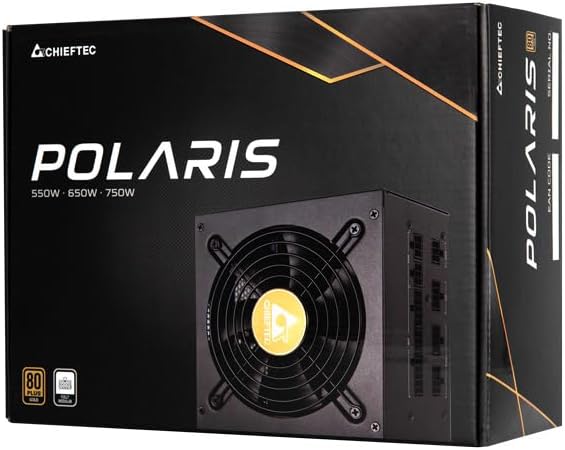
Image: The Chieftec Polaris 650W Power Supply Unit and its retail packaging.
4. Configurazione e installazione
Follow these steps to install your Chieftec Polaris 650W PSU into your personal computer system:
- Prepara il tuo sistema: Assicurati che il computer sia completamente spento e scollegato dalla presa a muro. Apri il case del computer per accedere all'area di montaggio dell'alimentatore.
- Rimuovere il vecchio alimentatore (se applicabile): If replacing an existing PSU, disconnect all cables from the components and motherboard, then unscrew and remove the old PSU.
- Montare il nuovo alimentatore: Carefully slide the Chieftec Polaris 650W PSU into the designated PSU bay in your computer case. Ensure the fan faces the correct direction (typically downwards for bottom-mounted PSUs, or as per case design for optimal airflow). Secure the PSU with the provided mounting screws.
- Collegare i cavi modulari: Identify the necessary modular cables for your system components (motherboard, CPU, graphics card, storage drives). Connect these cables to the corresponding ports on the back of the PSU. Refer to the image below for connector identification.
- Connetti ai componenti: Connect the other end of the modular cables to your motherboard (24-pin ATX and 8-pin EPS/CPU), graphics card(s) (PCIe), and storage devices (SATA/Molex). Ensure all connections are firm and fully seated.
- Gestione dei cavi: Disporre i cavi in modo ordinato per migliorare il flusso d'aria e l'estetica all'interno del case.
- Controlli finali: Double-check all connections. Ensure no loose cables are obstructing fans. Close your computer case.
- Collegare l'alimentazione CA: Plug the AC power cord into the PSU's power inlet and then into a wall outlet.

Immagine: Posteriore view of the Chieftec Polaris 650W PSU showing modular cable connection ports for M/B, SATA, PCIe, and CPU.

Image: The Chieftec Polaris 650W Power Supply Unit with its modular cables connected, ready for installation.
5. Istruzioni per l'uso
Once the Chieftec Polaris 650W PSU is correctly installed and all connections are secure:
- Accensione: Locate the power switch on the back of the PSU (next to the AC power inlet). Ensure it is in the 'I' (On) position.
- Avvio del sistema: Press the power button on your computer case. The system should power on, and the PSU fan will begin to spin, indicating normal operation.
- Funzionamento del ventilatore: The PSU features an air cooling method. The fan will operate to dissipate heat generated by the power supply components. Its speed may vary depending on the load and temperature to maintain optimal cooling and noise levels.
- Spegni: To shut down your system, use the operating system's shutdown procedure. For a complete power cut, switch the PSU's power switch to the 'O' (Off) position and unplug the AC power cord.
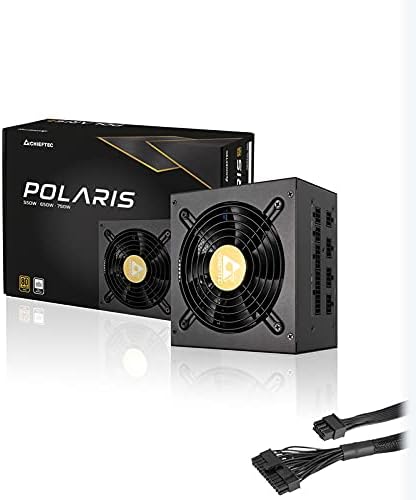
Immagine: dall'alto verso il basso view of the Chieftec Polaris 650W Power Supply, highlighting the cooling fan and protective grille.
6. Manutenzione
Proper maintenance ensures the longevity and optimal performance of your PSU:
- Pulizia della polvere: Periodically (e.g., every 3-6 months), power off your computer, unplug the AC cord, and open the case. Use compressed air to gently blow dust out of the PSU's fan and ventilation grilles. Non fare use a vacuum cleaner directly on the PSU as it can generate static electricity.
- Condizioni ambientali: Ensure the computer operates in a clean, dry, and well-ventilated environment. Avoid extreme temperatures and direct sunlight.
- Integrità del cavo: Occasionally check that all modular cables are securely connected and not frayed or damaged.
7. Risoluzione Dei Problemi
If you encounter issues with your Chieftec Polaris 650W PSU, consider the following troubleshooting steps:
- Nessun potere:
- Assicurarsi che il cavo di alimentazione CA sia collegato saldamente sia all'alimentatore che alla presa a muro.
- Check that the PSU's power switch on the back is in the 'I' (On) position.
- Verificare che la presa a muro funzioni collegandovi un altro dispositivo.
- Confirm all internal power cables (24-pin ATX, 8-pin EPS/CPU) are firmly connected to the motherboard.
- Instabilità del sistema/Arresti casuali:
- Ensure the PSU is adequately ventilated and not overheating.
- Check all power connections to components (graphics card, storage) for looseness.
- If possible, test the PSU with a different set of components or in another system to rule out other hardware issues.
- Rumori insoliti:
- A rattling or grinding noise may indicate a fan issue. Power off the system and inspect the PSU fan for obstructions (e.g., loose cables).
- If the noise persists and is not due to an obstruction, contact support.
Se questi passaggi non risolvono il problema, consultare la sezione Garanzia e supporto.
8. Specifiche
| Caratteristica | Specificazione |
|---|---|
| Marca | Capotecnico |
| Nome del modello | Polare |
| Numero modello articolo | IN-ACT-ZDLCHFOBU0087 |
| Uscita Wattage | 650 Watt |
| Fattore di forma | ATX |
| Metodo di raffreddamento | Aria |
| Tipo di connettore | ATX |
| Dispositivi compatibili | Personal computer |
| Dimensioni del prodotto (L x P x A) | 8.66 x 3.15 x 1.18 pollici (22 x 8 x 3 cm) |
| Peso dell'articolo | 4.4 libbre (2 chilogrammi) |
| Certificazione | Certificato 80Plus |
9. Garanzia e supporto
Chieftec products are manufactured to high-quality standards. For specific warranty terms and conditions, please refer to the warranty card included with your product or visit the official Chieftec websito. I periodi di garanzia e la copertura possono variare in base alla regione e al prodotto.
For technical support, product inquiries, or warranty claims, please contact Chieftec customer service through their official website or the contact information provided in your product documentation. When contacting support, please have your product model number (IN-ACT-ZDLCHFOBU0087) and proof of purchase readily available.