
Introduzione
This manual provides detailed instructions for the setup, operation, and maintenance of your CAMRY CR 1166 Weather Station. Please read this manual thoroughly before using the device to ensure proper function and longevity.
Istruzioni di sicurezza
- Tenere il dispositivo lontano dall'acqua e dall'umidità elevata.
- Non esporre il dispositivo a temperature estreme o alla luce solare diretta per periodi prolungati.
- Utilizzare solo l'adattatore di alimentazione o le batterie specificati.
- Non tentare di smontare o riparare il dispositivo da soli. Contattare personale di assistenza qualificato.
- Tenere fuori dalla portata dei bambini.
Contenuto della confezione
Verificare che tutti i componenti siano presenti nella confezione:
- CAMRY CR 1166 Weather Station (Main Unit)
- Sensore esterno remoto
- Adattatore di alimentazione CA.
- Manuale di istruzioni

Image: Main unit, remote sensor, and power adapter included in the package.
Impostare
1. Alimentazione dell'unità principale
- Utilizzo dell'alimentazione CA: Connect the provided AC power adapter to the main unit and plug it into a standard electrical outlet.
- Utilizzo delle batterie (facoltativo): Open the battery compartment on the back of the main unit and insert the required batteries (not included), observing polarity.
2. Setting up the Remote Outdoor Sensor
- Open the battery compartment of the remote sensor and insert the required batteries (not included), observing polarity.
- Place the remote sensor in a sheltered outdoor location, away from direct sunlight and rain, to ensure accurate temperature and humidity readings. Ensure it is within range of the main unit (connectivity technology: 433 MHz, 868 MHz).
3. Sincronizzazione iniziale
Once both the main unit and the remote sensor are powered, they should automatically synchronize. The outdoor temperature and humidity will appear on the main unit's display. If synchronization fails, refer to the Troubleshooting section.
Istruzioni per l'uso
Mostra sopraview
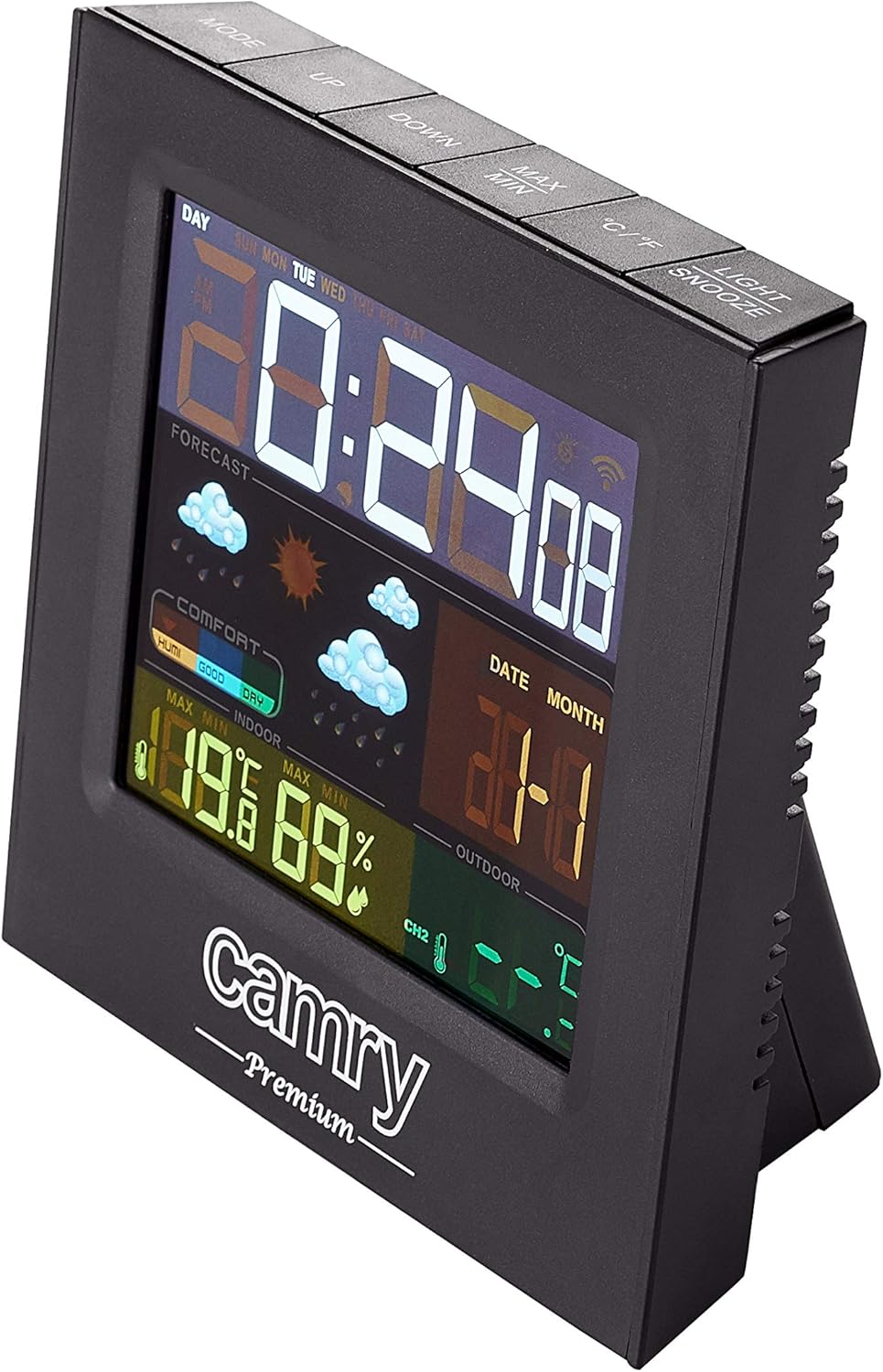
Immagine: dettagliata view of the weather station's multi-colored LCD display.
The multi-colored LCD display shows various information:
- Ora e data: Visualizza l'ora e la data correnti.
- Previsioni del tempo: Le icone indicano le condizioni meteorologiche previste (ad esempio, soleggiato, nuvoloso, piovoso).
- Temperatura e umidità interna: Current readings for the indoor environment.
- Temperatura e umidità esterne: Letture attuali dal sensore remoto.
- Indicatore del livello di comfort: Mostra il comfort interno in base alla temperatura e all'umidità.
Impostazione di ora e data
Refer to the buttons on the top of the unit (e.g., MODE, UP, DOWN).
- Premere il tasto MODALITÀ button to enter time/date setting mode.
- Utilizzare il UP E GIÙ pulsanti per regolare i valori.
- Premere MODALITÀ di nuovo per confermare e passare all'impostazione successiva.
Funzione di allarme
The device includes an alarm clock function.
- Premere il tasto MODALITÀ ripetutamente il pulsante finché non viene visualizzata l'ora della sveglia.
- Utilizzo UP E GIÙ per impostare l'ora della sveglia.
- Activate/deactivate the alarm using the designated button (e.g., ALARM ON/OFF or a long press of MODE).
Selezione unità di temperatura (°C/°F)
Premere il tasto ° C / ° F pulsante per passare da Celsius a Fahrenheit.
Manutenzione
- Pulizia: Pulire il dispositivo con un panno morbido e asciutto. Non utilizzare detergenti abrasivi o solventi.
- Sostituzione della batteria: Replace batteries in both the main unit and the remote sensor when the low battery indicator appears on the display.
- Posizionamento del sensore: Periodically check the outdoor sensor's placement to ensure it remains protected from direct weather elements and is within effective range.
Risoluzione dei problemi
| Problema | Possibile causa | Soluzione |
|---|---|---|
| Nessun display sull'unità principale. | Nessuna alimentazione o batterie scariche. | Check AC adapter connection or replace batteries. |
| Le letture esterne non vengono visualizzate o sono imprecise. | Sensor out of range, dead sensor batteries, or interference. |
|
| Inaccurate indoor temperature/humidity. | Unit placed near heat/cold source or in high humidity. | Move the main unit to a location with stable ambient conditions. |
Specifiche
| Modello: | CR 1166 |
| Marca: | macchina fotografica |
| Dimensioni del prodotto (L x P x A): | Dimensioni: 24 x 24 x 76 cm |
| Peso: | 384 grammi |
| Materiale: | Plastica |
| Colore: | Nero |
| Tipo di visualizzazione: | LCD |
| Fonte di energia: | AC Adapter or Battery |
| Tecnologia di connettività: | 433MHz, 868MHz |
| Precisione della temperatura: | Temperatura: 1-2 °C |
| Componenti inclusi: | Outdoor sensor, remote-controlled sensor |
| Paese di origine: | Cina |
Garanzia e supporto
For warranty information or technical support, please refer to the documentation provided with your purchase or contact CAMRY customer service.