
Introduzione
Thank you for choosing the Vector Optics SCRD-12 Maverick 1x22 Gen2 Red Dot Sight. This manual provides essential information for the safe and effective use of your red dot sight. Please read it thoroughly before installation and operation to ensure optimal performance and longevity of your device.
Caratteristiche del prodotto
- Design migliorato: The Gen2 model features an updated design and a stylish mount for improved aesthetics and functionality.
- Optimal Magnification: 1x magnification for true-to-life, unmagnified viewing.
- Clear Reticle: 3 MOA red dot reticle for precise aiming.
- Ampio campo di View: 22mm objective lens diameter provides a broad sight picture.
- Luminosità regolabile: 11 levels of red dot illumination for various lighting conditions, including daylight and night vision compatibility.
- Costruzione durevole: Lightweight yet robust aluminum alloy body, weighing only 188g.
- Dimensioni compatte: Overall length of 75mm, with a lens center height of 38mm.
- Montaggio versatile: Compatible with Picatinny rails, includes both Quick Detach (QD) high mount and low mount options.
- Efficienza energetica: Operates on a single CR2032 battery.
- Design impermeabile: Engineered for reliable performance in various weather conditions.
Contenuto della confezione
Dopo aver aperto la confezione, verificare che tutti gli articoli siano presenti e in buone condizioni:
- Vector Optics SCRD-12 Maverick 1x22 Gen2 Red Dot Sight
- Quick Detach (QD) High Mount
- Montatura bassa
- Copriobiettivo in gomma
- Batteria CR2032
- Adjustment Tools (Hex key, etc.)
- Panno per la pulizia
- Manuale d'uso
Identificazione dei componenti
Familiarize yourself with the various parts of your red dot sight:

Figura 1: Complessivamente view of the Vector Optics SCRD-12 Maverick 1x22 Gen2 Red Dot Sight, showing its compact design and integrated mount.

Figura 2: Lato view highlighting the elevation adjustment turret and the Quick Detach (QD) mount with safety lock button.

Figura 3: Angolato view displaying the windage adjustment turret (marked 'L' for left adjustment) and the rotary brightness control dial. The objective lens is visible with a slight tint.
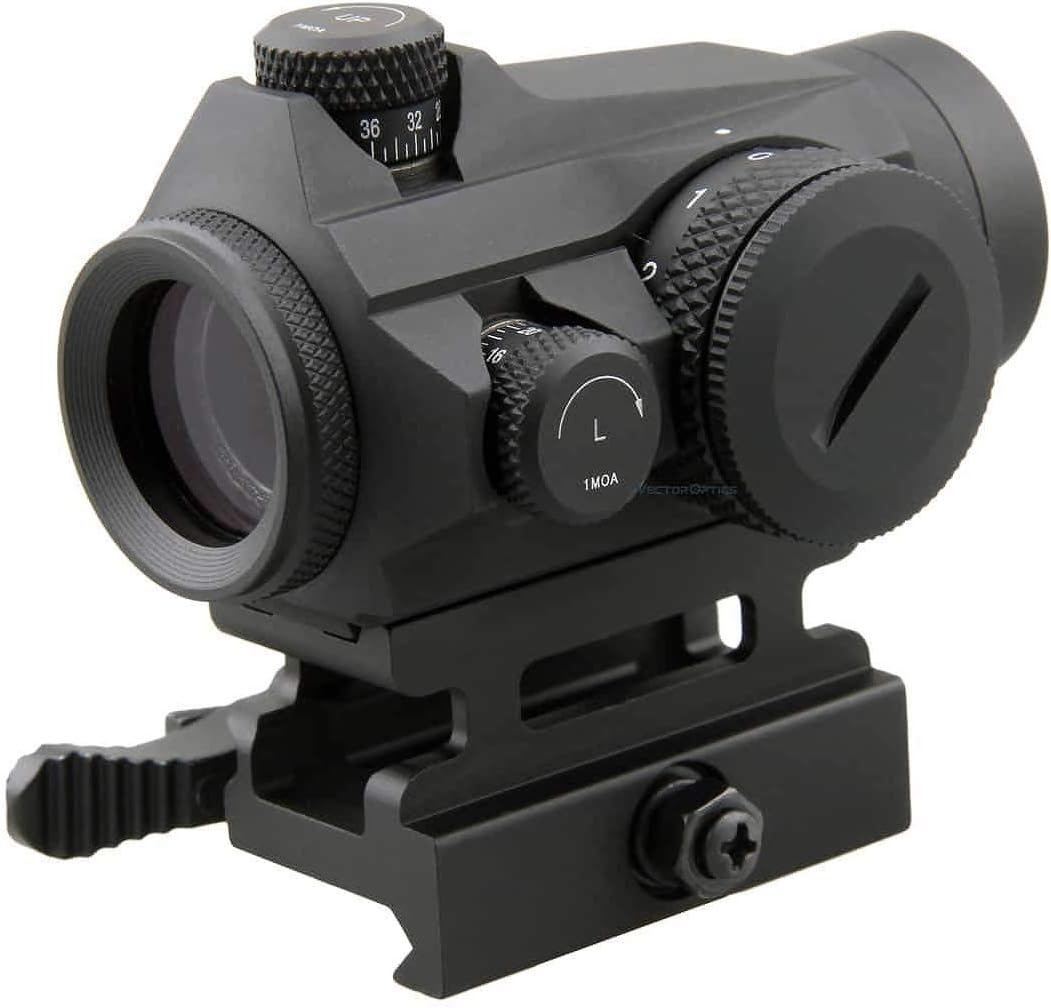
Figura 4: Posteriore view illustrating the 3 MOA red dot reticle and the sight's height of 38mm (1.5 inches) to the center of the lens. It also indicates 11 levels of red dot intensity, including 10 daylight and 1 night vision setting.
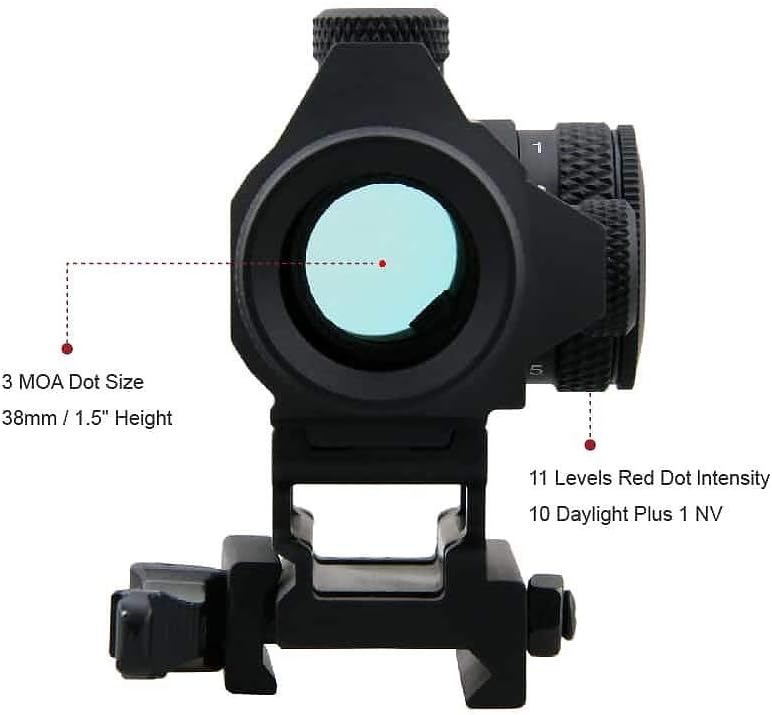
Figura 5: Avvicinamento view of the windage and elevation adjustment turrets, each marked for 1 MOA clicks, allowing for precise zeroing.

Figura 6: Metter il fondo a view of the red dot sight, showing the Quick Detach (QD) mount mechanism designed for secure attachment to Picatinny rails.
Impostare
1. Installazione della batteria
- Locate the battery compartment, typically on the side or top of the brightness adjustment dial.
- Svitare il tappo della batteria in senso antiorario.
- Insert one CR2032 battery with the positive (+) side facing outwards (towards the cap).
- Carefully screw the battery cap back on clockwise until it is finger-tight. Do not overtighten.
2. Montaggio del mirino a punto rosso
- Assicuratevi che l’arma sia scarica e puntata in una direzione sicura.
- Choose the appropriate mount (high or low QD mount) for your application.
- Allentare la leva QD sul supporto.
- Place the red dot sight onto your Picatinny rail at your desired position.
- Chiudere saldamente la leva QD finché non si blocca in posizione. Assicurarsi che il mirino sia fissato saldamente e non oscilli.
- Adjust the eye relief to a comfortable position. This red dot sight offers unlimited eye relief.
Istruzioni per l'uso
1. Accensione/spegnimento e regolazione della luminosità
- To turn on the red dot sight, rotate the brightness adjustment dial (located on the side) clockwise from the "0" (OFF) position.
- Continue rotating the dial clockwise to increase the brightness level. There are 11 distinct brightness settings.
- To decrease brightness, rotate the dial counter-clockwise.
- To turn off the red dot sight, rotate the dial counter-clockwise until it clicks into the "0" (OFF) position.
2. Zeroing the Red Dot Sight
Zeroing is the process of aligning the red dot with your point of impact. This should be done at a controlled range with proper safety precautions.
- Mount the red dot sight securely on your firearm.
- Set up a target at a known distance (e.g., 25 yards/meters).
- Fire a group of shots. Observe where the shots impact relative to your aiming point.
- Regolazione dell'elevazione: The top turret adjusts elevation. Turning the dial clockwise moves the point of impact GIÙ. Turning it counter-clockwise moves the point of impact UP. Each click represents 1 MOA (Minute of Angle) adjustment.
- Regolazione della derivazione: The side turret adjusts windage. Turning the dial clockwise moves the point of impact GIUSTO. Turning it counter-clockwise moves the point of impact SINISTRA. Each click represents 1 MOA adjustment.
- Make small adjustments, fire another group, and repeat until your point of aim matches your point of impact.
Manutenzione
1. Pulizia
- Lenti: Use the provided cleaning cloth or a soft, lint-free cloth with lens cleaning solution. Gently wipe the lenses to remove dust and smudges. Avoid harsh chemicals or abrasive materials.
- Corpo: Pulisci l'esterno del mirino con un panno morbido eamp cloth. For stubborn dirt, a mild soap solution can be used, followed by a clean, damp panno. Assicurarsi che non penetri umidità nei componenti elettronici.
2. Conservazione
- When not in use, turn the red dot sight OFF to conserve battery life.
- Conservare il mirino in un luogo fresco e asciutto, lontano dalla luce solare diretta e da temperature estreme.
- Use the rubber lens cover to protect the lenses from dust and scratches during storage.
- For long-term storage (several months or more), it is recommended to remove the CR2032 battery to prevent potential leakage and damage to the electronics.
Risoluzione dei problemi
| Problema | Possibile causa | Soluzione |
|---|---|---|
| Il punto rosso non appare. | Battery is dead or incorrectly installed. Brightness setting is too low or OFF. | Check battery orientation and replace if necessary. Increase brightness using the dial. |
| Il punto rosso è debole o lampeggia. | Low battery. Loose battery cap. | Replace battery. Ensure battery cap is securely tightened. |
| Red dot is blurry or distorted. | Dirty lens. Astigmatism (user's eye condition). | Clean lenses with a soft cloth. If the issue persists, it may be due to astigmatism; consult an eye care professional. |
| Point of impact shifts after zeroing. | Sight not securely mounted. Mount screws loose. | Ensure QD lever is fully engaged. Check and tighten any mounting screws with appropriate tools. |
Specifiche
| Caratteristica | Dettaglio |
|---|---|
| Marca | Ottica vettoriale |
| Modello | SCRD-12 Maverick 1x22 Gen2 |
| Ingrandimento | 1x |
| Diametro della lente dell'obiettivo | 22mm |
| Tipo di reticolo | Punto rosso da 3 MOA |
| Impostazioni luminosità | 11 levels (10 Daylight + 1 NV) |
| Windage/Elevation Adjustment | 1 MOA per click, Total 100 MOA Range |
| Eye Relief | Illimitato |
| Impostazione parallasse | Senza parallasse |
| Materiale | High-grade Aluminum Alloy |
| Peso | 188g |
| Lunghezza | 75mm |
| Height to Lens Center | 38mm |
| Tipo di montaggio | Picatinny Rail (QD High & Low Mounts included) |
| Tipo di batteria | CR2032 |
| Impermeabile | SÌ |
| Codice UPC | 192687275892 |
Informazioni sulla garanzia
The Vector Optics SCRD-12 Maverick 1x22 Gen2 Red Dot Sight is covered by a Garanzia del produttore di 5 anni from the date of purchase. This warranty covers defects in materials and workmanship under normal use. Please retain your proof of purchase for warranty claims. For specific terms and conditions, refer to the warranty card included in your package or contact Vector Optics customer service.
Supporto
Should you encounter any issues not covered in this manual or require further assistance, please contact Vector Optics customer support. Visit the official Vector Optics websito per informazioni di contatto, FAQ e risorse aggiuntive sui prodotti.