
Disney Frozen FR-v111V2
Disney Frozen II Sing Along Boombox with MP3 Connectivity and Microphone (Model FR-v111V2) Instruction Manual
Introduzione
This manual provides comprehensive instructions for the safe and effective use of your Disney Frozen II Sing Along Boombox. Please read this manual thoroughly before operating the device and retain it for future reference. This product allows users to sing along to built-in music or connect an external MP3 player for a personalized musical experience.
Informazioni sulla sicurezza
- Età consigliata: This product is recommended for children aged 36 months to 8 years.
- Sicurezza della batteria: Always use the specified battery type (2 AA batteries). Ensure correct polarity when inserting batteries. Do not mix old and new batteries, or different types of batteries. Remove batteries if the device will not be used for an extended period.
- Rischio di soffocamento: Potrebbero essere presenti piccole parti. Non adatto a bambini di età inferiore a 3 anni.
- Sicurezza elettrica: Do not expose the device to water or moisture. Do not attempt to disassemble or modify the device.
- Controllo del volume: Advise children to use the device at a moderate volume to protect their hearing.
Caratteristiche del prodotto
- Integrated microphone for sing-along functionality.
- Ability to connect an external MP3 player for expanded music options.
- Compact and lightweight design with a flexible handle for portability.
- Features distinct Elsa & Anna display from Disney Frozen II.
Contenuto della confezione
- 1 x Disney Frozen II Sing Along Boombox
- 1 x Real Microphone (attached)
- 1 x Manuale di istruzioni
Impostare
Installazione della batteria
- Individua il vano batteria sul retro del boombox.
- Utilizzando un piccolo cacciavite (non incluso), aprire il coperchio del vano batteria.
- Inserire 2 batterie AA nuove, assicurandosi che la polarità (+/-) sia corretta, come indicato all'interno del vano.
- Riposizionare il coperchio del vano batteria e fissarlo con la vite.

Descrizione dell'immagine: A detailed diagram illustrating the product's dimensions and identifying key components, including the battery compartment location on the back. It indicates that 2 AA batteries are required.
Connessione microfono
The microphone is pre-attached to the boombox. Ensure the microphone cable is securely plugged into its designated port on the side of the unit before use.
Istruzioni per l'uso
Accensione/spegnimento
Locate the power switch, typically on the side or back of the unit. Slide it to the 'ON' position to power on the boombox. Slide it to 'OFF' to power off.
Riproduzione di musica integrata
- Assicurarsi che il boombox sia acceso.
- Press the 'Music' button (often indicated by a musical note icon) on the front of the unit to play the pre-loaded Disney Frozen II song.
- Press the 'Music' button again to stop or cycle through available built-in tracks.
Connecting an External MP3 Player
- Locate the AUX IN jack on the side of the boombox.
- Connect one end of a 3.5mm audio cable (not included) to your MP3 player or other audio device.
- Connect the other end of the audio cable to the AUX IN jack on the boombox.
- Ensure the boombox is powered on. Play music from your connected MP3 player. The audio will now play through the boombox speakers.

Descrizione dell'immagine: An image demonstrating how to connect an external music device, such as a smartphone, to the boombox using an AUX cable for expanded music options.
Utilizzo del microfono
- With music playing (either built-in or from an external device), hold the microphone close to your mouth.
- Press and hold the 'Microphone' button (often indicated by a microphone icon) on the front of the unit to amplify your voice through the boombox speakers.
- Rilascia il pulsante per interrompere amplificando la tua voce.
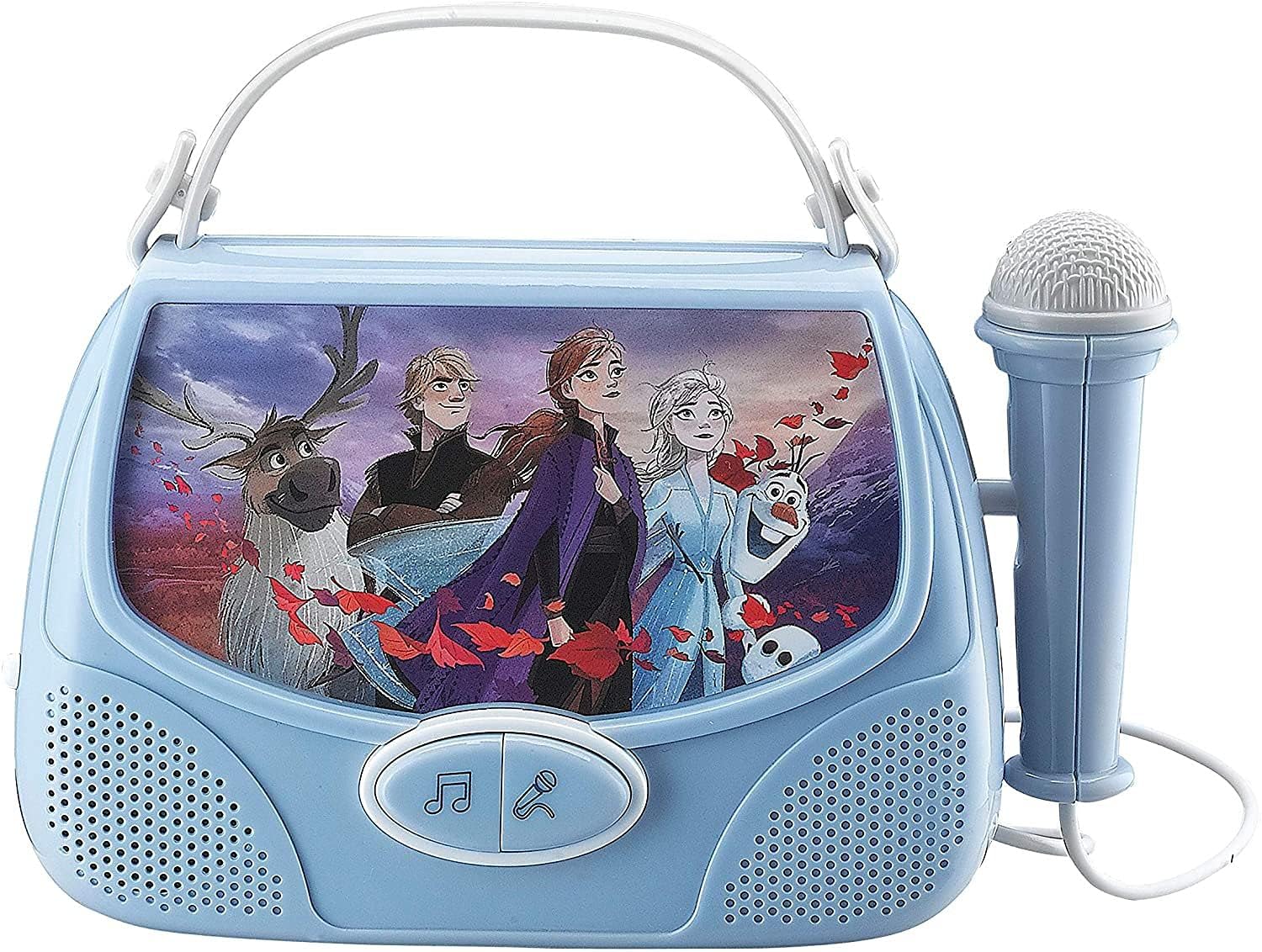
Descrizione dell'immagine: Fronte diretto view of the boombox, highlighting the character display, music and microphone buttons, and the attached microphone.
Controllo del volume
Adjust the volume using the 'Volume High' and 'Volume Low' switches or buttons, typically located on the side of the unit. For external MP3 players, you may also need to adjust the volume on the connected device.
Manutenzione
- Pulizia: Pulisci la superficie del boombox con un panno morbido e asciutto. Non utilizzare detergenti abrasivi o solventi.
- Magazzinaggio: Conservare il dispositivo in un luogo fresco e asciutto, lontano dalla luce solare diretta e da temperature estreme.
- Cura della batteria: Remove batteries if the unit is not in use for extended periods to prevent leakage.
Risoluzione dei problemi
| Problema | Possibile causa | Soluzione |
|---|---|---|
| Nessun potere | Le batterie sono scariche o inserite in modo errato. | Sostituire le batterie con nuove batterie AA, assicurandosi della corretta polarità. |
| Nessun suono dagli altoparlanti | Volume is too low; MP3 player not connected properly or its volume is low. | Increase volume on the boombox and/or the connected MP3 player. Ensure AUX cable is fully inserted. |
| Il microfono non funziona | Microphone button not pressed; microphone cable loose. | Press and hold the microphone button. Ensure the microphone cable is securely connected. |
| Suono distorto | Volume too high; weak batteries. | Abbassare il volume. Sostituire le batterie se sono scariche. |
Specifiche
| Caratteristica | Dettaglio |
|---|---|
| Dimensioni del prodotto | 10 x 2.1 x 8 pollici |
| Peso dell'articolo | 14.6 once |
| Numero di modello | FR-v111V2 |
| Età consigliata dal produttore | 36 mesi - 8 anni |
| Batterie richieste | 2 batterie AA (non incluse) |
| Marca | Disney Congelato |
| Caratteristica speciale | Compact, MP3 Connectivity |
| Componenti inclusi | Real Microphone |
Garanzia e supporto
Specific warranty information for this product is not provided in the available data. For warranty claims or technical support, please refer to the contact information provided on the product packaging or contact the manufacturer, Tech 2 Go, directly.
Ask a question about this manual
Ask about setup, troubleshooting, compatibility, parts, safety, or missing instructions. Manuals+ will review the question and use this page’s manual context to help answer it.