
1. Informazioni sulla sicurezza
Please read these safety instructions carefully before using the device. Failure to follow these instructions may result in laser radiation exposure or electric shock.
1.1 Sicurezza laser
- ATTENZIONE: This device emits a Class 2 laser. Do not stare directly into the laser beam.
- Non puntare il raggio laser su persone o animali.
- Do not disassemble or modify the device. Unauthorized repairs can cause laser radiation exposure.
- Tenere il dispositivo fuori dalla portata dei bambini.
1.2 Precauzioni generali
- Avoid using the device in direct sunlight or extremely bright conditions, as this may affect measurement accuracy and visibility of the laser point.
- Protect the device from moisture, dust, and strong impacts. The device has an IP54 rating for splash and dust protection, but it is not waterproof.
- Non conservare il dispositivo a temperature estreme.
2. Prodotto finitoview
The POPOMAN MTM100A is an advanced laser distance meter designed for accurate and efficient measurements. It features an electronic angle sensor for real-time angle display and multiple measurement modes.

Figura 2.1: POPOMAN MTM100A device dimensions and measurement mode icons. The device measures approximately 112mm in height, 50mm in width, and 25mm in depth. Icons represent various functions including single measurement, area, volume, Pythagorean, continuous measurement, and mute.
2.1 Caratteristiche principali
- Measurement Range: 0.05m to 50m
- Precisione: ± 2mm
- Electronic Angle Sensor: Real-time angle display for improved accuracy.
- Multiple Measurement Modes: Distance, Area, Volume, Pythagorean (single/double), Continuous, Addition/Subtraction, Max/Min values, Delay Measurement.
- Units: Switchable between meters (m), inches (in), feet (ft), and feet+inches (ft+in).
- LCD Display: Backlit for visibility in low-light conditions, 5-line data display.
- Data Storage: Stores up to 30 sets of measurements.
- Mute Function: Allows silent operation.
- Auto-Off: Device powers off automatically after 150 seconds of inactivity to conserve battery.
- IP54 Rating: Provides protection against dust and splashing water.
3. Impostazione
3.1 Contenuto della confezione
Verificare che tutti gli articoli siano presenti nel pacco:

Figura 3.1: The complete package includes the MTM100A device, two AAA batteries, a user manual, a protective carrying bag, a wrist strap for secure handling, and a reflective plate for enhanced visibility in challenging conditions.
- POPOMAN MTM100A Laser Distance Meter
- 2 batterie AAA da 1.5 V
- Manuale d'uso
- Borsa da trasporto portatile
- Cinturino da polso
- Piastra riflettente
3.2 Installazione della batteria
- Individuare il coperchio del vano batteria sul retro del dispositivo.
- Far scorrere il coperchio per aprirlo.
- Insert two 1.5V AAA alkaline batteries, ensuring correct polarity (+/-).
- Chiudere saldamente il coperchio del vano batterie.
4. Istruzioni per l'uso
4.1 Accensione/spegnimento
- Accensione: Premere il tasto [READ] premere una volta il pulsante per accendere il dispositivo e attivare il laser.
- Spegni: Premere e tenere premuto il tasto [OFF/CLEAR] button for 2 seconds to turn off the device. The device will automatically power off after 150 seconds of inactivity.
4.2 Misurazione di base

Figura 4.1: Proper handling of the device during a measurement, ensuring the laser is directed at the target surface.
- Turn on the device by pressing [READ]. The laser will activate.
- Puntare il raggio laser sul punto bersaglio.
- Premere [READ] again to take a single measurement. The result will be displayed on the screen.
5. Funzioni di misura
The MTM100A offers various measurement modes to suit different needs. Press the [FUNZ.] pulsante per scorrere le modalità disponibili.
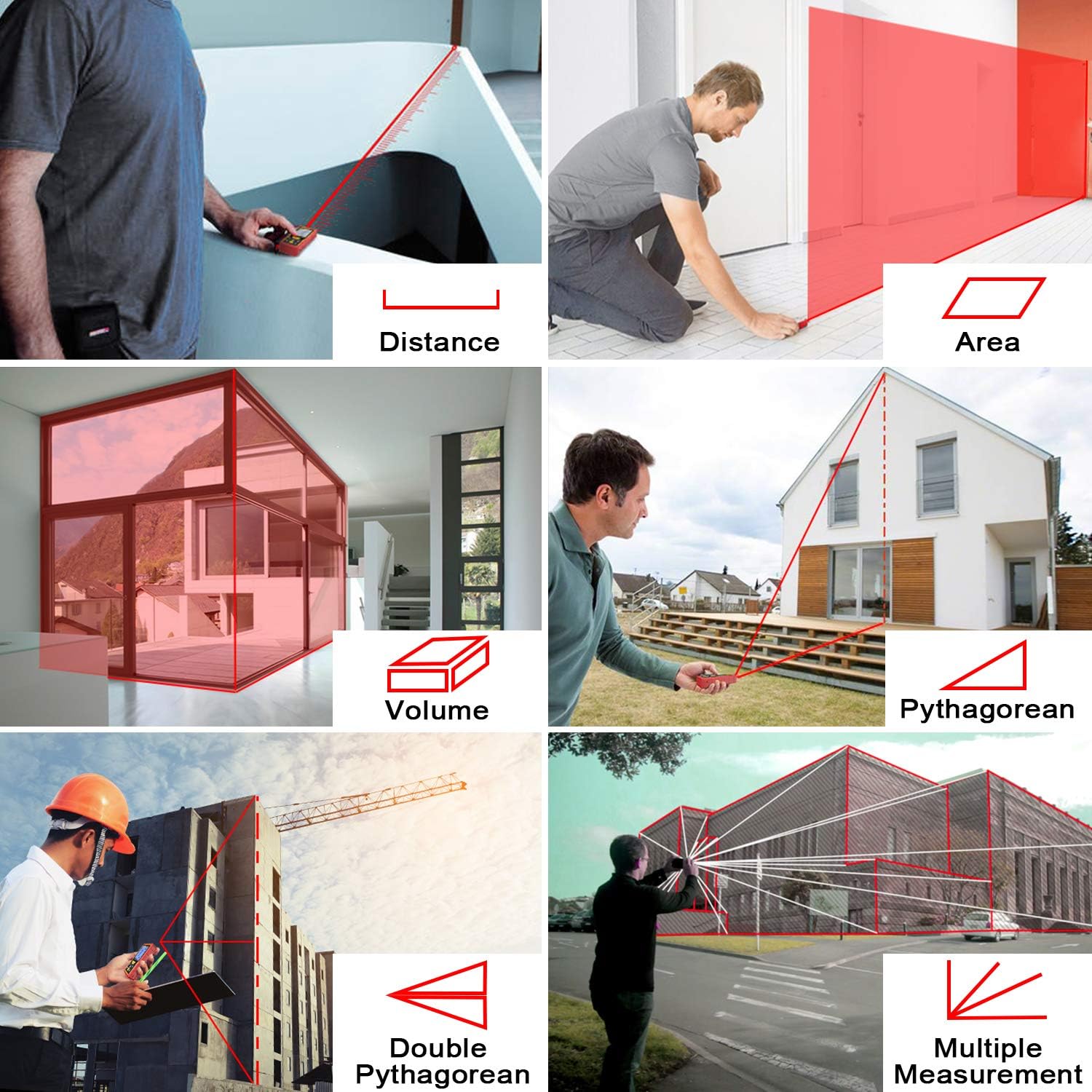
Figura 5.1: Visual guide to various measurement types: Distance, Area, Volume, Pythagorean (single and double), and Multiple Measurements.
5.1 Misurazione della distanza
This is the default mode for single linear measurements. Refer to Section 4.2 for basic operation.
5.2 Misurazione dell'area
- Premere [FUNZ.] until the area icon (square) appears on the display.
- Premere [READ] per misurare il primo lato (lunghezza).
- Premere [READ] di nuovo per misurare il secondo lato (larghezza).
- Il dispositivo calcolerà e visualizzerà automaticamente l'area.
5.3 Misura del volume
- Premere [FUNZ.] until the volume icon (cube) appears on the display.
- Premere [READ] per misurare la lunghezza.
- Premere [READ] per misurare la larghezza.
- Premere [READ] per misurare l'altezza.
- Il dispositivo calcolerà e visualizzerà automaticamente il volume.
5.4 Misurazione pitagorica
Used for indirect measurement of height or distance when direct measurement is obstructed.
5.4.1 Single Pythagorean Mode
- Premere [FUNZ.] until the single Pythagorean icon (right triangle with hypotenuse and one leg known) appears.
- Measure the hypotenuse (distance from device to top of object).
- Measure the base (distance from device to bottom of object).
- The device calculates the vertical height.
5.4.2 Double Pythagorean Mode
- Premere [FUNZ.] until the double Pythagorean icon (two right triangles sharing a leg) appears.
- Misura la prima ipotenusa (distanza tra il dispositivo e la parte superiore dell'oggetto).
- Measure the second hypotenuse (distance from device to middle point).
- Measure the base (distance from device to bottom of object).
- The device calculates the total vertical height.
5.5 Misurazione continua (Max/Min)
This mode allows for dynamic measurement, displaying the current, maximum, and minimum distances as you move the device.
- Premere [FUNZ.] until the continuous measurement icon (arrow with two lines) appears.
- Premere [READ] per avviare la misurazione continua.
- Move the device slowly. The display will show current, maximum, and minimum values.
- Premere [READ] di nuovo per interrompere la misurazione continua.
5.6 Sensore angolare elettronico
The integrated electronic angle sensor provides real-time angle readings, which can be used for more precise measurements or as a digital level.

Figura 5.2: The electronic angle sensor provides real-time angle display, enhancing measurement accuracy by showing the device's tilt.
The angle is displayed on the screen, allowing for more accurate positioning or for use in conjunction with Pythagorean functions.
5.7 Addizione e sottrazione
Dopo aver effettuato una misurazione, è possibile aggiungere o sottrarre le misurazioni successive.
- Prendi una misura.
- Premere [+] for addition or [-] for subtraction.
- Effettua la misurazione successiva. Il risultato verrà aggiunto o sottratto al totale precedente.
5.8 Misurazione del ritardo
This function allows you to set a timer before a measurement is taken, preventing device movement from affecting accuracy.
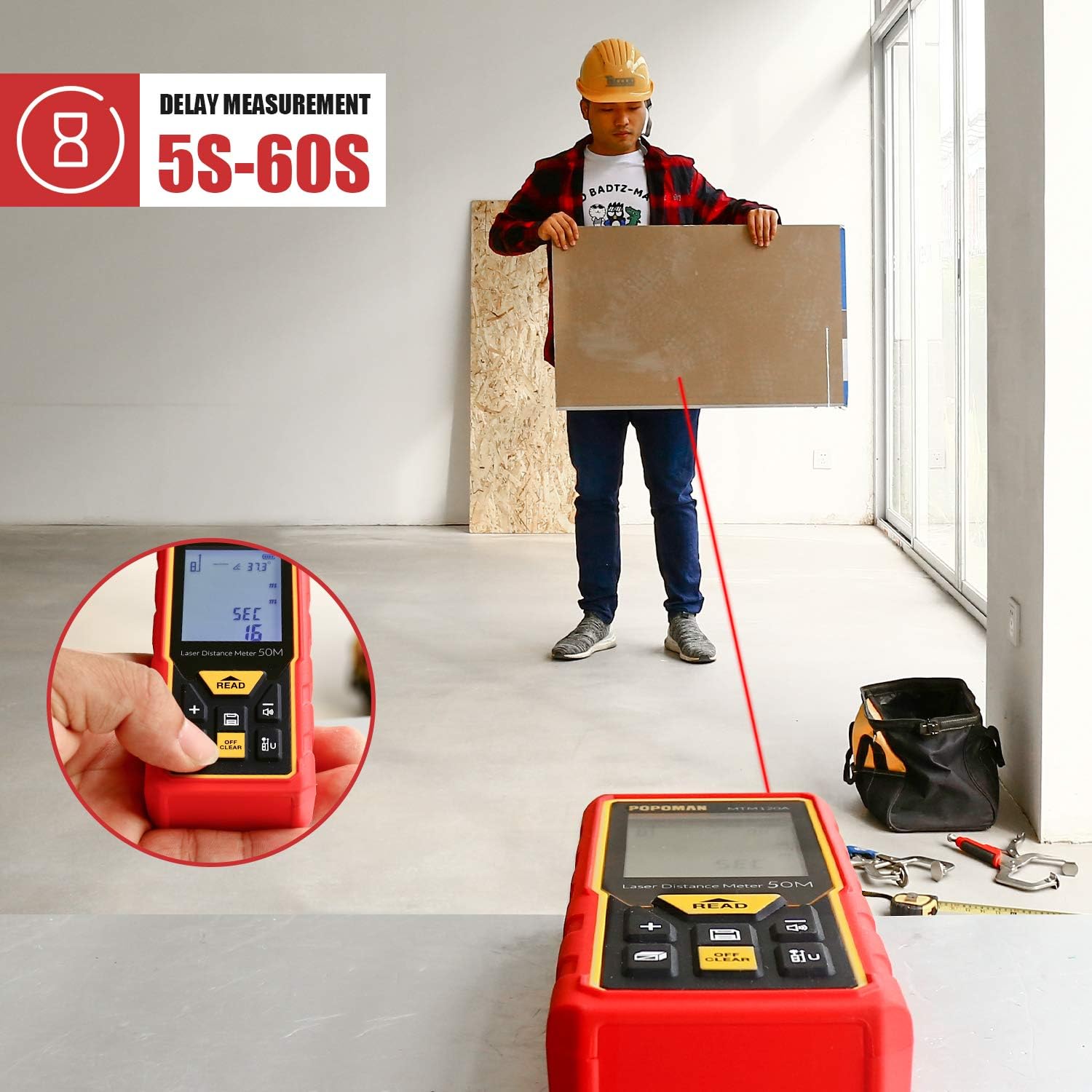
Figura 5.3: The delay measurement function allows setting a timer (5-60 seconds) before the measurement is taken, useful for stable positioning and avoiding hand shake.
- Premere e tenere premuto il tasto [FUNZ.] button to enter delay measurement setting.
- Utilizzo [+] or [-] to adjust the delay time (5-60 seconds).
- Premere [READ] to confirm the delay and start the countdown. The measurement will be taken automatically after the set time.
6. Impostazioni
6.1 Commutazione unità
Per cambiare l'unità di misura:
- Premere il tasto [UNITÀ] button (often labeled with 'U' or 'm/in/ft') to cycle through meters (m), inches (in), feet (ft), and feet+inches (ft+in).
- L'unità selezionata verrà visualizzata sullo schermo.
6.2 Funzione Mute
The mute function allows you to disable the measurement beep, useful in quiet environments.
- Premere il tasto [MUTO] button (often labeled with a speaker icon) to toggle the sound on or off.
- A speaker icon with a cross will indicate that the sound is muted.
7. Archiviazione dei dati
Il dispositivo può memorizzare fino a 30 set di dati di misurazione.
7.1 Richiamo dei dati
- Premere il tasto [MEM] button (often labeled with 'M' or a memory icon).
- Utilizzare il [+] or [-] buttons to scroll through the stored measurements.
- Premere [MEM] again to exit the memory view.
7.2 Clearing Data
Per cancellare la misurazione corrente dal display, premere il tasto [OFF/CLEAR] button once. To clear all stored data, refer to the troubleshooting section or specific instructions in the full manual if available.
8. Manutenzione
8.1 Pulizia
- Pulire il dispositivo con un panno morbido, damp panno. Non usare detergenti abrasivi o solventi.
- Pulisci con cura la lente laser con un panno morbido, come se stessi pulendo le lenti delle macchine fotografiche.
8.2 Conservazione
- Quando non si utilizzano le batterie per lunghi periodi, rimuoverle per evitare perdite.
- Conservare il dispositivo nella sua custodia portatile in un luogo fresco e asciutto, lontano dalla luce solare diretta e da temperature estreme.
9. Risoluzione Dei Problemi
If you encounter issues with your POPOMAN MTM100A, refer to the table below for common problems and solutions.
| Problema | Possibile causa | Soluzione |
|---|---|---|
| Il dispositivo non si accende | Batterie scariche o esaurite; Installazione errata della batteria | Replace batteries with new 1.5V AAA alkaline batteries; Check battery polarity. |
| Laser non visibile o debole | Bright ambient light; Dirty laser lens | Use in lower light conditions or use the reflective plate; Clean the laser lens. |
| Misurazioni imprecise | Unstable surface; Obstruction in laser path; Extreme temperatures; Target surface not reflective enough | Ensure stable positioning; Clear laser path; Use within operating temperature range; Use reflective plate on non-reflective surfaces. |
| Error message (e.g., 'ERR') | Misurazione fuori intervallo; Errore interno | Ensure target is within 0.05m-50m range; Turn off and restart the device. If error persists, contact support. |
10. Specifiche
| Caratteristica | Specificazione |
|---|---|
| Marca | POPOMAN |
| Modello | MTM100A |
| Campo di misura | 0.05 - 50 metri |
| Precisione della misurazione | ± 2.0 millimetri |
| Unità di misura | m / pollici / piedi / piedi+pollici |
| Classe laser | Classe 2, 635 nm, <1 mW |
| Tipo di visualizzazione | LCD with backlight, 5 lines |
| Archiviazione dei dati | 30 set |
| Sensore angolare elettronico | SÌ |
| Auto-Off Laser | 30 secondi |
| Auto-Off Device | 150 secondi |
| Batterie | 2 batterie alcaline AAA da 1.5 V (incluse) |
| Grado di protezione IP | IP54 (protetto da polvere e schizzi) |
| Peso dell'articolo | 121 grammi |
| Certificazioni | CE / FDA / FCC / ROHS |
11. Garanzia e supporto
POPOMAN provides a 24-month quality commitment for this product. For warranty claims or technical support, please refer to the contact information provided with your purchase documentation or visit the official POPOMAN websito.
Per ulteriore assistenza, contattare il servizio clienti:
- Websito: www.popomantools.com
- E-mail: Fare riferimento alla confezione del prodotto o websito per email di supporto specifiche.