
1. Introduzione
This manual provides essential information for the installation, operation, and maintenance of your AMD Ryzen 9 3950X 16-Core, 32-Thread Unlocked Desktop Processor. The AMD Ryzen 9 3950X is designed for high-performance computing, offering advanced capabilities for demanding applications and gaming.

Figure 1: AMD Ryzen 9 3950X Processor Retail Box. This image displays the packaging for the AMD Ryzen 9 3950X processor, highlighting the Ryzen logo and product series.
2. Caratteristiche principali
- 16 core e 32 thread di elaborazione: Offers exceptional multi-tasking and processing power for mainstream desktop applications.
- Alte prestazioni: Capable of delivering ultra-fast 100+ FPS performance in popular games.
- Sbloccato per l'overclocking: Features a 4.7 GHz max Boost clock, allowing for performance tuning.
- Advanced Socket AM4 Platform: Compatible with the AM4 platform, supporting PCIe 4.0 on X570 motherboards.
- DDR4-3200 Support: Optimized for high-speed DDR4 memory.
- 72 MB of Game Cache: Enhances gaming performance and responsiveness.
3. Specifiche
| Caratteristica | Dettaglio |
|---|---|
| Core processore | 16 |
| Elaborazione dei thread | 32 |
| Velocità di clock di base | 3.5 GHz |
| Orologio di potenziamento massimo | Fino a 4.7 GHz |
| Cache L1 totale | 1 MB |
| Cache L2 totale | 8 MB |
| Cache L3 totale | 72 MB |
| CMOS | TSMC 7nm FinFET |
| Versione PCI Express | PCIe 4.0 x16 |
| PRESA | AM4 |
| Temperatura operativa massima | 95°C |
| Supporto del sistema operativo | Windows 10 - 64-Bit Edition, RHEL x86 64-Bit, Ubuntu x86 64-Bit (OS support may vary by manufacturer) |
| Più fresco | Not included (Liquid cooler with 280mm or larger radiator recommended) |
4. Configurazione e installazione
Proper installation is crucial for optimal performance and longevity of your AMD Ryzen 9 3950X processor. Please follow these steps carefully.
4.1. Elenco di controllo pre-installazione
- Compatible AM4 motherboard (X570 recommended for PCIe 4.0).
- High-quality CPU cooler (liquid cooler with 280mm or larger radiator recommended).
- Thermal paste (if your cooler does not have it pre-applied).
- Anti-static wrist strap or ensure proper grounding to prevent electrostatic discharge (ESD).
- Screwdriver set.
4.2. Compatibilità della scheda madre
The Ryzen 9 3950X processor is designed for the AM4 socket. Ensure your motherboard has the latest BIOS update to support 3rd Gen Ryzen processors. For optimal performance, X570 motherboards are recommended to fully utilize PCIe 4.0 capabilities.
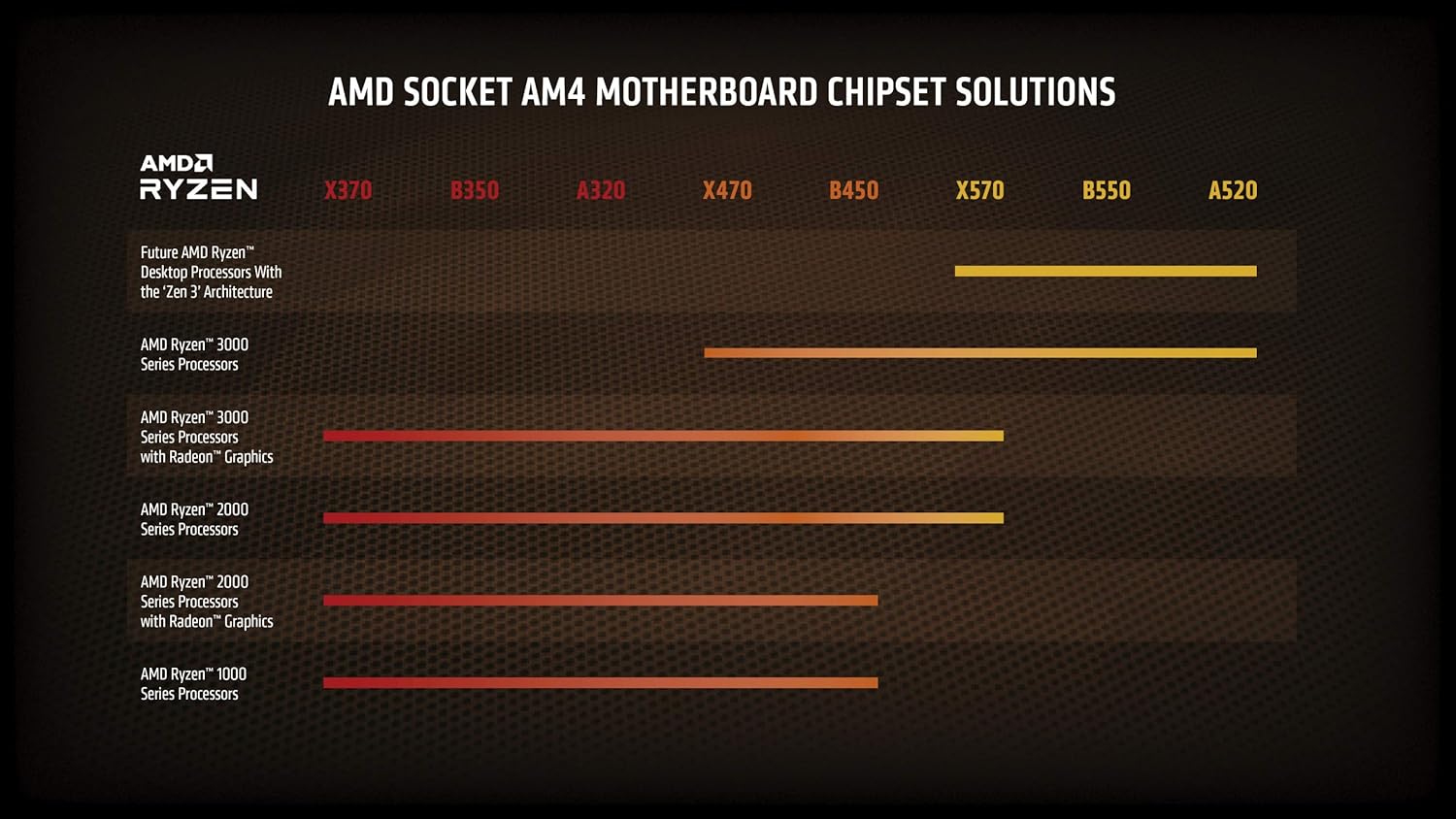
Figure 2: AMD Socket AM4 Motherboard Chipset Solutions. This chart illustrates compatibility of different AMD Ryzen processor generations with various AM4 motherboard chipsets (X370, B350, A320, X470, B450, X570, B550, A520).
4.3. Installazione del processore
- Preparare la scheda madre:
- Open the CPU socket retention arm on your AM4 motherboard.
- Carefully lift the metal load plate.
- Installare il processore:
- Align the gold triangle on the corner of the Ryzen 9 3950X processor with the triangle on the AM4 socket.
- Gently lower the processor straight down into the socket. Do not force it. If it does not seat easily, re-check alignment.
- Once seated, close the metal load plate and secure it with the retention arm.
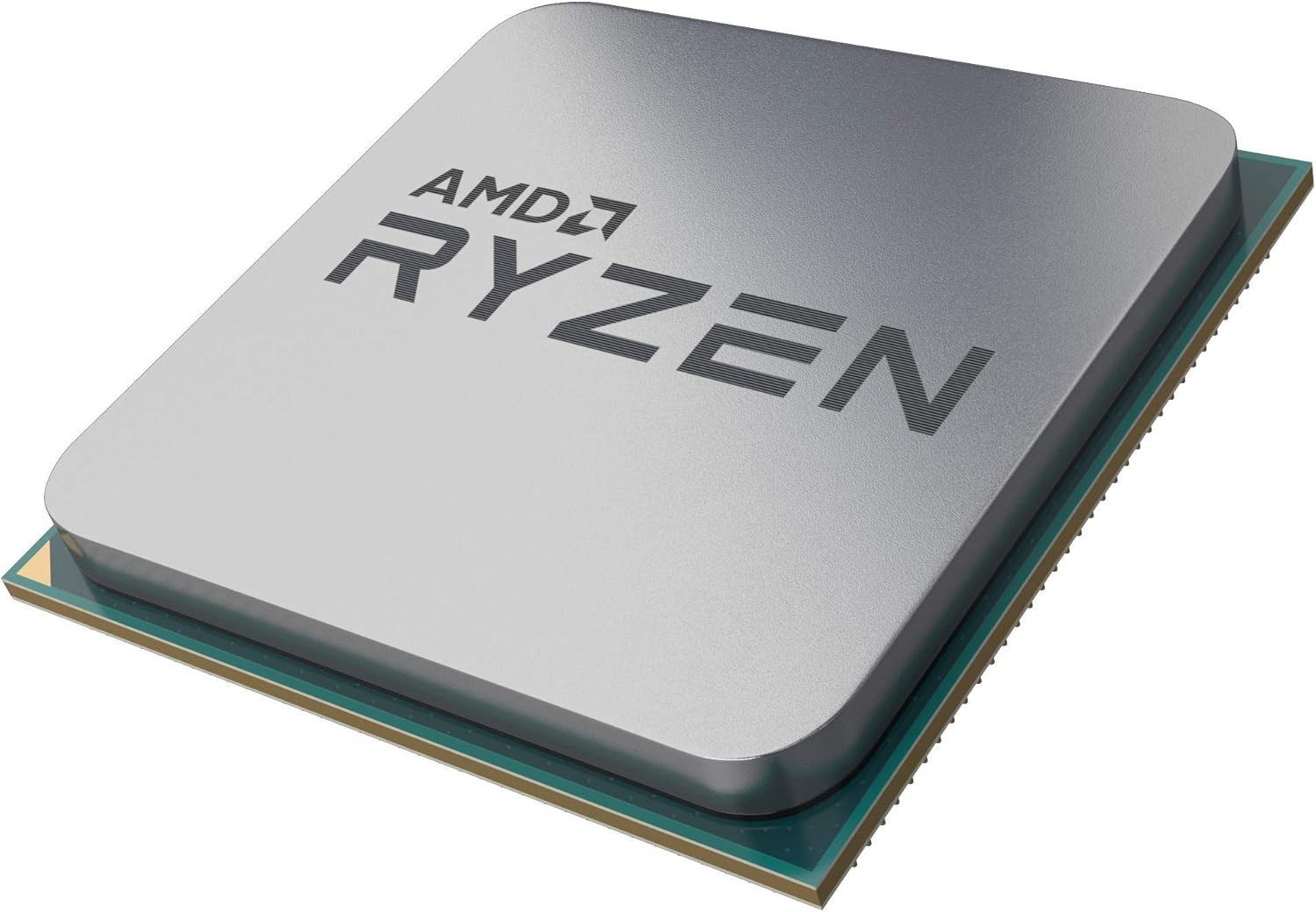
Figure 3: AMD Ryzen 9 3950X Processor. A close-up view of the AMD Ryzen 9 3950X processor, showing its integrated heat spreader (IHS) and pin grid array (PGA) design.
- Applicare la pasta termica (se necessario):
- If your cooler does not have pre-applied thermal paste, apply a small, pea-sized dot of thermal paste to the center of the processor's Integrated Heat Spreader (IHS).
- Non stendere la pasta manualmente: la pressione del refrigeratore la distribuirà uniformemente.
- Installare il dissipatore della CPU:
- Follow the specific instructions provided with your CPU cooler for installation. Ensure it is securely mounted and makes firm contact with the processor's IHS.
- Connect the cooler's fan and pump cables to the appropriate headers on your motherboard (e.g., CPU_FAN, AIO_PUMP, USB headers for control software).
5. Utilizzo del processore
Once installed, your AMD Ryzen 9 3950X processor will operate automatically within your system. Here are some general operating considerations:
- Impostazioni BIOS/UEFI: Access your motherboard's BIOS/UEFI to verify the processor is recognized correctly and to enable features like XMP/DOCP for memory.
- Installazione del driver: Install the latest chipset drivers from the AMD websito per prestazioni e stabilità ottimali.
- Monitoraggio: Use software utilities (e.g., AMD Ryzen Master, HWMonitor) to monitor CPU temperatures, clock speeds, and utilization. Maintain temperatures below 95°C for safe operation.
- Overclocking: The Ryzen 9 3950X is unlocked for overclocking. Refer to advanced guides and exercise caution if attempting to overclock, as it may affect system stability and warranty.
6. Manutenzione
Regular maintenance helps ensure the longevity and performance of your processor.
- Rimozione della polvere: Periodically clean dust from your CPU cooler and case fans to maintain efficient airflow and cooling.
- Riapplicazione della pasta termica: If you remove your CPU cooler for any reason, clean off the old thermal paste from both the CPU and cooler base using isopropyl alcohol and reapply fresh thermal paste before reinstallation.
- Aggiornamenti software: Keep your operating system, motherboard BIOS/UEFI, and AMD chipset drivers updated to benefit from performance improvements and bug fixes.
7. Risoluzione Dei Problemi
Se riscontri problemi, prendi in considerazione questi comuni passaggi per la risoluzione dei problemi:
- Nessun problema di visualizzazione/avvio:
- Assicurarsi che tutti i cavi di alimentazione (ATX a 24 pin, CPU a 8 pin) siano collegati saldamente.
- Verificare che la CPU sia correttamente inserita nel socket e che il dissipatore sia installato correttamente.
- Verificare che i moduli RAM siano completamente inseriti nei rispettivi slot.
- Confirm your motherboard BIOS/UEFI supports the Ryzen 9 3950X.
- Temperature elevate:
- Check CPU cooler mounting pressure and thermal paste application.
- Ensure case airflow is adequate and fans are operating correctly.
- Verify pump and fan speeds are set appropriately in BIOS/UEFI or software.
- Instabilità/arresti anomali del sistema:
- Aggiornare il BIOS/UEFI della scheda madre e i driver del chipset.
- Test memory stability (e.g., with MemTest86).
- In caso di overclock, ripristinare le impostazioni predefinite per verificarne la stabilità.
8. Garanzia e supporto
AMD processors typically come with a limited warranty. For specific warranty terms, conditions, and duration, please refer to the official AMD website or the documentation included with your processor. For technical support, driver downloads, and further assistance, visit the Supporto AMD websito.