
1. Introduzione
The Waytronic WT-14 Infrared Motion Sensor Activated Sound Speaker is a versatile device designed to play custom recorded messages or sounds upon detecting motion. It is suitable for various applications, including greeting visitors, providing security alerts, reminding individuals, or even deterring animals. This manual will guide you through the setup, operation, and maintenance of your device.
2. Prodotto finitoview
The WT-14 features a built-in microphone for direct recording, an infrared motion sensor for activation, and a speaker for audio output. It offers adjustable volume and flexible mounting options.
Caratteristiche principali:
- Funzione di registrazione: Built-in microphone allows instant recording of up to 130 seconds of audio.
- Ampio range di rilevamento: Infrared sensor detects motion horizontally at 120 degrees and vertically at 60 degrees, with a maximum detection distance of 4 meters (13 feet).
- Volume regolabile: Two-level volume control for clear sound output.
- Applicazioni versatili: Ideal for door entrance greetings, daily reminders, sale advertising, security alerts, and animal deterrence.
- Installazione semplice: Designed for indoor use with included mounting accessories.
- Opzioni di alimentazione: Operates on 3 AAA batteries (not included) or via a 5V USB cable.
Componenti del dispositivo:

Figura 2.1: Fronte view of the Waytronic WT-14 with labeled components.
- Sensore PIR: Detects motion to trigger audio playback.
- Button A (Record): Press and hold to record audio.
- Button B (Play/Stop): Press to manually play or stop the recorded audio.
- Speaker with Built-in MIC: Outputs sound and captures audio for recording.
- Volume/ON/OFF Switch: Controls power and adjusts sound volume.
- Custodia della batteria: Located on the back for 3 AAA batteries.
- Screw Mounting Hole & Bracket Mounting: Per un'installazione sicura.
3. Contenuto della confezione
Si prega di verificare che tutti gli articoli siano presenti nel pacco:
- Waytronic WT-14 Motion Sensor Activated Sound Speaker
- Viti di montaggio
- Ball Mounting Accessories
- Manuale dell'utente (questo documento)
4. Installazione
4.1 Alimentazione del dispositivo
The WT-14 can be powered by batteries or a USB cable.
- Installazione della batteria: Open the battery compartment on the back of the device and insert 3 AAA batteries (not included), ensuring correct polarity.
- Alimentazione USB: Connect a 5V USB cable (not included) to the USB port on the side of the device.
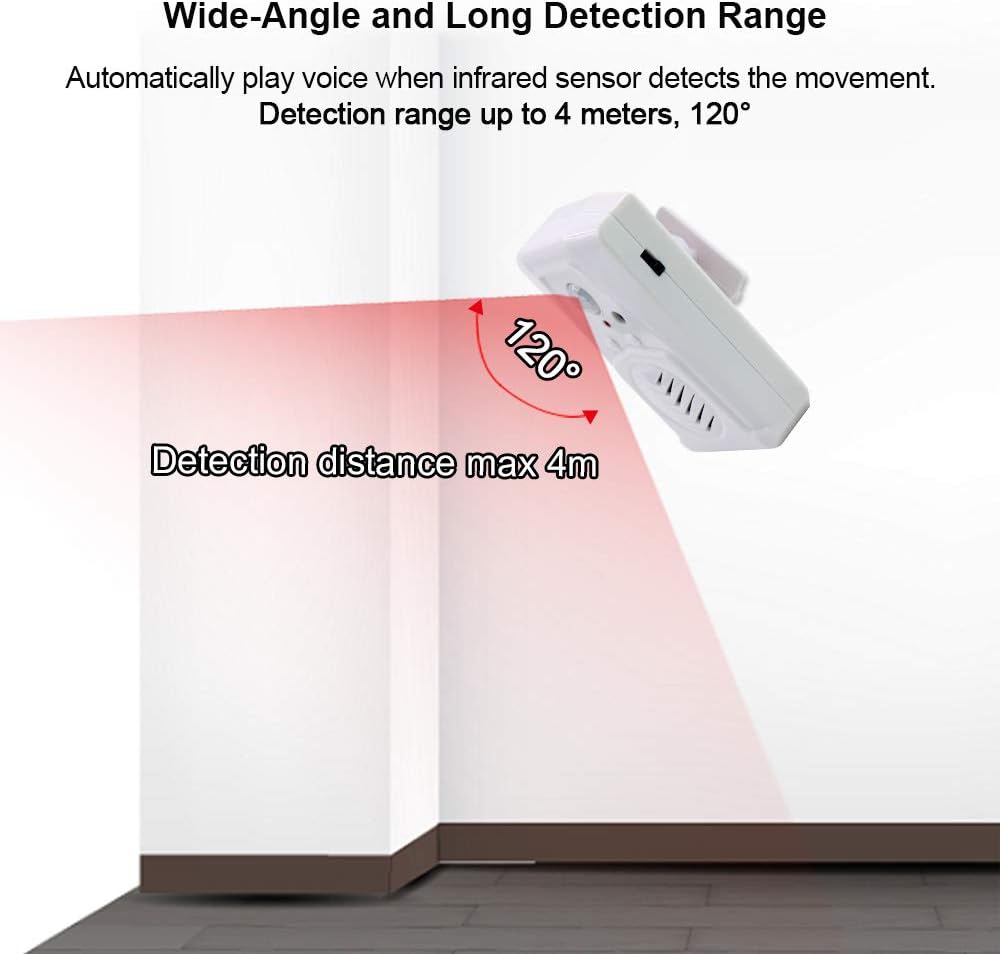
Figura 4.1: Indietro view con vano batteria e punti di montaggio.

Figura 4.2: lato view showing USB power port and switch.
4.2 Montaggio del dispositivo
The device can be mounted using the included screws and ball mounting accessories.
- Scegliere un luogo interno adatto per l'installazione.
- Attach the ball mounting bracket to the desired surface using the provided screws.
- Secure the WT-14 device onto the ball mounting accessory. The ball joint allows for 360-degree rotation to optimize the detection angle.

Figure 4.3: Ball mounting accessory for flexible positioning.
4.3 Considerazioni sul posizionamento
For optimal performance and to prevent false triggers, observe the following guidelines:
- Installare solo all'interno.
- Evitare le zone esposte alla luce solare diretta.
- Do not place near large temperature variations, such as air conditioners or heaters.
- Position the device to cover the desired detection area, considering the 120-degree horizontal and 60-degree vertical detection angles, and a maximum range of 4 meters (13 feet).

Figure 4.4: Detection range illustration.
5. Funzionamento
5.1 Registrazione audio
The WT-14 allows you to record custom audio messages directly using its built-in microphone.
- Ensure the device is powered on using the side switch.
- Premere e tenere premuto Button A (Record). The indicator light may change to confirm recording is active.
- Speak clearly into the built-in microphone. The maximum recording time is 130 seconds.
- Pubblicazione Pulsante A per interrompere la registrazione.
- Importante: For successful recording, ensure your message is longer than 3 seconds.

Figura 5.1: Audio file change methods (Button Recording only).
5.2 Riproduzione dell'audio
Audio can be played automatically via motion detection or manually.
- Motion Activated Playback: Once a message is recorded, the device will automatically play the audio when the infrared sensor detects movement within its range.
- Riproduzione manuale: Premere Button B (Play/Stop) to manually play the last recorded message. Press it again to stop playback.
5.3 Regolazione del volume
The device features a two-level volume adjustment.
- Utilizzare il Volume/ON/OFF Switch located on the side of the device to select between high and low volume settings.
6. Applicazioni
The Waytronic WT-14 can be used in various scenarios:
- Door Entrance Greeting: Welcome visitors to your shop or home with a custom message.
- Security Reminder: Play a warning message or sound when motion is detected in a restricted area.
- Daily Audio Reminder: Set up reminders for tasks or medication.
- Sale Advertising: Announce special offers in a retail environment.
- Animal Deterrent: Record sounds to repel unwanted animals from specific areas.
- Holiday/Festival Sounds: Play festive greetings or spooky sounds for Halloween.

Figure 6.1: Common applications of the sound speaker.

Figura 6.2: Esamples of animal repelling and security reminder uses.
7. Risoluzione Dei Problemi
If you encounter issues with your WT-14 device, please refer to the following common solutions:
| Problema | Possibile causa | Soluzione |
|---|---|---|
| Il dispositivo non si accende. | Le batterie sono scariche o inserite in modo errato; il cavo USB non è collegato o è difettoso. | Controllare la polarità della batteria e sostituirla se necessario. Assicurarsi che il cavo USB sia collegato saldamente a una fonte di alimentazione funzionante. |
| Recording is unsuccessful or unclear. | Recording duration too short; microphone too far; background noise. | Ensure recording for at least 3 seconds. Speak closer to the microphone. Record in a quiet environment. |
| Nessuna riproduzione audio. | Volume set to minimum; no message recorded; speaker malfunction. | Adjust volume using the side switch. Record a message if none exists. If problem persists, contact support. |
| Motion sensor not triggering or false triggers. | Incorrect placement; sensor obstructed; environmental factors. | Ensure device is placed in an optimal location, away from direct sunlight, heat sources, or air currents. Clear any obstructions from the sensor's view. |
| Il raggio di rilevamento è più breve del previsto. | Environmental interference; sensor angle. | Adjust the device's angle using the ball mounting accessory. Ensure no objects are partially blocking the sensor's field of view. |
8. Specifiche
| Caratteristica | Specificazione |
|---|---|
| Numero di modello | WT-14 (Part Number: WT-M14) |
| Marca | Waytronic |
| Colore | Bianco |
| Fonte di alimentazione | 3 AAA Batteries (not included) or 5V USB |
| Peso dell'articolo | 85 grammi (3 once) |
| Dimensioni del prodotto | 3.54 x 2.36 x 1.02 pollici |
| Portata massima di rilevamento | 4 metri (13 piedi) |
| Angolo di rilevamento orizzontale | 120 gradi |
| Angolo di rilevamento verticale | 60 gradi |
| Tempo di registrazione | Fino a 130 secondi |
| Tipo di montaggio | Door Mount / Wall Mount (with ball mounting accessory) |
| Ambiente di utilizzo | Al chiuso |
9. Informazioni sulla sicurezza
- Questo dispositivo è destinato esclusivamente all'uso in ambienti interni. Non esporre a pioggia o umidità.
- Non tentare di smontare o modificare il dispositivo. Ciò potrebbe invalidare la garanzia e causare danni.
- Tenere fuori dalla portata dei bambini.
- Smaltire le batterie secondo le normative locali. Non mischiare batterie vecchie e nuove o tipi diversi di batterie.
- Avoid placing the device in direct sunlight or near heat sources to prevent overheating and malfunction.
10. Garanzia e supporto
Waytronic provides customer support for any questions or issues you may have regarding your WT-14 device. If you encounter problems not covered in this manual or require further assistance, please contact Waytronic customer service. Refer to your purchase documentation for specific warranty details.
For inquiries, please visit the Waytronic Store on Amazon.