
Introduzione
The Nobsound Douk Audio U4 Mini is a versatile HiFi audio device designed to enhance your listening experience. It functions as a Bluetooth 5.0 receiver, USB DAC, headphone amplifier, and stereo audio preamplifier. Featuring a classic 6N3 vacuum tube, it delivers a warm, clear, and smooth sound, effectively eliminating harsh digital artifacts. This manual provides detailed instructions for setup, operation, and maintenance to ensure optimal performance.
Caratteristiche del prodotto
- Design multifunzionale: Combines Bluetooth receiver, USB DAC, headphone amplificatore e preamplifier capabilities in one compact unit.
- Connettività versatile: Supports Bluetooth 5.0 and USB audio inputs, with Stereo RCA, 3.5mm AUX, and 3.5mm headphone jack outputs.
- Suono del tubo a vuoto: Incorporates a 6N3 vacuum tube for a warm, clear, soft, and sweet audio signature, ideal for vocals, string instruments, and classical music.
- Componenti di alta qualità: Features QCC3008 Bluetooth chip (supporting APT-X, APTX-LL), TDA1543 decode chip, 2704 USB chip, and MAX9722 headphone ampchip lificatore.
- Ampia compatibilità: USB audio input is compatible with Windows, Mac, Linux systems, and Android smartphones with OTG function, offering plug-and-play convenience without drivers.
- Powerful Headphone Output: The MAX9722 headphone amplifier provides 300mW output, capable of driving most headphones with impedances from 16 to 600 ohms.
Contenuto della confezione
Si prega di controllare la confezione per verificare la presenza dei seguenti elementi:
- 1 x Douk Audio U4 Mini Headphone Amppiù vivace
- 1 x 6N3 Vacuum Tube
- 1 adattatore di alimentazione 12V
- 1 cavo USB
- 1 antenna Bluetooth
Impostare
- Installazione del tubo: Carefully insert the 6N3 vacuum tube into its socket on the top of the unit. Ensure it is seated firmly but do not force it.
- Bluetooth Antenna Connection: Avvitare l'antenna Bluetooth in dotazione al connettore 'ANT' sul pannello posteriore.
- Collegamento elettrico: Connect the 12V power adapter to the 'DC 12V' input on the rear panel, then plug the adapter into a power outlet.
- Collegamento uscita audio:
- For speakers or a power amplifier, connect the 'AUDIO OUT' RCA jacks to your audio system using RCA cables.
- For headphones, plug your 3.5mm headphones into the 'PHONE' jack on the front panel.
- Connessione ingresso audio:
- Ingresso USB: Connect your computer (Windows, Mac, Linux) or Android smartphone (with OTG) to the 'PC-USB' port on the rear panel using the supplied USB cable.
- Ingresso Bluetooth: Ensure the Bluetooth antenna is connected. The device will be discoverable for pairing.

Image: Rear panel showing 'AUDIO OUT' (RCA/3.5mm), 'PC-USB', 'ANT' (Bluetooth antenna), and 'DC 12V' power input.

Image: Illustrates USB compatibility with various operating systems including Windows, Mac, Linux, and Android devices.
Istruzioni per l'uso
- Accensione/spegnimento: Press the 'POWER' switch on the front panel to turn the unit on or off. The vacuum tube will glow when powered on.
- Selezione input: Use the 'SELECT' switch on the front panel to cycle between USB and Bluetooth inputs. The corresponding LED indicator (USB or Bluetooth) will light up.
- Accoppiamento Bluetooth:
- Switch the input to Bluetooth. The Bluetooth LED will blink, indicating it's in pairing mode.
- On your source device (smartphone, tablet, etc.), search for Bluetooth devices and select "Douk Audio U4 Mini" to pair.
- Once paired, the Bluetooth LED will remain solid.
- Controllo del volume: Adjust the 'VOLUME' knob on the front panel to control the output level for both headphone and RCA/AUX outputs. Start with a low volume and gradually increase it to a comfortable listening level.
- Utilizzo delle cuffie: When headphones are plugged into the 'PHONE' jack, the RCA/AUX outputs may be muted depending on the unit's design. Unplug headphones to resume output to speakers.

Image: Front panel showing Power switch, Select switch, Phone jack, Volume knob, and Power/USB/Bluetooth indicators.

Image: A user wearing headphones connected to the Douk Audio U4 Mini, demonstrating its headphone ampfunzione lificatore.
Manutenzione
- Pulizia: Per pulire l'unità, utilizzare un panno morbido e asciutto. Non utilizzare detergenti liquidi o solventi.
- Vacuum Tube Care: The vacuum tube can become hot during operation. Avoid touching it. If replacement is needed, ensure the unit is powered off and cooled down before handling the tube.
- Posizionamento: Posizionare l'unità su una superficie stabile e piana, lontano dalla luce solare diretta, da fonti di calore e da umidità eccessiva. Garantire un'adeguata ventilazione attorno all'unità.
- Magazzinaggio: Se si conserva l'unità per un periodo prolungato, scollegarla dall'alimentazione e conservarla in un luogo fresco e asciutto.
Risoluzione dei problemi
| Problema | Possibile causa | Soluzione |
|---|---|---|
| Nessuna uscita audio | Unit not powered on; incorrect input selected; cables loose; volume too low; headphones plugged in (muting RCA/AUX). | Check power switch; verify input selection; ensure all cables are securely connected; increase volume; unplug headphones if using RCA/AUX. |
| Il Bluetooth non si connette | Bluetooth input not selected; antenna not connected; device too far; already paired with another device. | Select Bluetooth input; ensure antenna is connected; move source device closer; disconnect from other devices and try pairing again. |
| Suono distorto | Volume too high; faulty cables; source audio quality issues; vacuum tube issue. | Reduce volume; try different cables; check source audio; ensure vacuum tube is properly seated. |
| No USB audio | USB input not selected; USB cable faulty; computer/phone not recognizing device. | Select USB input; try a different USB cable; check device manager on PC or audio settings on Mac/Android. |
Specifiche
| Caratteristica | Dettaglio |
|---|---|
| Ingresso audio | Bluetooth 5.0, USB |
| Uscita audio | Stereo RCA, 3.5mm AUX, 3.5mm Headphone Jack |
| Chip Bluetooth | QCC3008 (supports APT-X, APTX-LL) |
| Decode Chip | TDA1543 |
| Chip USB | 2704 (supports up to 16bit/96kHz) |
| Cuffia Amp Chip | MAX9722 |
| Rapporto segnale / rumore (SNR) | > 99 dB |
| Gamma dinamica | > 99 dB |
| Potenza di uscita delle cuffie | 300 mW |
| Impedenza delle cuffie | 16-600Ω |
| Distorsione Armonica Totale + Rumore (THD + N) | 0.004% (RL> 10kΩ) |
| Dimensioni (L*W*H) | 97 * 77 * 32 mm (3.82 * 3.03 * 1.26 pollici) |
| Peso unitario | 250g |
| Peso del pacco | 470g |
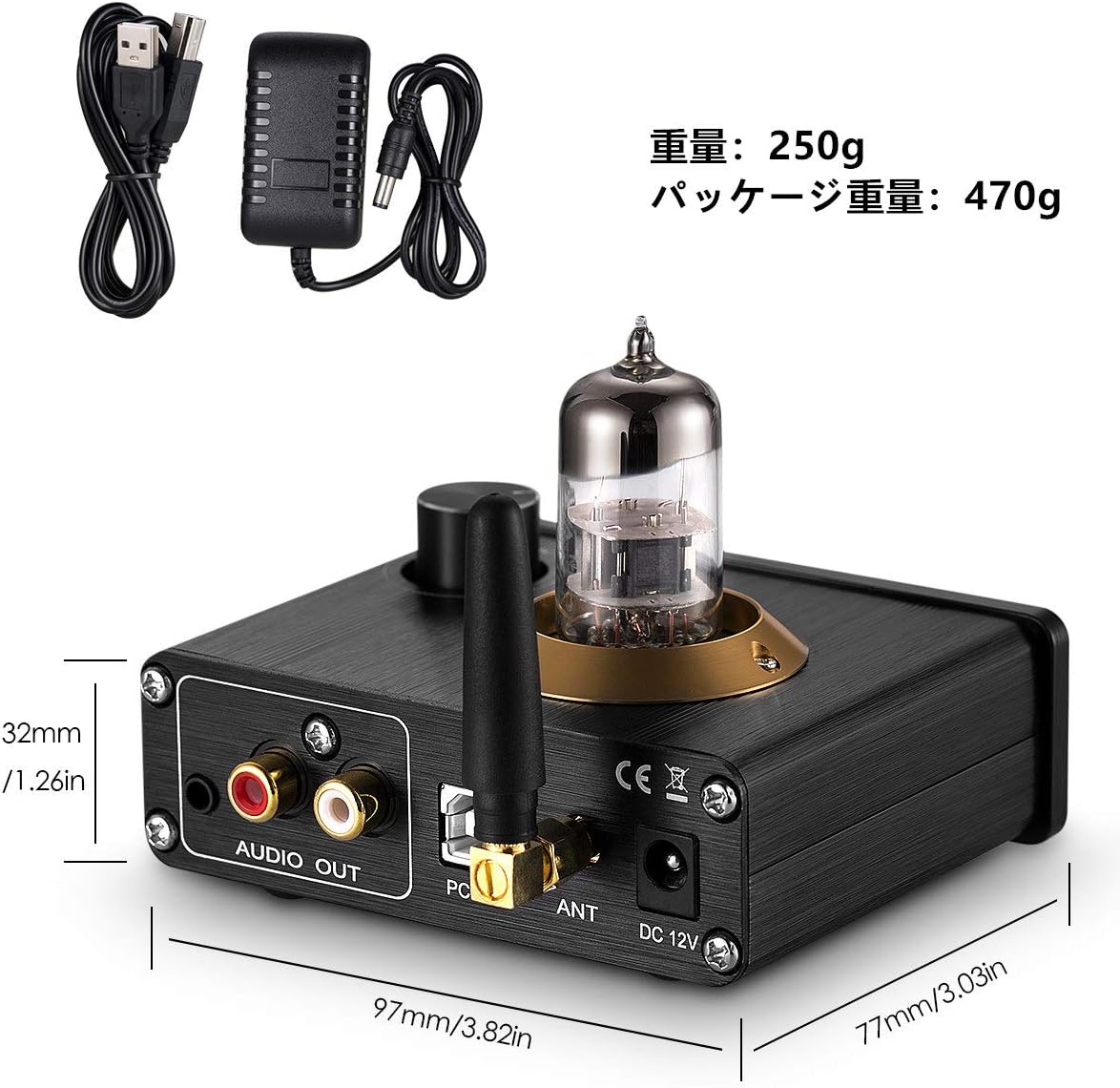
Image: Diagram showing the dimensions of the Douk Audio U4 Mini in millimeters and inches.
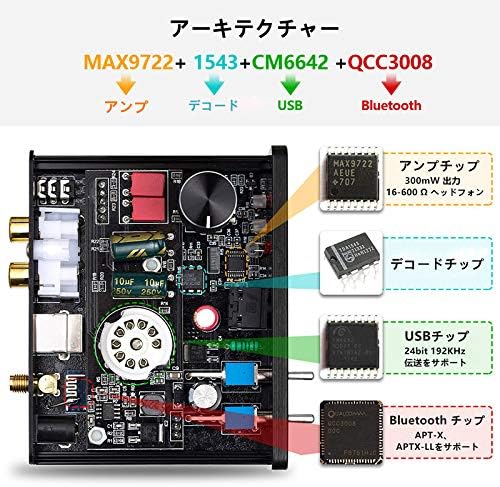
Image: Internal architecture diagram highlighting the MAX9722 (Amp), TDA1543 (Decode), 2704 (USB), and QCC3008 (Bluetooth) chips.
Garanzia e supporto
Nobsound products are designed for reliability and performance. For warranty information, please refer to the documentation included with your purchase or contact your retailer. For technical support, please visit the official Nobsound website or contact their customer service department. Please have your model number (U4 Mini or DZ077) and purchase details ready when seeking support.