
1. Introduzione
Grazie per l'acquistoasing the KINGONE K9 Portable Bluetooth Speaker. This manual provides essential information for setting up, operating, and maintaining your device. Please read these instructions carefully before use to ensure optimal performance and longevity of your speaker.
2. Prodotto finitoview
2.1 Caratteristiche
- Potenza in uscita: 5W x 2
- Versione Bluetooth: 4.0
- Audio Input Modes: Bluetooth, Line-in (AUX), TF Card
- Built-in FM Radio function
- Ricarica: DC 5V 2A
- Battery Capacity: 2200mAh internal rechargeable Lithium Polymer battery
- Compact dimensions for portability
2.2 Componenti degli altoparlanti
Familiarizza con i controlli e le porte dell'altoparlante:

Image 2.2.1: Top Control Panel. This image displays the top surface of the KINGONE K9 speaker, highlighting the control buttons including power, mode selection, play/pause, and volume up/down.

Image 2.2.2: Side Input Ports. This image shows the side panel of the KINGONE K9 speaker, featuring the TF card slot, Line-in (AUX) port, and Micro USB charging port.
3. Impostazione
3.1 Ricarica dell'altoparlante
- Connect the provided Micro USB cable to the charging port on the side of the speaker (refer to Image 2.2.2).
- Connect the other end of the USB cable to a DC 5V 2A power adapter (not included) or a compatible USB port.
- La spia di carica si accenderà durante la ricarica e si spegnerà quando la carica sarà completamente completata.
3.2 Accensione/Spegnimento
- To power on: Press and hold the Power button (usually marked with a circle icon) on the top panel until the indicator light turns on.
- To power off: Press and hold the Power button again until the indicator light turns off.
4. Istruzioni per l'uso
4.1 Associazione Bluetooth
- Ensure the speaker is powered on and in Bluetooth mode. If not, press the 'M' (Mode) button to switch to Bluetooth mode. The Bluetooth indicator light will flash, indicating it is ready for pairing.
- Abilita il Bluetooth sul tuo dispositivo mobile (smartphone, tablet, computer).
- Cercare available Bluetooth devices. Select "KINGONE K9" from the list.
- Una volta effettuato l'accoppiamento, la spia Bluetooth smetterà di lampeggiare e rimarrà fissa. Ora puoi riprodurre l'audio tramite l'altoparlante.
4.2 Line-in (AUX) Mode
- Connect one end of a 3.5mm audio cable (not included) to the Line-in port on the speaker (refer to Image 2.2.2).
- Connect the other end of the audio cable to the audio output jack of your external device.
- Press the 'M' (Mode) button on the speaker to switch to Line-in mode. The speaker will automatically play audio from the connected device.
4.3 Modalità scheda TF
- Inserire una scheda TF (Micro SD) con audio MP3 files into the TF card slot on the side of the speaker (refer to Image 2.2.2).
- Press the 'M' (Mode) button to switch to TF Card mode. The speaker will automatically begin playing music from the card.
4.4 Modalità radio FM
- Premere il pulsante 'M' (Modalità) per passare alla modalità Radio FM.
- To automatically scan and save available FM stations, press and hold the Play/Pause button. The speaker will scan and store stations.
- Use the 'Previous Track' and 'Next Track' buttons to navigate between saved FM stations.
4.5 Controllo del volume e della traccia
- Aumenta volume: Premere il pulsante '+'.
- Volume basso: Premere il pulsante '-'.
- Traccia successiva: Press the 'Next Track' button.
- Traccia precedente: Press the 'Previous Track' button.
- Riproduci/Pausa: Premi il pulsante Riproduci/Pausa.
5. Manutenzione
- Tenere l'altoparlante lontano da acqua, umidità e temperature estreme.
- Pulire l'altoparlante con un panno morbido e asciutto. Non utilizzare detergenti abrasivi o solventi.
- Evitare di far cadere l'altoparlante o di sottoporlo a forti urti.
- Quando non viene utilizzata per lunghi periodi, caricare la batteria almeno una volta ogni tre mesi per mantenerla in buone condizioni.
6. Risoluzione Dei Problemi
| Problema | Possibile soluzione |
|---|---|
| L'altoparlante non si accende. | Assicurati che la batteria sia carica. Collega l'altoparlante a una fonte di alimentazione e riprova. |
| Impossibile effettuare l'associazione tramite Bluetooth. | Make sure the speaker is in Bluetooth pairing mode (flashing indicator). Ensure your device's Bluetooth is on and within range. Forget previous pairings on your device and try again. |
| No sound in Line-in mode. | Verify the audio cable is securely connected to both the speaker and the external device. Ensure the speaker is in Line-in mode. Check the volume levels on both the speaker and the external device. |
| Scarsa ricezione radio FM. | Move the speaker to a different location, away from potential interference. Re-scan for stations. |
| Distorsione del suono. | Ridurre il volume sia dell'altoparlante che del dispositivo collegato. Assicurarsi che la sorgente audio sia di buona qualità. |
7. Specifiche
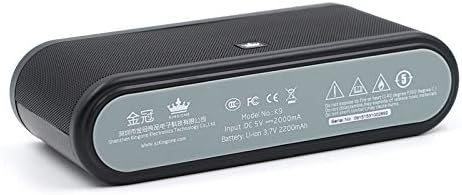
Image 7.1: Speaker Bottom Panel. This image shows the bottom panel of the KINGONE K9 speaker, displaying regulatory marks, model number, input voltage, and battery specifications.
| Specificazione | Valore |
|---|---|
| Modello | K9 |
| Potenza di uscita | 5W x 2 |
| Versione Bluetooth | 4.0 |
| Modalità di ingresso audio | Bluetooth, Line-in, TF Card |
| Ingresso di ricarica | Corrente continua 5V 2A |
| Capacità della batteria | Polimero di litio da 2200 mAh |
| Dimensioni (L x P x A) | Dimensioni: 181 mm x 46 mm x 88 mm |
| Radio FM | SÌ |
| Tecnologia di connettività | Senza fili |
8. Garanzia e supporto
For warranty information or technical support, please refer to the warranty card included with your product or visit the official KINGONE websito. Conservare la ricevuta d'acquisto come prova d'acquisto per eventuali reclami in garanzia.