
Introduzione
Grazie per l'acquistoasing the Muse M-1935 DJ Bluetooth Party Speaker. This powerful audio system is designed to deliver high-quality sound with dynamic light effects, perfect for any gathering. Featuring Bluetooth connectivity, USB playback, AUX input, and a microphone jack, it offers versatile entertainment options. Please read this manual carefully before using the device to ensure proper operation and to maximize its performance.
Importanti istruzioni di sicurezza
- Leggere queste istruzioni.
- Conservare queste istruzioni.
- Prestate attenzione a tutti gli avvertimenti.
- Seguire tutte le istruzioni.
- Non utilizzare questo apparecchio vicino all'acqua.
- Pulire solo con un panno asciutto.
- Non bloccare le aperture di ventilazione. Installare secondo le istruzioni del produttore.
- Non installare vicino a fonti di calore come radiatori, bocchette di riscaldamento, stufe o altri apparecchi (inclusi amplificatori) che producono calore.
- Proteggere il cavo di alimentazione per evitare che venga calpestato o schiacciato, in particolare in corrispondenza delle spine, delle prese di corrente e del punto in cui esce dall'apparecchio.
- Utilizzare solo accessori/componenti specificati dal produttore.
- Scollegare l'apparecchio durante i temporali o quando non viene utilizzato per lunghi periodi di tempo.
- Affidare tutti gli interventi di assistenza a personale di assistenza qualificato. L'assistenza è richiesta quando l'apparecchio è stato danneggiato in qualsiasi modo, ad esempio se il cavo di alimentazione o la spina sono danneggiati, se è stato versato del liquido o sono caduti degli oggetti nell'apparecchio, se l'apparecchio è stato esposto a pioggia o umidità, se non funziona normalmente o se è caduto.
Contenuto della confezione
Si prega di verificare che tutti gli articoli elencati di seguito siano inclusi nel pacchetto:
- Muse M-1935 DJ Party Speaker
- Telecomando
- AUX IN Cable (3.5mm)
- Microfono cablato
- Cavo di alimentazione
- Manuale d'uso

Image showing the Muse M-1935 DJ Party Speaker along with its standard accessories: a remote control, a 3.5mm AUX input cable, and a wired microphone. These components are essential for full functionality and versatile use of the speaker system.
Prodotto finitoview
The Muse M-1935 DJ is a tower-type party speaker featuring a robust design and multiple connectivity options. It includes an amber LED display for clear information, integrated color lights and flash effects for dynamic visuals, and various input ports for audio playback.
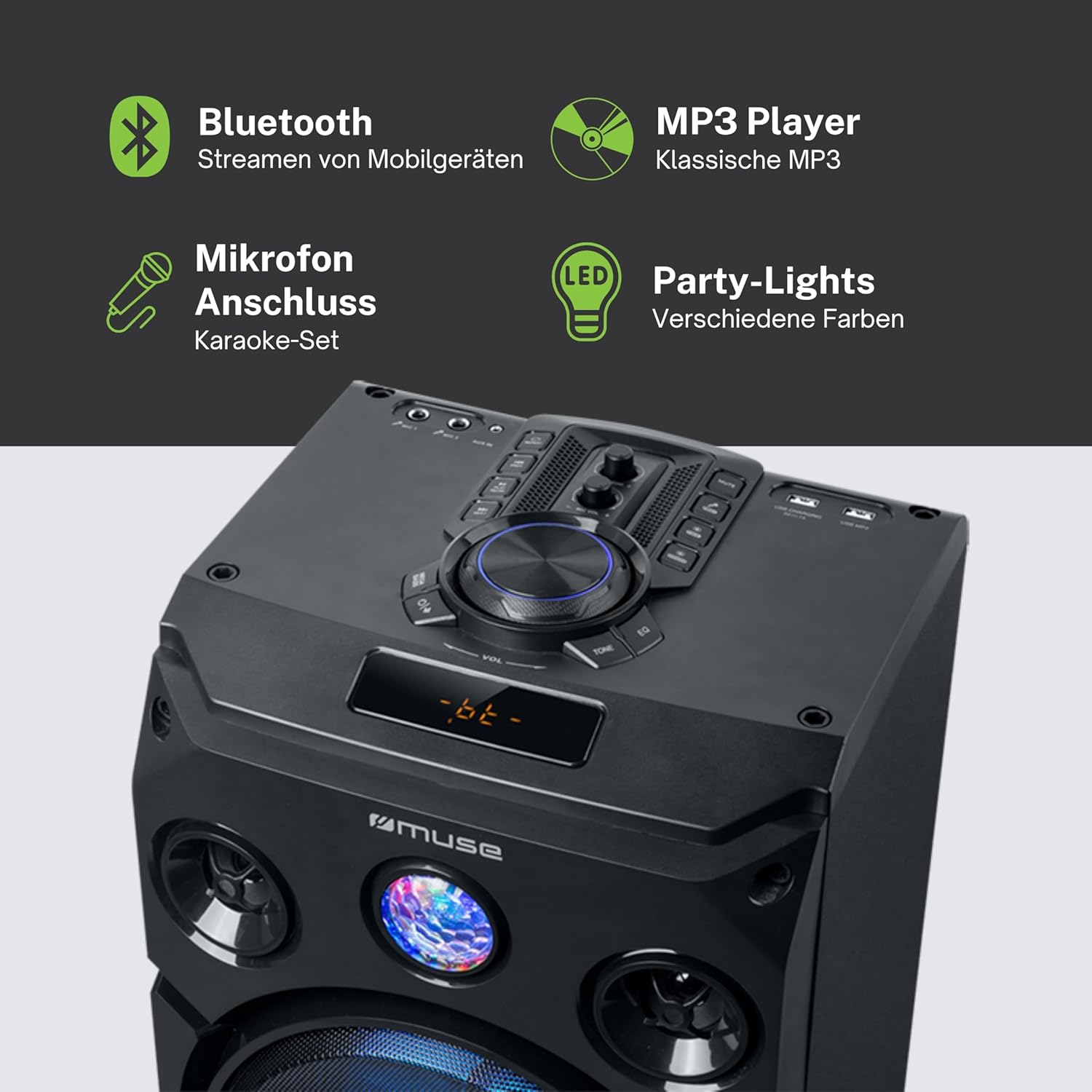
Questa immagine fornisce una descrizione dettagliata view of the speaker's key features, including the control panel at the top, the amber LED display, and the integrated party lights. Icons indicate support for Bluetooth streaming, MP3 playback via USB, microphone connection for karaoke, and dynamic party light effects.
Impostare
1. Collegamento elettrico
- Ensure the speaker is placed on a stable, flat surface.
- Connect the power cable to the AC IN port on the back of the speaker.
- Collegare l'altra estremità del cavo di alimentazione a una presa a muro standard (CA 100-240 V, 50/60 Hz).
2. Audio Connections (Optional)
- Ingresso AUX: For connecting external audio devices (e.g., smartphone, tablet, MP3 player) via a 3.5mm audio cable. Insert one end of the AUX cable into the AUX IN port on the speaker and the other end into your device's headphone jack.
- Riproduzione USB: Inserire una chiavetta USB contenente audio MP3 files into the USB port. The speaker will automatically detect and begin playing compatible files.
3. Collegamento del microfono (facoltativo)
- Connect the wired microphone to the MIC IN jack on the speaker. Adjust the microphone volume using the dedicated control on the speaker's panel.
Istruzioni per l'uso
1. Accensione/Spegnimento
- Premere il tasto ENERGIA pulsante sul pannello di controllo o sul telecomando per accendere o spegnere l'altoparlante.
2. Accoppiamento Bluetooth
- Turn on the speaker. The LED display will show the current mode.
- Premere il tasto MODALITÀ button to select Bluetooth mode. The display will show "BT" and an indicator will flash, signifying it's ready for pairing.
- Sul tuo dispositivo abilitato Bluetooth (smartphone, tablet, ecc.), attiva il Bluetooth e cerca i dispositivi disponibili.
- Select "MUSE M-1935 DJ" from the list. Once paired, the speaker will emit a confirmation sound, and the Bluetooth indicator will stop flashing.
- Ora puoi trasmettere in streaming l'audio in modalità wireless dal tuo dispositivo all'altoparlante.
3. Riproduzione USB
- Insert a USB flash drive into the USB port. The speaker will automatically switch to USB mode and begin playing MP3 files.
- Utilizzare il RIPRODUCI/PAUSA, PROSSIMO, E PRECEDENTE pulsanti per controllare la riproduzione.
4. Ingresso AUX
- Connect your external audio device to the AUX IN port using the provided 3.5mm cable.
- Premere il tasto MODALITÀ button to select AUX mode. Audio will now play through the speaker.
5. Funzionamento della radio FM
- Premere il tasto MODALITÀ pulsante per selezionare la modalità Radio FM.
- Premere e tenere premuto il tasto RIPRODUCI/PAUSA button to initiate an automatic scan for FM stations. The speaker will save found stations as presets (up to 60 presets).
- Utilizzare il PROSSIMO E PRECEDENTE pulsanti per navigare tra le stazioni salvate.
6. Utilizzo del microfono
- Ensure the microphone is connected to the MIC IN jack.
- Regolare il volume del microfono utilizzando l'apposito VOL MICROFONO manopola sul pannello di controllo.
7. Controllo degli effetti di luce
- The speaker features integrated color lights and flash effects. Use the LEGGERO button on the control panel or remote to cycle through different light modes or turn them off.
8. Controllo del volume e del tono
- Regolare il volume principale utilizzando il grande VOLUME manopola.
- Utilizzare il BASS E ALTI controls (if available) to fine-tune the audio output.

This diagram visually represents the diverse functionalities of the speaker, such as dynamic color and flash lighting, the clear amber LED display, USB connectivity for MP3 playback and charging, built-in FM radio with extensive preset memory, and a versatile AUX input for external devices.
Manutenzione
- Pulizia: Disconnect the power before cleaning. Use a soft, dry cloth to wipe the exterior of the speaker. Do not use liquid cleaners or aerosol sprays.
- Magazzinaggio: Quando non viene utilizzato per lunghi periodi, conservare l'altoparlante in un luogo fresco e asciutto, lontano dalla luce solare diretta e da temperature estreme.
- Cura della batteria: The speaker contains a Lithium-ion battery. For optimal battery life, avoid fully discharging the battery frequently and store the unit with a partial charge if not used for long periods.
Risoluzione dei problemi
| Problema | Possibile causa | Soluzione |
|---|---|---|
| Nessun potere | Power cable not connected; Power outlet faulty; Speaker turned off. | Ensure power cable is securely connected. Try a different power outlet. Press the POWER button to turn on the speaker. |
| Nessun suono | Volume troppo basso; Modalità di ingresso selezionata non corretta; Cavo audio non collegato correttamente (AUX); Bluetooth non associato. | Increase volume. Select the correct input mode (Bluetooth, AUX, USB, FM). Check audio cable connections. Re-pair Bluetooth device. |
| L'associazione Bluetooth non riesce | Altoparlante non in modalità di associazione; Dispositivo troppo lontano; Interferenza. | Ensure speaker is in Bluetooth pairing mode. Move device closer to speaker (within 10m). Avoid obstacles and other wireless devices. |
| La riproduzione USB non funziona | Unità USB non formattata correttamente; Incompatibile file tipi; unità USB danneggiata. | Assicurati che l'unità USB sia formattata in FAT32. Solo MP3 filesono supportati. Prova un'altra unità USB. |
| Il microfono non funziona | Microphone not connected; MIC VOL too low. | Ensure microphone is securely plugged into MIC IN. Increase the MIC VOL knob. |
Specifiche
| Caratteristica | Specificazione |
|---|---|
| Numero di modello | DJ M-1935 |
| Potenza di uscita | 400 Watt |
| Tipo di altoparlante | Torre |
| Tecnologia di connettività | Bluetooth, USB, AUX |
| Ingresso audio | Microphone jacks, AUX IN (3.5mm) |
| Caratteristiche speciali | Bluetooth, Color Lights, Flash Effects, Amber LED Display, FM Radio (60 presets), USB Charging |
| Fonte di alimentazione | Electric Cable, Built-in Lithium-ion Battery |
| Materiale | Plastica |
| Colore | Nero |
| Dimensioni del prodotto (L x P x A) | Dimensioni: 83.5 x 26.5 x 28.7 cm |
| Peso dell'articolo | 9.05 chilogrammi |
| Produttore | MUSA |
| Paese di origine | Belgio |

This technical drawing provides precise measurements of the Muse M-1935 DJ speaker, indicating its height (835mm), width (287mm), and depth (265mm). These dimensions are crucial for planning placement and transportation.
Garanzia e supporto
Garanzia del produttore
The Muse M-1935 DJ Party Speaker comes with a three-year warranty against manufacturing defects. Please retain your proof of purchase for warranty claims. This warranty covers defects in materials and workmanship under normal use. It does not cover damage caused by misuse, accidents, unauthorized modifications, or normal wear and tear.
Disponibilità dei pezzi di ricambio
Spare parts for this product are guaranteed to be available for 2 years from the date of purchase within the EU.
Assistenza clienti
For technical assistance, warranty service, or general inquiries, please contact Muse customer support. Refer to the official Muse websito o nella documentazione di acquisto per le informazioni di contatto più aggiornate.