
1. Introduzione
Thank you for choosing the Amcrest 1080P WiFi Pan/Tilt Indoor Security Camera (Model: ASH21-W). This manual provides essential information for setting up, operating, and maintaining your device. This camera offers advanced features such as 1080P Full-HD video, pan/tilt functionality, human and pet detection, motion tracking, two-way audio, and various storage options to ensure comprehensive monitoring of your indoor spaces.
2. Cosa c'è nella scatola
- Amcrest ASH21-W 1080P WiFi Pan/Tilt Camera
- Adattatore di alimentazione
- Cavo di alimentazione USB
- Piastra di montaggio
- Viti e ancoraggi di montaggio
- Guida rapida
Nota: A MicroSD card (up to 256GB) for local storage is not included and must be purchased separately.
3. Impostazione
3.1 Accensione
- Collegare il cavo di alimentazione USB alla porta di alimentazione della fotocamera.
- Collega l'alimentatore a una presa elettrica standard.
- The camera will power on, and the indicator light will begin to flash.
3.2 Download dell'app e registrazione dell'account
- Scarica il Amcrest SmartHome app dall'App Store (iOS) o dal Google Play Store (Android).
- Apri l'app e registrati per un nuovo account oppure accedi se ne hai già uno.
3.3 Associazione del dispositivo
- In the Amcrest SmartHome app, tap the "Add Device" icon (usually a '+' symbol).
- Select your camera model or choose to scan the QR code.
- Scansiona il codice QR che si trova nella parte inferiore della fotocamera.
- Follow the on-screen prompts to connect the camera to your 2.4GHz Wi-Fi network and set a device password.
- Name your device (e.g., "Living Room Camera", "Baby's Room").
3.4 Opzioni di montaggio
The camera can be placed on a tabletop or mounted on a wall or ceiling. Use the provided mounting plate, screws, and anchors for secure installation if mounting is desired.

Immagine 1: Amcrest ASH21-W camera on a table, showcasing il suo design compatto.
4. Istruzioni per l'uso
4.1 Vivere View e controllo Pan/Tilt
Once connected, access the live video feed through the Amcrest SmartHome app. Use the on-screen controls to remotely pan (355°) and tilt (80°) the camera lens to view diverse aree della stanza.

Immagine 2: Amcrest ASH21-W camera demonstrating pan and tilt motion with blue arrows, indicating its auto-tracking capability.
4.2 Audio bidirezionale
The camera features a built-in microphone and speaker, enabling two-way communication. Tap the "Talk" button in the app to speak through the camera, and tap "Listen" to hear audio from the camera's location.

Immagine 3: A person using a smartphone to engage in two-way talk through the Amcrest camera, showing the live feed on the phone screen.
4.3 Baby Monitor Mode
Activate Baby Monitor Mode in the app to receive notifications based on adjustable sound thresholds (VOX alarm). This feature is ideal for monitoring infants or pets, alerting you to sounds like crying or barking without requiring constant visual monitoring.
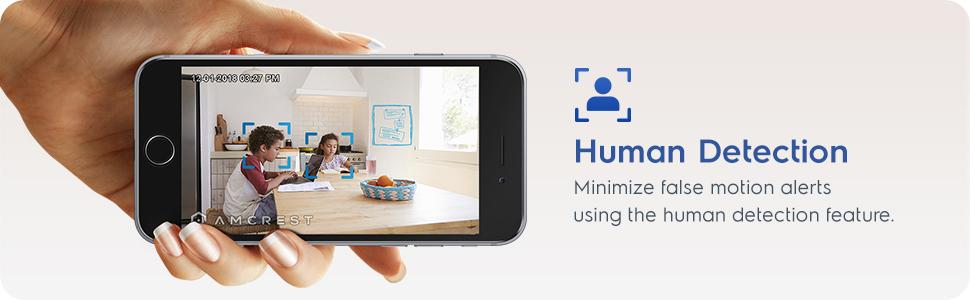
Immagine 4: Amcrest ASH21-W camera with a smartphone displaying the baby monitor interface, showing a baby in a crib and audio level graphs.
4.4 Motion Detection & Smart Tracking
Enable motion detection to receive alerts and record footage when movement is detected. Utilize the human detection filter to reduce false alarms. With Smart Tracking enabled, the camera will automatically pan and tilt to follow detected human movement across the room.

Immagine 5: Amcrest ASH21-W camera on a table, with a smartphone showing a human detection alert and a 93-degree viewing angle graphic.
4.5 Visione notturna
The camera provides clear night vision up to 33 feet in absolute darkness, ensuring continuous monitoring even in low-light conditions.
4.6 Registrazione e archiviazione
Le registrazioni possono essere archiviate in diversi modi:
- Scheda MicroSD: Inserire una scheda MicroSD (fino a 256 GB, non inclusa) nello slot della telecamera per l'archiviazione locale.
- Nuvola Amcrest: Utilize optional cloud storage services for remote access to recordings.
- Software di terze parti: Compatible with Amcrest NVRs and third-party surveillance software like Blue Iris, Synology, QNAP NAS, Zoneminder, and RTSP.

Immagine 6: Amcrest ASH21-W camera highlighting the MicroSD card slot and showing icons for Amcrest Smart Home Cloud and MicroSD Card storage options.
4.7 Alerts & Notifications
Receive instant notifications on your smartphone when motion or human detection events occur. Review event playback directly from the app.
1 video: Official Amcrest video demonstrating the Smart Home WiFi Pan/Tilt Baby Monitor Camera's features, including setup, app interface, baby monitor mode, human detection, smart tracking, night vision, and storage options.
5. Manutenzione
- Pulizia: Utilizzare un panno morbido e asciutto per pulire l'obiettivo e il corpo della fotocamera. Evitare prodotti chimici aggressivi o materiali abrasivi.
- Aggiornamenti del firmware: Regularly check the Amcrest SmartHome app for firmware updates to ensure optimal performance and security.
- Posizionamento: Ensure the camera is placed in a location with good Wi-Fi signal strength and away from direct heat sources or extreme temperatures.
6. Risoluzione Dei Problemi
- Problemi di connettività: Ensure your Wi-Fi network is 2.4GHz. Check your router's signal strength and try restarting both the camera and your router.
- Niente dal vivo View: Verify the camera is powered on and connected to Wi-Fi. Check the app for any error messages.
- Falsi allarmi: Adjust motion detection sensitivity settings in the app. Utilize human detection filters to minimize alerts from non-human movement.
- Scarsa qualità dell'immagine: Assicurati che l'obiettivo della fotocamera sia pulito. Controlla la velocità della tua connessione Internet.
- Problemi audio bidirezionali: Check volume settings on your phone and in the app. Ensure there is no obstruction to the camera's microphone or speaker.
7. Specifiche
| Caratteristica | Dettaglio |
|---|---|
| Risoluzione di acquisizione video | Formato: 1080p |
| Gamma di panoramica/inclinazione | Pan 355 °, inclinazione 80 ° |
| Viewangolo di ing | 93 gradi |
| Gamma di visione notturna | Fino a 33 piedi |
| Opzioni di archiviazione | MicroSD (up to 256GB), Amcrest Cloud, NVR/3rd Party Software |
| Connettività | Wi-Fi (2.4 GHz) |
| Audio bidirezionale | Yes (Built-in Mic & Speaker) |
| Rilevamento del movimento | Yes (Human & Pet Detection, Motion-Tracking) |
| Dispositivi compatibili | Amazon Alexa |
| Fonte di alimentazione | Elettrico con cavo (5 V CC, 5 W) |
| Dimensioni (L x P x A) | 4.17 x 3.04 x 3.04 pollici |
| Peso dell'articolo | 0.53 libbre (8.4 once) |
| Materiale | Plastica |
| Uso interno/esterno | Al chiuso |
8. Garanzia e supporto
The Amcrest ASH21-W camera comes with a full Garanzia USA di 1 anno. For any technical assistance or support, please contact Amcrest directly. Lifetime technical support is provided by Amcrest, a United States-based company headquartered in Houston, TX.
For further assistance, please refer to the Amcrest SmartHome app's support section or visit the official Amcrest websito.