
Introduzione
The Aula S6 Multi-Mode Wireless Gaming Headset is designed to provide a versatile audio experience for gaming and multimedia. This headset features three connection options: 2.4GHz wireless, Bluetooth 5.3, and a traditional 3.5mm wired connection. Its ultra-lightweight design, weighing only 180 grams, ensures comfort during extended use. The integrated microphone with smart noise reduction technology delivers clear communication, and the headset offers up to 22 hours of battery life.
Contenuto della confezione
Si prega di selezionare la casella per i seguenti elementi:
- 1 x Aula S6 Multi-Mode Wireless Gaming Headset
- 1 x 2.4GHz Wireless Connection Dongle
- 1 x Type-C to 3.5mm Audio Connection Cable (1.5 meters)
- 1 x Cavo di ricarica tipo-C USB
- 1 x Manuale utente
Prodotto finitoview
Familiarizzare con i componenti e i comandi dell'auricolare.
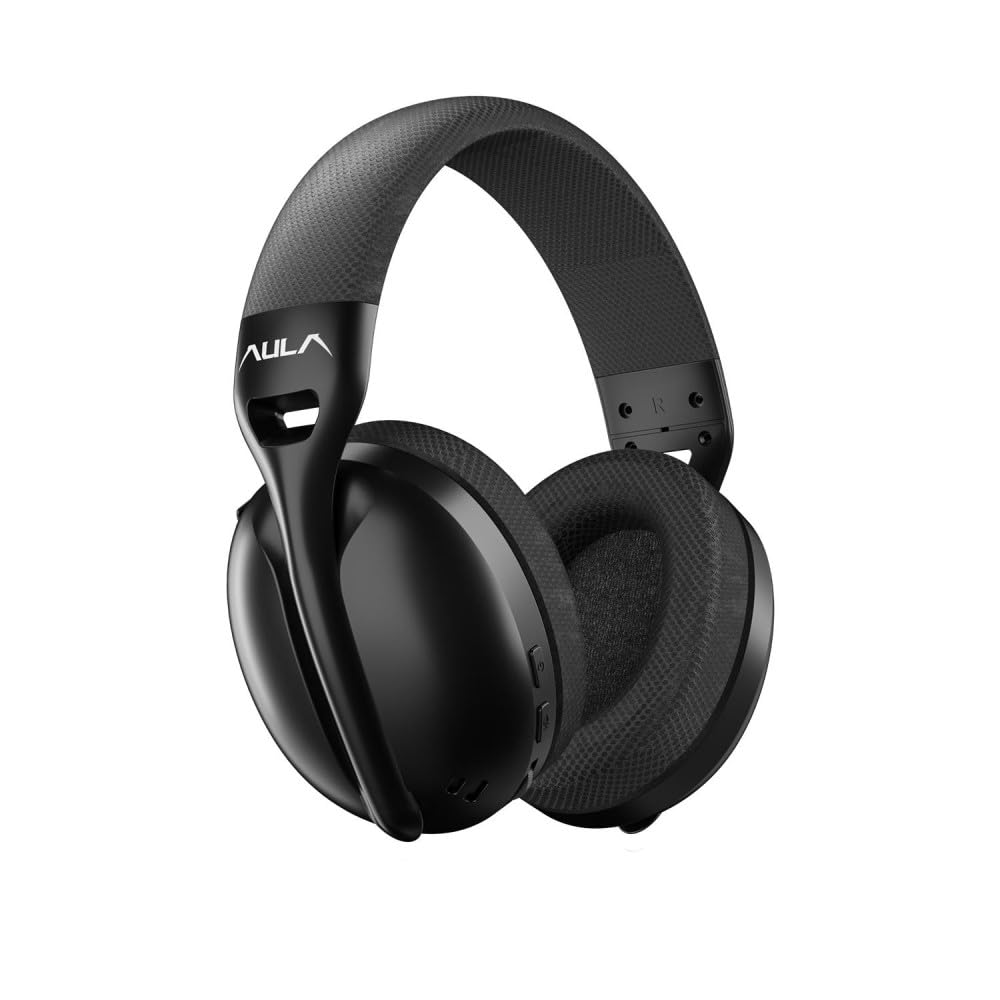
Immagine: Davanti view of the Aula S6 Multi-Mode Wireless Gaming Headset. This image displays the overall design of the headset, highlighting its earcups and headband.
Controlli e porte

Immagine: Metter il fondo a view of the Aula S6 headset. This image illustrates the location of the Type-C charging port, 3.5mm audio jack, volume wheel, and other control buttons on the earcups.
- Pulsante di accensione: Used to power the headset on/off and for pairing.
- Pulsante di cambio modalità: Toggles between Game Mode and Music Mode for optimized audio profiles.
- Ruota del volume: Regola il volume dell'audio.
- Pulsanti multifunzione: For call management (accept/reject) and switching between Bluetooth and 2.4GHz connections.
- Microfono retrattile: Mute by retracting into the earcup, unmute by extending.
- Porta di tipo C: Per caricare l'auricolare.
- Jack audio da 3.5 mm: For wired connection using the provided Type-C to 3.5mm cable.
Impostare
Ricarica dell'auricolare
Before first use, fully charge the headset. Connect the provided USB Type-C charging cable to the headset's Type-C port and the other end to a USB power source (e.g., computer, wall adapter). The LED indicator will show charging status and turn off when fully charged.
Collegamento dell'auricolare
The Aula S6 offers three connection methods:
1. 2.4GHz Wireless Connection (via Dongle)
- Insert the 2.4GHz wireless dongle into a USB port on your computer or compatible device.
- Accendere l'auricolare tenendo premuto il pulsante di accensione.
- The headset should automatically connect to the dongle. The LED indicator will confirm a successful connection.
2. Connessione Bluetooth 5.3
- Accendi l'auricolare.
- Tenere premuto il pulsante di accensione finché l'indicatore LED non lampeggia rapidamente, indicando la modalità di associazione.
- Sul tuo dispositivo (smartphone, tablet, laptop), attiva il Bluetooth e cerca i dispositivi disponibili.
- Select "Aula S6" from the list of devices to pair. The LED indicator will show a solid light upon successful connection.
3. Wired 3.5mm Connection
- Connect the Type-C end of the provided audio cable to the headset's Type-C port.
- Connect the 3.5mm end of the cable to the audio jack of your device.
- The headset will operate in wired mode, bypassing wireless functions.
Istruzioni per l'uso
Accensione/spegnimento
- Per accendere: Tenere premuto il pulsante di accensione per circa 3 secondi finché l'indicatore LED non si accende.
- Per spegnere: Tenere premuto il pulsante di accensione per circa 5 secondi finché l'indicatore LED non si spegne.
Cambio modalità (Gioco/Musica)
Press the Mode Switch button to toggle between Game Mode and Music Mode. Each mode optimizes audio settings for its intended use.
Utilizzo del microfono

Immagine: Angolato view of the Aula S6 headset with its retractable microphone extended. This shows the microphone in its active position for communication.
- Per riattivare: Extend the microphone from the earcup.
- Per disattivare l'audio: Retract the microphone fully into the earcup.
The smart noise reduction technology helps minimize ambient noise for clearer voice transmission.
Gestione delle chiamate
When connected via Bluetooth or 2.4GHz wireless, use the multi-function buttons on the headset to manage calls:
- Accetta la chiamata: Premi una volta il pulsante multifunzione.
- Rifiuta chiamata: Tieni premuto il pulsante multifunzione per 2 secondi.
- Termina chiamata: Premere una volta il pulsante multifunzione durante una chiamata.
Controllo del volume
Rotate the Volume Wheel up or down to precisely adjust the audio output level.
Connessione multi-dispositivo
The headset supports simultaneous wireless connection to two different devices. Use the multi-function buttons to switch between the connected devices as needed.
Manutenzione
To ensure the longevity and optimal performance of your Aula S6 headset, follow these maintenance guidelines:
- Pulizia: Per pulire le cuffie, utilizzare un panno morbido e asciutto. Evitare l'uso di prodotti chimici aggressivi o materiali abrasivi.
- Magazzinaggio: Conservare le cuffie in un luogo fresco e asciutto, lontano dalla luce solare diretta e da temperature estreme.
- Evitare l'umidità: The headset is not waterproof. Keep it away from water and high humidity.
- Cura del cavo: Maneggiare i cavi con cura. Evitare piegature brusche o trazioni eccessive per evitare danni.
Risoluzione dei problemi
If you encounter issues with your Aula S6 headset, refer to the following common solutions:
- Nessun suono/Volume basso:
- Controllare il livello del volume sia sull'auricolare che sul dispositivo connesso.
- Ensure the headset is properly connected (wired, Bluetooth, or 2.4GHz dongle).
- Verifica che nelle impostazioni audio del tuo dispositivo sia selezionato il dispositivo di output audio corretto.
- Microfono non funzionante:
- Ensure the microphone is extended and not muted.
- Controlla le impostazioni di ingresso del microfono sul dispositivo connesso.
- Prova il microfono con un'altra applicazione o un altro dispositivo.
- Problemi di connessione:
- Per Bluetooth: Ensure the headset is in pairing mode and within range. Forget the device on your phone and re-pair.
- Per 2.4 GHz: Ensure the dongle is securely plugged in and the headset is powered on. Try a different USB port.
- Per Wired: Ensure the 3.5mm cable is fully inserted into both the headset and the device.
- L'auricolare non si accende:
- Caricare l'auricolare per almeno 30 minuti.
- Prova un cavo di ricarica e una fonte di alimentazione diversi.
Specifiche
| Marca | Aula |
| Modello | S6 |
| Connettività | Bluetooth 5.3, 2.4GHz Wireless, 3.5mm Wired |
| Dimensioni del conducente | 40 millimetri |
| Impedenza | 120 Ohm |
| Sensibilità delle cuffie | 120 dB |
| Sensibilità del microfono | -38 ± 2 dB |
| Risposta in frequenza | Frequenza di campionamento: |
| Peso | 180 grammi |
| Durata della batteria | Fino a 22 ore |
| Materiale | Breathable Fabric and ABS Plastic |
| Dispositivi compatibili | Mobile Phone, Laptop, Desktop Computer, Game Console, Tablet, Television |
Garanzia e supporto
The Aula S6 Multi-Mode Wireless Gaming Headset comes with a 2-Year Aula Turkey Warranty.
For warranty claims, technical support, or further assistance, please contact your local Aula authorized dealer or visit the official Aula websito per le informazioni di contatto del supporto.