
1. Introduzione
This manual provides comprehensive instructions for the setup, operation, and maintenance of your Lorex N841A81 Series 8 Channel 4K Ultra HD Network Video Recorder (NVR). This NVR is designed to record and manage video surveillance from compatible cameras, offering advanced features for enhanced security monitoring.
2. Contenuto della confezione
Assicurati che tutti gli articoli elencati di seguito siano presenti nel tuo pacco:
- Lorex N841A81 NVR Unit
- Adattatore di alimentazione CA.
- Mouse USB
- Cavo Ethernet
- Cavo HDMI
- Guida rapida / Manuale di istruzioni (questo documento)
3. Impostazione
3.1 NVR Oltreview
Familiarize yourself with the front and rear panels of your NVR unit.

Figure 1: Front panel of the Lorex N841A81 NVR, showing the 4K Ultra HD NVR label and a front USB port.
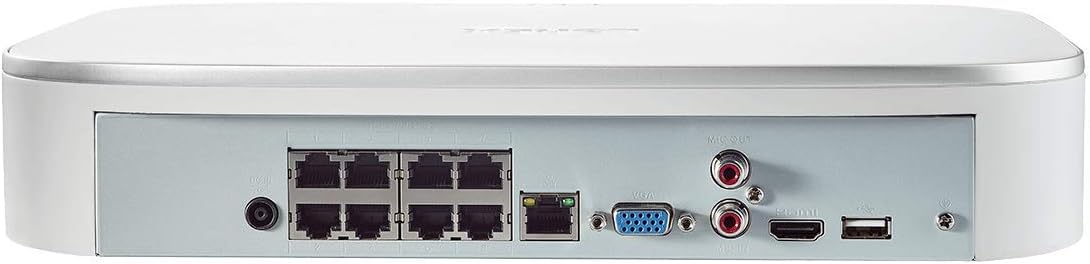
Figure 2: Rear panel of the Lorex N841A81 NVR, displaying multiple PoE ports, HDMI, VGA, USB, LAN, and audio output connections.
3.2 Connessione iniziale
- Collegamento a un display: Connect the NVR to a monitor or TV using the provided HDMI cable. Alternatively, use a VGA cable (not included).
- Collegare il mouse USB: Plug the USB mouse into one of the NVR's USB ports (front or rear).
- Connetti alla rete: Connect the NVR to your router using the provided Ethernet cable. This enables remote viewfunzionalità di rete e di comunicazione.
- Collega le telecamere: Connect your compatible IP cameras to the PoE ports on the rear of the NVR. The NVR provides power and data connection through these ports.
- Accensione: Connect the AC power adapter to the NVR's power input and then plug it into a power outlet. The NVR will power on automatically.
3.3 Procedura guidata di configurazione iniziale
Upon initial power-on, the NVR will guide you through a setup wizard to configure basic settings such as language, time zone, and password creation. Follow the on-screen prompts to complete the setup.
4. Istruzioni per l'uso
4.1 Lorex Home Mobile App
The Lorex Home app allows you to remotely view your security system from your smartphone or tablet. It also provides control over active deterrence features and allows you to receive motion-activated push notifications and email alerts.
- Scarica l'App: Download the free Lorex Home app from your device's app store.
- Aggiungi dispositivo: Scan the QR code located on your NVR to add it to your account.
- Remoto Viewin: Una volta aggiunto, puoi view live or recorded video streams from your cameras.
- Notifiche: Configure push notifications and email alerts for motion detection events.
4.2 Rilevamento intelligente del movimento
The NVR features advanced smart motion detection to reduce false alarms. It can differentiate between motion caused by people or vehicles, sending only the most relevant alerts.
- Configurazione: Access the NVR's menu via a connected display to configure motion detection zones and sensitivity for each camera.
- Avvisi: Receive push notifications or email alerts when people or vehicles are detected in configured zones.
4.3 Ricerca intelligente
Use the Smart Search feature to quickly review pippotage by filtering motion events based on area, time/date, and the type of detection (person or vehicle).
- Accesso: Navigate to the playback or search menu on your NVR.
- Filtro: Apply filters for specific events to efficiently locate relevant recordings.
4.4 Voice Control & Smart Home Compatibility
The NVR is compatible with Amazon Alexa, Google Assistant, Apple TV, and Chromecast, allowing for hands-free control and viewing.
- Integrazione: Follow the instructions provided by your smart home assistant or streaming device to link your Lorex account.
- Comandi vocali: Use simple voice commands to activate camera features or view live/recorded footage on your smart TV.
5. Manutenzione
5.1 Gestione del disco rigido
The NVR includes a local built-in security-grade 1TB hard drive, expandable up to 10TB. Regular maintenance ensures optimal recording performance.
- Capacità di archiviazione: Monitor the remaining storage space through the NVR's system settings.
- Sovrascrittura: The NVR is configured to overwrite the oldest footage quando il disco rigido è pieno, garantendo una registrazione continua.
- Backup: Eseguire regolarmente il backup dei dati importantitage su un'unità USB esterna o su un archivio di rete.
5.2 Cura generale
- Per evitare il surriscaldamento, conservare l'NVR in un luogo ben ventilato.
- Clean the exterior of the NVR with a soft, dry cloth. Avoid using harsh chemicals.
- Assicurarsi che tutti i collegamenti dei cavi siano sicuri.
6. Risoluzione Dei Problemi
If you encounter issues with your Lorex NVR, consider the following:
- Nessuna visualizzazione video: Check HDMI/VGA cable connections and ensure the display is set to the correct input source.
- Nessuna connessione di rete: Verify the Ethernet cable is securely connected to both the NVR and your router. Check your router's internet connection.
- No Camera Footage: Ensure cameras are properly connected to the PoE ports and powered on. Check camera compatibility with the NVR.
- Problemi di rilevamento del movimento: Review motion detection zone settings and sensitivity levels in the NVR menu or Lorex Home app.
- Sistema bloccato/non reattivo: Try rebooting the NVR. If the issue persists, consult the Lorex support website for firmware updates or further assistance.
7. Specifiche
| Caratteristica | Specificazione |
|---|---|
| Numero di modello | N841A81 |
| Risoluzione video | Up to 4K (8MP) Ultra HD |
| Canali | 8 IP Channels with built-in PoE ports |
| Dimensioni del disco rigido | 1 TB (Preinstalled) |
| Capacità di archiviazione della memoria (max) | 10 TB |
| Tecnologia di connettività | Cablato |
| Dispositivi compatibili | Smartphone, Tablet, Television, Smart Home Assistants |
| Dimensioni del pacco | 15.7 x 13.1 x 5.5 pollici |
| Peso dell'articolo | 6.93 libbre |
8. Garanzia e supporto
For warranty information, technical support, or to access the latest firmware and documentation, please visit the official Lorex website or contact Lorex customer service. Keep your product's model number and serial number handy when seeking support.