
ZZIPP TXZZ580
ZZIPP TXZZ580 UHF 48-Channel Wireless Microphone System User Manual
Model: TXZZ580
Introduzione
This manual provides detailed instructions for the proper setup, operation, and maintenance of your ZZIPP TXZZ580 UHF 48-Channel Wireless Microphone System. Please read this manual thoroughly before using the product to ensure optimal performance and longevity.
Prodotto finitoview
Cosa c'è nella scatola
- Two Handheld Microphones (Transmitters)
- Unità ricevente
- Adattatore di alimentazione per ricevitore
- Cavo di collegamento audio
- Manuale d'uso
Caratteristiche principali
- Tecnologia wireless UHF
- 48 canali selezionabili
- Manual and IR Configuration
- Designed for Karaoke and other vocal applications
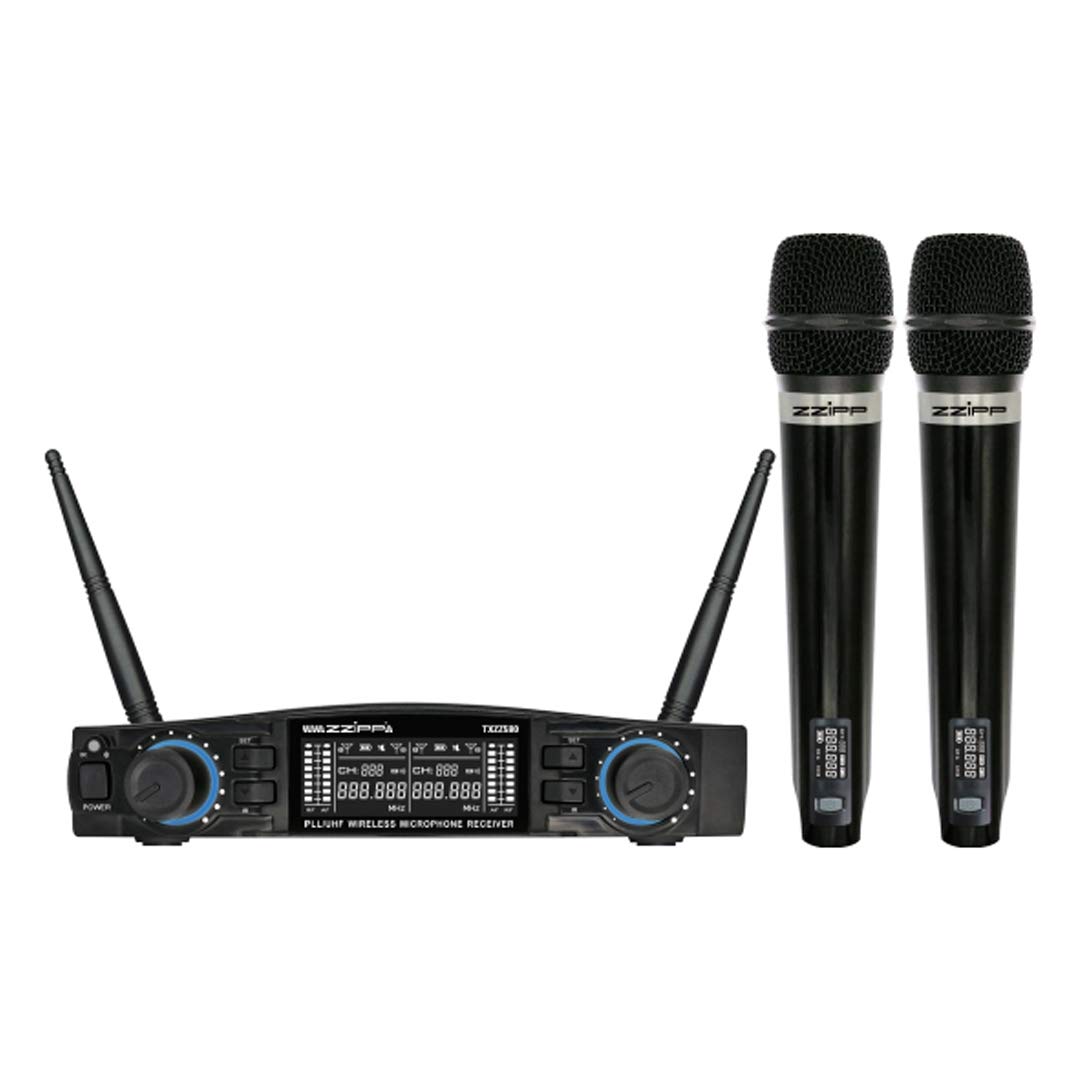
Figura 1: Sopraview of the ZZIPP TXZZ580 Wireless Microphone System, showing the receiver unit and two handheld microphones.
Impostare
- Disimballare i componenti: Estrarre con cautela tutti gli articoli dall'imballaggio.
- Posizionamento del ricevitore: Place the receiver unit on a stable surface, away from potential sources of interference such as computers, Wi-Fi routers, or other wireless devices. Ensure good line-of-sight to the area where the microphones will be used.
- Connetti alimentazione: Connect the provided power adapter to the receiver's DC input and then plug it into a suitable power outlet.
- Collega l'uscita audio: Connect the receiver's audio output (e.g., 3.5mm Jack) to the input of your mixer, amplifier, or sound system using the supplied audio cable.
- Installare le batterie nei trasmettitori: Open the battery compartment of each handheld microphone and insert the required batteries (typically AA, not always included). Observe correct polarity.
- Accensione: Turn on the receiver unit and then each handheld microphone.
- Channel Synchronization (Manual/IR):
- Configurazione manuale: Refer to the receiver's display and controls to manually select a desired channel for each microphone. Ensure each microphone is set to a unique channel to avoid interference.
- Sincronizzazione IR: For automatic synchronization, align the IR sensor on the microphone with the IR sensor on the receiver. Activate the IR sync function on the receiver, and the microphone will automatically pair to the selected channel.
- Suono di prova: Speak into each microphone to test the audio output through your sound system. Adjust volume levels as needed.
Istruzioni per l'uso
Accensione/spegnimento
- Ricevitore: Premere il pulsante di accensione sul pannello frontale per accendere o spegnere l'unità.
- Microfoni: Press and hold the power button on the microphone handle until the display illuminates (on) or turns off (off).
Selezione del canale
The system offers 48 UHF channels. If you experience interference, change the operating channel. This can be done manually on the receiver and then synchronized with the microphone via IR, or directly on the microphone if it supports manual channel adjustment.
Controllo del volume
Adjust the output volume for each microphone using the dedicated volume knobs on the receiver's front panel. Further volume adjustments can be made on your connected mixer or amppiù vivace.
Suggerimenti per l'uso
- Maintain a clear line of sight between the microphones and the receiver for optimal signal quality.
- Evitare di posizionare il ricevitore vicino a grandi oggetti metallici o altri dispositivi elettronici che potrebbero causare interferenze.
- Regularly check microphone battery levels to prevent unexpected power loss during use.
- For best sound quality, hold the microphone approximately 2-6 inches from your mouth.
Manutenzione
Sostituzione della batteria
When the microphone's battery indicator shows low power, replace the batteries immediately. Always use fresh batteries of the correct type (e.g., AA). Remove batteries if the microphones will not be used for an extended period to prevent leakage.
Pulizia
Clean the receiver and microphones with a soft, dry cloth. Do not use liquid cleaners or solvents, as these can damage the finish or internal components. For microphone grilles, a soft brush can be used to remove debris.
Magazzinaggio
Store the system in a cool, dry place, away from direct sunlight and extreme temperatures. If possible, use the original packaging or a protective case for transport and storage.
Risoluzione dei problemi
| Problema | Possibile causa | Soluzione |
|---|---|---|
| Nessun suono dal microfono |
|
|
| Interferenza o statica |
|
|
| Breve raggio d'azione |
|
|
Specifiche
- Marca: ZZIPP
- Modello: TXZZ580
- Colore: Nero
- Tipo wireless: Frequenza ultra-alta
- Numero di canali: 48
- Connettività: 3.5 mm Jack
- Fonte di energia: Corded Electric (for receiver)
- Caratteristica speciale: Manual and IR Configuration
- Uso consigliato: Il karaoke
- Componenti inclusi: Two Handheld Microphones, Receiver
Garanzia e supporto
Per informazioni sulla garanzia, supporto tecnico o richieste di assistenza, consultare la documentazione fornita con l'acquisto o contattare il rivenditore. Conservare la prova d'acquisto per eventuali reclami in garanzia.
Ask a question about this manual
Ask about setup, troubleshooting, compatibility, parts, safety, or missing instructions. Manuals+ will review the question and use this page’s manual context to help answer it.