
ASA JWM41
Manuale utente dello stereo da parete Jensen JWM41
Model: JWM41
1. Introduzione
The Jensen JWM41 is a versatile wall-mount stereo system designed for various applications, offering a comprehensive range of audio and video playback options. This unit features AM/FM radio, DVD/CD player, USB and AUX inputs, and Bluetooth connectivity for wireless audio streaming. It supports two speaker zones and provides four speaker outputs, making it suitable for multi-room or multi-area audio setups.
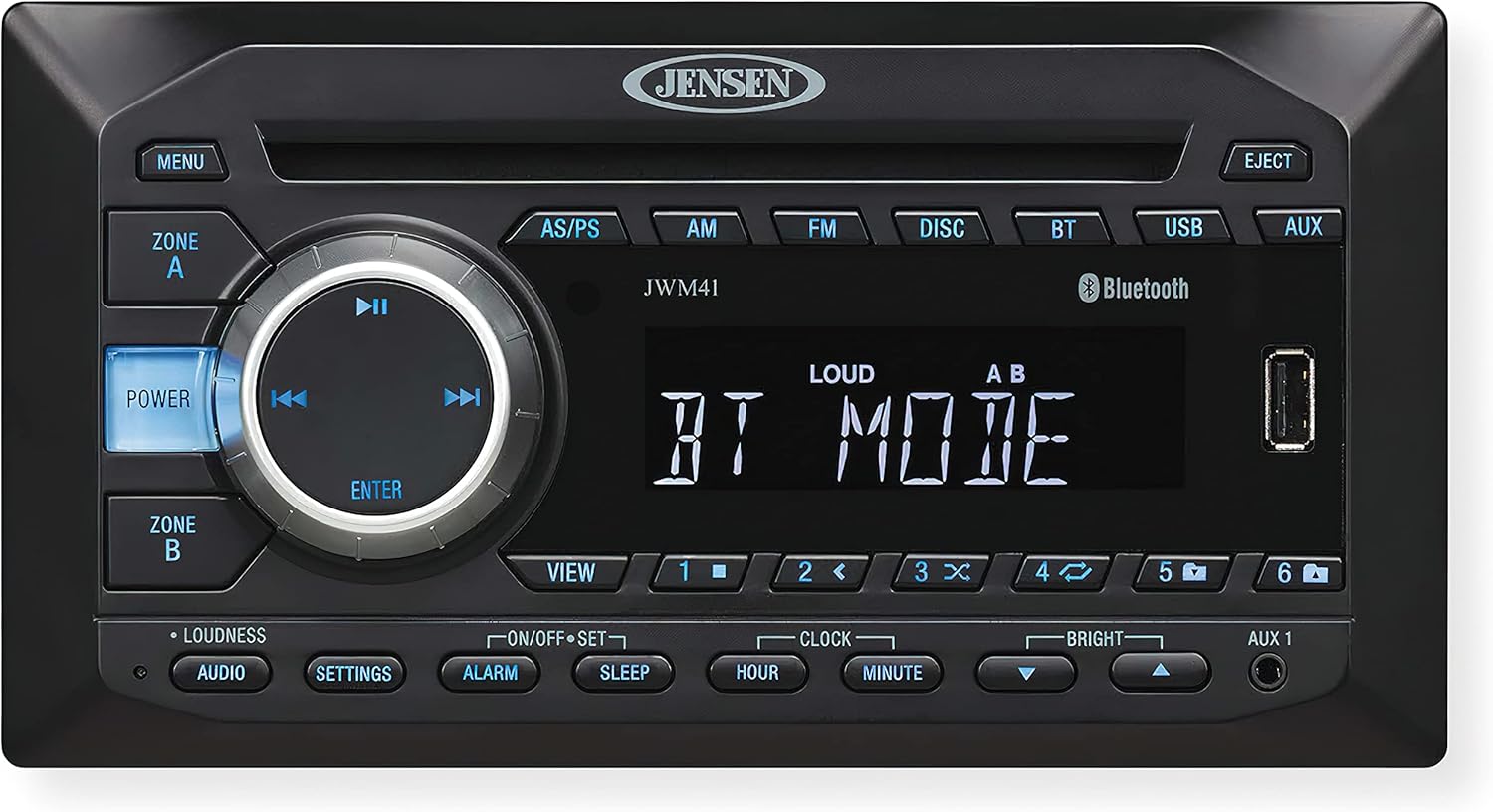
This image displays the front panel of the Jensen JWM41 Wallmount Stereo. Key features visible include the central display screen, the disc slot, a large rotary control knob with integrated playback buttons (Play/Pause, Skip), and various function buttons such as Power, Menu, Zone A/B, AM, FM, Disc, BT (Bluetooth), USB, and AUX. A USB port is also visible on the right side of the unit. The Jensen logo is prominently displayed at the top center.
2. Informazioni sulla sicurezza
Leggere attentamente tutte le istruzioni prima di utilizzare l'unità. Conservare il manuale per riferimento futuro.
- Non esporre l'unità all'acqua o all'umidità.
- Garantire una ventilazione adeguata per evitare il surriscaldamento.
- Use only the specified power supply (DC 12 Volts, Negative Ground).
- Non tentare di riparare l'unità da soli. Affidare qualsiasi intervento di manutenzione a personale qualificato.
- Before installation, ensure all shipping screws are removed from the unit. Failure to do so may cause damage.
3. Configurazione e installazione
3.1 Disimballaggio e preparazione iniziale
- Rimuovere con attenzione l'unità dalla confezione.
- Importante: Before installation, locate and remove any shipping screws. These are typically small screws designed to secure internal components during transit.
- Verify all accessories are present, including the wireless remote control.
3.2 Montaggio dell'unità
The JWM41 is designed for wall-mount installation. Ensure the mounting surface is stable and can support the unit's weight (approximately 2.41 pounds). The overall dimensions are 8.23" (W) x 6.56" (D) x 4.37" (H), with mounting dimensions of 7.09" (W) x 5.24" (D) x 3.47" (H).
- Mark the desired mounting location.
- Drill pilot holes as necessary.
- Secure the unit using four M3x20mm screws (not included with the unit).
3.3 Collegamenti di cablaggio
Prima di effettuare qualsiasi collegamento elettrico, assicurarsi che tutta l'alimentazione sia scollegata.
- Energia: Connect the unit to a DC 12 Volt, negative ground power source. Operating voltage è 11-16 V c.c.
- Relatori: Connect up to four speakers. The unit supports 2 speaker zones and 4 speaker outputs. It is compatible with 4-8 ohm speakers, with a 4 ohm load minimum.
- Ingresso A/V AUX anteriore: Use the 3.5mm jack for connecting external audio/video devices.
- Rear Audio RCA Input/Output: One rear audio RCA input and one rear RCA output are available.
- RCA Composite Video Output: One RCA composite video output is provided. Note: This unit does NOT have an HDMI port.
- Porta USB: The front USB port supports MP3/WMA playback.
4. Istruzioni per l'uso
4.1 Controlli di base
- Pulsante di accensione: Premere per accendere o spegnere l'unità.
- Pulsante MENU: Access various settings and options.
- ZONE A / ZONE B Buttons: Control audio output for independent speaker zones.
- Rotary Knob (Volume/ENTER): Ruotare per regolare il volume. Premere per confermare le selezioni nei menu.
- Playback Controls (▶▶ / ◀◀ / ▶▶): Use for Play/Pause, Skip Forward, and Skip Backward during media playback.
- EJECT Button: Ejects a disc from the disc slot.
4.2 Selezione della sorgente
Press the corresponding button on the front panel to select an audio/video source:
- AM / FM: Selects AM or FM radio tuner.
- DISCO: Selects the DVD/CD player.
- Bluetooth (Bluetooth): Attiva la modalità Bluetooth per lo streaming audio wireless.
- USB: Seleziona l'ingresso USB per la riproduzione multimediale.
- AUSILIARI: Selects the Auxiliary input (front 3.5mm or rear RCA).
4.3 Funzionamento della radio
- tuning: Use the skip buttons (◀◀ / ▶▶) to manually tune or seek for stations.
- Preselezioni: The unit features 30 preset stations (12 AM / 18 FM). Use the AS/PS button to auto-store or scan presets.
Riproduzione di dischi 4.4
The JWM41 supports CD, CD-R, CD-RW, DVD, DVD+RW, DVD-RW, DVD-Video, MPEG-4, VCD, JPEG, CD-DA, MP3, and WMA formats.
- Insert a disc into the slot. The unit will automatically switch to DISC mode.
- Use the playback controls for Play/Pause, Skip Track, and Fast Forward/Rewind.
- Press EJECT to remove the disc.
4.5 Funzionamento Bluetooth
The unit supports Bluetooth streaming audio (A2DP) and control (AVRCP).
- Press the BT button to enter Bluetooth mode.
- On your Bluetooth device, search for "JWM41" and pair with it.
- Una volta effettuato l'abbinamento, puoi trasmettere l'audio in modalità wireless dal tuo dispositivo allo stereo.
4.6 Impostazioni audio
Access audio settings via the AUDIO or SETTINGS buttons.
- Loudness: Enhances bass and treble at low volumes.
- Electronic Bass, Treble, Balance, Fader Controls: Adjust these settings to customize your audio output.
4.7 Funzioni orologio e timer
The unit includes a clock with alarm and sleep timer functions.
- Impostazione dell'orologio: Use HOUR and MINUTE buttons to set the time.
- Allarme: Set an alarm time using the ALARM button.
- Sveglia: Use the SLEEP button to set a timer for the unit to automatically turn off.
4.8 Luminosità dello schermo
Adjust the brightness of the white LED backlight LCD panel using the BRIGHT controls.
5. Manutenzione
- Pulizia: Utilizzare un panno morbido e asciutto per pulire l'esterno dell'unità. Non utilizzare detergenti abrasivi o solventi.
- Cura del disco: Maneggiare i dischi tenendoli per i bordi. Mantenerli puliti e privi di graffi.
- Ventilazione: Assicurarsi che le aperture di ventilazione non siano bloccate per evitare il surriscaldamento.
6. Risoluzione Dei Problemi
| Problema | Possibile causa | Soluzione |
|---|---|---|
| Nessun potere | Incorrect wiring; Blown fuse; Shipping screws not removed. | Check power connections; Replace fuse if necessary; Ensure all shipping screws are removed. |
| Nessun suono | Volume troppo basso; Disattivazione audio attivata; Cablaggio altoparlanti errato; Sorgente selezionata errata. | Aumentare il volume; Disattivare l'audio; Controllare i collegamenti degli altoparlanti; Selezionare la sorgente corretta. |
| Errore disco / Disco non riprodotto | Dirty or scratched disc; Unsupported disc format; Disc inserted incorrectly. | Clean disc; Use supported disc format; Re-insert disc correctly. |
| Il Bluetooth non si connette | Unit not in pairing mode; Device too far; Device already paired with another unit. | Ensure unit is in BT mode; Move device closer; Disconnect from other devices and try again. |
| Ricezione radio scarsa | Antenna non collegata o danneggiata; area con segnale debole. | Check antenna connection; Try repositioning antenna or unit. |
7. Specifiche
| Categoria | Dettaglio |
|---|---|
| Generale | |
| Requisiti di alimentazione | CC 12 Volt, massa negativa |
| Volume di eserciziotage | 11-16 VCC |
| Dimensioni complessive (L x P x A) | 8.23" x 6.56" x 4.37" |
| Mounting Dimensions (W x D x H) | 7.09" x 5.24" x 3.47" |
| Peso | 2.41 libbre |
| sintonizzatore FM | |
| Copertura delle frequenze (USA) | da 87.5 a 107.9 MHz |
| Sensibilità | <4μV |
| Stereo Separation@1 kHz | >25 dB |
| Sintonizzatore AM | |
| Gamma di frequenza (USA) | 530-1710 kHz |
| Sensibilità (S/N=20dB) | <63μV |
| Amppiù vivace | |
| Potenza di uscita | 6W x 4 |
| Impedenza di uscita | Compatible with 4-8 Ω speakers, 4 Ω load minimum |
| DVD | |
| Risposta in frequenza | Frequenza |
| Separazione dei canali | 50 dB |
| Rapporto segnale/rumore | 65 dB |
| Distorsione | 0.5% |
8. Garanzia e supporto
For detailed warranty information, please refer to the warranty card included with your product or visit the official ASA Electronics websito. Conservare la prova d'acquisto per eventuali reclami in garanzia.
For technical support or service inquiries, please contact ASA Electronics customer service. Contact information can typically be found on the manufacturer's websito o nella confezione del prodotto.
Ask a question about this manual
Ask about setup, troubleshooting, compatibility, parts, safety, or missing instructions. Manuals+ will review the question and use this page’s manual context to help answer it.