
1. Introduzione
Thank you for choosing the BEREST A11 Baby Sleep Soother. This soft, cuddly sheep toy is designed to help soothe your baby to sleep with a combination of calming sounds, gentle melodies, and a captivating light projection. It features multiple sound options, adjustable volume, a starry night light projector, and convenient auto-off timers. Please read this manual carefully to ensure proper use and care of your product.

Image: The BEREST A11 Baby Sleep Soother, a grey sheep plush toy with a light projector on its tummy, holding a yellow blanket. Musical notes float around it.
2. Informazioni sulla sicurezza
- Always ensure the product is placed securely and out of reach of infants to prevent entanglement or choking hazards.
- Do not immerse the electronic sound box in water. Remove it before washing the plush toy.
- Utilizzare solo il tipo di batteria specificato (3 batterie AAA). Non mischiare batterie vecchie e nuove o tipi diversi di batterie.
- Tenere le batterie fuori dalla portata dei bambini. In caso di ingestione, consultare immediatamente un medico.
- Inspect the product regularly for any damage. Discontinue use if any part is broken or detached.
3. Contenuto della confezione
- BEREST A11 Sleep Soother Plush Toy (Sheep)
- Sound and Light Module (pre-installed)
- Yellow Comfort Blanket (attached)
- Manuale d'uso
- 3 AAA Batteries (may be included)
- Small Screwdriver (may be included for battery compartment)
4. Impostazione
4.1 Installazione della batteria
- Locate the battery compartment on the back of the sound and light module, which is inside the plush toy.
- Using a small screwdriver (if provided), open the battery compartment.
- Inserire 3 batterie AAA, assicurandosi della corretta polarità (+/-).
- Close the battery compartment securely with the screw.
4.2 Placement and Attachment
The BEREST A11 Sleep Soother can be placed on a flat surface near the baby or attached to a crib, car seat, or stroller using its secure Velcro fastener.

Image: The BEREST A11 Baby Sleep Soother attached to a crib with a Velcro fastener, with a baby sleeping peacefully below. An inset shows a close-up of the Velcro strap.
5. Istruzioni per l'uso
The control panel is located on the front of the sound and light module, accessible through the sheep's tummy.
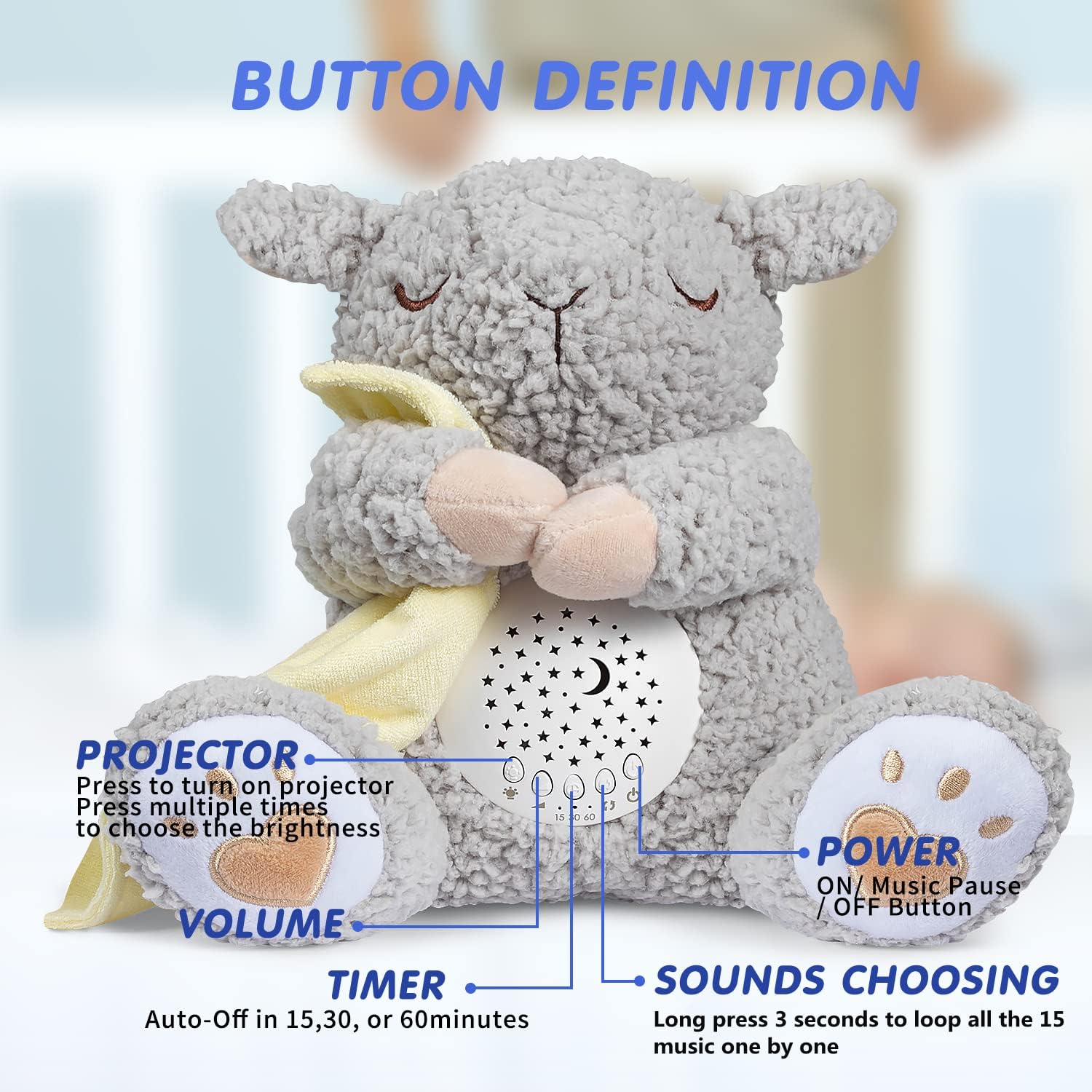
Image: Close-up of the BEREST A11 Baby Sleep Soother's control panel, showing buttons for projector, volume, timer, and sound selection, with labels indicating their functions.
5.1 Accensione/spegnimento
- Premere il tasto Pulsante di accensione (usually the rightmost button) to turn the device on or off.
- A short press will toggle power.
5.2 Funzioni sonore
The soother offers 15 high-quality soothing sounds.
- Selezione del suono: Premere a lungo il tasto Sounds Choosing button (usually the second from the right) for 3 seconds to loop through the 15 available sounds one by one. These include 11 lullabies, 2 white noise sounds, and a mother's heartbeat sound.
- Controllo del volume: Utilizzare il Pulsanti del volume (usually the two leftmost buttons, marked with '+' and '-') to adjust the sound level.

Image: The BEREST A11 Baby Sleep Soother with icons representing different sound options like womb's heartbeat, shushing sound, white noise, lullabies, and natural bird song, next to a sleeping baby.
5.3 Light Projection
The soother features a colorful moon and starry night light display projector.
- Projector Activation: Premere il tasto Pulsante proiettore (usually the leftmost button) to turn on the light projection.
- Controllo della luminosità: Press the Projector button multiple times to cycle through different brightness settings. The light slowly fades into various colors to capture attention.

Image: The BEREST A11 Baby Sleep Soother projecting stars and a moon onto a wall, with a child sleeping in a bed. Text indicates "STAR PROJECTOR WITH 3 ADJUSTABLE BRIGHTNESS SETTINGS".
5.4 modalità luce notturna
For a softer glow, the comfort blanket can be used to cover the projector.
- Attiva la luce notturna: Accendi il proiettore.
- Soften Light: Gently cover the projector area on the sheep's tummy with the attached yellow comfort blanket. This diffuses the light, creating a soft night light effect.

Image: The BEREST A11 Baby Sleep Soother with its yellow blanket covering the projector, creating a soft night light, next to a sleeping child. Text indicates "NIGHT LIGHT Cover the blanket over sheep's tummy for a soft night light".
5.5 Timer di spegnimento automatico
The soother includes an auto-off timer to conserve battery life.
- Impostazione del timer: Premere il tasto Pulsante timer (usually the third from the right) to select auto-off durations of 15, 30, or 60 minutes.
- Il dispositivo si spegnerà automaticamente dopo il tempo selezionato.
Video: This video demonstrates the various sound and light functions of the BEREST A11 Sleep Soother, including sound selection, volume adjustment, and light projection. It also shows the night light feature and the auto-off timer options.
6. Manutenzione
6.1 Pulizia
The plush toy is hand and machine washable for hygiene.
- Before washing, carefully remove the electronic sound and light module from inside the plush toy.
- The plush toy can be hand washed or machine washed on a gentle cycle with mild detergent.
- Allow the plush toy to air dry completely before reinserting the module.
- Wipe the electronic module with a dry cloth if needed. Do not use liquid cleaners.

Image: The BEREST A11 Baby Sleep Soother plush toy being washed, with the electronic music box removed and shown separately. Text indicates "HAND/ MACHINE WASHABLE Give New & Clean Sheep Toy To Baby Everyday" and "Please take out of the music box before washing."
7. Risoluzione Dei Problemi
| Problema | Possibile causa | Soluzione |
|---|---|---|
| Nessun suono o luce | Le batterie sono scariche o inserite in modo errato. | Sostituire le batterie con nuove batterie AAA, assicurandosi della corretta polarità. |
| Il suono è troppo basso o troppo alto | L'impostazione del volume necessita di regolazione. | Use the '+' and '-' volume buttons to adjust to the desired level. |
| Light projection is dim or unclear | Brightness setting is low or projector lens is obstructed. | Press the Projector button to increase brightness. Ensure the lens is clean and unobstructed. |
| Il dispositivo si spegne inaspettatamente | Il timer di spegnimento automatico è attivato. | Check the timer setting. If continuous play is desired, ensure the timer is set to 'off' or the longest duration. |
8. Specifiche
| Caratteristica | Dettaglio |
|---|---|
| Dimensioni del prodotto | 3.5 x 5.9 x 9.5 pollici |
| Peso dell'articolo | 0.52 libbre (8.32 once) |
| Numero di modello | A11 |
| Età consigliata | 0 mesi e oltre |
| Fonte di alimentazione | Alimentato a batteria (sono necessarie 3 batterie AAA) |
| Materiale | Panno morbido |
| Produttore | SZ-AKTE |
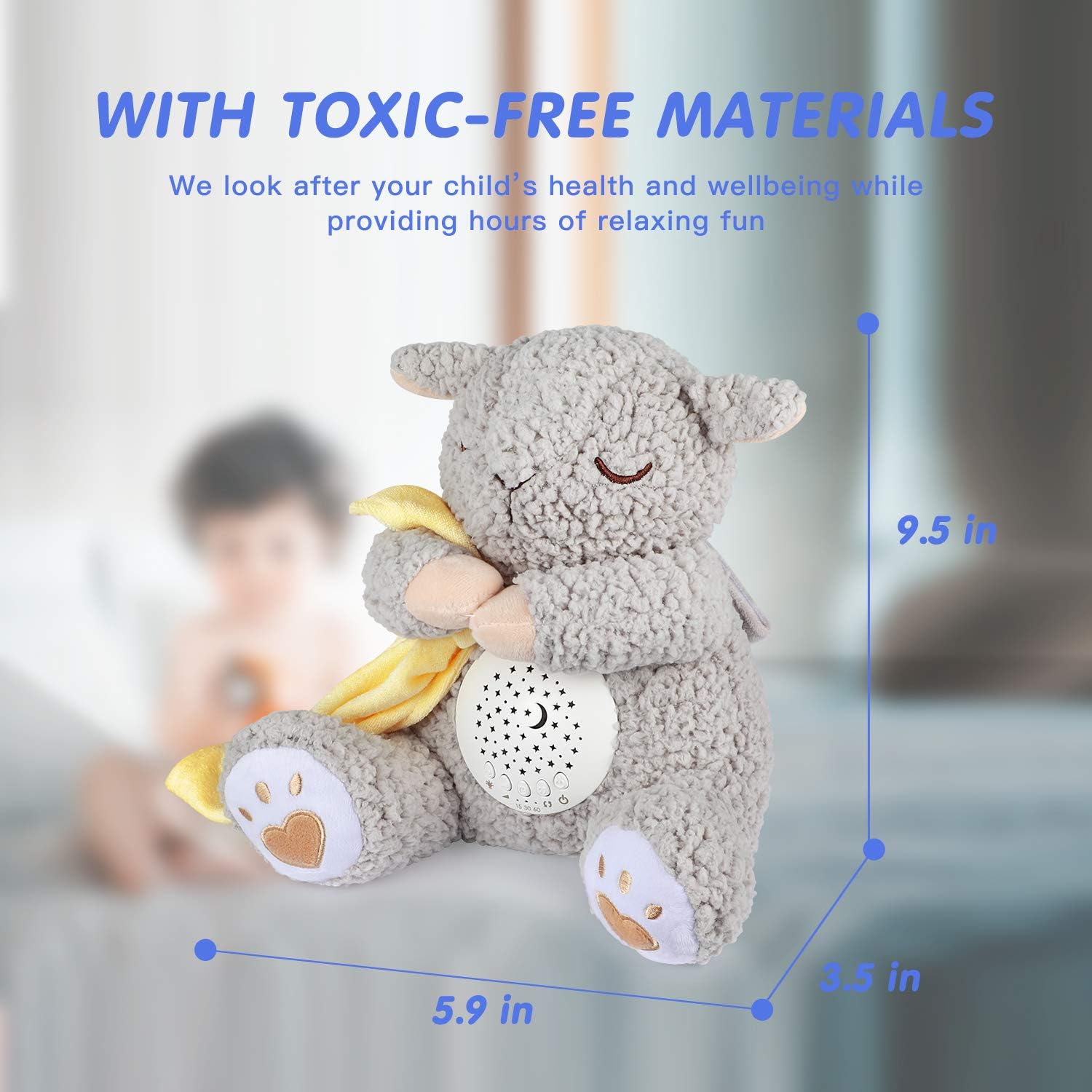
Image: The BEREST A11 Baby Sleep Soother with dimensions labeled: 9.5 inches height, 5.9 inches width, 3.5 inches depth. Text indicates "WITH TOXIC-FREE MATERIALS We look after your child's health and wellbeing while providing hours of relaxing fun".
9. Garanzia e supporto
For warranty information or customer support, please refer to the product packaging or contact BEREST customer service directly. Keep your purchase receipt for any warranty claims.
Video: Questo video fornisce una panoramicaview of the BEREST Dreamy Sheep, highlighting its features such as sound options, light projection, and overall design, presented by the seller.