
1. Introduzione
The V7 KW550ESBT Bluetooth Keyboard is designed to enhance your productivity with versatile connectivity options. This compact, ultra-slim keyboard offers a comfortable and quiet typing experience, featuring laser-etched keys for long-lasting durability. It supports connection to multiple devices via Bluetooth or a 2.4 GHz USB dongle.
Le caratteristiche principali includono:
- Seamless switching between up to 2 Bluetooth devices or connection via the included 2.4 GHz USB dongle.
- Scissor-switch keys for comfortable and quiet typing.
- Laser-etched keys for enhanced durability.
- Ultra-slim and compact design.
- Includes two AAA batteries for immediate use.
2. Contenuto della confezione
Si prega di controllare la confezione per verificare la presenza dei seguenti elementi:
- V7 KW550ESBT Bluetooth Keyboard
- Ricevitore USB da 2.4 GHz (dongle)
- 2 batterie AAA
- Manuale dell'utente (questo documento)

Image: The V7 KW550ESBT keyboard shown with its accompanying 2.4 GHz USB receiver, ready for connection.
3. Impostazione
3.1. Installazione della batteria
- Individuare il vano batteria sul lato inferiore della tastiera.
- Aprire il coperchio del vano batterie.
- Inserire le due batterie AAA, assicurandosi della corretta polarità (+/-).
- Chiudere saldamente il coperchio del vano batterie.
3.2. Connecting via 2.4 GHz USB Dongle
- Remove the 2.4 GHz USB receiver from its storage slot (usually within the battery compartment or a dedicated slot).
- Collegare il ricevitore USB a una porta USB disponibile sul computer o sul dispositivo.
- The keyboard should automatically connect. If not, ensure the keyboard is powered on and the connection indicator light (if present) is active.
3.3. Connessione tramite Bluetooth
The V7 KW550ESBT keyboard supports connecting to up to two Bluetooth devices.
- Assicurati che la tastiera sia accesa.
- Press and hold the Bluetooth pairing key (refer to keyboard layout for specific key, often indicated by a Bluetooth symbol or 'BT1'/'BT2') for a few seconds until the Bluetooth indicator light starts blinking, indicating it's in pairing mode.
- Sul tuo dispositivo (computer, tablet, smartphone), vai alle impostazioni Bluetooth.
- Cercare available devices and select "V7 KW550ESBT" (or similar name) from the list.
- Segui le istruzioni sullo schermo per completare il processo di associazione. Potrebbe esserti richiesto di inserire un codice visualizzato sullo schermo tramite la tastiera.
- Repeat for a second Bluetooth device if desired, using the other Bluetooth pairing key.
3.4. Passaggio tra dispositivi connessi
To switch between connected devices (Bluetooth 1, Bluetooth 2, or 2.4 GHz USB), press the corresponding function key (e.g., Fn + BT1, Fn + BT2, or Fn + 2.4G if available). Refer to your keyboard's specific layout for these keys.
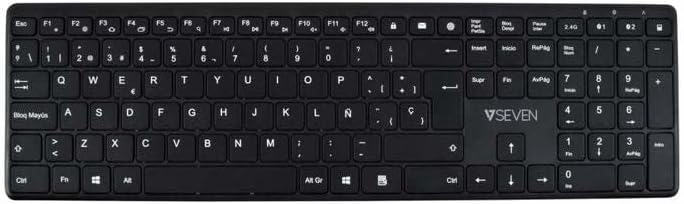
Immagine: dall'alto verso il basso view of the V7 KW550ESBT keyboard, showing the full QWERTY layout and function keys.
4. Utilizzo della tastiera
4.1. Standard Key Functions
The keyboard features a standard QWERTY layout with all essential alphanumeric keys, punctuation, and modifier keys (Shift, Ctrl, Alt, Windows/Command).
4.2. Tasti multimediali e funzione
The top row of keys (F1-F12) often doubles as multimedia or special function keys. These functions are typically accessed by pressing the Fn key simultaneously with the desired F-key. Common functions include:
- Controllo del volume (muto, diminuisci, aumenta)
- Riproduzione multimediale (riproduzione/pausa, precedente, successivo)
- Regolazione della luminosità dello schermo
- Funzione di ricerca
- Schermata di blocco
Refer to the icons printed on your specific keyboard's F-keys for exact functionality.
4.3. Quiet Typing Experience
The scissor-switch key design minimizes typing noise, making it suitable for quiet environments.

Immagine: Pro lateralefile of the V7 KW550ESBT keyboard, highlighting its ultra-slim design.
5. Manutenzione
5.1. Pulizia
Per pulire la tastiera:
- Turn off the keyboard and disconnect it from your device.
- Utilizzare un panno morbido e privo di lanugine leggermente damplucidato con acqua o una soluzione detergente delicata.
- Pulisci delicatamente i tasti e la superficie. Evita l'eccessiva umidità.
- Per rimuovere polvere e detriti tra i tasti, utilizzare aria compressa.
5.2. Sostituzione della batteria
When the keyboard's performance degrades or the battery indicator (if present) signals low power, replace the AAA batteries as described in Section 3.1.
6. Risoluzione Dei Problemi
If you encounter issues with your V7 KW550ESBT keyboard, try the following solutions:
| Problema | Possibile soluzione |
|---|---|
| La tastiera non risponde |
|
| I tasti sono bloccati o non rispondono |
|
| L'associazione Bluetooth non riesce |
|
7. Specifiche
| Caratteristica | Dettaglio |
|---|---|
| Marca | V7 |
| Numero di modello | KW550ESBT |
| Tecnologia di connettività | Bluetooth, 2.4 GHz Wireless (USB Dongle) |
| Descrizione della tastiera | Multimedia |
| Uso consigliato | Ufficio |
| Caratteristica speciale | Bluetooth |
| Colore | Nero |
| Stile | Classico |
| Dimensioni del prodotto | 16.1L x 4.7W x 0.8H centimetri |
| Materiale | Plastica |
| Fonte di alimentazione | 2 batterie AAA (incluse) |
8. Garanzia e supporto
For warranty information and technical support, please refer to the documentation provided with your purchase or visit the official V7 websito. Conservare la prova d'acquisto per eventuali reclami in garanzia.