
Pymeter 10A 1200W
Pymeter Digital Temperature Controller User Manual
Model: 10A 1200W
Introduzione
This user manual provides detailed instructions for the operation, setup, and maintenance of your Pymeter Digital Temperature Controller. Designed for precise temperature management, this dual-probe thermostat is ideal for various applications including terrariums, heat mats, heating pads, cooling fans, freezers, and refrigerators. Please read this manual thoroughly before use to ensure safe and optimal performance.
Precauzioni di sicurezza
- Assicurarsi sempre che il dispositivo sia correttamente collegato a terra.
- Do not immerse the main unit in water or expose it to excessive moisture. The probes are waterproof, but the main unit is not.
- Garantire l'acqua totaletage dei dispositivi collegati non superi i 1200W (10A).
- Tenere fuori dalla portata dei bambini e degli animali domestici.
- Scollegare l'alimentazione prima di effettuare operazioni di pulizia o manutenzione.
- Non tentare di smontare o riparare l'unità da soli. Contattare personale qualificato per l'assistenza.
- Different measurement methods and contact status can lead to varied results. Do not compare with common inaccurate thermometers. Calibrate with an ice-water mixture (0℃/32℉) if necessary for verification.
Contenuto della confezione
Verifica che tutti gli articoli siano presenti nel tuo pacco:
- 1 x Pymeter Digital Temperature Controller (10A 1200W)
- 2 x Waterproof Temperature Probes
- 1 x Manuale utente (questo documento)

Image: Contents of the Pymeter Digital Temperature Controller package, showing the main unit, two temperature probes, and the instruction manual.
Caratteristiche e componenti del prodotto
The Pymeter Digital Temperature Controller is designed for versatile temperature management with its dual-zone control capabilities.
- Dual Zones Control: Two independent outlets, each capable of controlling heating or cooling devices.
- Dual Waterproof Sensors: Allows for monitoring and control of two separate areas simultaneously.
- Caratteristiche di sicurezza: High and low temperature alarms, and temperature difference alarm for enhanced security.
- Protezione del compressore: Features a Power-On delay to protect compressors from frequent on/off cycles, suitable for converting freezers to refrigerators.
- Ampia applicazione: Suitable for reptile terrariums, heat mats, aquariums, greenhouses, grow tents, and more.

Image: The Pymeter Digital Temperature Controller, displaying its digital screen, control buttons (SET, SAV, Up, Down), and two distinct power outlets labeled OUT 1 and OUT 2.
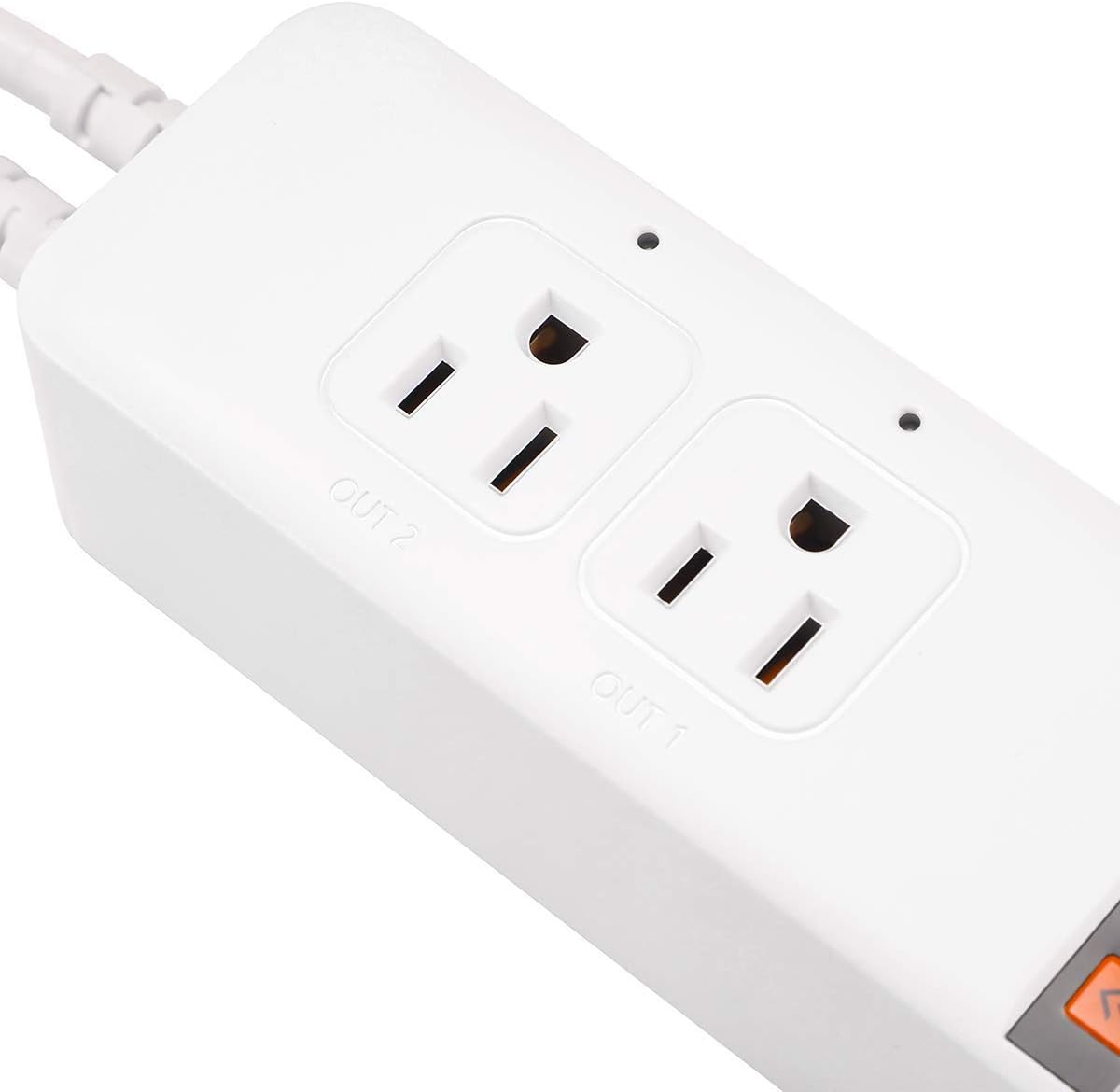
Immagine: Un dettaglio view of the two controlled outlets on the Pymeter thermostat, showing their individual indicator lights and labels.

Image: An illustration demonstrating the Pymeter controller's use with a terrarium, showing how it can manage both a heat lamp and a heat mat for optimal heating.
Installazione e configurazione
- Montaggio: The unit can be wall-mounted or placed on a flat surface. Ensure it is in a location with good ventilation and away from direct heat or moisture.
- Collegare le sonde: Insert the two waterproof temperature probes into the designated ports at the bottom of the unit. Place the probe tips in the areas where temperature monitoring and control are required.
- Connetti dispositivi: Plug your heating or cooling devices (e.g., heat mat, fan, lamp) into the "OUT 1" and "OUT 2" controlled outlets.
- Accensione: Plug the Pymeter controller into a standard 120V AC power outlet. The display will light up, showing the current temperature readings.

Image: The Pymeter controller installed on a wall, illustrating its compact design and how it can be integrated into a setup.
Istruzioni per l'uso
Comprensione del display
The display shows two main temperature values:
- PV (valore di processo): The current temperature measured by the probe.
- SV (valore impostato): The target temperature or setting value.
Navigazione e impostazioni di base
- Premere il tasto IMPOSTATO button to cycle through the settings for each outlet (1oN, 1oF, 2oN, 2oF, AL, AH, d7, P0-P8).
- Utilizzare il Up E Giù frecce per regolare i valori.
- Premere Salvataggio to save your changes and exit the setting mode. If no button is pressed for a few seconds, the unit will automatically save and exit.
Temperature Control Logic
The Pymeter controller operates by setting ON-Temp and OFF-Temp for each outlet.
Heating Mode (1oN & 1oF for Outlet 1, 2oN & 2oF for Outlet 2)
- Heating starts when the temperature drops to the ON-Temp (1oN/2oN).
- Heating stops when the temperature rises to the OFF-Temp (1oF/2oF).
- For heating, you MUST SET ON-Temp LESS than OFF-Temp.
- In heating mode, ON-Temp is the minimum temperature you allow, and OFF-Temp is the maximum temperature you allow.
Cooling Mode (1oN & 1oF for Outlet 1, 2oN & 2oF for Outlet 2)
- Cooling starts when the temperature rises to the ON-Temp (1oN/2oN).
- Cooling stops when the temperature drops to the OFF-Temp (1oF/2oF).
- For cooling, you MUST SET ON-Temp GREATER than OFF-Temp.
- In cooling mode, ON-Temp is the maximum temperature you allow, and OFF-Temp is the minimum temperature you allow.
Advanced Settings (P0-P8)
Premere e tenere premuto il tasto IMPOSTATO button for 3 seconds to enter the advanced settings menu (P0-P8).
| Parametro | Descrizione | Valore predefinito |
|---|---|---|
| P0 | Unità di temperatura (℃/℉) | ℉ |
| P1 | Power-On Delay (0-10 minutes) | 0 |
| P2 | Temperature Calibration (Sensor 1) | 0.0 |
| P3 | Temperature Calibration (Sensor 2) | 0.0 |
| AL | Allarme di bassa temperatura | Default (usually very low) |
| AH | Allarme alta temperatura | Default (usually very high) |
| d7 | Temperature Difference Alarm (between Sensor 1 and Sensor 2) | Default (usually high) |
Nota: To factory reset settings, change the temperature unit (P0) from Fahrenheit to Celsius or vice versa. This will revert all alarm settings (AL, AH, d7) to their default values.
Manutenzione
- Pulizia: Wipe the unit with a soft, dry cloth. Do not use abrasive cleaners or immerse in water.
- Cura della sonda: Ensure probes are clean and free of debris for accurate readings. Avoid bending or damaging the probe cables.
- Magazzinaggio: Quando non lo si utilizza, conservare il controller in un luogo fresco e asciutto, lontano dalla luce solare diretta.
Risoluzione dei problemi
Issue: Reading temperature is inaccurate.
Soluzione: Every Pymeter controller is calibrated at the factory. Do not compare its readings to common inaccurate thermostats or temperature guns. If you suspect inaccuracy, calibrate the device using an ice-water mixture (which is 32℉ / 0℃ when ice is melting). You can also use the P2 and P3 parameters in the advanced settings to fine-tune the calibration if needed, comparing it to a known accurate thermometer.
Issue: Beeper keeps sounding.
Soluzione: This is likely due to the alarm settings (AL, AH, d7) being triggered.
- AL (Allarme bassa temperatura): Sounds when the current temperature is at or below the AL setting.
- AH (Allarme alta temperatura): Sounds when the current temperature is at or above the AH setting.
- d7 (Temperature Difference Alarm): Sounds when the temperature deviation between Sensor 1 and Sensor 2 exceeds the d7 setting.
Specifiche tecniche
| Specificazione | Valore |
|---|---|
| Marca | Pimetro |
| Numero di modello | 10 A 1200 W. |
| Dimensioni del prodotto | 8.26"P x 2.16"L x 1.57"A |
| Tipo di controllore | Premere il pulsante |
| Caratteristica speciale | Dual Zones Control, Each outlet works for Heating or Cooling |
| Colore | Bianco |
| Usi specifici per il prodotto | Heat Pump, Refrigerator |
| Tipo di controllo della temperatura | Riscaldamento, raffreddamento |
| Componenti inclusi | Dual Sensors |
| Fonte di alimentazione | AC |
| Peso dell'articolo | 1.04 libbre |
| Voltage | 120 Volt |
| Materiale | Policarbonato (PC) |
| Forma | Rettangolare |
| Tipo di visualizzazione | GUIDATO |
| Tipo di controllo | Controllo dei pulsanti |
| Metodo di controllo | Remoto |
| Tipo di montaggio | Montaggio a parete |
| Stile | Moderno |
| Retroilluminazione | SÌ |
| Cosatage | 1200 watt |
| Codice UPC | 791386439637 |
| Produttore | Pimetro |
| Batterie richieste | NO |

Image: Dimensional drawing of the Pymeter controller, indicating its length, width, and height.

Image: The back of the Pymeter controller, displaying its electrical specifications and regulatory compliance markings.
Garanzia e supporto
For warranty information and technical support, please refer to the contact details provided on the product packaging or visit the official Pymeter webluogo. Conserva la ricevuta di acquisto per eventuali richieste di garanzia.
Ask a question about this manual
Ask about setup, troubleshooting, compatibility, parts, safety, or missing instructions. Manuals+ will review the question and use this page’s manual context to help answer it.