
Introduzione
This manual provides detailed instructions for the proper setup, operation, and maintenance of your Supvan TP76E Black & White Label Printer. Please read this manual thoroughly before using the device to ensure optimal performance and longevity. The Supvan TP76E is designed for efficient label printing, offering monochrome output at speeds up to 25 labels per minute.
Contenuto della confezione
Prima di iniziare, verificare che tutti gli elementi siano presenti nella confezione:
- Supvan TP76E Label Printer
- Adattatore di alimentazione
- Cavo USB
- Sampil rotolo di etichette
- Manuale dell'utente (questo documento)
Impostare
1. Disimballaggio e posizionamento
Carefully remove the printer from its packaging. Place the printer on a stable, flat surface with adequate ventilation. Ensure there is enough space around the printer for easy access to ports and for label output.

Figure 1: Supvan TP76E Label Printer (Side View)
This image displays the Supvan TP76E label printer from a side angle, highlighting its integrated keyboard, the transparent cover over the label compartment, and the overall compact design. The handle on the right side is also visible.
2. Collegamento elettrico
- Connect the power adapter to the power input port on the printer.
- Collegare l'altra estremità dell'adattatore di alimentazione a una presa elettrica standard.
- Press the power button to turn on the printer. The display should illuminate.
3. Loading Label Roll
The TP76E uses thermal label rolls. Follow these steps to load a new roll:
- Open the transparent cover of the label compartment located at the top of the printer.
- Place the label roll onto the spindle, ensuring the labels feed from the bottom of the roll towards the print head.
- Feed the leading edge of the label through the guide until it is positioned under the print head.
- Chiudere saldamente il coperchio trasparente.
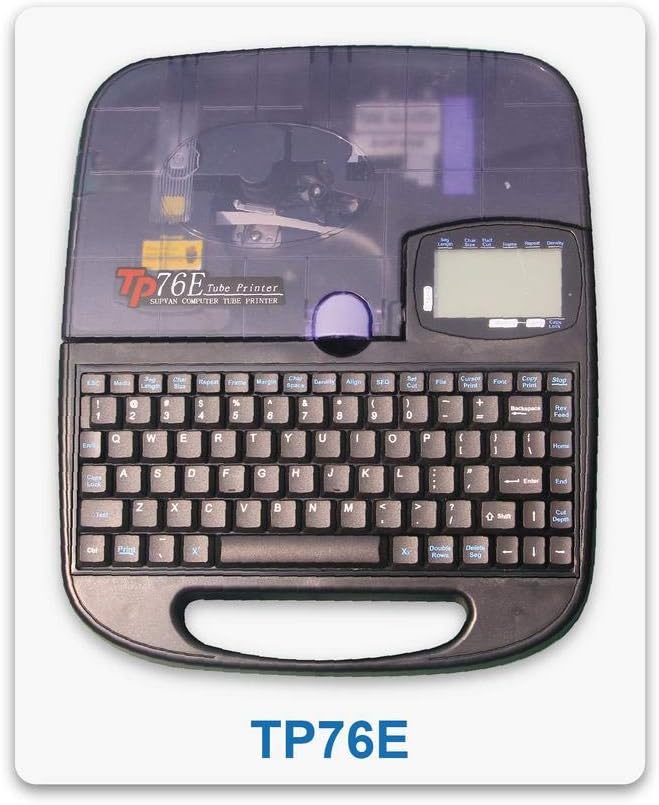
Figure 2: Supvan TP76E Label Printer (Top View)
Questa immagine fornisce una vista dall'alto verso il basso view of the Supvan TP76E, clearly showing the full QWERTY keyboard layout, the LCD display, and the transparent cover of the label roll compartment. This perspective is useful for understanding the user interface.
4. Connessione a un computer (facoltativo)
The TP76E supports USB connectivity for printing from a computer.
- Connect one end of the provided USB cable to the USB port on the printer.
- Collegare l'altra estremità del cavo USB a una porta USB disponibile sul computer.
- Install the necessary drivers and software from the official Supvan website or the included installation media (if applicable).
Istruzioni per l'uso
1. Creazione di etichette di base
- Accendere la stampante.
- Use the integrated QWERTY keyboard to type your desired text. The text will appear on the LCD display.
- Utilize the navigation keys to move the cursor and edit text.
- Premere il tasto Stampa pulsante per stampare l'etichetta.
2. Formatting Options
The TP76E offers various formatting options accessible via dedicated keys or menu functions:
- Dimensione del carattere: Adjust the size of the text to fit your label requirements.
- Bold/Italic: Apply bold or italic styling to your text for emphasis.
- Sottolineare: Add an underline to text.
- Telaio: Add decorative frames around your text.
- Allineamento: Choose left, center, or right alignment for your text.
3. Saving and Recalling Labels
The printer allows you to save frequently used label designs for quick recall:
- After creating a label, navigate to the Salva function (refer to the display menu).
- Select an empty memory slot to store the label.
- To recall a saved label, navigate to the Richiamo or Aprire function and select the desired label from the list.
Manutenzione
1. Pulizia della testina di stampa
Regular cleaning of the print head ensures clear and consistent print quality. Clean the print head if you notice faded or incomplete prints.
- Spegnere la stampante e scollegare l'adattatore di alimentazione.
- Aprire il coperchio dello scomparto delle etichette.
- Pulire delicatamente la superficie della testina di stampa con un batuffolo di cotone leggermenteampcon alcol isopropilico. Non utilizzare acqua o detergenti abrasivi.
- Lasciare asciugare completamente la testina di stampa prima di chiudere il coperchio e ricollegare l'alimentazione.
2. Sostituzione dei rotoli di etichette
When the label roll is depleted, replace it as follows:
- Aprire il coperchio dello scomparto delle etichette.
- Remove the empty label roll core.
- Insert a new label roll as described in the Impostare sezione.
- Chiudere il coperchio.
Risoluzione dei problemi
This section addresses common issues you might encounter with your Supvan TP76E printer.
| Problema | Possibile causa | Soluzione |
|---|---|---|
| La stampante non si accende | No power supply; Power adapter faulty | Ensure power adapter is securely connected to printer and outlet. Try a different outlet. |
| No labels are printing | Label roll empty; Labels incorrectly loaded; Print head dirty | Replace label roll. Re-load labels correctly. Clean the print head as per maintenance instructions. |
| Print quality is poor/faded | Print head dirty; Low quality labels | Clean the print head. Ensure you are using high-quality thermal labels. |
| Stampante non riconosciuta dal computer | USB cable faulty; Drivers not installed or outdated | Try a different USB cable or port. Install or update printer drivers from the Supvan websito. |
Specifiche
Key technical specifications for the Supvan TP76E Label Printer:
- Numero modello: Supvan TP76E
- Uscita stampante: Monocromatico (bianco e nero)
- Tecnologia di stampa: Termico
- Connettività: USB
- Stampa: Etichette
- Capacità massima del foglio in ingresso: 25 (labels per minute)
- Stampa fronte-retro: NO
- Batterie richieste: NO
Garanzia e supporto
For warranty information, technical support, or to purchase accessories and replacement parts, please contact Supvan customer service or visit their official websito.
Puoi trovare maggiori informazioni e risorse di supporto sul sito ufficiale Negozio SUPVAN su Amazon.
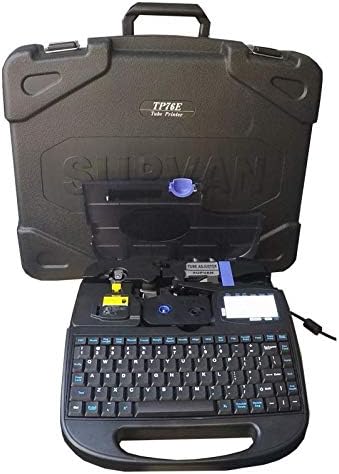
Figure 3: Supvan TP76E Label Printer in Carrying Case
This image shows the Supvan TP76E label printer neatly stored within its custom-fitted protective carrying case, emphasizing its portability and secure storage solution.